The TikZpingus package
Clothes
A.5.2 The shirt
/pingu/shirt = ⟨color⟩(default: pingu@bronze)

/pingu/shirt raise = ⟨length⟩(default: 2.25mm)
Requires shirt.

\begin{tikzpicture}

  \pingu[shirt, shirt raise=5mm]

\end{tikzpicture}
/pingu/shirt padding = ⟨length⟩(default: 0mm)
Requires shirt.

\begin{tikzpicture}

  \pingu[shirt, shirt padding=4mm]

\end{tikzpicture}
/pingu/shirt buttons = ⟨color⟩(default: pingu@black)
Requires shirt.
Set the color of all buttons. The three buttons (top, middle and bottom) have a key of their own: shirt button top, shirt button middle and shirt button bottom, and the same is true for their shading with the suffix shade.
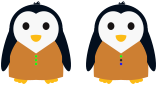
\begin{tikzpicture}

  \pingu[shirt, shirt buttons=green]

  \pingu[shirt, shirt button top=green, shirt button bottom=blue, xshift=3cm]

\end{tikzpicture}
/pingu/shirt buttons shade = ⟨color⟩
Requires shirt.
Set the shading of all buttons:

\begin{tikzpicture}

  \pingu[shirt, shirt buttons shade=green]

\end{tikzpicture}
/pingu/shirt no buttons
Requires shirt.
Disable all buttons (by setting their colors to !hide):

\begin{tikzpicture}

  \pingu[shirt, shirt no buttons]

\end{tikzpicture}
/pingu/shirt above(default: false)
Requires shirt.
This is interesting in combination with other extras as it allows the /pingu/shirt to be drawn above them.