The TikZpingus package
Wing items
A.4.13 The staff
/pingu/staff left = ⟨color⟩(default: pingu@bronze)

\begin{tikzpicture}

  \pingu[staff left=green, left item angle=70]

\end{tikzpicture}
/pingu/staff left length = ⟨length⟩(default: 28mm)
Requires staff left.
Change the staff length:

\begin{tikzpicture}

  \pingu[staff left, staff left length=20mm]

\end{tikzpicture}
/pingu/staff left raise = ⟨length⟩(default: -11mm)
Requires staff left.

\begin{tikzpicture}

  \pingu[staff left, staff left raise=-2mm]

\end{tikzpicture}
/pingu/staff left code = ⟨tikz-code⟩
Requires staff left.

\begin{tikzpicture}

  \pingu[staff left, staff left code={\fill circle[radius=2mm];}]

\end{tikzpicture}
/pingu/staff left code app = ⟨tikz-code⟩
Requires staff left.
Similar to /pingu/staff left code but does not override but (locally) append to previous calls.
/pingu/staff left code pre = ⟨tikz-code⟩
Requires staff left.
Similar to /pingu/staff left code but does not override but (locally) prepend to previous calls.
/pingu/spear left = ⟨color⟩(default: gray)
Example of /pingu/staff left code app that renders a little spear-tip:
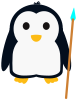
\begin{tikzpicture}

  \pingu[spear left=cyan]

\end{tikzpicture}
/pingu/cross left = ⟨color⟩(default: pingu@bronze)
Example of /pingu/staff left code app that renders a little cross:
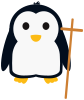
\begin{tikzpicture}

  \pingu[cross left]

\end{tikzpicture}
/pingu/staff right = ⟨color⟩(default: pingu@bronze)

\begin{tikzpicture}

  \pingu[staff right=green, right item angle=70]

\end{tikzpicture}
/pingu/staff right length = ⟨length⟩(default: 28mm)
Requires staff right.
Change the staff length:

\begin{tikzpicture}

  \pingu[staff right, staff right length=20mm]

\end{tikzpicture}
/pingu/staff right raise = ⟨length⟩(default: -11mm)
Requires staff right.

\begin{tikzpicture}

  \pingu[staff right, staff right raise=-2mm]

\end{tikzpicture}
/pingu/staff right code = ⟨tikz-code⟩
Requires staff right.
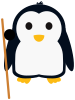
\begin{tikzpicture}

  \pingu[staff right, staff right code={\fill circle[radius=2mm];}]

\end{tikzpicture}
/pingu/staff right code app = ⟨tikz-code⟩
Requires staff right.
Similar to /pingu/staff right code but does not override but (locally) append to previous calls.
/pingu/staff right code pre = ⟨tikz-code⟩
Requires staff right.
Similar to /pingu/staff right code but does not override but (locally) prepend to previous calls.
/pingu/spear right = ⟨color⟩(default: gray)
Example of /pingu/staff right code app that renders a little spear-tip:
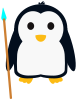
\begin{tikzpicture}

  \pingu[spear right=cyan]

\end{tikzpicture}
/pingu/cross right = ⟨color⟩(default: pingu@bronze)
Example of /pingu/staff right code app that renders a little cross:

\begin{tikzpicture}

  \pingu[cross right]

\end{tikzpicture}