tikz.dev / TikZ-Feynman Manual
\(\newcommand{\footnotename}{footnote}\) \(\def \LWRfootnote {1}\) \(\newcommand {\footnote }[2][\LWRfootnote ]{{}^{\mathrm {#1}}}\) \(\newcommand {\footnotemark }[1][\LWRfootnote ]{{}^{\mathrm {#1}}}\) \(\let \LWRorighspace \hspace \) \(\renewcommand {\hspace }{\ifstar \LWRorighspace \LWRorighspace }\) \(\newcommand {\TextOrMath }[2]{#2}\) \(\newcommand {\mathnormal }[1]{{#1}}\) \(\newcommand \ensuremath [1]{#1}\) \(\newcommand {\LWRframebox }[2][]{\fbox {#2}} \newcommand {\framebox }[1][]{\LWRframebox } \) \(\newcommand {\setlength }[2]{}\) \(\newcommand {\addtolength }[2]{}\) \(\newcommand {\setcounter }[2]{}\) \(\newcommand {\addtocounter }[2]{}\) \(\newcommand {\arabic }[1]{}\) \(\newcommand {\number }[1]{}\) \(\newcommand {\noalign }[1]{\text {#1}\notag \\}\) \(\newcommand {\cline }[1]{}\) \(\newcommand {\directlua }[1]{\text {(directlua)}}\) \(\newcommand {\luatexdirectlua }[1]{\text {(directlua)}}\) \(\newcommand {\protect }{}\) \(\def \LWRabsorbnumber #1 {}\) \(\def \LWRabsorbquotenumber "#1 {}\) \(\newcommand {\LWRabsorboption }[1][]{}\) \(\newcommand {\LWRabsorbtwooptions }[1][]{\LWRabsorboption }\) \(\def \mathchar {\ifnextchar "\LWRabsorbquotenumber \LWRabsorbnumber }\) \(\def \mathcode #1={\mathchar }\) \(\let \delcode \mathcode \) \(\let \delimiter \mathchar \) \(\def \oe {\unicode {x0153}}\) \(\def \OE {\unicode {x0152}}\) \(\def \ae {\unicode {x00E6}}\) \(\def \AE {\unicode {x00C6}}\) \(\def \aa {\unicode {x00E5}}\) \(\def \AA {\unicode {x00C5}}\) \(\def \o {\unicode {x00F8}}\) \(\def \O {\unicode {x00D8}}\) \(\def \l {\unicode {x0142}}\) \(\def \L {\unicode {x0141}}\) \(\def \ss {\unicode {x00DF}}\) \(\def \SS {\unicode {x1E9E}}\) \(\def \dag {\unicode {x2020}}\) \(\def \ddag {\unicode {x2021}}\) \(\def \P {\unicode {x00B6}}\) \(\def \copyright {\unicode {x00A9}}\) \(\def \pounds {\unicode {x00A3}}\) \(\let \LWRref \ref \) \(\renewcommand {\ref }{\ifstar \LWRref \LWRref }\) \( \newcommand {\multicolumn }[3]{#3}\) \(\require {textcomp}\) \(\newcommand {\meta }[1]{\langle \textit {#1}\rangle }\) \(\newcommand {\intertext }[1]{\text {#1}\notag \\}\) \(\let \Hat \hat \) \(\let \Check \check \) \(\let \Tilde \tilde \) \(\let \Acute \acute \) \(\let \Grave \grave \) \(\let \Dot \dot \) \(\let \Ddot \ddot \) \(\let \Breve \breve \) \(\let \Bar \bar \) \(\let \Vec \vec \) \(\require {mathtools}\) \(\newcommand {\vcentcolon }{\mathrel {\unicode {x2236}}}\) \(\newcommand {\approxcolon }{\approx \vcentcolon }\) \(\newcommand {\Approxcolon }{\approx \dblcolon }\) \(\newcommand {\simcolon }{\sim \vcentcolon }\) \(\newcommand {\Simcolon }{\sim \dblcolon }\) \(\newcommand {\dashcolon }{\mathrel {-}\vcentcolon }\) \(\newcommand {\Dashcolon }{\mathrel {-}\dblcolon }\) \(\newcommand {\colondash }{\vcentcolon \mathrel {-}}\) \(\newcommand {\Colondash }{\dblcolon \mathrel {-}}\) \(\newenvironment {crampedsubarray}[1]{}{}\) \(\newcommand {\smashoperator }[2][]{#2\limits }\) \(\newcommand {\SwapAboveDisplaySkip }{}\) \(\newcommand {\LaTeXunderbrace }[1]{\underbrace {#1}}\) \(\newcommand {\LaTeXoverbrace }[1]{\overbrace {#1}}\) \(\Newextarrow \xLongleftarrow {10,10}{0x21D0}\) \(\Newextarrow \xLongrightarrow {10,10}{0x21D2}\) \(\let \xlongleftarrow \xleftarrow \) \(\let \xlongrightarrow \xrightarrow \) \(\newcommand {\LWRmultlined }[1][]{\begin {multline*}}\) \(\newenvironment {multlined}[1][]{\LWRmultlined }{\end {multline*}}\) \(\let \LWRorigshoveleft \shoveleft \) \(\renewcommand {\shoveleft }[1][]{\LWRorigshoveleft }\) \(\let \LWRorigshoveright \shoveright \) \(\renewcommand {\shoveright }[1][]{\LWRorigshoveright }\) \(\newcommand {\shortintertext }[1]{\text {#1}\notag \\}\) \(\require {centernot}\) \(\newcommand {\LWRoverlaysymbols }[2]{\mathord {\smash {\mathop {#2\strut }\limits ^{\smash {\lower 3ex{#1}}}}\strut }}\) \(\newcommand {\mmapsto }{\mathrel {\unicode {x021A6}}}\) \(\let \mmapstochar \mmapsto \) \(\newcommand {\longmmapsto }{\mathrel {\unicode {x021A6}}}\) \(\newcommand {\mmappedfrom }{\mathrel {\unicode {x021A4}}}\) \(\let \mmappedfromchar \mmappedfrom \) \(\newcommand {\longmmappedfrom }{\mathrel {\unicode {x021A4}}}\) \(\let \mmapsfrom \mmappedfrom \) \(\let \longmmapsfrom \longmmappedfrom \) \(\newcommand {\Mmapsto }{\mathrel {\unicode {x02907}}}\) \(\let \Mmapstochar \Mmapsto \) \(\newcommand {\Longmmapsto }{\mathrel {\unicode {x027FE}}}\) \(\newcommand {\Mmappedfrom }{\mathrel {\unicode {x02906}}}\) \(\let \Mmappedfromchar \Mmappedfrom \) \(\newcommand {\Longmmappedfrom }{\mathrel {\unicode {x027FD}}}\) \(\let \Mmapsfrom \Mmappedfrom \) \(\let \Longmmapsfrom \Longmmappedfrom \) \(\newcommand {\boxright }{\mathrel {\unicode {x025A1}\!\unicode {x02192}}}\) \(\newcommand {\boxleft }{\mathrel {\unicode {x02190}\!\unicode {x025A1}}}\) \(\newcommand {\boxdotright }{\mathrel {\unicode {x022A1}\!\unicode {x02192}}}\) \(\newcommand {\boxdotleft }{\mathrel {\unicode {x02190}\!\unicode {x022A1}}}\) \(\newcommand {\Diamondright }{\mathrel {\unicode {x025C7}\!\unicode {x02192}}}\) \(\newcommand {\Diamondleft }{\mathrel {\unicode {x02190}\!\unicode {x025C7}}}\) \(\newcommand {\Diamonddotright }{\mathrel {\unicode {x027D0}\!\unicode {x02192}}}\) \(\newcommand {\Diamonddotleft }{\mathrel {\unicode {x02190}\!\unicode {x027D0}}}\) \(\newcommand {\boxRight }{\mathrel {\unicode {x025A1}\!\unicode {x021D2}}}\) \(\newcommand {\boxLeft }{\mathrel {\unicode {x021D0}\!\unicode {x025A1}}}\) \(\newcommand {\boxdotRight }{\mathrel {\unicode {x022A1}\!\unicode {x021D2}}}\) \(\newcommand {\boxdotLeft }{\mathrel {\unicode {x021D0}\!\unicode {x022A1}}}\) \(\newcommand {\DiamondRight }{\mathrel {\unicode {x025C7}\!\unicode {x021D2}}}\) \(\newcommand {\DiamondLeft }{\mathrel {\unicode {x021D0}\!\unicode {x025C7}}}\) \(\newcommand {\DiamonddotRight }{\mathrel {\unicode {x027D0}\!\unicode {x021D2}}}\) \(\newcommand {\DiamonddotLeft }{\mathrel {\unicode {x021D0}\!\unicode {x027D0}}}\) \(\newcommand {\Diamonddot }{\mathrel {\unicode {x027D0}}}\) \(\newcommand {\circleright }{\mathrel {\unicode {x025CB}\!\unicode {x02192}}}\) \(\newcommand {\circleleft }{\mathrel {\unicode {x02190}\!\unicode {x025CB}}}\) \(\newcommand {\circledotright }{\mathrel {\unicode {x02299}\!\unicode {x02192}}}\) \(\newcommand {\circledotleft }{\mathrel {\unicode {x02190}\!\unicode {x02299}}}\) \(\let \circleddotright \circledotright \) \(\let \circleddotleft \circledotleft \) \(\newcommand {\multimapinv }{\mathrel {\unicode {x027DC}}}\) \(\newcommand {\multimapboth }{\mathrel {\unicode {x029DF}}}\) \(\newcommand {\multimapdot }{{\mathrel {-\!\bullet }}}\) \(\newcommand {\multimapdotinv }{\mathrel {\bullet \!-}}\) \(\newcommand {\multimapdotboth }{\mathrel {{\bullet \!\!-\!\!\bullet }}}\) \(\newcommand {\multimapdotbothA }{\mathrel {\unicode {x022B6}}}\) \(\newcommand {\multimapdotbothB }{\mathrel {\unicode {x22B7}}}\) \(\newcommand {\multimapbothvert }{\mathrel {\overset {\unicode {x025CB}}{\underset {\unicode {x025CB}}{|}}}}\) \(\newcommand {\multimapdotbothvert }{\mathrel {\overset {\unicode {x025CF}}{\underset {\unicode {x025CF}}{|}}}}\) \(\newcommand {\multimapdotbothBvert }{\mathrel {\overset {\unicode {x025CF}}{\underset {\unicode {x025CB}}{|}}}}\) \(\newcommand {\multimapdotbothAvert }{\mathrel {\overset {\unicode {x025CB}}{\underset {\unicode {x025CF}}{|}}}}\) \(\newcommand {\bignplus }{\mathop {\LWRoverlaysymbols {\unicode {xFF0B}}{\unicode {x22C2}}}}\) \(\let \bigcapplus \bignplus \) \(\let \capplus \bignplus \) \(\newcommand {\bigsqcapplus }{\mathop {\LWRoverlaysymbols {\unicode {xFF0B}}{\unicode {x2A05}}} }\) \(\let \sqcapplus \bigsqcapplus \) \(\newcommand {\bigsqcupplus }{\mathop {\LWRoverlaysymbols {\unicode {xFF0B}}{\unicode {x2A06}}} }\) \(\let \sqcupplus \bigsqcupplus \) \(\newcommand {\parallelslant }{\mathrel {\unicode {x02AFD}}}\) \(\newcommand {\parallelbackslant }{\mathrel {\unicode {x0005C}\!\!\unicode {x0005C}}}\) \(\newcommand {\Eqqcolon }{\mathrel {=\!\unicode {x2237}}}\) \(\let \eqqColon \Eqqcolon \) \(\newcommand {\dashColon }{\mathrel {-\unicode {x2237}}}\) \(\newcommand {\Colondash }{\mathrel {\unicode {x2237}-}}\) \(\newcommand {\colonapprox }{\mathrel {:\approx }}\) \(\newcommand {\colonsim }{\mathrel {:\sim }}\) \(\newcommand {\Colonapprox }{\mathrel {\unicode {x2237}\!\approx }}\) \(\newcommand {\Colonsim }{\mathrel {\unicode {x2237}\!\sim }}\) \(\newcommand {\strictif }{\mathrel {\unicode {x0297D}}}\) \(\newcommand {\strictfi }{\mathrel {\unicode {x0297C}}}\) \(\newcommand {\strictiff }{\mathrel {\unicode {x0297C}\!\!\unicode {x0297D}}}\) \(\newcommand {\circledwedge }{\mathbin {\LWRoverlaysymbols {\unicode {x025EF}}{\unicode {x02227}}}}\) \(\newcommand {\circledvee }{\mathbin {\LWRoverlaysymbols {\unicode {x025EF}}{\unicode {0x02228}}}}\) \(\newcommand {\circledbar }{\mathbin {\unicode {x029B6}}}\) \(\newcommand {\openJoin }{\mathrel {\unicode {x2AA4}}}\) \(\newcommand {\opentimes }{\mathrel {\unicode {x2AA4}}}\) \(\newcommand {\VvDash }{\mathrel {\unicode {x22AA}}}\) \(\newcommand {\lambdabar }{\mathord {\LWRoverlaysymbols {\raise {.5ex}{-}}{\lambda }}}\) \(\newcommand {\lambdaslash }{\mathord {\unicode {x019B}}}\) \(\newcommand {\Wr }{\mathbin {\unicode {x02240}\!\unicode {x02240}}}\) \(\newcommand {\dashleftrightarrow }{\mathrel {\unicode {x021E0}\!\unicode {x021E2}}}\) \(\let \leftrightdasharrow \dashleftrightarrow \) \(\newcommand {\fAlt }{f}\) \(\newcommand {\rhoAlt }{\rho }\) \(\newcommand {\imathscr }{\mathord {\mathscr {i}}}\) \(\newcommand {\jmathscr }{\mathord {\mathscr {j}}}\) \(\let \llbracket \lBrack \) \(\let \rrbracket \rBrack \) \(\let \smlbrace \{\) \(\let \smrbrace \}\) \(\newcommand {\Perp }{\mathrel {\unicode {x02AEB}}}\) \(\newcommand {\nPerp }{\mathrel {\not {\!\unicode {x02AEB}}}}\) \(\newcommand {\Zbar }{\mathord {\unicode {x01B5}}}\) \(\newcommand {\Angstrom }{\mathord {\unicode {x212B}}}\) \(\newcommand {\Euler }{\mathord {\unicode {x2107}}}\) \(\newcommand {\transp }{\mathord {\unicode {xFF34}}}\) \(\newcommand {\hermtransp }{\mathord {\unicode {xFF28}}}\) \(\let \htransp =\hermtransp \) \(\newcommand {\circledplus }{\mathbin {\unicode {x2295}}}\) \(\newcommand {\circledminus }{\mathbin {\unicode {x2296}}}\) \(\newcommand {\circledtimes }{\mathbin {\unicode {x2297}}}\) \(\newcommand {\circledslash }{\mathbin {\unicode {x2298}}}\) \(\newcommand {\circleddot }{\mathbin {\unicode {x2299}}}\) \(\let \overgroup \overparen \) \(\let \overgroupra \overrightarrow \) \(\let \undergroup \underparen \) \(\let \undergroupla \underleftarrow \) \(\newcommand {\widering }[1]{\stackrel {\unicode {x2218}}{\overgroup {#1}}}\) \(\let \widearc \overparen \) \(\let \wideOarc \overrightarrow \) \(\newcommand {\LWRvvstar }[2]{{\overrightarrow {#1}_{#2}}}\) \(\newcommand {\vv }{\ifstar \LWRvvstar \overrightarrow }\) \(\let \smallintsl \smallint \) \(\newcommand {\smalliintsl }{\mathop {\unicode {x222C}}\limits }\) \(\newcommand {\smalliiintsl }{\mathop {\unicode {x222D}}\limits }\) \(\newcommand {\smalliiiintsl }{\mathop {\unicode {x2A0C}}\limits }\) \(\newcommand {\smallointsl }{\mathop {\unicode {x222E}}\limits }\) \(\newcommand {\smalloiintsl }{\mathop {\unicode {x222F}}\limits }\) \(\newcommand {\smalloiiintsl }{\mathop {\unicode {x2230}}\limits }\) \(\newcommand {\smallvarointclockwisesl }{\mathop {\unicode {x2232}}\limits }\) \(\newcommand {\smallointctrclockwisesl }{\mathop {\unicode {x2233}}\limits }\) \(\newcommand {\smallsumintsl }{\mathop {\unicode {x2A0B}}\limits }\) \(\newcommand {\smallfintsl }{\mathop {\unicode {x2A0F}}\limits }\) \(\newcommand {\smallsqintsl }{\mathop {\unicode {x2A16}}\limits }\) \(\let \smallintup \smallint \) \(\newcommand {\smalliintup }{\mathop {\unicode {x222C}}\limits }\) \(\newcommand {\smalliiintup }{\mathop {\unicode {x222D}}\limits }\) \(\newcommand {\smalliiiintup }{\mathop {\unicode {x2A0C}}\limits }\) \(\newcommand {\smallointup }{\mathop {\unicode {x222E}}\limits }\) \(\newcommand {\smalloiintup }{\mathop {\unicode {x222F}}\limits }\) \(\newcommand {\smalloiiintup }{\mathop {\unicode {x2230}}\limits }\) \(\newcommand {\smallvarointclockwiseup }{\mathop {\unicode {x2232}}\limits }\) \(\newcommand {\smallointctrclockwiseup }{\mathop {\unicode {x2233}}\limits }\) \(\newcommand {\smallsumintup }{\mathop {\unicode {x2A0B}}\limits }\) \(\newcommand {\smallfintup }{\mathop {\unicode {x2A0F}}\limits }\) \(\newcommand {\smallsqintup }{\mathop {\unicode {x2A16}}\limits }\) \(\newcommand {\iint }{\mathop {\unicode {x222C}}\limits }\) \(\newcommand {\iiint }{\mathop {\unicode {x222D}}\limits }\) \(\newcommand {\iiiint }{\mathop {\unicode {x2A0C}}\limits }\) \(\newcommand {\oiint }{\mathop {\unicode {x222F}}\limits }\) \(\newcommand {\oiiint }{\mathop {\unicode {x2230}}\limits }\) \(\newcommand {\varointclockwise }{\mathop {\unicode {x2232}}\limits }\) \(\newcommand {\ointctrclockwise }{\mathop {\unicode {x2233}}\limits }\) \(\newcommand {\sumint }{\mathop {\unicode {x2A0B}}\limits }\) \(\newcommand {\fint }{\mathop {\unicode {x2A0F}}\limits }\) \(\newcommand {\sqint }{\mathop {\unicode {x2A16}}\limits }\) \(\let \intsl \int \) \(\newcommand {\iintsl }{\mathop {\unicode {x222C}}\limits }\) \(\newcommand {\iiintsl }{\mathop {\unicode {x222D}}\limits }\) \(\newcommand {\iiiintsl }{\mathop {\unicode {x2A0C}}\limits }\) \(\let \ointsl \oint \) \(\newcommand {\oiintsl }{\mathop {\unicode {x222F}}\limits }\) \(\newcommand {\oiiintsl }{\mathop {\unicode {x2230}}\limits }\) \(\newcommand {\varointclockwisesl }{\mathop {\unicode {x2232}}\limits }\) \(\newcommand {\ointctrclockwisesl }{\mathop {\unicode {x2233}}\limits }\) \(\newcommand {\sumintsl }{\mathop {\unicode {x2A0B}}\limits }\) \(\newcommand {\fintsl }{\mathop {\unicode {x2A0F}}\limits }\) \(\newcommand {\sqintsl }{\mathop {\unicode {x2A16}}\limits }\) \(\let \intup \int \) \(\newcommand {\iintup }{\mathop {\unicode {x222C}}\limits }\) \(\newcommand {\iiintup }{\mathop {\unicode {x222D}}\limits }\) \(\newcommand {\iiiintup }{\mathop {\unicode {x2A0C}}\limits }\) \(\let \ointup \oint \) \(\newcommand {\oiintup }{\mathop {\unicode {x222F}}\limits }\) \(\newcommand {\oiiintup }{\mathop {\unicode {x2230}}\limits }\) \(\newcommand {\varointclockwiseup }{\mathop {\unicode {x2232}}\limits }\) \(\newcommand {\ointctrclockwiseup }{\mathop {\unicode {x2233}}\limits }\) \(\newcommand {\sumintup }{\mathop {\unicode {x2A0B}}\limits }\) \(\newcommand {\fintup }{\mathop {\unicode {x2A0F}}\limits }\) \(\newcommand {\sqintup }{\mathop {\unicode {x2A16}}\limits }\) \(\newcommand {\bigcupdot }{\mathop {\unicode {x2A03}}}\) \(\newcommand {\bigcupplus }{\mathop {\unicode {x2A04}}}\) \(\newcommand {\bigsqcap }{\mathop {\unicode {x2A05}}}\) \(\newcommand {\bigtimes }{\mathop {\unicode {x2A09}}}\) \(\let \varprod \bigtimes \) \(\newcommand {\mappedfrom }{\mathrel {\unicode {x021A4}}}\) \(\let \mappedfromchar \mappedfrom \) \(\newcommand {\mapsfrom }{\mathrel {\unicode {x021A4}}}\) \(\newcommand {\longmappedfrom }{\mathrel {\unicode {x027FB}}}\) \(\newcommand {\Mapsto }{\mathrel {\unicode {x02907}}}\) \(\let \Mapstochar \Mapsto \) \(\newcommand {\Longmapsto }{\mathrel {\unicode {x027FE}}}\) \(\newcommand {\Mappedfrom }{\mathrel {\unicode {x02906}}}\) \(\let \Mappedfromchar \Mappedfrom \) \(\newcommand {\Mapsfrom }{\mathrel {\unicode {x02906}}}\) \(\newcommand {\Longmappedfrom }{\mathrel {\unicode {x27FD}}}\) \(\newcommand {\medcirc }{\mathbin {\unicode {x025CB}}}\) \(\newcommand {\medbullet }{\mathbin {\unicode {x025CF}}}\) \(\newcommand {\varparallel }{\mathrel {\unicode {x02AFD}}}\) \(\newcommand {\varparallelinv }{\mathrel {\unicode {x244A}}}\) \(\newcommand {\nvarparallel }{\mathrel {\LWRoverlaysymbols {-}{\unicode {x02AFD}}}}\) \(\newcommand {\nvarparallelinv }{\mathrel {\LWRoverlaysymbols {-}{\unicode {x244A}}}}\) \(\newcommand {\coloneq }{\mathrel {\unicode {x02254}}}\) \(\newcommand {\eqcolon }{\mathrel {\unicode {x02255}}}\) \(\newcommand {\VDash }{\mathrel {\unicode {x22AB}}}\) \(\newcommand {\preceqq }{\mathrel {\unicode {x02AB3}}}\) \(\newcommand {\succeqq }{\mathrel {\unicode {x02AB4}}}\) \(\newcommand {\nprecsim }{\mathrel {\LWRoverlaysymbols {/}{\unicode {x0227E}}}}\) \(\newcommand {\nsuccsim }{\mathrel {\LWRoverlaysymbols {/}{\unicode {x0227F}}}}\) \(\newcommand {\nlesssim }{\mathrel {\unicode {x02274}}}\) \(\newcommand {\ngtrsim }{\mathrel {\unicode {x02275}}}\) \(\newcommand {\nsubset }{\mathrel {\unicode {x02284}}}\) \(\newcommand {\nsupset }{\mathrel {\unicode {x02285}}}\) \(\newcommand {\notni }{\mathrel {\unicode {x220C}}}\) \(\let \notowns \notni \) \(\newcommand {\nlessapprox }{\mathrel {\LWRoverlaysymbols {/}{\unicode {x02A85}}}}\) \(\newcommand {\ngtrapprox }{\mathrel {\LWRoverlaysymbols {/}{\unicode {x02A86}}}}\) \(\newcommand {\npreccurlyeq }{\mathrel {\LWRoverlaysymbols {/}{\unicode {x0227C}}}}\) \(\newcommand {\nsucccurlyeq }{\mathrel {\LWRoverlaysymbols {/}{\unicode {x0227D}}}}\) \(\newcommand {\ngtrless }{\mathrel {\unicode {x02279}}}\) \(\newcommand {\nlessgtr }{\mathrel {\unicode {x2278}}}\) \(\newcommand {\nbumpeq }{\mathrel {\LWRoverlaysymbols {/}{\unicode {x0224F}}}}\) \(\newcommand {\nBumpeq }{\mathrel {\LWRoverlaysymbols {/}{\unicode {x0224E}}}}\) \(\newcommand {\nbacksim }{\mathrel {\LWRoverlaysymbols {/}{\unicode {x0223D}}}}\) \(\newcommand {\nbacksimeq }{\mathrel {\LWRoverlaysymbols {/}{\unicode {x022CD}}}}\) \(\newcommand {\nasymp }{\mathrel {\unicode {x226D}}}\) \(\newcommand {\nequiv }{\mathrel {\unicode {x2262}}}\) \(\newcommand {\napprox }{\mathrel {\unicode {x2249}}}\) \(\newcommand {\nll }{\mathrel {\LWRoverlaysymbols {/}{\unicode {x0226A}}}}\) \(\newcommand {\ngg }{\mathrel {\LWRoverlaysymbols {/}{\unicode {x0226B}}}}\) \(\newcommand {\nthickapprox }{\mathrel {\LWRoverlaysymbols {/}{{\mathbf {\unicode {x02248}}}}}}\) \(\newcommand {\napproxeq }{\mathrel {\LWRoverlaysymbols {/}{\unicode {x0224A}}}}\) \(\newcommand {\nprecapprox }{\mathrel {\LWRoverlaysymbols {/}{\unicode {x02AB7}}}}\) \(\newcommand {\nsuccapprox }{\mathrel {\LWRoverlaysymbols {/}{\unicode {x02AB8}}}}\) \(\newcommand {\npreceqq }{\mathrel {\LWRoverlaysymbols {/}{\unicode {x02AB3}}}}\) \(\newcommand {\nsucceqq }{\mathrel {\LWRoverlaysymbols {/}{\unicode {x02AB4}}}}\) \(\newcommand {\nsimeq }{\mathrel {\unicode {x02244}}}\) \(\newcommand {\nSubset }{\mathrel {\LWRoverlaysymbols {/}{\unicode {x022D0}}}}\) \(\newcommand {\nSupset }{\mathrel {\LWRoverlaysymbols {/}{\unicode {x022D1}}}}\) \(\newcommand {\nsqsubseteq }{\mathrel {\unicode {x022E2}}}\) \(\newcommand {\nsqsupseteq }{\mathrel {\unicode {x022E3}}}\) \(\newcommand {\coloneqq }{\mathrel {\unicode {x02254}}}\) \(\newcommand {\eqqcolon }{\mathrel {\unicode {x02255}}}\) \(\newcommand {\Coloneqq }{\mathrel {\unicode {x02A74}}}\) \(\newcommand {\Coloneq }{\mathrel {\unicode {x2237}-}}\) \(\newcommand {\Eqcolon }{\mathrel {-\unicode {x2237}}}\) \(\newcommand {\lvec }[1]{\mathord {\overset {\unicode {x02190}}{#1}}}\) \(\newcommand {\lrvec }[1]{\mathord {\overset {\unicode {x2194}}{#1}}}\) \(\newcommand {\harpoonacc }[1]{\mathord {\overset {\unicode {x021C0}}{#1}}}\) \(\newcommand {\lharpoonacc }[1]{\mathord {\overset {\unicode {x021BC}}{#1}}}\) \(\newcommand {\lrharpoonacc }[1]{\mathord {\overset {\unicode {x0294E}}{#1}}}\) \(\newcommand {\barbar }[1]{\mathord {\overset {=}{#1}}}\) \(\newcommand {\bartilde }[1]{\mathord {\overset {\simeq }{#1}}}\) \(\newcommand {\barhat }[1]{\mathord {\hat {\bar {#1}}}}\) \(\newcommand {\tildebar }[1]{\mathord {\overset {\eqsim }{#1}}}\) \(\newcommand {\tildetilde }[1]{\mathord {\overset {\approx }{#1}}}\) \(\newcommand {\tildehat }[1]{\mathord {\hat {\tilde {#1}}}}\) \(\newcommand {\hatbar }[1]{\mathord {\bar {\hat {#1}}}}\) \(\newcommand {\hattilde }[1]{\mathord {\tilde {\hat {#1}}}}\) \(\newcommand {\hathat }[1]{\mathord {\hat {\hat {#1}}}}\) \(\newcommand {\cdotB }{\mathord {\boldsymbol {\cdot }}}\) \(\newcommand {\cdotBB }{\mathord {\unicode {x2022}}}\) \(\newcommand {\circS }{\boldsymbol {\circ }}\) \(\newcommand {\bulletSSS }{\bullet }\) \(\newcommand {\bulletSS }{\mathord {\unicode {x025CF}}}\) \(\newcommand {\bulletS }{\mathord {\unicode {x02B24}}}\) \(\newcommand {\primeS }{\prime }\) \(\newcommand {\invamp }{\mathbin {\unicode {x0214B}}}\) \(\newcommand {\Lbag }{\mathopen {\large \unicode {x027C5}}}\) \(\newcommand {\Rbag }{\mathclose {\large \unicode {x027C6}}}\) \(\newcommand {\circledless }{\mathrel {\unicode {x029C0}}}\) \(\newcommand {\circledgtr }{\mathrel {\unicode {x029C1}}}\) \(\newcommand {\circledbslash }{\mathbin {\unicode {x029B8}}}\) \(\newcommand {\lJoin }{\mathrel {\unicode {x22C9}}}\) \(\newcommand {\rJoin }{\mathrel {\unicode {x22CA}}}\) \(\newcommand {\lrJoin }{\mathrel {\unicode {x2A1D}}}\) \(\newcommand {\lrtimes }{\mathrel {\unicode {x2A1D}}}\) \(\newcommand {\Diamondblack }{\mathord {\unicode {x025C6}}}\) \(\newcommand {\nplus }{\mathrel {\LWRoverlaysymbols {+}{\unicode {x02229}}}}\) \(\newcommand {\nsqsubset }{\mathrel {\LWRoverlaysymbols {/}{\unicode {x0228F}}}}\) \(\newcommand {\nsqsupset }{\mathrel {\LWRoverlaysymbols {/}{\unicode {x02290}}}}\) \(\newcommand {\dasharrow }{\mathrel {\unicode {x021E2}}}\) \(\newcommand {\leftsquigarrow }{\mathrel {\unicode {x021DC}}}\) \(\newcommand {\ntwoheadrightarrow }{\mathrel {\unicode {x02900}}}\) \(\newcommand {\ntwoheadleftarrow }{\mathrel {\unicode {x02B34}}}\) \(\newcommand {\boxast }{\mathbin {\unicode {x029C6}}}\) \(\newcommand {\boxbslash }{\mathbin {\unicode {x29C5}}}\) \(\newcommand {\boxbar }{\mathbin {\unicode {x025EB}}}\) \(\newcommand {\boxslash }{\mathbin {\unicode {x029C4}}}\) \(\newcommand {\varclubsuit }{\mathord {\unicode {x02667}}}\) \(\newcommand {\vardiamondsuit }{\mathord {\unicode {x02666}}}\) \(\newcommand {\varheartsuit }{\mathord {\unicode {x02665}}}\) \(\newcommand {\varspadesuit }{\mathord {\unicode {x02664}}}\) \(\newcommand {\Nearrow }{\mathrel {\unicode {x021D7}}}\) \(\newcommand {\Searrow }{\mathrel {\unicode {x021D8}}}\) \(\newcommand {\Nwarrow }{\mathrel {\unicode {x021D6}}}\) \(\newcommand {\Swarrow }{\mathrel {\unicode {x021D9}}}\) \(\newcommand {\Top }{\mathord {\unicode {x02AEA}}}\) \(\newcommand {\Bot }{\mathord {\unicode {x02AEB}}}\) \(\newcommand {\leadstoext }{\mathrel {\unicode {xFF5E}}}\) \(\newcommand {\sqcupplus }{\mathbin {\LWRoverlaysymbols {+}{\unicode {x02294}}}}\) \(\newcommand {\sqcapplus }{\mathbin {\LWRoverlaysymbols {+}{\unicode {x02293}}}}\) \(\newcommand {\dlb }{\mathopen {\unicode {x027E6}}}\) \(\newcommand {\drb }{\mathopen {\unicode {x027E7}}}\) \(\newcommand {\varg }{g}\) \(\newcommand {\vary }{y}\) \(\newcommand {\varv }{v}\) \(\newcommand {\varw }{w}\) \(\newcommand {\nexistsAlt }{\mathord {\unicode {x02204}}}\) \(\newcommand {\existsAlt }{\mathord {\unicode {x02203}}}\) \(\newcommand {\forallAlt }{\mathord {\unicode {x02200}}}\) \(\newcommand {\emptysetAlt }{\mathord {\unicode {x02205}}}\) \(\newcommand {\uppartial }{\mathord {\unicode {x02202}}}\) \(\let \varmathbb \mathbb \) \(\let \vmathbb \mathbb \) \(\let \vvmathbb \mathbb \) \(\let \smallprod \prod \) \(\let \smallsum \sum \) \(\let \smallcoprod \coprod \) \(\newcommand {\openbox }{\mathord {\unicode {x25FD}}}\) \(\let \textsquare \openbox \) \(\let \varemptyset \emptyset \) \(\newcommand {\mathsterling }{\mathord {\unicode {x000A3}}}\) \(\newcommand {\mathcent }{\mathord {\unicode {x000A2}}}\) \(\def\Alphaup{\unicode{x0391}}\) \(\def\Betaup{\unicode{x0392}}\) \(\def\Gammaup{\unicode{x0393}}\) \(\def\Digammaup{\unicode{x03DC}}\) \(\def\Deltaup{\unicode{x0394}}\) \(\def\Epsilonup{\unicode{x0395}}\) \(\def\Zetaup{\unicode{x0396}}\) \(\def\Etaup{\unicode{x0397}}\) \(\def\Thetaup{\unicode{x0398}}\) \(\def\Varthetaup{\unicode{x03F4}}\) \(\def\Iotaup{\unicode{x0399}}\) \(\def\Kappaup{\unicode{x039A}}\) \(\def\Lambdaup{\unicode{x039B}}\) \(\def\Muup{\unicode{x039C}}\) \(\def\Nuup{\unicode{x039D}}\) \(\def\Xiup{\unicode{x039E}}\) \(\def\Omicronup{\unicode{x039F}}\) \(\def\Piup{\unicode{x03A0}}\) \(\def\Varpiup{\unicode{x03D6}}\) \(\def\Rhoup{\unicode{x03A1}}\) \(\def\Sigmaup{\unicode{x03A3}}\) \(\def\Tauup{\unicode{x03A4}}\) \(\def\Upsilonup{\unicode{x03A5}}\) \(\def\Phiup{\unicode{x03A6}}\) \(\def\Chiup{\unicode{x03A7}}\) \(\def\Psiup{\unicode{x03A8}}\) \(\def\Omegaup{\unicode{x03A9}}\) \(\def\upAlpha{\unicode{x0391}}\) \(\def\upBeta{\unicode{x0392}}\) \(\def\upGamma{\unicode{x0393}}\) \(\def\upDigamma{\unicode{x03DC}}\) \(\def\upDelta{\unicode{x0394}}\) \(\def\upEpsilon{\unicode{x0395}}\) \(\def\upZeta{\unicode{x0396}}\) \(\def\upEta{\unicode{x0397}}\) \(\def\upTheta{\unicode{x0398}}\) \(\def\upVartheta{\unicode{x03F4}}\) \(\def\upIota{\unicode{x0399}}\) \(\def\upKappa{\unicode{x039A}}\) \(\def\upLambda{\unicode{x039B}}\) \(\def\upMu{\unicode{x039C}}\) \(\def\upNu{\unicode{x039D}}\) \(\def\upXi{\unicode{x039E}}\) \(\def\upOmicron{\unicode{x039F}}\) \(\def\upPi{\unicode{x03A0}}\) \(\def\upVarpi{\unicode{x03D6}}\) \(\def\upRho{\unicode{x03A1}}\) \(\def\upSigma{\unicode{x03A3}}\) \(\def\upTau{\unicode{x03A4}}\) \(\def\upUpsilon{\unicode{x03A5}}\) \(\def\upPhi{\unicode{x03A6}}\) \(\def\upChi{\unicode{x03A7}}\) \(\def\upPsi{\unicode{x03A8}}\) \(\def\upOmega{\unicode{x03A9}}\) \(\def\upalpha{\unicode{x03B1}}\) \(\def\upbeta{\unicode{x03B2}}\) \(\def\upvarbeta{\unicode{x03D0}}\) \(\def\upgamma{\unicode{x03B3}}\) \(\def\updigamma{\unicode{x03DD}}\) \(\def\updelta{\unicode{x03B4}}\) \(\def\upepsilon{\unicode{x03F5}}\) \(\def\upvarepsilon{\unicode{x03B5}}\) \(\def\upzeta{\unicode{x03B6}}\) \(\def\upeta{\unicode{x03B7}}\) \(\def\uptheta{\unicode{x03B8}}\) \(\def\upvartheta{\unicode{x03D1}}\) \(\def\upiota{\unicode{x03B9}}\) \(\def\upkappa{\unicode{x03BA}}\) \(\def\upvarkappa{\unicode{x03F0}}\) \(\def\uplambda{\unicode{x03BB}}\) \(\def\upmu{\unicode{x03BC}}\) \(\def\upnu{\unicode{x03BD}}\) \(\def\upxi{\unicode{x03BE}}\) \(\def\upomicron{\unicode{x03BF}}\) \(\def\uppi{\unicode{x03C0}}\) \(\def\upvarpi{\unicode{x03D6}}\) \(\def\uprho{\unicode{x03C1}}\) \(\def\upvarrho{\unicode{x03F1}}\) \(\def\upsigma{\unicode{x03C3}}\) \(\def\upvarsigma{\unicode{x03C2}}\) \(\def\uptau{\unicode{x03C4}}\) \(\def\upupsilon{\unicode{x03C5}}\) \(\def\upphi{\unicode{x03D5}}\) \(\def\upvarphi{\unicode{x03C6}}\) \(\def\upchi{\unicode{x03C7}}\) \(\def\uppsi{\unicode{x03C8}}\) \(\def\upomega{\unicode{x03C9}}\) \(\def\alphaup{\unicode{x03B1}}\) \(\def\betaup{\unicode{x03B2}}\) \(\def\varbetaup{\unicode{x03D0}}\) \(\def\gammaup{\unicode{x03B3}}\) \(\def\digammaup{\unicode{x03DD}}\) \(\def\deltaup{\unicode{x03B4}}\) \(\def\epsilonup{\unicode{x03F5}}\) \(\def\varepsilonup{\unicode{x03B5}}\) \(\def\zetaup{\unicode{x03B6}}\) \(\def\etaup{\unicode{x03B7}}\) \(\def\thetaup{\unicode{x03B8}}\) \(\def\varthetaup{\unicode{x03D1}}\) \(\def\iotaup{\unicode{x03B9}}\) \(\def\kappaup{\unicode{x03BA}}\) \(\def\varkappaup{\unicode{x03F0}}\) \(\def\lambdaup{\unicode{x03BB}}\) \(\def\muup{\unicode{x03BC}}\) \(\def\nuup{\unicode{x03BD}}\) \(\def\xiup{\unicode{x03BE}}\) \(\def\omicronup{\unicode{x03BF}}\) \(\def\piup{\unicode{x03C0}}\) \(\def\varpiup{\unicode{x03D6}}\) \(\def\rhoup{\unicode{x03C1}}\) \(\def\varrhoup{\unicode{x03F1}}\) \(\def\sigmaup{\unicode{x03C3}}\) \(\def\varsigmaup{\unicode{x03C2}}\) \(\def\tauup{\unicode{x03C4}}\) \(\def\upsilonup{\unicode{x03C5}}\) \(\def\phiup{\unicode{x03D5}}\) \(\def\varphiup{\unicode{x03C6}}\) \(\def\chiup{\unicode{x03C7}}\) \(\def\psiup{\unicode{x03C8}}\) \(\def\omegaup{\unicode{x03C9}}\) \(\def\Alphait{\unicode{x1D6E2}}\) \(\def\Betait{\unicode{x1D6E3}}\) \(\def\Gammait{\unicode{x1D6E4}}\) \(\def\Digammait{\mathit{\unicode{x03DC}}}\) \(\def\Deltait{\unicode{x1D6E5}}\) \(\def\Epsilonit{\unicode{x1D6E6}}\) \(\def\Zetait{\unicode{x1D6E7}}\) \(\def\Etait{\unicode{x1D6E8}}\) \(\def\Thetait{\unicode{x1D6E9}}\) \(\def\Varthetait{\unicode{x1D6F3}}\) \(\def\Iotait{\unicode{x1D6EA}}\) \(\def\Kappait{\unicode{x1D6EB}}\) \(\def\Lambdait{\unicode{x1D6EC}}\) \(\def\Muit{\unicode{x1D6ED}}\) \(\def\Nuit{\unicode{x1D6EE}}\) \(\def\Xiit{\unicode{x1D6EF}}\) \(\def\Omicronit{\unicode{x1D6F0}}\) \(\def\Piit{\unicode{x1D6F1}}\) \(\def\Rhoit{\unicode{x1D6F2}}\) \(\def\Sigmait{\unicode{x1D6F4}}\) \(\def\Tauit{\unicode{x1D6F5}}\) \(\def\Upsilonit{\unicode{x1D6F6}}\) \(\def\Phiit{\unicode{x1D6F7}}\) \(\def\Chiit{\unicode{x1D6F8}}\) \(\def\Psiit{\unicode{x1D6F9}}\) \(\def\Omegait{\unicode{x1D6FA}}\) \(\def\alphait{\unicode{x1D6FC}}\) \(\def\betait{\unicode{x1D6FD}}\) \(\def\varbetait{\unicode{x03D0}}\) \(\def\gammait{\unicode{x1D6FE}}\) \(\def\digammait{\mathit{\unicode{x03DD}}}\) \(\def\deltait{\unicode{x1D6FF}}\) \(\def\epsilonit{\unicode{x1D716}}\) \(\def\varepsilonit{\unicode{x1D700}}\) \(\def\zetait{\unicode{x1D701}}\) \(\def\etait{\unicode{x1D702}}\) \(\def\thetait{\unicode{x1D703}}\) \(\def\varthetait{\unicode{x1D717}}\) \(\def\iotait{\unicode{x1D704}}\) \(\def\kappait{\unicode{x1D705}}\) \(\def\varkappait{\unicode{x1D718}}\) \(\def\lambdait{\unicode{x1D706}}\) \(\def\muit{\unicode{x1D707}}\) \(\def\nuit{\unicode{x1D708}}\) \(\def\xiit{\unicode{x1D709}}\) \(\def\omicronit{\unicode{x1D70A}}\) \(\def\piit{\unicode{x1D70B}}\) \(\def\varpiit{\unicode{x1D71B}}\) \(\def\rhoit{\unicode{x1D70C}}\) \(\def\varrhoit{\unicode{x1D71A}}\) \(\def\sigmait{\unicode{x1D70E}}\) \(\def\varsigmait{\unicode{x1D70D}}\) \(\def\tauit{\unicode{x1D70F}}\) \(\def\upsilonit{\unicode{x1D710}}\) \(\def\phiit{\unicode{x1D719}}\) \(\def\varphiit{\unicode{x1D711}}\) \(\def\chiit{\unicode{x1D712}}\) \(\def\psiit{\unicode{x1D713}}\) \(\def\omegait{\unicode{x1D714}}\) \(\def\itAlpha{\unicode{x1D6E2}}\) \(\def\itBeta{\unicode{x1D6E3}}\) \(\def\itGamma{\unicode{x1D6E4}}\) \(\def\itDigamma{\mathit{\unicode{x03DC}}}\) \(\def\itDelta{\unicode{x1D6E5}}\) \(\def\itEpsilon{\unicode{x1D6E6}}\) \(\def\itZeta{\unicode{x1D6E7}}\) \(\def\itEta{\unicode{x1D6E8}}\) \(\def\itTheta{\unicode{x1D6E9}}\) \(\def\itVartheta{\unicode{x1D6F3}}\) \(\def\itIota{\unicode{x1D6EA}}\) \(\def\itKappa{\unicode{x1D6EB}}\) \(\def\itLambda{\unicode{x1D6EC}}\) \(\def\itMu{\unicode{x1D6ED}}\) \(\def\itNu{\unicode{x1D6EE}}\) \(\def\itXi{\unicode{x1D6EF}}\) \(\def\itOmicron{\unicode{x1D6F0}}\) \(\def\itPi{\unicode{x1D6F1}}\) \(\def\itRho{\unicode{x1D6F2}}\) \(\def\itSigma{\unicode{x1D6F4}}\) \(\def\itTau{\unicode{x1D6F5}}\) \(\def\itUpsilon{\unicode{x1D6F6}}\) \(\def\itPhi{\unicode{x1D6F7}}\) \(\def\itChi{\unicode{x1D6F8}}\) \(\def\itPsi{\unicode{x1D6F9}}\) \(\def\itOmega{\unicode{x1D6FA}}\) \(\def\italpha{\unicode{x1D6FC}}\) \(\def\itbeta{\unicode{x1D6FD}}\) \(\def\itvarbeta{\unicode{x03D0}}\) \(\def\itgamma{\unicode{x1D6FE}}\) \(\def\itdigamma{\mathit{\unicode{x03DD}}}\) \(\def\itdelta{\unicode{x1D6FF}}\) \(\def\itepsilon{\unicode{x1D716}}\) \(\def\itvarepsilon{\unicode{x1D700}}\) \(\def\itzeta{\unicode{x1D701}}\) \(\def\iteta{\unicode{x1D702}}\) \(\def\ittheta{\unicode{x1D703}}\) \(\def\itvartheta{\unicode{x1D717}}\) \(\def\itiota{\unicode{x1D704}}\) \(\def\itkappa{\unicode{x1D705}}\) \(\def\itvarkappa{\unicode{x1D718}}\) \(\def\itlambda{\unicode{x1D706}}\) \(\def\itmu{\unicode{x1D707}}\) \(\def\itnu{\unicode{x1D708}}\) \(\def\itxi{\unicode{x1D709}}\) \(\def\itomicron{\unicode{x1D70A}}\) \(\def\itpi{\unicode{x1D70B}}\) \(\def\itvarpi{\unicode{x1D71B}}\) \(\def\itrho{\unicode{x1D70C}}\) \(\def\itvarrho{\unicode{x1D71A}}\) \(\def\itsigma{\unicode{x1D70E}}\) \(\def\itvarsigma{\unicode{x1D70D}}\) \(\def\ittau{\unicode{x1D70F}}\) \(\def\itupsilon{\unicode{x1D710}}\) \(\def\itphi{\unicode{x1D719}}\) \(\def\itvarphi{\unicode{x1D711}}\) \(\def\itchi{\unicode{x1D712}}\) \(\def\itpsi{\unicode{x1D713}}\) \(\def\itomega{\unicode{x1D714}}\) \(\newcommand{\anglesLWRsubstar}[2][]{{#1\left \langle #2#1\right \rangle }}\) \(\newcommand{\anglesLWRsubnostar}[2][]{{#1\langle #2#1\rangle }}\) \(\newcommand{\angles}{\ifstar\anglesLWRsubstar\anglesLWRsubnostar}\)

3Documentation

3.1Commands & Environments
  • \tikzfeynmanset{⟨options⟩}

  • This command will process ⟨options⟩ using \pgfkeys with the default path set to /tikzfeynman. Typically, ⟨options⟩ will be a comma-separated list of the form ⟨key⟩=⟨value⟩, though the full power of the mechanism behind \pgfkeys can be used (see the TikZ manual for a complete description).

    Typically, this is used in the preamble of the document to add or change certain keys for the whole document.

  • \feynmandiagram[⟨TikZ options⟩][⟨diagram options⟩]{⟨diagram instructions⟩}

  • This command creates a {tikzpicture} and {feynman} environment, and places a \diagram inside with the provided ⟨diagram instruction⟩. Please refer to the documentation for \diagram for the ⟨diagram instruction⟩ syntax.

    The optional arguments specified in ⟨TikZ options⟩ are passed on to the {tikzpicture}, and the ⟨diagram options⟩ are passed on to \diagram. If only one optional argument is given, then the optional arguments are given to both. A single optional argument will usually suffice as most keys are recognized by both commands and appropriately selected; however, in the event that a key is not recognized, both options are provided.

  • \begin{feynman}[⟨options⟩]

  • ⟨environment contents⟩

  • \end{feynman}

  • The {feynman} environment is where all the drawing of Feynman diagrams takes place. It makes all the TikZ-Feynman styles available and defines commands such as \vertex and \diagram which are otherwise unavailable outside of this environment. The {feynman} environment is only accessible within the {tikzpicture} environment.

    Options which are passed in ⟨options⟩ apply for the whole environment in the same way that the {scope} environment work in TikZ.

    • \vertex[⟨options⟩] (⟨name⟩) at (⟨coordinate⟩) {⟨contents⟩};

    • Defines a new vertex with the provided ⟨name⟩. If ⟨contents⟩ is not provided, the resulting vertex will have zero size. On the other hand, if ⟨contents⟩ is provided, the particle=⟨contents⟩ style is applied. Additional styles can be applied to the vertex through ⟨options⟩.

      The final semicolon (;) is vital for this command since without it, the LATEX engine will not know when the \vertex command ends. Additionally, this command cannot be chained like one can do with the inbuilt TikZ commands.

      This command is only available with the {feynman} environment.

    • \diagram[⟨options⟩]{⟨diagram instructions⟩}

    • Begins a new diagram using the spring layout. Keys passed through ⟨options⟩ can include general TikZ keys, graph-specific keys and any applicable TikZ-Feynman keys too. Other algorithms (such as tree layout) can be passed through ⟨options⟩ and that will override the spring layout.

      The syntax for the ⟨diagram instructions⟩ is thoroughly described in the TikZ manual, but in the context of this package, it will usually suffice to know the following:

      • • Vertices within the graph are specified with no delimiters (i.e. no parenthesis, no brackets) and only require spaces around either side. In order to refer to a vertex defined outside of the \diagram command, its name must be given in parenthesis: (⟨name⟩). Note that in order to refer to external vertices, one must use \diagram* as most algorithms (including the default spring layout) are incompatible with vertices defined outside of the algorithm.

        When a vertex name is used multiple times, the underlying algorithm will consider them to be the same vertex and introduces additional edges.

        Options can be given to the vertex in brackets after the name: ⟨name⟩ [⟨options⟩]. For vertices defined outside of the \diagram command, these options should be specified when the vertex is first declared.

      • • The edges between each pair of vertices is specified with --, and these can be chained together: a -- b -- c. In order to pass a style to the edge, it is specified in brackets after the dashed: -- [⟨options⟩]. For example, to make on edge red, one would use -- [red].

      • • A comma (,)—or equivalently a semicolon (;)—specifies the end of a sequence of edges and vertices and allows for another sequence to be started. So a -- b, c -- d will create two disconnected edges.

      • • Subgroups (akin to scopes in TikZ) are specified with braces: {[⟨options⟩]⟨diagram instructions⟩}. This can be quite useful when a lot of edges or nodes share a common style. For example, one could use {[edges={fermion}] a -- b -- c, x -- y -- z} and every edge will have the fermion style applied automatically.

        Another useful feature of subgroups is that an edge to a group will create an edge to each vertex in that subgroup as shown below. The example also shows how they can be nested which in some cases (such as with a layered layout) can be extremely useful.
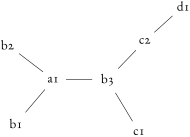
        (-tikz- diagram)

        \feynmandiagram [ nodes=circle, horizontal=a1 to b3] {
        a1 -- {b1, b2, b3 -- {c1, c2 -- d1}}
        };
    • \diagram*[⟨options⟩]{⟨diagram instructions⟩}

    • Same as \diagram, but instead of using the spring layout algorithm to place the vertices, this uses the most basic algorithm. This basic algorithm in most cases will not produce a satisfactory diagram, but is intended to be used with vertices which have been declared and positioned outside of the \diagram* command. Essentially, \diagram* should be used only to connect existing vertices.

3.2Keys & Styles

The various styles and options that allow the Feynman diagrams to be customized are defined in what TikZ calls keys. The documentation includes all keys which are defined within TikZ-Feynman which all begin with the prefix /tikzfeynman. In addition, a few of the keys from TikZ itself which are particularly useful to TikZ-Feynman are documented and these are prefixed with /tikz or /graph drawing. Please refer to the TikZ manual for a more in thorough documentation of the TikZ keys.

TikZ-Feynman provides many every ⟨key⟩ which allow every instance of ⟨key⟩ to be modified. For example, to make every diagram red except for small diagrams which should be blue, then one would add to the preamble:

\tikzfeynmanset{
every diagram={red},
every small={blue},
}

If you are completely unhappy with a particular inbuilt style, you can define your own style with ⟨key⟩/.style={...} as shown in the following example:

\tikzfeynmanset{
myblob/.style={
shape=circle,
draw=blue,
fill=red,
}
}

All the keys defined here are made available inside the {feynman} environment and inside \feynmandiagram; but if you wish to access them outside of this (say, in a regular {tikzpicture} environment), you will need to specify the full path with the leading /tikzfeynman.

3.2.1Feynman Keys
  • /tikzfeynman/execute at begin feynman={⟨TEX code⟩}(no default)

  • /tikzfeynman/execute at end feynman={⟨TEX code⟩}(no default)

  • Allows for custom code to be executed at the start or end of each {feynman} environment.

  • /tikzfeynman/every feynman=⟨styles⟩(no default)

  • Set of styles which are applied to every {feynman} environments (and consequently, every apply inside all \feynmandiagram too). The style also applies to regular TikZ commands used inside the {feynman} environment.
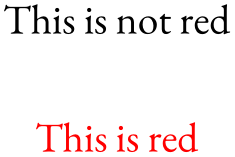
    (-tikz- diagram)

    \tikzfeynmanset{every feynman={red}}
    \begin{tikzpicture}
    \node at (0, 0.5) {This is not red};
    \begin{ feynman}
    \node at (0, -0.5) {This is red};
    \end{ feynman}
    \end{tikzpicture}
  • /tikzfeynman/inline=⟨node⟩(style, no default)

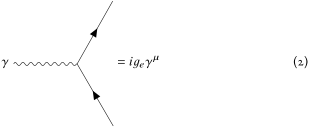
  • A style used to display a Feynman diagram inline (typically in an equation), and aligning such that its vertical placement is at the node specified. The node specification must be enclosed in parentheses. For nodes which contain text (such as when the particle style is applied), it is possible to use the baseline of the text inside the node to line up with the baseline of the equation by using (⟨node⟩.base) as demonstrated in the following example. Note that this key applies additional styles to make the diagram fit in an equation more nicely; if you do not wish to have these additional styles, use the baseline key.
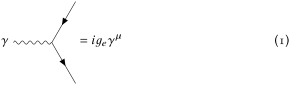
    (Feynman diagram in an equation)

    \begin{equation}
    \feynmandiagram [ inline=(d.base), horizontal=d to b] {
    a -- [ fermion] b -- [ fermion] c,
    b -- [ boson] d [ particle=\(\gamma\)],
    };
    = i g_{e} \gamma^{\mu}
    \end{equation}
  • /tikz/baseline=⟨node⟩(no default)

  • Changes the vertical alignment of the Feynman diagram such that it diagram’s baseline is at the node specified. This works in the same way as inline=⟨node⟩, but it does not apply any additional styles (notice how the following example is larger than the one above). (Feynman diagram in an equation)
    \begin{equation}
    \feynmandiagram [ baseline=(d.base), horizontal=d to b] {
    a -- [ fermion] b -- [ fermion] c,
    b -- [ boson] d [ particle=\(\gamma\)],
    };
    = i g_{e} \gamma^{\mu}
    \end{equation}
  • /graph drawing/horizontal=⟨node⟩ to ⟨node⟩(no default)

  • /graph drawing/horizontal'=⟨node⟩ to ⟨node⟩(no default)

  • /graph drawing/vertical=⟨node⟩ to ⟨node⟩(no default)

  • /graph drawing/vertical'=⟨node⟩ to ⟨node⟩(no default)

  • The underlying algorithm will arrange all the nodes relative to each other, but beyond that it has no idea how the overall graph should be oriented. By using one of the above keys, the final output of the algorithm is oriented and/or mirrored such that the two nodes specified are on the same horizontal (or vertical) line. The two nodes need not actually be connected by an edge for this to work.

    The two ⟨node⟩ specifications should not be enclosed in parentheses, unlike the inline and baseline keys.

    The horizontal' and vertical' keys work in the same was as horizontal and vertical, but with a flip.

    (-tikz- diagram) (-tikz- diagram) (-tikz- diagram) (-tikz- diagram)

    \feynmandiagram [ inline=(b), horizontal=a to b, red] {
    a -- b -- {c [ particle=\(c\)], d [ particle=\(d\)]}
    };
    \feynmandiagram [ inline=(b), horizontal'=a to b, blue] {
    a -- b -- {c [ particle=\(c\)], d [ particle=\(d\)]}
    };
    \feynmandiagram [ inline=(b), vertical=a to b, green!40!black] {
    a -- b -- {c [ particle=\(c\)], d [ particle=\(d\)]}
    };
    \feynmandiagram [ inline=(b), vertical=b to a, black] {
    a -- b -- {c [ particle=\(c\)], d [ particle=\(d\)]}
    };
3.2.2Diagram Keys
  • /tikzfeynman/every diagram=⟨styles⟩(no default)

  • Set of styles which are applied to every diagram; that is, to everything inside the \feynmandiagram, \diagram and \diagram* commands but not the general {feynman} environment (see section 3.2.1 for that).

    (-tikz- diagram)

    \tikzfeynmanset{every diagram={red}}
    \feynmandiagram [ small, horizontal=d to b] {
    a -- [ fermion] b -- [ fermion] c,
    b -- [ boson] d,
    };
  • /tikzfeynman/small(no value)

  • /tikzfeynman/medium(no value)

  • /tikzfeynman/large(no value)

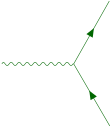
  • Changes the default separation between the vertices and changes the size of arrows, blobs, and other shapes to fit different context. The small size is best used with when the diagram is quite simple and does not have too many annotations (such as momentum arrows and particle labels). The medium size is the default and is usually large enough that even diagrams with many labels and momentum arrows do not become too cluttered. Finally the large key is best for large illustrations as used on the title page of this document.

    (-tikz- diagram) (-tikz- diagram) (-tikz- diagram)

    \feynmandiagram [ baseline=(b), small, horizontal=d to b, red] {
    a -- [ fermion] b -- [ fermion] c,
    b -- [ boson] d,
    };
    \feynmandiagram [ baseline=(b), medium, horizontal=d to b, green!40!black] {
    a -- [ fermion] b -- [ fermion] c,
    b -- [ boson] d,
    };
    \feynmandiagram [ baseline=(b), large, horizontal=d to b, blue] {
    a -- [ fermion] b -- [ fermion] c,
    b -- [ boson] d,
    };

There are several algorithms which are available to place the vertices which are all provided within the graph drawing library from TikZ. Below are listed a few of these layouts which are more relevant for drawing Feynman diagrams. For a more complete description of how these algorithms work, please refer to the TikZ manual. Please note that most graph drawing algorithms are implemented in Lua and thus require LuaTEX in order to work. If LuaTEX is not used, TikZ-Feynman will default to a more rudimentary algorithm and will warn the user instead.

  • /graph drawing/spring layout=⟨string⟩(no default)

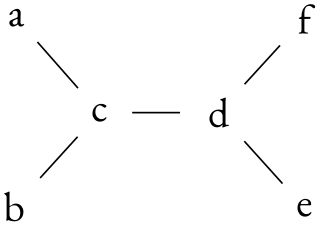
  • Uses Hu’s spring layout [Hu 2005] as implemented by Pohlmann [Pohlmann 2011]. This models each edge as springs and attempts to spread everything out as much as possible. This is the default layout.
    (-tikz- diagram)

    \feynmandiagram [ nodes=circle, small, horizontal=c to d] {
    {a, b} -- c -- d -- {e, f},
    };
  • /graph drawing/spring electrical layout=⟨string⟩(no default)

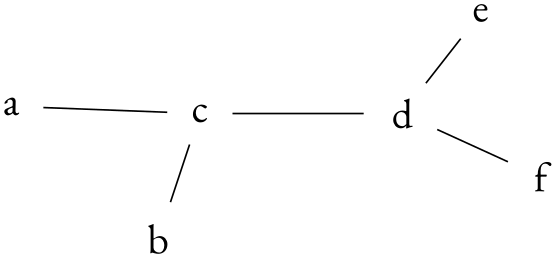
  • Uses Hu’s spring electrical layout [Hu 2005] as implemented by Pohlmann [Pohlmann 2011]. This models each edge as springs and gives each vertex a charge. This algorithm allows for the charge of a particular vertex to be adjusted using the electric charge key (the default is 1).
    (-tikz- diagram)

    \feynmandiagram [ nodes=circle,
    small, horizontal=c to d,
    spring electrical layout

    ] {
    {a, b [electric charge=2]} -- c -- d -- {e, f [electric charge=0.1]},
    };
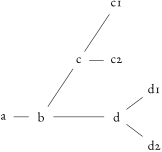
  • /graph drawing/tree layout=⟨string⟩(no default)

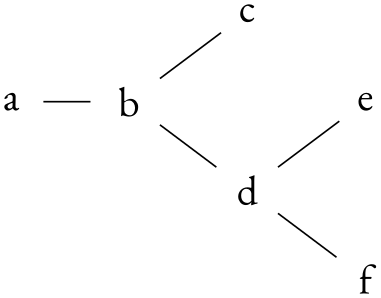
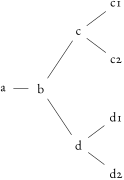
  • Uses the Reingold–Tilford algorithm in order to place the node. This works in a similar way to the layered layout, but has quite a lot of additional options to handle missing children in the tree. Please refer to the TikZ manual for a thorough description of these additional features.

    When an edge is specified, the first vertex is always located on the layer above the second vertex. This creates a hierarchy of vertices which is particularly useful for decays.

    (-tikz- diagram)

    \feynmandiagram [ nodes=circle, small, horizontal=a to b, tree layout] {
    a -- b -- {c, d -- {e, f}},
    };
    (-tikz- diagram)

    \feynmandiagram [ nodes=circle, small, horizontal=a to b, tree layout] {
    a -- b -- {c -- {c1, c2}, d -- {d1, d2}},
    };
  • /tikz/graphs/edges=⟨options⟩(no default)

  • /tikz/graphs/nodes=⟨options⟩(no default)

  • Just like it is possible to change the shape of every vertex or edge in the whole document, it is also possible to change the shape of every vertex or edge in a single diagram by modifying these keys and adding the desired styles.

3.2.3Vertex Keys
  • /tikzfeynman/vertex(no value)

  • The default, base style applied to every vertex initially. Other styles are subsequently added. This sets the vertex shape to be a coordinate, that is, a null shape with no size nor width.

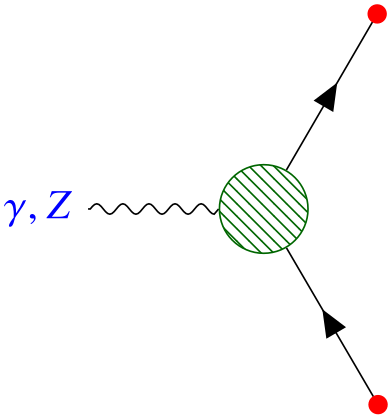
  • /tikzfeynman/every ⟨vertex shape⟩=⟨styles⟩(no default)

  • The style of specific vertices can be modified by changing the appropriate every ⟨vertex shape⟩ key. For example, in order to change the style of every dot-styled vertex, you can modify the every dot key, or to modify every vertex globally, the every vertex key can be modified.
    (-tikz- diagram)

    \tikzfeynmanset{
    every vertex={red, dot},
    every particle={blue},
    every blob={draw=green!40!black, pattern color=green!40!black},
    }
    \feynmandiagram [ horizontal=a to b] {
    a [ particle={\(\gamma, Z\)}] -- [ boson] b [ blob],
    c -- [ fermion] b -- [ fermion] d,
    };
  • /tikzfeynman/dot(no value)

  • Modifies the vertex so that it has a small filled circle.

    (-tikz- diagram)

    \feynmandiagram [ small] {
    a -- b [ dot] -- {c, d}
    };
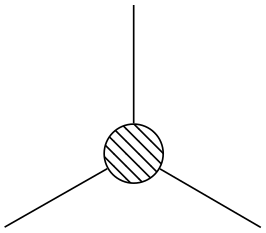
  • /tikzfeynman/blob(no value)

  • Modifies the vertex so that it is a large blob, usually used to denote an effective operator.
    (-tikz- diagram)

    \feynmandiagram [ small] {
    a -- b [ blob] -- {c, d}
    };
  • /tikzfeynman/particle=⟨name⟩(no default)

  • Modifies the vertex so that it shows ⟨name⟩. This is intended to label initial and final particles, but it should not be used on internal vertices as it will result in the lines at the vertex having a gap. For propagators the edge label key is much more appropriate.

    Note that if ⟨name⟩ contains characters such as brackets ([]) or commas (,), the whole ⟨name⟩ has to be enclosed in braces ({}); otherwise, the parser will interpret the comma as the end of the ⟨name⟩ and the start of the next key, or the closing bracket as the end of all optional arguments.

    (-tikz- diagram)

    \feynmandiagram [ small, horizontal=a to b] {
    a [ particle={\(\gamma, Z\)}] -- [ boson] b -- {c, d},
    };
3.2.4Edge Keys

Just like with the various vertex keys, each edge type has a corresponding every ⟨edge type⟩; however, due to the existence of very similar keys such as scalar, charged scalar and anti charged scalar, more specific keys inherit styles from less specific ones. For example, styles in every scalar will apply to charged scalar and anti charged scalar.

The edge styles do not override each other and instead stack. This means that an edge styled with both boson and fermion will consist of a straight line with a wavy line on top and an error. If no styles are provided, then a simple solid line is drawn.

  • /tikzfeynman/every edge=⟨styles⟩(no default)

  • A style to apply to every edge initially.

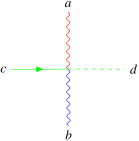
  • /tikzfeynman/every ⟨edge style⟩=⟨styles⟩(style, no default)

  • The style of specific edges can be modified by changing the appropriate every ⟨edge style⟩ key. For example, in order to make a global change to every boson, you can modify the every boson key.
    (-tikz- diagram)

    \tikzfeynmanset{
    every edge={green},
    every boson={red},
    every photon={blue},
    }
    \feynmandiagram [ small] {
    a [ particle=\(a\)] -- [ boson] o -- [ photon] b [ particle=\(b\)],
    f1 [ particle=\(c\)] -- [ fermion] o -- [ scalar] f2 [ particle=\(d\)],
    };
  • /tikz/edge label=⟨text⟩(no default)

  • /tikz/edge label'=⟨text⟩(no default)

  • Places a label halfway along the edge with the given text. The primed key switches which side of the edge the label is placed.

  • /tikzfeynman/insertion=[⟨options⟩]⟨distance⟩(no default)

  • Places an insertion (for mass or momentum insertion) along an edge. The distance specifies how far along the edge the insertion should be placed such that 0 and 1 respectively correspond to the start and the end of the edge.

    Multiple insertions can be placed along a single edge by repeating the style key.

    Through the ⟨options⟩ argument, the insertion size and style can be changed.

    (-tikz- diagram)

    \feynmandiagram [ horizontal=a to b] {a -- [ insertion=0.33, insertion=0.67] b};
    • /tikzfeynman/insertion/size=⟨distance⟩ (no default, initially 3pt)

    • Specifies how big the insertion should be. The length of each edge starting from the center will be \(\sqrt {2} \times \meta {distance}\).

      (-tikz- diagram)

      \feynmandiagram [ horizontal=a to b] {a -- [ insertion={[ size=10pt]0.4}] b};
    • /tikzfeynman/insertion/style=⟨distance⟩ (no default, initially empty)

    • Specifies additional styles to applying to the lines of the insertion.

      (-tikz- diagram)

      \feynmandiagram [ horizontal=a to b] {a -- [ insertion={[ style=red]0.4}] b};
3.2.5Momentum Keys
  • /tikzfeynman/momentum=[⟨options⟩]⟨text⟩(no default)

  • /tikzfeynman/momentum'=[⟨options⟩]⟨text⟩(no default)

  • /tikzfeynman/reversed momentum=[⟨options⟩]⟨text⟩(no default)

  • /tikzfeynman/reversed momentum'=[⟨options⟩]⟨text⟩(no default)

  • /tikzfeynman/rmomentum=[⟨options⟩]⟨text⟩(no default)

  • /tikzfeynman/rmomentum'=[⟨options⟩]⟨text⟩(no default)

  • Places a momentum arrow on the specified edge with label given by ⟨text⟩. The primed (') version places the momentum arrow on the other side of the edge; that is, if the momentum arrow was on the right, it will be placed on the left of the edge. The reversed momentum and reversed momentum' keys are analogous to momentum and momentum' except that the momentum arrow points in the opposite direction. Finally, the rmomentum and rmomentum' are aliases of reversed momentum and reversed momentum'.

    Note that due to the way the arrow is drawn, it does not inherit styles of the edge. As a result, they have to be re-specified through ⟨options⟩.
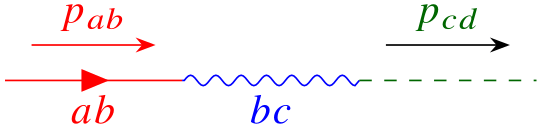
    (-tikz- diagram)

    \feynmandiagram [ layered layout, horizontal=a to b] {
    a -- [red, fermion, edge label'=\(ab\), momentum={[ arrow style=red]\(p_{ab}\)}] b
    -- [blue, photon, edge label'=\(bc\)] c
    -- [green!40!black, scalar, momentum=\(p_{cd}\)] d,
    };
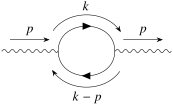
    (-tikz- diagram)

    \feynmandiagram [ layered layout, horizontal=b to c] {
    a -- [ photon, momentum=\(p\)] b
    -- [ fermion, half left, looseness=1.5, momentum=\(k\)] c
    -- [ fermion, half left, looseness=1.5, momentum=\(k-p\)] b,
    c -- [ photon, momentum=\(p\)] d,
    };

    The ⟨options⟩ allows for the following options to customize the appearance of the momentum arrows. These can be either set globally with the usual \tikzfeynmanset, or can be set on a individual basis through the ⟨options⟩ argument of the momentum key. In the latter case, only the ⟨key⟩ in /tikzfeynman/momentum/⟨key⟩ is required.

    • /tikzfeynman/momentum/label distance=⟨distance⟩ (no default, initially 0pt)

    • Set the separation between the text and the arrow. Note that the text is still surrounded by an inner sep=0.3333em by default so the default distance of 0pt will not result in the momentum label touching the arrow.

    • /tikzfeynman/momentum/arrow distance=⟨distance⟩ (no default, initially 3mm)

    • Set the separation between the edge and the arrow.

    • /tikzfeynman/momentum/arrow shorten=⟨distance⟩ (no default, initially 0.15)

    • Specify the fraction of the total edge length by which the momentum arrow is shortened at each end.

    • /tikzfeynman/momentum/label style=⟨style⟩ (no default, initially empty)

    • Define styles to apply to the momentum label node.

    • /tikzfeynman/momentum/arrow style=⟨style⟩ (no default, initially empty)

    • Define style to apply to the momentum arrow.

3.2.6Modifier Keys

Modifier keys serve only to slightly modify a small feature of the edge.

  • /tikz/out=⟨angle⟩(no default)

  • /tikz/in=⟨angle⟩(no default)

  • Specifies the angle at which the edge leaves the first vertex in an edge and the angle at which it enters the second vertex in an edge.

  • /tikz/relative=⟨true or false⟩ (default true)

  • If relative is set to false, the angle is relative to the paper whilst when relative is set to true, the angle is relative to the straight line joining the two vertices.

  • /tikz/looseness=⟨number⟩ (no default, initially 1)

  • As the name suggests, this specifies how ‘loose’ or ‘tight’ a curve is connecting two vertices.