Forest
Reference
3.3 The bracket representation
A bracket representation of a tree is a token list with the following syntax:
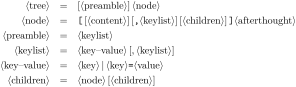
The ⟨preamble⟩ keylist is stored into keylist register preamble. The ⟨keylist⟩ of a ⟨node⟩ is stored into keylist option given options. ⟨content⟩ and ⟨afterthought⟩ are normally stored by prepending and appending content'=⟨content⟩ and afterthought=⟨afterthought⟩ to given options, respectively; this is customizable via content to and redefining style afterthought.
Normally, the tokens in the bracket representation are not expanded while the input is parsed. However, it is possible to control expansion. Expansion control sequences of Forest’s bracket parser are shown below. Note that by default, there is no action character.

To customize the bracket parser, call \ bracketset⟨keylist⟩, where the keys can be the following.
opening bracket=⟨character⟩(bracket key, default [)
closing bracket=⟨character⟩(bracket key, default ])
action character=⟨character⟩(bracket key, default none)
Careful when setting the opening bracket to (, as an initial ( is understood as the delimiter of the optional ⟨config⟩ argument of the forest environment or \ Forest macro. The workaround is to either provide an empty ⟨config⟩ argument (), or put some whitespace (e.g. a newline) before the tree specification.
By redefining the following two keys, the bracket parser can be used outside Forest.
new node=⟨preamble⟩⟨node specification⟩⟨csname⟩.(bracket key)
Required semantics: create a new node given the preamble (in the case of a new root node) and the node specification and store the new node’s id into ⟨csname⟩.
set afterthought=⟨afterthought⟩⟨node id⟩.(bracket key)
Required semantics: store the afterthought in the node with given id.