Forest
Reference
3.7 Formatting the tree¶
3.7.1 Node appearance¶
The following options apply at stage typeset nodes. Changing them afterwards has no effect in the normal course of events.
The option value (a tabular environment header specification) is set. The special values left, center and right invoke styles setting the actual header to the value shown in the above example.
If you know that the align was set with a special value, you can easily check the value using if in align.
Option content format is set to the following value:
\noexpand\begin{tabular}[\forestoption{base}]{\forestoption{align}}%
\forestoption{content}%
\noexpand\end{tabular}%As you can see, it is this value that determines that options base, align and content specify the vertical alignment, header and content of the table.
Creates a left/center/right-aligned multiline node, or a tabular node. In the content option, the lines of the node should separated by \\ and the columns (if any) by &, as usual.
The vertical alignment of the multiline/tabular node can be specified by option base.
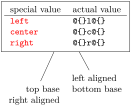
  \begin{forest} l sep+=2ex

    [special value&actual value\\\hline

      \indexdef{value of=align>left}&||\texttt{@\{\}l@\{\}}\\

      \indexdef{value of=align>center}&||\texttt{@\{\}c@\{\}}\\

      \indexdef{value of=align>right}&||\texttt{@\{\}r@\{\}}\\

      ,~align~=ll,draw

      [top base\\right aligned, ~align~=right,~base~=top]

      [left aligned\\bottom base, ~align~=left,~base~=bottom]

    ]

  \end{forest}
Internally, setting this option has two effects:
base=⟨toks: vertical alignment⟩(option, default t)¶
This option controls the vertical alignment of multiline (and in general, tabular) nodes created with align. Its value becomes the optional argument to the tabular environment. Thus, sensible values are t (the top line of the table will be the baseline) and b (the bottom line of the table will be the baseline). Note that this will only have effect if the node is anchored on a baseline, like in the default case of anchor=base.
For readability, you can use top and bottom instead of t and b. (top and bottom are still stored as t and b.)
content=⟨autowrapped toks⟩(option, default {})¶
The content of the node.
Normally, the value of option content is given implicitely by virtue of the special (initial) position of content in the bracket representation (see §3.3). However, the option also be set explicitely, as any other option.
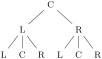
  \begin{forest}

    delay={for tree={

        if n=1{content=L}

             {if n'=1{content=R}

                      {content=C}}}}

    [[[][][]][[][][]]]

  \end{forest}
Note that the execution of the content option should usually be delayed: otherwise, the implicitely given content (in the example below, the empty string) will override the explicitely given content.

  \begin{forest}

    for tree={

        if n=1{content=L}

             {if n'=1{content=R}

                      {content=C}}}

    [[[][][]][[][][]]]

  \end{forest}
content format=⟨toks⟩(option, default \forestoption {content})¶
When typesetting the node under the default conditions (see option node format), the value of this option is passed to the TikZ node operation as its ⟨text⟩ argument [Tantau 2007, §16.2]. The default value of the option simply puts the content in the node.
This is a fairly low level option, but sometimes you might still want to change its value. If you do so, take care of what is expanded when. Most importantly, if you use a formatting command such as \textbf in the default setting of node format, be sure to precede it with \noexpand. For details, read the documentation of option node format and macros \ forestoption and \ foresteoption; for an example, see option align.
math content¶
Changes content format so that the content of the node will be typeset in a math environment.
plain content¶
Resets content format to the default value.
node format=⟨toks⟩(option)¶
\noexpand\node(\forestoption{name})
[\forestoption{node options}]{\foresteoption{content format}};
The node is typeset by executing the expansion of this option’s value in a tikzpicture environment.
Important: the value of this option is first expanded using \edef and only then executed. Note that in its default value, content format is fully expanded using \ foresteoption: this is necessary for complex content formats, such as tabular environments.
This is a low level option. Ideally, there should be no need to change its value. If you do, note that the TikZ node you create should be named using the value of option name; otherwise, parent–child edges can’t be drawn, see option edge path.
node format’=⟨toks⟩¶
Sets node format, automatically wrapping the given ⟨toks⟩ by \noexpand\node(\forestoption{name}) and ;. Only the node options and content must therefore be given.
node options=⟨keylist⟩(option, default anchor=base)¶
When the node is being typeset under the default conditions (see option node format), the content of this option is passed to TikZ as options to the TikZ node operation [Tantau 2007, §16].
This option is rarely manipulated manually: almost all options unknown to Forest are automatically appended to node options. Exceptions are (i) label and pin, which require special attention in order to work; and (ii) anchor, which is saved in order to retain the information about the selected anchor.
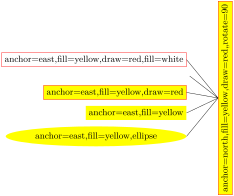
  \begin{forest}

    for descendants={anchor=east,child anchor=east},

    grow=west,anchor=north,parent anchor=north,

    l sep=1cm,

    for tree={~fill=yellow~},where={n()<=3}{~draw=red~}{},

    delay={for tree={content/.pgfmath=~node_options~}}

    [root,rotate=90,

      [,~fill=white~]

      [,~node options'~]

      []

      []

      [,~node options~={~ellipse~}]

    ]

  \end{forest}

3.7.2 Node position¶
Most of the following options apply at stage pack. Changing them afterwards has no effect in the normal course of events. (Options l, s, x, y and anchor are exceptions; see their documentation for details).
anchor=⟨toks: Forest anchor⟩(option, default base)¶
While this option is saved by Forest, it is essentially an option of TikZ’s \node command [see Tantau 2007, §16.5.1]. Forest autoforwards it to keylist option node options, which is passed on to TikZ’s \node command when the node is typeset. (Option anchor thus normally applies in stage typeset nodes.)
In the TikZ code, you can refer to the node’s anchor using Forest’s anchor anchor; this anchor is sometimes also called the node anchor in this documentation, to distinguish it clearly from parent and child anchors.
⟨toks: Forest anchor⟩ can be any TikZ anchor. Additionally, Forest defines several tree hierarchy related anchors; for details, see §3.17.
The effect of setting the node anchor is twofold:
calign=child|child edge|midpoint|edge midpoint|fixed angles|fixed edge angles(option, default center)¶
first|last|center.
The packing algorithm positions the children so that they don’t overlap, effectively computing the minimal distances between the node anchors of the children. This option (calign stands for child alignment) specifies how the children are positioned with respect to the parent (while respecting the above-mentioned minimal distances).
The child alignment methods refer to the primary and the secondary child, and to the primary and the secondary angle. These are set using the keys described just after calign.
calign=child s-aligns the node anchors of the parent and the primary child. calign=child edge s-aligns the parent anchor of the parent and the child anchor of the primary child. calign=first is an abbreviation for calign=child,calign_child=1. calign=last is an abbreviation for calign=child,calign_child=-1. calign=midpoint s-aligns the parent’s node anchor and the midpoint between the primary and the secondary child’s node anchor. calign=edge midpoint s-aligns the parent’s parent anchor and the midpoint between the primary and the secondary child’s child anchor. calign=center is an abbreviation for
calign=midpoint, calign_primary_child=1, calign_secondary_child=-1.
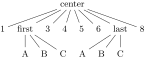
  \begin{forest}

    [center,calign=center[1]

      [first,calign=first[A][B][C]][3][4][5][6]

      [last,calign=last[A][B][C]][8]]

  \end{forest}
calign=fixed angles: The angle between the direction of growth at the current node (specified by option grow) and the line through the node anchors of the parent and the primary/secondary child will equal the primary/secondary angle.
To achieve this, the block of children might be spread or further distanced from the parent. calign=fixed edge angles: The angle between the direction of growth at the current node (specified by option grow) and the line through the parent’s parent anchor and the primary/secondary child’s child anchor will equal the primary/secondary angle.
To achieve this, the block of children might be spread or further distanced from the parent.

  \begin{forest}

    calign=fixed edge angles,

    calign primary angle=-30,calign secondary angle=60,

    for tree={l=2cm}

    [CP[C][TP]]

    \draw[dotted] (!1) -| coordinate(p) () (!2) -| ();

    \path ()--(p) node[pos=0.4,left,inner sep=1pt]{-30};

    \path ()--(p) node[pos=0.1,right,inner sep=1pt]{60};

  \end{forest}
calign child=⟨count⟩¶
is an abbreviation for calign primary child=⟨count⟩.
calign angle=⟨count⟩¶
is an abbreviation for: calign primary angle=-⟨count⟩, calign secondary angle=⟨count⟩.
calign with current¶
s-aligns the node anchors of the current node and its parent. This key is an abbreviation for:
for parent/.wrap pgfmath arg={calign=child,calign primary child=##1}{n}.
calign with current edge¶
s-aligns the child anchor of the current node and the parent anchor of its parent. This key is an abbreviation for:
for parent/.wrap pgfmath arg={calign=child edge,calign primary child=##1}{n}
fit=tight|rectangle|band(option, default tight)¶
fit=tight: an exact boundary of the node’s subtree is computed, resulting in a compactly packed tree. Below, the boundary of subtree L is drawn.
(65)
\begin{forest}
delay={for tree={name/.pgfmath=content}}
[root
[L,fit=tight, % default
show boundary
[L1][L2][L3]]
[R]
]
\end{forest}fit=rectangle: puts the node’s subtree in a rectangle and effectively packs this rectangle; the resulting tree will usually be wider.
(66)
\begin{forest}
delay={for tree={name/.pgfmath=content}}
[root
[L,fit=rectangle,
show boundary
[L1][L2][L3]]
[R]
]
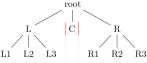
\end{forest}fit=band: puts the node’s subtree in a rectangle of “infinite depth”: the space under the node and its descendants will be kept clear.
(67)
\begin{forest}
delay={for tree={name/.pgfmath=content}}
[root
[L[L1][L2][L3]]
[C,fit=band]
[R[R1][R2][R3]]
]
\draw[thin,red]
(C.south west)--(C.north west)
(C.north east)--(C.south east);
\draw[thin,red,dotted]
(C.south west)--+(0,-1)
(C.south east)--+(0,-1);
\end{forest}
  \makeatletter\tikzset{use path/.code={\tikz@addmode{\pgfsyssoftpath@setcurrentpath#1}

    \appto\tikz@preactions{\let\tikz@actions@path#1}}}\makeatother

  \forestset{show boundary/.style={

    before drawing tree={get min s tree boundary=\minboundary, get max s tree boundary=\maxboundary},

    tikz+={\draw[red,use path=\minboundary]; \draw[red,use path=\maxboundary];}}}
This option sets the type of the (s-)boundary that will be computed for the subtree rooted in the node, thereby determining how it will be packed into the subtree rooted in the node’s parent. There are three choices:1
grow=⟨count⟩,(option, default 270)¶
grow’=⟨count⟩, grow”=⟨count⟩
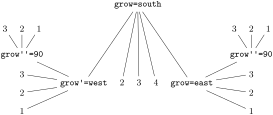
The direction of the tree’s growth at the node.
The growth direction is understood as in TikZ’s tree library [Tantau 2007, §18.5.2] when using the default growth method: the (node anchor’s of the) children of the node are placed on a line orthogonal to the current direction of growth. (The final result might be different, however, if l is changed after packing or if some child undergoes tier alignment.)
This option is essentially numeric (pgfmath function grow will always return an integer), but there are some twists. The growth direction can be specified either numerically or as a compass direction (east, north east, …). Furthermore, like in TikZ, setting the growth direction using key grow additionally sets the value of option reversed to false, while setting it with grow’ sets it to true; to change the growth direction without influencing reversed, use key grow”.
Between stages pack and compute xy, the value of grow should not be changed.
  \begin{forest}

    delay={where in content={~grow~}{

        for current/.pgfmath=content,

        content=\texttt{#1}

      }{}

    }

    [{~grow~=south}

      [{~grow'~=west}[1][2][3]

        [{~grow''~=90}[1][2][3]]]

      [2][3][4]

      [{~grow~=east}[1][2][3]

        [{~grow''~=90}[1][2][3]]]]

  \end{forest}
ignore=⟨boolean⟩(option, default false)¶
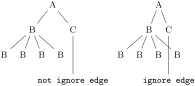
If this option is set, the packing mechanism ignores the node, i.e. it pretends that the node has no boundary. Note: this only applies to the node, not to the tree.
Maybe someone will even find this option useful for some reason …
ignore edge=⟨boolean⟩(option, default false)¶
If this option is set, the packing mechanism ignores the edge from the node to the parent, i.e. nodes and other edges can overlap it. (See §6.2 for some problematic situations.)
  \begin{forest}

    [A[B[B][B][B][B]][C

      [\texttt{not ignore edge},l*=2]]]

  \end{forest}

  \begin{forest}

    [A[B[B][B][B][B]][C

      [\texttt{ignore edge},l*=2,~ignore edge~]]]

  \end{forest}
l=⟨dimen⟩(option)¶
The value of l at the beginning of stage pack determines the minimal l-distance between the anchors of the node and its parent. Thus, changing l before packing will influence this process. (During packing, l can be increased due to parent’s l sep, tier alignment, or calign methods fixed angles and fixed edge angles.
Changing l after packing but before stage compute xy will result in a manual adjustment of the computed position. (The augmented assignment operators can be useful here.)
Changing l after the absolute positions have been computed has no effect in the normal course of events.
The l-position of the node, in the parent’s ls-coordinate system. (The origin of a node’s ls-coordinate system is at its (node) anchor. The l-axis points in the direction of the tree growth at the node, which is given by option grow. The s-axis is orthogonal to the l-axis; the positive side is in the counter-clockwise direction from l axis.)
The initial value of l is set from the standard node. By default, it equals:
\[\index{l sep}+2\cdot\mbox{\texttt{outer ysep}}+\mbox{total height(standard node)}\]
The value of l can be changed at any point, with different effects.
l sep=⟨dimen⟩(option)¶
The minimal l-distance between the node and its descendants.
This option determines the l-distance between the boundaries of the node and its descendants, not node anchors. The final effect is that there will be a l sep wide band, in the l-dimension, between the node and all its descendants.
The initial value of l sep is set from the standard node and equals
\[\mbox{height}(\mbox{strut})+\mbox{\texttt{inner ysep}}\]
Note that despite the similar name, the semantics of l sep and s sep are quite different.
rotate=⟨count⟩(option, default 0)¶
This option is saved and autoforwarded to TikZ’s \node command via node options.
s=⟨dimen⟩(option)¶
The s-position of the node, in the parent’s ls-coordinate system. (The origin of a node’s ls-coordinate system is at its (node) anchor. The l-axis points in the direction of the tree growth at the node, which is given by option grow. The s-axis is orthogonal to the l-axis; the positive side is in the counter-clockwise direction from l axis.)
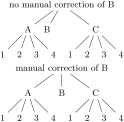
The value of s is computed in stage pack stage and used in stage compute xy stage, so it only makes sense to (inspect and) change it in before computing xy and during packing (before packing node and after packing node). Any value given before packing is overridden, and changing the value after computing xy has no effect.
For example, consider the manual correction below. By default, B is closer to A than C because packing proceeds from the first to the last child — the position of B would be the same if there was no C. Adjusting s at the right moment, it is easy to center B between A and C.
  \begin{forest}

    [no manual correction of B

      [A[1][2][3][4]]

      [B]

      [C[1][2][3][4]]

    ]

  \end{forest}


   \begin{forest}

    [manual correction of B

      [A[1][2][3][4]]

      [B,before computing xy={s/.average={s}{siblings}}]

      [C[1][2][3][4]]

    ]

  \end{forest}
s sep=⟨dimen⟩(option)¶
The subtrees rooted in the node’s children will be kept at least s sep apart in the s-dimension. Note that s sep is about the minimal distance between node boundaries, not node anchors.
The initial value of s sep is set from the standard node and equals \(2\cdot\mbox{\texttt{inner xsep}}\).
Note that despite the similar name, the semantics of s sep and l sep are quite different.
tier=⟨toks⟩(option, default {})¶
Setting this option to something non-empty “puts a node on a tier.” All the nodes on the same tier are aligned in the l-dimension.
Tier alignment across changes in growth direction is impossible. In the case of incompatible options, Forest will yield an error.
Tier alignment also does not work well with calign=fixed angles and calign=fixed edge angles, because these child alignment methods may change the l-position of the children. When this might happen, Forest will yield a warning.
x=⟨dimen⟩(option)¶
y=⟨dimen⟩(option)¶
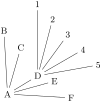
x and y are the coordinates of the node in the “normal” (paper) coordinate system, relative to the root of the tree that is being drawn. So, essentially, they are absolute coordinates.
The values of x and y are computed in stage compute xy. It only makes sense to inspect and change them (for manual adjustments) afterwards (normally, in the before drawing tree hook, see §3.4.1.) x and y of the (formal) root node are exceptions, as they are not changed in stage compute xy.
  \begin{forest}

    for tree={grow'=45,l=1.5cm}

    [A[B][C][D,before drawing tree={~y-~=4mm}[1][2][3][4][5]][E][F]]

  \end{forest}
3.7.3 Edges¶
These options determine the shape and position of the edge from a node to its parent. They apply at stage draw tree.
child anchor=⟨toks: Forest anchor⟩(option, default {})¶
See parent anchor.
edge=⟨keylist⟩(option, default draw)¶
When edge path has its default value, the value of this option is passed as options to the TikZ \path expression used to draw the edge between the node and its parent.
Also see key no edge.

  \begin{forest} for tree={grow'=0,l=2cm,anchor=west,child anchor=west},

    [root

      [normal]

      [none,~no~ edge]

      [dotted,edge=dotted]

      [dashed,edge=dashed]

      [dashed,edge={dashed,red}]

    ]

  \end{forest}
edge label=⟨toks: TikZ code⟩(option, default {})¶
When edge path has its default value, the value of this option is used at the end of the edge path specification to typeset a node (or nodes) along the edge.
The packing mechanism is not sensitive to edge labels.

  \begin{forest}

    [VP

      [V,~edge label~={node[midway,left,font=\scriptsize]{head}}]

      [DP,~edge label~={node[midway,right,font=\scriptsize]{complement}}]

    ]

  \end{forest}
edge path=⟨toks: TikZ code⟩(option)¶
\noexpand\path[\ forestoption{edge}]
(!u.parent anchor)--(.child anchor)\ forestoption{edge label};
This option contains the code that draws the edge from the node to its parent. By default, it creates a path consisting of a single line segment between the node’s child anchor and its parent’s parent anchor. Options given by edge are passed to the path; by default, the path is simply drawn. Contents of edge label are used to potentially place a node (or nodes) along the edge.
When specifying the edge path, the values of options edge and edge label can be used. Furthermore, two anchors, parent anchor and child anchor, are defined, to facilitate access to options parent anchor and child anchor from the TikZ code.
The node positioning algorithm is sensitive to edges, i.e. it will avoid a node overlapping an edge or two edges overlapping. However, the positioning algorithm always behaves as if the edge path had the default value — changing the edge path does not influence the packing! Sorry. (Parent–child edges can be ignored, however: see option ignore edge.)
parent anchor=⟨toks: Forest anchor⟩ ((option, default {})¶
Information also applies to option child anchor.)
Forest defines anchors parent anchor and child anchor (which work only for Forest and not also TikZ nodes, of course) to facilitate reference to the desired endpoints of child–parent edges. Whenever one of these anchors is invoked, it looks up the value of the parent anchor or child anchor of the node named in the coordinate specification, and forwards the request to the (TikZ) anchor given as the value.
The intended use of the two anchors is chiefly in edge path specification, but they can used in any TikZ code.

  \begin{forest}

    for tree={~parent anchor~=south,~child anchor~=north}

    [VP[V][DP]]

    \path[fill=red] (.parent anchor) circle[radius=2pt];

    \path[fill=blue] (!1.child anchor) circle[radius=2pt]

                     (!2.child anchor) circle[radius=2pt];

  \end{forest}
The empty value (which is the default) is interpreted as in TikZ: as an edge to the appropriate border point. See also §3.17 for a list of additional anchors defined by Forest.
no edge¶
Clears the edge options (edge'={}) and sets ignore edge.
3.7.4 Information about node¶
The values of these options provide various information about the tree and its nodes.
alias=⟨toks⟩¶
alias’=⟨toks⟩¶
Sets the alias for the node’s name.
Unlike name, alias is not an option: you cannot e.g. query it’s value via a pgfmath expression.
If the given alias clashes with an existing node name, alias will yield an error, while alias' will silently rename the node with this name to its default value (node@⟨id⟩).
Aliases can be used as the ⟨forest node name⟩ part of a relative node name and as the argument to the name step of a node walk. The latter includes the usage as the argument of the for name propagator.
Technically speaking, Forest alias is not a TikZ alias! However, you can still use it as a “node name” in TikZ coordinates, since Forest hacks TikZ’s implicit node coordinate system to accept relative node names; see §3.16.
id=⟨count⟩(readonly option)¶
The internal id of the node.
level=⟨count⟩(readonly option)¶
The hierarchical level of the node. The root is on level \(0\).
max x=⟨dimen⟩(readonly option)¶
max y=⟨dimen⟩(readonly option)¶
min x=⟨dimen⟩(readonly option)¶
min y=⟨dimen⟩(readonly option)¶
Measures of the node, in the shape’s coordinate system [see Tantau 2007, §16.2,§48,§75] shifted so that the node anchor is at the origin.
In pgfmath expressions, these options are accessible as max__x, max__y, min__x and min__y.
n=⟨count⟩(readonly option)¶
The child’s sequence number in the list of its parent’s children.
The enumeration starts with 1. For a geometric root, n equals \(0\).
name=⟨toks⟩(option)¶
node@⟨id⟩
name’=⟨toks⟩¶
Sets the name of the node.
The expansion of ⟨toks⟩ becomes the ⟨forest node name⟩ of the node. The TikZ node created from the Forest node will get the name specified by this option.
Node names must be unique. If a node with the given name already exists, name will yield an error, while name' will silently rename the node with this name to its default (node@⟨id⟩) value. Use an empty argument to reset the node’s name to its default value.
n children=⟨count⟩(readonly option)¶
The number of children of the node.
In pgfmath expressions, this option is accessible as n__children.
3.7.5 Various¶
baseline¶
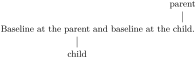
The node’s anchor becomes the baseline of the whole tree [cf. Tantau 2007, §69.3.1].
In plain language, when the tree is inserted in your (normal TeX) text, it will be vertically aligned to the anchor of the current node.
Behind the scenes, this style sets the alias of the current node to forest@baseline@node.
  Baseline at the

  \begin{forest}

    [parent,~baseline~,use as bounding box'

      [child]]

  \end{forest}

  and baseline at the

  \begin{forest}

    [parent

      [child,~baseline~,use as bounding box']]

  \end{forest}.
/tikz/fit to=⟨nodewalk⟩(tikz key)¶
Fits the TikZ node to the nodes in the given ⟨nodewalk⟩.
This key should be used like /tikz/fit of the TikZ’s fitting library [see Tantau 2007, §34]: as an option to TikZ’s node operation, the obvious restriction being that fit to must be used in the context of some Forest node. For an example, see footnote 2.3.
This key works by calling /tikz/fit and providing it with the the coordinates of the subtree’s boundary.
The ⟨nodewalk⟩ inherits its history from the outer nodewalk (if there is one). Its every-step keylist is empty.
get min s tree boundary=⟨cs⟩¶
label=⟨toks: TikZ node⟩(option)¶
The current node is labelled by a TikZ node.
The label is specified as a TikZ option label [Tantau 2007, §16.10]. Technically, the value of this option is passed to TikZ’s as a late option [Tantau 2007, §16.14]. (This is so because Forest must first typeset the nodes separately to measure them (stage typeset nodes); the preconstructed nodes are inserted in the big picture later, at stage draw tree.) Another option with the same technicality is pin.
pin=⟨toks: TikZ node⟩(option)¶
The current node gets a pin, see [Tantau 2007, §16.10]. ¸ The technical details are the same as for label.
use as bounding box¶
The current node’s box is used as a bounding box for the whole tree.
use as bounding box’¶
Like use as bounding box, but subtracts the (current) inner and outer sep from the node’s box. For an example, see baseline.
tikz=⟨toks: TikZ code⟩(option, default {})¶
“Decorations.”
The code given as the value of this option will be included in the tikzpicture environment used to draw the tree. By default, the code is included after all nodes of the tree have been drawn, so it can refer to any node of the tree (furthermore, relative node names can be used to refer to nodes of the tree, see §3.15) and the code given to various nodes is appended in a depth-first, parent-first fashion. See §3.4.3 for details and customization.
By default, bracket parser’s afterthoughts feed the value of this option. See afterthought.
1 Below is the definition of style show boundary. The use path trick is adjusted from TeX Stackexchange question Calling a previously named path in tikz.