Forest
Tutorial
2.3 Decorating the tree¶
The tree can be decorated (think movement arrows) with arbitrary TikZ code.
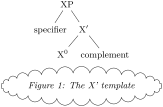
  \begin{forest}

    [XP

      [specifier]

      [X$'$

        [X$^0$]

        [complement]

      ]

    ]

    ~\node at (current bounding box.south)

      [below=1ex,draw,cloud,aspect=6,cloud puffs=30]

      {\emph{Figure 1: The X' template}};~

  \end{forest}
However, decorating the tree would make little sense if one could not refer to the nodes. The simplest way to do so is to give them a TikZ name using the name option, and then use this name in TikZ code as any other (TikZ) node name.
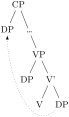
  \begin{forest}

    [CP

      [DP,name=spec CP]

      [\dots

        [,phantom]

        [VP

          [DP]

          [V'

            [V]

            [DP,name=object]]]]]

    \draw[->,dotted] ~(object)~ to[out=south west,in=south] ~(spec CP)~;

  \end{forest}
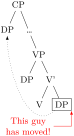
It gets better than this, however! In the previous examples, we put the TikZ code after the tree specification, i.e. after the closing bracket of the root node. In fact, you can put TikZ code after any closing bracket, and Forest will know what the current node is. (Putting the code after a node’s bracket is actually just a special way to provide a value for option tikz of that node.) To refer to the current node, simply use an empty node name. This works both with and without anchors [see Tantau 2007, §16.11]: below, (.south east) and ().
  \begin{forest}

    [CP

      [DP,name=spec CP]

      [\dots

        [,phantom]

        [VP

          [DP]

          [V'

            [V]

            [DP,draw] ~{~

              \draw[->,dotted] ~()~ to[out=south west,in=south] (spec CP);

              \draw[<-,red] ~(.south east)~--++(0em,-4ex)--++(-2em,0pt)

                   node[anchor=east,align=center]{This guy\\has moved!};

                 ~}~

          ]]]]

  \end{forest}
Important: the TikZ code should usually be enclosed in braces to hide it from the bracket parser. You don’t want all the bracketed code (e.g. [->,dotted]) to become tree nodes, right? (Well, they probably wouldn’t anyway, because TeX would spit out a thousand errors.)
Finally, the most powerful tool in the node reference toolbox: relative nodes. It is possible to refer to other nodes which stand in some (most often geometrical) relation to the current node. To do this, follow the node’s name with a ! and a nodewalk specification.
A nodewalk is a concise1 way of expressing node relations. It is simply a string of steps, which are represented by single characters, where: u stands for the parent node (up); p for the previous sibling; n for the next sibling; s for the sibling (useful only in binary trees); 1, 2, … 9 for first, second, … ninth child; l, for the last child, etc. For the complete specification, see section 3.8.7.
To see the nodewalk in action, consider the following examples. In the first example, the agree arrow connects the V node, specified simply as (), since the TikZ code follows [V], and the DP node, which is described as “a sister of V’s parent”: !us = up + sibling.

  \begin{forest}

    [VP

      [DP]

      [V'

        [V] {\draw[<->] ~()~

             .. controls +(left:1cm) and +(south west:0.4cm) ..

             node[very near start,below,sloped]{\tiny agree}

             ~(!us)~;}

        [DP]

      ]

    ]

  \end{forest}
  \begin{forest}

    [CP

      [DP$_1$]

      [\dots

        [,phantom]

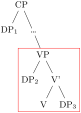
        [VP,tikz={\node [draw,red,inner sep=0,~fit to~=tree]{};}

          [DP$_2$]

          [V'

            [V]

            [DP$_3$]

    ]]]]

  \end{forest}
The second example uses TikZ’s fitting library (automatically loaded by Forest) to compute the smallest rectangle containing node VP, its first child (DP\(_2\)) and its last grandchild (DP\(_3\)). The example also illustrates that the TikZ code can be specified via the “normal” option syntax, i.e. as a value to option tikz.2
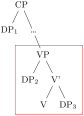
  \begin{forest}

    [CP

      [DP$_1$]

      [\dots

        [,phantom]

        [VP,tikz={\node [draw,red,fit=~()(!1)(!ll)~] {};}

          [DP$_2$]

          [V'

            [V]

            [DP$_3$]

    ]]]]

  \end{forest}
1 Actually, Forest distinguishes two kinds of steps in node walks: long-form and short-form steps. This section introduces only short-form steps. See §3.8.
2 Actually, there’s a simpler way to do this: use /tikz/fit to=tree!