Forest
Tutorial
2.1 Basic usage¶
A tree is input by enclosing its specification in a forest environment. The tree is encoded by the bracket syntax: every node is enclosed in square brackets; the children of a node are given within its brackets, after its content. keywords=forest, otherkeywords=[,],keywordstyle=,texcsstyle=

  \begin{forest}

    [VP

      [DP]

      [V'

        [V]

        [DP]

      ]

    ]

  \end{forest}
Binary trees are nice, but not the only thing this package can draw. Note that by default, the children are vertically centered with respect to their parent, i.e. the parent is vertically aligned with the midpoint between the first and the last child.
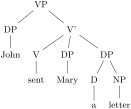
  \begin{forest}

    [VP

      [DP[John]]

      [V'

        [V[sent]]

        [DP[Mary]]

        [DP[D[a]][NP[letter]]]

      ]

    ]

  \end{forest}
Spaces around brackets are ignored — format your code as you desire!
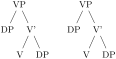
  \begin{forest}

    [VP[DP][V'[V][DP]]]

  \end{forest}

  \quad

  \begin{forest}[VP

    [DP ] [ V'[V][ DP]]

    ]\end{forest}
If you need a square bracket as part of a node’s content, use braces. The same is true for the other characters which have a special meaning in the Forest package, like comma , and equality sign =.

  \begin{forest}

    [V{P,}

      [{[DP]}]

      [V'

        [V]

        [{===DP===}]]]

  \end{forest}
Macros in a node specification will be expanded when the node is drawn — you can freely use formatting commands inside nodes!

  \begin{forest}

    [VP

      [{~\textbf~{DP}}]

      [V'

        [V]

        [DP]]]

  \end{forest}
All the examples given above produced top-down trees with centered children. The other sections of this manual explain how various properties of a tree can be changed, making it possible to typeset radically different-looking trees. However, you don’t have to learn everything about this package to profit from its power. Using styles, you can draw predefined types of trees with ease. For example, a phonologist can use the GP1 style from library linguistics to easily typeset (Government Phonology) phonological representations. The style is applied simply by writing its name before the first (opening) bracket of the tree.
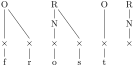
  \usepackage[~linguistics~]{forest}

  % ...

  \begin{forest} ~GP1~ [

    [O[x[f]][x[r]]]

    [R[N[x[o]]][x[s]]]

    [O[x[t]]]

    [R[N[x]]]

  ]\end{forest}
Of course, someone needs to develop the style — you, me, your local TeX nician … Fortunately, designing styles is not very difficult once you get the hang of Forest, if you write one, please contribute! Some macros relating to various fields are collected in libraries that are distributed alongside the main package. This is the case for the GP1 style used above, which is defined in the linguistics library. The simplest way to load a library is as shown in the example, by loading the package with an optional argument. For more information on loading libraries, see §3.1.