Forest
Tutorial
2.8 Expansion control in the bracket parser
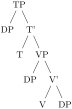
By default, macros in the bracket encoding of a tree are not expanded until nodes are being drawn — this way, node specification can contain formatting instructions, as illustrated in section 2.1. However, sometimes it is useful to expand macros while parsing the bracket representation, for example to define tree templates such as the X-bar template, familiar to generative grammarians:1
  ~\bracketset{action character=@}~

  \def\XP#1#2#3{#1P[#2][#1'[#1][#3]]}

  \begin{forest}

    [~@~\XP T{DP}{~@~\XP V{DP}{DP}}]

  \end{forest}
In the above example, the \XP macro is preceded by the action character @: as the result, the token following the action character was expanded before the parsing proceeded.
The action character is not hard coded into Forest. Actually, there is no action character by default. (There’s enough special characters in Forest already, anyway, and the situations where controlling the expansion is preferable to using the pgfkeys interface are not numerous.) It is defined at the top of the example by processing key action character in the /bracket path; the definition is local to the TeX group.
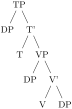
Let us continue with the description of the expansion control facilities of the bracket parser. The expandable token following the action character is expanded only once. Thus, if one defined macro \VP in terms of the general \XP and tried to use it in the same fashion as \XP above, he would fail. The correct way is to follow the action character by a braced expression: the braced expression is fully expanded before bracket-parsing is resumed.
  \bracketset{action character=@}

  \def\XP#1#2#3{#1P[#2][#1'[#1][#3]]}

  \def\VP#1#2{\XP V{#1}{#2}}

  \begin{forest}

    [@\XP T{DP}{~@{~\VP{DP}{DP}~}~}]

  \end{forest}
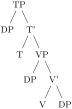
In some applications, the need for macro expansion might be much more common than the need to embed formatting instructions. Therefore, the bracket parser provides commands @+ and @-: @+ switches to full expansion mode — all tokens are fully expanded before parsing them; @- switches back to the default mode, where nothing is automatically expanded.
  \bracketset{action character=@}

  \def\XP#1#2#3{#1P[#2][#1'[#1][#3]]}

  \def\VP#1#2{\XP V{#1}{#2}}

  \begin{forest} ~@+~

    [\XP T{DP}{\VP{DP}{DP}}]

  \end{forest}
All the action commands discussed above were dealing only with TeX’s macro expansion. There is one final action command, @@, which yields control to the user code and expects it to call \bracketResume to resume parsing. This is useful to e.g. implement automatic node enumeration:

  \bracketset{action character=@}

  \newcount\xcount

  \def\x#1{~@@~\advance\xcount1

    \edef\xtemp{[$\noexpand\times_{\the\xcount}$[#1]]}%

    \expandafter\bracketResume\xtemp

  }

  \begin{forest}

    phantom,

    delay={where level=1{content={\strut #1}}{}}

    ~@+~

    [\x{f}\x{o}\x{r}\x{e}\x{s}\x{t}]

  \end{forest}
This example is fairly complex, so let’s discuss how it works. @+ switches to the full expansion mode, so that macro \x can be easily run. The real magic hides in this macro. In order to be able to advance the node counter \xcount, the macro takes control from Forest by the @@ command. Since we’re already in control, we can use \edef to define the node content. Finally, the \xtemp macro containing the node specification is expanded with the resume command sticked in front of the expansion.