Forest
Tutorial
2.2 Options¶
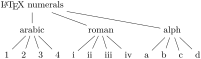
A node can be given various options, which control various properties of the node and the tree. For example, at the end of section 2.1, we have seen that the GP1 style vertically aligns the parent with the first child. This is achieved by setting option calign (for child-alignment) to first (child).
Let’s try. Options are given inside the brackets, following the content, but separated from it by a comma. (If multiple options are given, they are also separated by commas.) A single option assignment takes the form ⟨option name⟩=⟨option value⟩. (There are also options which do not require a value or have a default value: these are given simply as ⟨option name⟩.)
  \begin{forest}

    [\LaTeX\ numerals, ~calign=first~

      [arabic[1][2][3][4]]

      [roman[i][ii][iii][iv]]

      [alph[a][b][c][d]]

    ]

  \end{forest}
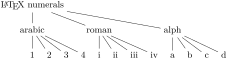
The experiment has succeeded only partially. The root node’s children are aligned as desired (so calign=first applied to the root node), but the value of the calign option didn’t get automatically assigned to the root’s children! An option given at some node applies only to that node. In Forest, the options are passed to the node’s relatives via special keys, called propagators. What we need above is the for tree propagator. Observe:
  \begin{forest}

    [\LaTeX\ numerals,

         ~for tree~={calign=first}

      [arabic[1][2][3][4]]

      [roman[i][ii][iii][iv]]

      [alph[a][b][c][d]]

    ]

  \end{forest}
The value of propagator for tree is a list of keys that we want to process. This keylist is propagated to all the nodes in the subtree1 rooted in the current node (i.e. the node where for tree was given), including the node itself. (Propagator for descendants is just like for tree, only that it excludes the node itself. There are many other for ⟨step⟩ propagators; for the complete list, see sections 3.5.1 and 3.8.)
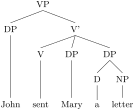
Some other useful options are parent anchor, child anchor and tier. The parent anchor and child anchor options tell where the parent’s and child’s endpoint of the edge between them should be, respectively: usually, the value is either empty (meaning a smartly determined border point [see Tantau 2007, §16.11]; this is the default) or a compass direction [see Tantau 2007, §16.5.1]. (Note: the parent anchor determines where the edge from the child will arrive to this node, not where the node’s edge to its parent will start!)
Option tier is what makes the skeletal points \(\times\) in example (6) align horizontally although they occur at different levels in the logical structure of the tree. Using option tier is very simple: just set tier=tier_name at all the nodes that you want to align horizontally. Any tier name will do, as long as the tier names of different tiers are different … (Yes, you can have multiple tiers!)
  \begin{forest}

    [VP, for tree={~parent anchor~=south, ~child anchor~=north}

      [DP[John,tier=word]]

      [V'

        [V[sent,tier=word]]

        [DP[Mary,tier=word]]

        [DP[D[a,tier=word]][NP[letter,tier=word]]]

      ]

    ]

  \end{forest}
Before discussing the variety of Forest’s options, it is worth mentioning that Forest’s node accepts all options [Tantau 2007, see §16] that TikZ’s node does — mostly, it just passes them on to TikZ. For example, you can easily encircle a node like this:2

  \begin{forest}

    [VP,~circle~,~draw~

      [DP][V'[V][DP]]

    ]

  \end{forest}
Let’s have another look at example (6). You will note that the skeletal positions were input by typing xs, while the result looks like this: \(\times\) (input as \times in math mode). Obviously, the content of the node can be changed. Even more, it can be manipulated: added to, doubled, boldened, emphasized, etc. We will demonstrate this by making example (8) a bit fancier: we’ll write the input in the arabic numbers and have LaTeX convert it to the other formats. We’ll start with the easiest case of roman numerals: to get them, we can use the (plain) TeX command \romannumeral. To change the content of the node, we use option content. When specifying its new value, we can use #1 to insert the current content.3

  \begin{forest}

    [roman, delay={for children={content=\romannumeral#1}}

      [1][2][3][4]

    ]

  \end{forest}
This example introduces another option: delay. Without it, the example wouldn’t work: we would get arabic numerals. This is so because of the order in which the options are processed. First, the processing proceeds through the tree in a depth-first, parent-first fashion (first the parent is processed, and then its children, recursively; but see processing order). Next, the option string of a node is processed linearly, in the order they were given. Option content is specified implicitely and is always the first. If a propagator is encountered, the options given as its value are propagated immediately. The net effect is that if the above example contained simply roman,for_children={content=...}, the content option given there would be processed before the implicit content options given to the children (i.e. numbers 1, 2, 3 and 4). Thus, there would be nothing for the \romannumeral to change — it would actually crash; more generally, the content assigned in such a way would get overridden by the implicit content. Key delay is true to its name. It delays the processing of the keylist given as its argument until the whole tree was processed. In other words, it introduces cyclical option processing. Whatever is delayed in one cycle, gets processed in the next one. The number of cycles is not limited — you can nest delays as deep as you need.
Unlike for ⟨step⟩ keys we have met before, delay is not a spatial, but a temporal propagator. Several other temporal propagators options exist, see §3.4.1.
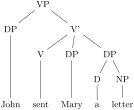
We are now ready to learn about simple conditionals.4 Every node option has the corresponding if ⟨option⟩ and where ⟨option⟩ keys. if ⟨option⟩=⟨value⟩⟨true options⟩⟨false options⟩ checks whether the value of ⟨option⟩ equals ⟨value⟩. If so, ⟨true options⟩ are processed, otherwise ⟨false options⟩. The where ⟨option⟩ keys are the same, but do this for the every node in the subtree; informally speaking, where = for_tree + if. To see this in action, consider the rewrite of the tier example (9) from above. We don’t set the tiers manually, but rather put the terminal nodes (option n children is a read-only option containing the number of children) on tier word.5
  \begin{forest}

    ~where n children~=0{tier=word}{}

    [VP

      [DP[John]]

      [V'

        [V[sent]]

        [DP[Mary]]

        [DP[D[a]][NP[letter]]]

      ]

    ]

  \end{forest}
Note that you usually don’t want to embed a where ... conditional in a for tree, as this will lead to a multiple traversal of many nodes, resulting in a slower execution. If you’re inside a for tree, you probably want to use if.
Finally, let’s talk about styles. (They are not actually defined in the Forest package, but rather inherited from pgfkeys.)
At the first approximation, styles are abbreviations: if you often want to have non-default parent/child anchors, say south/north as in example (9), you could save some typing by defining a style. Styles are defined using PGF’s handler .style, like shown below.6
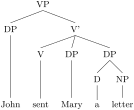
  \begin{forest}

    ~sn edges~/~.style~={for tree={

            parent anchor=south, child anchor=north}},

    ~sn edges~

    [VP,

      [DP[John,tier=word]]

      [V'

        [V[sent,tier=word]]

        [DP[Mary,tier=word]]

        [DP[D[a,tier=word]][NP[letter,tier=word]]]]]

  \end{forest}
If you want to use a style in more than one tree, you have to define it outside the forest environment. Use macro \ forestset to do this.
  ~\forestset~{

    sn edges/.style={for tree={parent anchor=south, child anchor=north}},

    background tree/.style={for tree={

                text opacity=0.2,draw opacity=0.2,edge={draw opacity=0.2}}}

  }
You might have noticed that in the last two examples, some keys occurred even before the first opening bracket, contradicting was said at the beginning of this section. This is mainly just syntactic sugar (it can separate the design and the content): such preamble keys behave as if they were given in the root node, the only difference (which often does not matter) being that they get processed before all other root node options, even the implicit content.
If you find yourself writing the same preamble for every tree in your document, consider modifying default preamble, which is implicitely included at the beginning of every preamble.
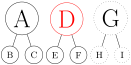
  \forestset{

    ~default preamble~={

      font=\Huge,

      for tree={circle,draw}

    }

  }

  \begin{forest}                   [A[B][C]] \end{forest}

  \begin{forest} red               [D[E][F]] \end{forest}

  \begin{forest} for tree={dotted} [G[H][I]] \end{forest}
1 It might be more precise to call for tree for subtree … but this name at least saves some typing.
2 If option draw was not given, the shape of the node would still be circular, but the edge would not be drawn. For details, see [Tantau 2007, §16].
3 This mechanism is called wrapping. By default, content is the only ⟨autowrapped toks⟩ option, i.e. option where wrapping works implicitely (simply because I assume that wrapping will be almost exclusively used with this option). To wrap values of other options, use handler .wrap value; see §3.12.
4 See §3.9 for further information on conditionals, including the generic if and where.
5 We could omit the braces around 0 because it is a single character. If we were hunting for nodes with 42 children, we’d have to write where n children={42}....
6 Style sn edges is actually already defined by library linguistics. The definition there is a bit more generic.