chemfig
Reaction schemes
5 Anchoring
As noted above, arrows lie on the line connecting the center of the compounds’ bounding boxes. Default anchors are called “center” in the sense of TikZ. Non-default anchoring points can be user-specified as well with an argument between brackets:
(n1.a1--n2.a2)
where the anchor “a1” or “a2” can be: north west, north, north east, west, center, east, mid west, mid, mid east, base west, base, base east, south west, south , south east, text, or any angle. Here is an example from the TikZ manual where the anchors are located on the bounding box:
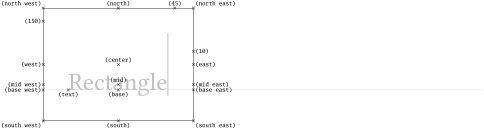
\Huge

\begin{tikzpicture}[baseline]

\node[anchor=base west,name=x,draw,inner sep=25pt] {\color{lightgray}Rectangle\vrule width 1pt height 2cm};

\foreach \anchor/\placement in

{north west/above left, north/above, north east/above right,west/left, center/above, east/right,

mid west/left, mid/above, mid east/right,base west/left, base/below, base east/right,

south west/below left, south/below, south east/below right,text/below,10/right,45/above,150/left}

\draw[shift=(x.\anchor)] plot[mark=x] coordinates{(0,0)}

node[\placement,inner sep=0pt,outer sep=2pt] {\scriptsize\texttt{(\anchor)}};

\end{tikzpicture}
Like for names, arrival and departure anchoring points are independent and optional.
In this example, the default alignment is not good because the two “A” are not aligned vertically. Debug information show that the default “center” anchors are not suitable:
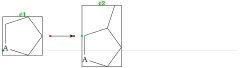
\setchemfig{scheme debug=true}

\schemestart

  \chemfig{A*5(-----)}

  \arrow

  \chemfig{A*5(---(-)--)}

\schemestop
For the alignment to be correct, arrows will leave/arrive either from the anchor “base east”/“base west”, or from anchor “mid east”/“mid west”:
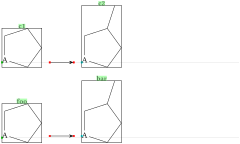
\setchemfig{scheme debug=true}

\schemestart

  \chemfig{A*5(-----)}

  \arrow(.base east--.base west)

  \chemfig{A*5(---(-)--)}

\schemestop

\bigskip


\schemestart

  \chemfig{A*5(-----)}

  \arrow(foo.mid east--bar.mid west)

  \chemfig{A*5(---(-)--)}

\schemestop
One last anchor need be specified: the anchor of the first compound with respect to the baseline of the text just before it. This is illustrated by the green point on the left-hand side of the scheme below:

\setchemfig{scheme debug=true}

Preceding text:

\schemestart

  \chemfig{A*5(-----)}\arrow A

\schemestop
The default position of this anchor on the first compound’s bounding box is that given by “text”. This position can be controlled with the key init anchor:
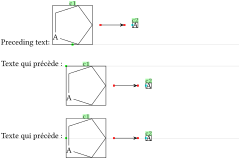
\setchemfig{scheme debug=true}

Preceding text:

\schemestart[init anchor=south]

  \chemfig{A*5(-----)}\arrow A

\schemestop

\bigskip


Texte qui précède :

\schemestart[init anchor=north west]

  \chemfig{A*5(-----)}\arrow A

\schemestop

\bigskip


Texte qui précède :

\schemestart[init anchor=west]

  \chemfig{A*5(-----)}\arrow A

\schemestop