chemfig
Reaction schemes
6 Compounds style
The \arrow command can also include TikZ instructions to define the bounding box style “s” of the reactant and the product of the reaction. This is done with the argument between parentheses. Always style through the argument in brackets of the \arrow, we can specify with TikZ instructions the style “s” to bounding box of the compound of departure or of arrival. Therefore the complete syntax of the \arrow command, with each specification being optional, is as follows:
\arrow(n1.a1[s1]--n2.a2[s2]){arrow type}[angle,coeff,arrow style]
Like forn names, if specific styles are given to one compound by arrows arriving on it and leaving from it, the first style will be ignored with a warning.
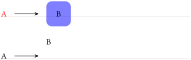
\schemestart

  A

  \arrow([red]--[fill=blue,semitransparent,text opacity=1,

  inner sep=10pt,rounded corners=2mm])

  B

\schemestop

\bigskip


\schemestart

  A\arrow(--foo[yshift=5mm])B

\schemestop
The macro \setcompoundstyle{⟨code tikz⟩} allows to globally define the style of compounds displayed thereafter. Entering an empty argument results in the absence of style, which corresponds to the default case.
Here a style is defined with round corner-shaped boxes and semitransparent background:
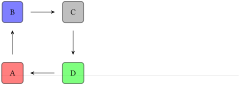
\setchemfig{compound style={draw,line width=0.8pt,

semitransparent,text opacity=1,inner sep=8pt,

rounded corners=1mm}}

\schemestart

  A\arrow([fill=red]--[fill=blue])[90]

  B\arrow(--[fill=gray])

  C\arrow(--[fill=green])[-90]

  D\arrow(--[draw=none])[-180]

\schemestop