chemfig
Reaction schemes
1 Overview
Important: As of version 1.8, the following syntax—where ⟨a⟩ is the default angle of the arrows, ⟨c⟩ is the coefficient of their length, ⟨s⟩ is their style, and ⟨p⟩ is the anchor of the first compound—is no longer valid
\schemestart[⟨a⟩,⟨c⟩,⟨s⟩][⟨p⟩] ⟨reaction⟩ \schemestop
You should now use a single optional argument
\schemestart[⟨keys⟩=⟨values⟩] ⟨reaction⟩ \schemestop
where the default angle, length, and style of the arrows are accessible via the keys arrow angle, arrow coeff, arrow style, and the anchor of the first compound via init anchor.
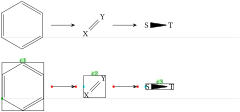
As shown in this example, debug information is either hidden or displayed with the ⟨key⟩ scheme debug and the value ⟨true⟩ ou ⟨false⟩:
\setchemfig{scheme debug=false}

\schemestart

  \chemfig{*6(-=-=-=)}\arrow

  \chemfig{X=[1]Y}\arrow

  \chemfig{S>T}

\schemestop

\bigskip


\setchemfig{scheme debug=true}

\schemestart

  \chemfig{*6(-=-=-=)}\arrow

  \chemfig{X=[1]Y}\arrow

  \chemfig{S>T}

\schemestop
Some comments:
the \arrow commands draw the arrows;
everything lying between two \arrow commands is considered a compound. It was decided that all possible settings, whether for arrows or compounds, are controlled by the arguments of the \arrow command, whose syntax may become quite complex;
arrows are plotted horizontally, this can obviously be modified;
arrows are plotted on the imaginary line connecting the center of the compounds’ bounding boxes (the red and blue squares are the anchoring points of arrows). This behavior can also be modified;
debug information is displayed with the scheme debug ⟨key⟩. It consists of:
the green label above the bounding boxes is the default name assigned to compounds by chemfig. It follows the series "c1", "c2", etc. Numbering is reset to 1 for every reaction scheme.
display of the compounds bounding boxes;
the arrows start and end points represented by red points and anchors by blue points;
the distance from edge to edge between two compounds is defined with the ⟨key⟩ compound sep = ⟨dim⟩. By default this ⟨dim⟩ is 5em;
finally, the distance between the edges of the compounds and the beginning and end of the arrows is defined with the ⟨key⟩ arrow offset = ⟨dim⟩. By default, this ⟨dim⟩ is 4pt.
Here is the complete list of parameters for the \schemestart macro, their default values, and a brief description. These parameters must be set using the \setchemfig{⟨keys⟩=⟨values⟩} macro.
| ⟨keys⟩ | Default ⟨values⟩ | Description |
|---|---|---|
| schemestart code | ⟨empty⟩ | ccode executed at the very beginning of a non nested reaction scheme |
| schemestop code | ⟨empty⟩ | code executed at the very end of a non-nested reaction scheme |
| init anchor | text | anchor of the first compound |
| scheme debug | false | if ⟨true⟩, show nodes, names and anchors |
| compound style | ⟨empty⟩ | style of compounds |
| compound sep | 5em | space between compounds |
| name sep | 1.5ex | minimum vertical distance between the compound boxes and its name |
| arrow offset | 1em | space between compound and arrow |
| arrow angle | 0 | angle of the reaction arrow |
| arrow coeff | 1 | length ratio of arrows |
| arrow style | ⟨empty⟩ | style of arrows |
| arrow double sep | 2pt | space between double arrows |
| arrow double coeff | 0.6 | shrinkage ratio for the little arrow in ”<->>” and ”<<->” |
| arrow double harpoon | true | boolean for double harpoon arrows |
| arrow label sep | 3pt | space between arrow and its label |
| arrow head | -CF | style of arrow head |
| + sep left | 0.5em | space before the \(+\) sign |
| + sep right | 0.5em | space after the \(+\) sign |
| + vshift | 0pt | vertical shift of the \(+\) sign |