chemfig
Reaction schemes
9 Arrows optional arguments
Within the argument in braces of the \arrow command, the arrow name can be followed by optional arguments written between brackets. Here are the possible values for these optional arguments and their meaning, as defined by chemfig:
the arrows “->”, “<-”, “<->”, “<=>”, “<<->”,“<->>”, “-/>” have three optional arguments:
the first one contains the “label” to be placed above the arrow;
the second one contains the “label” to be placed below the arrow. The orientation of these two labels is given by the same angle as the arrow. The perpendicular shift between the arrow and the label anchor can be adjusted with the ⟨key⟩ arrow label sep = ⟨dim⟩ which value is 3pt by default. Labels contained in the two optional arguments are not typed in math mode.
the third one is a dimension corresponding to a shift perpendicular to the arrow that can be applied to it: the dimension is positive for an upward shift of the arrow (and of its labels, if any), and negative for a downward shift.
the “-U>” arrow has 5 optional arguments:
the first three are identical to those found in the other arrow types;
the fourth one is a coefficient (which is 0.333 by default) which multiplies the length of the arrow to get the radius of the arc;
the fifth one is the half-angle from the center of the arc path, it is 60 degrees by default.
the invisible arrow “0” accepts two optional arguments of the same type as the first two listed above;
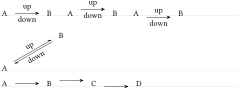
\setchemfig{scheme debug=false}

\schemestart A\arrow{->[up][down]}B \schemestop

\qquad

\schemestart A\arrow{->[up][down][4pt]}B \schemestop

\qquad

\schemestart A\arrow{->[up][down][-4pt]}B \schemestop

\medskip


\schemestart A\arrow{<=>[up][down]}[30,1.5]B \schemestop

\medskip


\schemestart[[arrow angle=-20]

  A\arrow{->}B\arrow{->[][][3pt]}C\arrow{->[][][-3pt]}D

\schemestop
A problem arises for vertical arrows:

\schemestart

  A\arrow{->[up][down]}[-90]B

\schemestop
For the sake of clarity, one may prefer to have the “above” and “below” labels written horizontally. Label angles can be specified, while default is the same angle as that of the arrow. To choose a specific angle, *{⟨angle⟩} can be written at the beginning of the optional arguments:
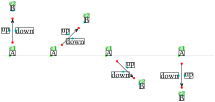
\setchemfig{scheme debug=true}

\schemestart A\arrow{->[*{0}up][*{0}down]}[90]B\schemestop

\qquad

\schemestart A\arrow{->[*{0}up][*{0}down]}[45]B\schemestop

\qquad

\schemestart A\arrow{->[*{0}up][*{0}down]}[-45]B\schemestop

\qquad

\schemestart A\arrow{->[*{0}up][*{0}down]}[-90]B\schemestop
The default position of the label anchor can lead to undesired results:
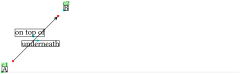
\setchemfig{scheme debug=true}

\schemestart

  A\arrow{->[*{0}on top of][*{0}underneath]}[45,2]B

\schemestop
To counter this, the anchoring position can be specified as well to override the one selected by chemfig by default. The syntax for this is: *{⟨angle⟩.⟨ancre⟩}.
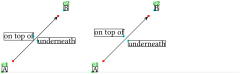
\setchemfig{scheme debug=true}

\schemestart

  A\arrow{->[*{0.0}on top of][*{0.180}underneath]}[45,2]B

\schemestop

\qquad

\schemestart

  A\arrow{->[*{0.south east}on top of]%

    [*{0.north west}underneath]}[45,2]B

\schemestop
The “-U>” arrow remains a particular case. If one of the two labels from the first two optional arguments is present, the corresponding arc is plotted:
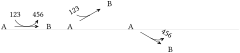
\schemestart A\arrow{-U>[123][456]}B\schemestop

\qquad

\schemestart A\arrow{-U>[123]}[30]B\schemestop

\qquad

\schemestart A\arrow{-U>[][456]}[-30]B\schemestop
The fourth and fifth optional arguments modify the appearance of the arc: respectively the arrow length coefficient which sets the arc radius, and the angle that defines the half arc:

\schemestart A\arrow{-U>[123][456][][0.25]}B\schemestop

\qquad

\schemestart A\arrow{-U>[123][456][][][90]}B\schemestop

\qquad

\schemestart A\arrow{-U>[123][456][][1][45]}B\schemestop
With negative values for the radius and the angle, the arc is drawn below the arrow:

\schemestart

  A\arrow{-U>[123][456][][-0.333][-60]}B

\schemestop
Label angles and anchoring customization is controlled with the first two arguments, just like for other arrows:
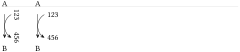
\schemestart

  A\arrow{-U>[123][456]}[-90]B

\schemestop

\qquad

\schemestart

  A\arrow{-U>[*{0.180}123][*{0.180}456]}[-90]B

\schemestop