chemfig
Advanced usage
3 Arguments given to tikz
The ⟨key⟩ chemfig style contains TikZ instructions which will be passed to the tikzpicture environment in which the molecule is drawn. On the other hand, the The ⟨key⟩ atom style contains TikZ instructions which will be executed when each node; these instructions are added to the end of every node/.style{<argument>}, i.e. after the fhe following instructions: “anchor=base,inner sep=0pt,outer sep=0pt,minimum size=0pt”.
With the use of the first optional argument one can, for example, choose the global color or thickness of lines:
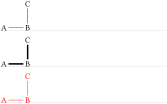
Style choice
\chemfig{A-B-[2]C}\par\medskip

\setchemfig{chemfig style={line width=1.5pt}}\chemfig{A-B-[2]C}\par\medskip

\setchemfig{chemfig style=red}\chemfig{A-B-[2]C}
With node style, one can choose the colour of nodes drawn by TikZ, change the angle of the drawing or its scale:

Style choices
\chemfig{A-B-[2]C}\par\medskip

\setchemfig{atom style=red}\chemfig{A-B-[2]C}\par\medskip

\setchemfig{atom style={rotate=20}}\chemfig{A-B-[2]C}\par\medskip

\setchemfig{atom style={scale=0.5}}\chemfig{A-B-[2]C}