chemfig
Advanced usage
6 Saving a sub-molecule
chemfig is capable of saving a ⟨code⟩ as an alias for reuse in a more compact form in the code of a molecule. This is particularly useful when the ⟨code⟩ appears several times.
To do this, one gives the command
\definesubmol{⟨name⟩}{⟨code⟩}
which saves the ⟨code⟩ for recall in the code of the molecule via the shortcut “!{name}”. This ⟨name⟩ can be:
a sequence of characters: all the alphanumeric characters able to be between \csname and \endcsname are accepted;
a control sequence.
In all cases, if the alias is already defined you should not overwrite it with a new definition using \definesubmol. A warning will be issued to the user that the old alias will be overwritten by the new one. To override the definition of an alias made previously, use:
\redefinesubmol{⟨name⟩}{⟨code⟩}
Here is a code which draws the pentane molecule. An alias “xy” was defined beforehand for the code CH_2:

\definesubmol{xy}{CH_2}

  \chemfig{H_3C-!{xy}-!{xy}-!{xy}-CH_3}
In this case the technique is not very interesting because “!{xy}” is just as long to type as the code it replaces.
But in certain cases, this feature saves a lot of space in the code of the molecule and increases readability. In the following example, we draw the complete structural diagram of butane. We will define an alias with the control sequence “\xx” for the sub-molecule \(\mathrm{CH_2}\). If we use only relative angles, it is possible to rotate the entire molecule to any given angle by using the optional global angle parameter which specifies the default bond angle of the main molecule. It is set to 15° here:
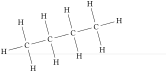
\definesubmol\xx{C(-[::+90]H)(-[::-90]H)}

\chemfig{[:15]H-!\xx-!\xx-!\xx-!\xx-H}
The \definesubmol command takes an optional argument; its syntax is as follows:
\definesubmol{⟨name⟩}[⟨code1⟩]{code2}
When the optional argument is present, the alias “!⟨name⟩” will be replaced by ⟨code1⟩ if the bond which arrives at the alias comes from the right, i.e., if the angle which the arriving bond makes is between but is not equal to 90° and 270°. For all the other cases where the bond arrives from the left of vertically, the alias will be replaced by ⟨code2⟩.
We will define a control sequence \Me pour “methyl” so that the alias “!\Me” will be replaced by “H_3C” when the bond arrives from the right and by “CH_3” when it arrives from the left. We can observe in the example that with this alias we need no longer worry about the angle:
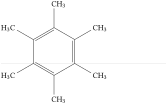
\definesubmol\Me[H_3C]{CH_3}

\chemfig{*6((-!\Me)=(-!\Me)-(-!\Me)=(-!\Me)-(-!\Me)=(-!\Me)-)}
The sub-molecule saved with a ⟨name⟩ does not admit an argument when it is called after "!". To define a sub-molecule admitting one or more arguments, place this \Verb<number> of arguments just after the \Verb<name>. And the full syntax of \verbs:
\definesubmol{⟨name⟩}⟨number⟩[⟨code1⟩]{⟨code2⟩}
In the ⟨codes⟩, the arguments must appear in their usual form "#⟨n⟩" where ⟨n⟩ is the argument number.
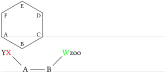
\definesubmol\X1{-[,-0.2,,,draw=none]{\scriptstyle#1}}

\chemfig{*6((!\X A)-(!\X B)-(!\X C)-(!\X D)-(!\X E)-(!\X F)-)}


\definesubmol{foo}3[#3|\textcolor{#1}{#2}]{\textcolor{#1}{#2}|#3}

\chemfig{A(-[:135]!{foo}{red}XY)-B(-[:45]!{foo}{green}{W}{zoo})}
It should be noted that if the ⟨number⟩ of arguments is incorrect (negative or greater than 9), an error message will be issued and chemfig will consider that the sub molecule does not admit an argument.
Except in cases where the character "#" is followed by a number between 1 and ⟨number⟩ in which case it represents an argument, "#" are allowed in the sub-molecule codes.

\definesubmol\X2{#1-#2-#3-#(3pt,3pt)#4}

\chemfig{A-!\X{M}{N}-B}
In this example, only #1 and #2 are understood as the arguments of the sub molecule \X. The other "#" are displayed as they are in the molecule (case of #3 and #4) or understood as the character specifying the fine adjustment of the offset of the bonds.