chemfig
Advanced usage
8 The macro \charge
8.1 Overview
The macro load, which requires two mandatory arguments, allows to arrange elements (called ⟨charges⟩) around an ⟨atome⟩; its syntax is
\charge{[⟨general parameters⟩]⟨position⟩[⟨tikz code⟩]=⟨charge⟩}{⟨atom⟩}
where:
the ⟨atom⟩ is usually one or two letters, but it can also be empty;
the ⟨charge⟩ is an arbitrary content that will be placed around the atom. Few constraints exist on this content: it can be text (in math mode if needed), or even TikZ code or a molecule drawn with chemfig;
the ⟨general parameters⟩ (optional) are a list of key/values specifying the options that this execution of the macro must satisfy. These keys/values are described below;
the ⟨position⟩ is "⟨angle⟩:⟨shift⟩", but it is possible to specify only the ⟨angle⟩, in which case, the ⟨shift⟩ will be equal to 0pt;
the optionnal ⟨tikz code⟩ sets the options given to the TikZ macro \node, which places the ⟨charge⟩.
8.2 Parameters
The ⟨keys⟩\({}={}\)⟨values⟩ available in the ⟨general parameters⟩ are:
| ⟨keys⟩ | default ⟨values⟩ | Description |
|---|---|---|
| debug | false | boolean which, when ⟨true⟩, draws the outlines of the nodes receiving the ⟨atoms⟩ (in green), the ⟨loads⟩ (in blue) and the ⟨charge⟩ (in red). |
| macro atom | \printatom | macro receiving the ⟨atom⟩ as argument. |
| circle | false | boolean which, when ⟨true⟩, puts the ⟨atom⟩ in a circular node; otherwise, the node is rectangular. |
| macro charge | ⟨vide⟩ | macro (e.g., \printatom or \ensuremath) receiving each charge as an argument. |
| extra sep | 1.5pt | node size increment of the ⟨atom⟩ to put the ⟨charges⟩: it is the value passed to the inner sep of TikZ. |
| overlay | true | boolean which, when ⟨true⟩, draws the ⟨charges⟩ "overlay", i.e. outside the final bounding box. |
| shortcuts | true | boolean which, when ⟨true⟩, activates the shortcuts"\.," "\:," "\| and "\"" to draw Lewis formuas. |
| lewisautorot | true | boolean which, when ⟨true⟩, automatically rotates "\:," "\| and "\"". |
| .radius | 0.15ex | radius of the point used to plot "\." and "\:". |
| :sep | 0.3em | separation between the two dots of "\:". |
| .style | fill=black | TikZ style used to draw the "\." and "\:" dots. |
| "length | 1.5ex | length of the rectangle "\ "and the line "\|". |
| "width | .3ex | width of the rectangle \". |
| "style | black,line width=0.4pt | TikZ style used to draw the rectangle \". |
| |style | black,line width=0.4pt | TIKZ style used to draw the line \|. |
It is possible to set some (or all) of these parameters by running the macro
\setcharge{⟨keys⟩=⟨values⟩}
and reset all parameters to their default values with
\resetcharge
The \charge macro places the ⟨charges⟩ out of the bounding box (unless otherwise specified in the ⟨parameters⟩) while \Charge places them into the bounding box.
The ⟨angle⟩ is the location on the boundary of the node where the ⟨charge⟩ is placed. This ⟨angle⟩ can be expressed in degrees or it can be a boundary anchor in the sense of TikZ, like "south east." The ⟨shift⟩ is a TeX-dimension and represents an additional length between the boundary of the node containing the ⟨atom⟩ and the place where the ⟨charge⟩ is placed. Unless otherwise specified in the ⟨tikz code⟩, the center anchor of ⟨charges⟩.
In the two following examples, debug will be set to ⟨true⟩ in order to better perceive the changes induced by the modification of the parameters. In addition, the macro \Charge will be used so that the bounding boxes take into account the charges. Here we see the influence of the node shape on the placement of the charges:

\setcharge{debug}

Default then circle:

\Charge{30=\:,120=$\ominus$,210=$\delta^+$}{Fe}\qquad

\Charge{[circle]30=\:,120=$\ominus$,210=$\delta^+$}{Fe}
To place the loads \(\ominus\) and \(\delta^+\) further away, we can play on the ⟨shift⟩ or better, on the anchor: the ⟨angle⟩ where the load is placed is stored in the macro \chargeangle, so it is wise to choose the anchor 180+\chargeangle. It is also possible to specify a circular node to place the charge.

\setcharge{debug}

\Charge{30=\:,120:3pt=$\ominus$,210:5pt=$\delta^+$}{Fe}\qquad

\Charge{[circle]30=\:,

        120[circle,anchor=180+\chargeangle]=$\ominus$,

        210[anchor=180+\chargeangle]=$\delta^+$}{Fe}
It is important to note that circular nodes have dimensions sometimes very different from the "classic" rectangular nodes, especially in terms of horizontal and vertical extent. It is therefore advisable to set ⟨true⟩ the boolean key circle knowingly.

\chemfig{\charge{90=\.}{N}H_3} : rectangle nodes\smallbreak

\chemfig{\charge{[circle]90=\.}{N}H_3} : circle node
8.3 Lewis formula
When shortcut is ⟨true⟩, the shortcuts "\.», "\:», "\| and "\"» are actgive to draw Lewis formulas " », "
», " », "» et "
 ». You can deactivate them at any time with the \disableshortcuts macro and reactivate them with \enableshortcuts.
When the boolean shortcut is ⟨false⟩ or the shortcuts have been disabled with \disableshortcuts, shortcuts "\:", "\|" and "\"" are no longer programmed to draw Lewis formulas, so the macros \chargedot, \chargeddot, \chargeline and \chargerect must be used instead.
The key lewisautorot, which is ⟨true⟩ by default, acts on " ", "" and "
 " and rotates them.

\Charge{60=\:,150=\"}{A} et

\Charge{[lewisautorot=false]60=\:,150=\"}{A}
The customization of Lewis’ formulas is done via the macro \setcharge or via the optional argument of \charge by acting on the keys .radius, :sep, .style, |style, "length, "width and "style. It is also possible to modify these keys for each formula with their optional argument which receives a list of keys\({}={}\)⟨values⟩.

\Charge{[.radius=1.5pt,.style={draw=gray}]

   45  =\.[{.style={draw=none,fill=red}}],

   135 =\.[{.style={draw=none,fill=blue}}],

   -45 =\.[{.style={draw=none,fill=green}}],

   -135=\.}{A}\quad

\Charge{

   45 =\"[{"style={draw=red,fill=gray}}],

   135=\"[{"width=3pt,"style={line width=.8pt,draw=blue,fill=cyan}}]}{A}
8.4 Integration in chemfig
A macro \charge can take the place of an atom.
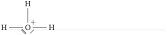
\chemfig{H-\charge{45:1.5pt=$\scriptstyle+$,-45=\|,-135=\"}{O}(-[2]H)-H}
However, chemfig has been modified so that the bonds are joined when the dimensions of an atom is zero, that is, if its width, height and depth are all 0pt. This was previously only the case if the atom was empty. This new feature makes it easy to place charges in carbon chains.

\chemfig{[:30]-\charge{90=\:}{}

-[:-30]\charge{-90=\"}{}-\charge{90:2pt=$\delta^+$}{}-[:-30]}