The tcolorbox package
The Core Package
5 Initialization Option Keys
The initialization options are only applicable for the generation of new environments and commands based on tcolorbox and friends. Particularly, they can be used for
and friends like \renewtcolorbox, etc.
Typically, these options may generate counters and alike. It is strongly recommended that you use initialization options inside the preamble only. Otherwise, you may get trouble when using LaTeX’s \include features. Also, it is recommended to generate new environments and commands with these options after hyperref is loaded to avoid warnings about duplicate identifiers.
5.1 Numbered Boxes
Counters assigned using the initialization options are administrated automatically. Especially, they are increased for each new box.
\tcbcounter
Real counter name of the current numbered box for possible use inside the box.
\thetcbcounter
Counter value of the current numbered box. It may be used inside the box, e. g. inside the title of the box. See /tcb/new/auto counter and following for examples.
\tcbcounterof{⟨tcolorbox⟩}New: 2025-07-21
Real counter name of a numbered ⟨tcolorbox⟩.
\thetcbcounterof{⟨tcolorbox⟩}New: 2025-07-21
Counter value of a numbered ⟨tcolorbox⟩ created with initialization options as documented below, e. g. /tcb/new/auto counter. ⟨tcolorbox⟩ can be the name of a created box environment (by \newtcolorbox and friends) or a created box macro (by \newtcbox and friends; here, the name is without the leading backslash of the macro).
\renewthetcbcounter{⟨tcolorbox⟩}{⟨code⟩}New: 2026-03-05
Redefines \thetcbcounter for usage inside an already existing ⟨tcolorbox⟩. Most likely, this is only needed for quite exotic application scenarios. The ⟨code⟩ is some formatting code which should contain \tcbcounter to reference the automated counter. Since this ⟨code⟩ is expanded, you have to secure each macro with \noexpand with exception of \tcbcounter.
\renewthetcbcounter{examplebox}{(Q/\noexpand\thesection/\noexpand\Alph{\tcbcounter})}
Also see /tcb/new/number freestyle.
/tcb/new/auto counter(no value, initially unset)
Creates a new counter automatically. With /tcb/new/number format and /tcb/new/counter within, the appearance and behavior of the counter can be changed. The counter value is referenced by \thetcbcounter.
\newtcolorbox[auto counter,counter within=section]{pabox}[2][]{%

  colback=red!5!white,colframe=red!75!black,fonttitle=\bfseries,

  title=Examp.~\thetcbcounter: #2,#1}

\begin{pabox}[label={myautocounter}]{Title with number}

This box is automatically numbered with \ref{myautocounter} on page

\pageref{myautocounter}. Inside the box, the \thetcbcounter\ can

also be referenced by |\thetcbcounter|.

The real counter name is \texttt{\tcbcounter}.

\end{pabox}
/tcb/new/use counter from=⟨tcolorbox⟩(no default, initially unset)
Here, a counter from another ⟨tcolorbox⟩ is reused. Note that the settings for /tcb/new/number format and /tcb/new/counter within are inherited and cannot be changed. The counter value is referenced by \thetcbcounter.

\newtcolorbox[use counter from=pabox]{mybox}[2][]{%

colback=blue!5!white,colframe=blue!75!black,fonttitle=\bfseries,

title=Some Box \thetcbcounter: #2,#1}


\begin{mybox}[label={myusecounterfrom}]{Title with continued number}

This box is automatically numbered with \ref{myusecounterfrom} on page

\pageref{myusecounterfrom}. Inside the box, the \thetcbcounter\ can

also be referenced by |\thetcbcounter|.

The real counter name is \texttt{\tcbcounter}.

\end{mybox}
/tcb/new/use counter=⟨counter⟩(no default, initially unset)
Here, an ordinary existing LaTeX ⟨counter⟩ is used for numbering. With /tcb/new/number format and /tcb/new/counter within, the appearance and behavior of the counter can be changed. The counter value is referenced by \thetcbcounter.

% \newcounter{myexample}%  preamble

\newtcolorbox[use counter=myexample,number format=\Alph]{mybox}[2][]{%

colback=green!5!white,colframe=green!55!black,fonttitle=\bfseries,

title=Some Box \thetcbcounter: #2,#1}


\begin{mybox}[label={myusecounter}]{Title with \LaTeX\ number}

This box is automatically numbered with \ref{myusecounter} on page

\pageref{myusecounter}. Inside the box, the \thetcbcounter\ can

also be referenced by |\thetcbcounter|.

The real counter name is \texttt{\tcbcounter}.

\end{mybox}
/tcb/new/use counter*=⟨counter⟩(no default, initially unset)New: 2014-09-19
An existing LaTeX ⟨counter⟩ is used for numbering. In contrast to /tcb/new/use counter, the options /tcb/new/number format and /tcb/new/counter within are ignored. Use this for counters which are already configured outside the tcolorbox package, e. g. the standard figure counter.
/tcb/new/no counter(no value, initially set)
The created boxes are not numbered. This is the default. The option may be used to overrule a previous option.
/tcb/new/reset counter on overlays=true|false(default true, initially false)New: 2019-10-18
For beamer slides, this invokes the \resetcounteronoverlays command for the box counter. The counter is automatically reset on subsequent overlay slides of a frame. Thereby, the counter will be the same on all slides of every frame.
/tcb/new/counter within=⟨counter⟩(no default, initially unset)New: 2026-03-05
/tcb/new/number within=⟨counter⟩(no default, initially unset)
The automatic counter is set to zero, if ⟨counter⟩ is increased. Additionally, during output, the value of ⟨counter⟩ is prepended to the value of the automatic counter. To prepend the automatic counter with the chapter number and to reset it with every new chapter, use:
counter within=chapter
See /tcb/new/Crefname for a complete example.
/tcb/new/counter within from=⟨tcolorbox⟩(no default, initially unset)New: 2026-03-05
/tcb/new/number within from=⟨tcolorbox⟩(no default, initially unset)New: 2025-07-21
This is a shortcut for /tcb/new/counter within=\tcbcounterof⟨tcolorbox⟩, i. e., the automatic counter is set to zero, if the counter of the referenced ⟨tcolorbox⟩ is increased.
/tcb/new/number format=⟨format macro⟩(no default, initially \arabic)
Declares the format of the automatic counter. The ⟨format macro⟩ can be any valid LaTeX number formatting macro like \arabic, \roman, etc. To display the counter value in large roman numbers, use:
number format=\Roman
See /tcb/new/auto counter for a complete example.
/tcb/new/number freestyle=⟨code⟩(no default, initially unset)
Allows advanced control over the complete number format. This option overrules the format given by /tcb/new/counter within and /tcb/new/number format. Nevertheless, you can combine it with /tcb/new/counter within to get the desired reset property. The ⟨code⟩ is some formatting code which should contain \tcbcounter to reference the automated counter. Since this ⟨code⟩ is expanded, you have to secure each macro with \noexpand with exception of \tcbcounter.
\newtcolorbox[auto counter,counter within=section,

  number freestyle={(Q/\noexpand\thesection/\noexpand\Alph{\tcbcounter})},

  ]{phbox}[2][]{%

  colback=yellow!15!white,colframe=blue!75!black,fonttitle=\bfseries,

  title=Question~\thetcbcounter: #2,#1}

\begin{phbox}[label={myfreestyle}]{Title with freestyle number}

This box is automatically numbered with \ref{myfreestyle} on page

\pageref{myfreestyle}. Inside the box, the \thetcbcounter\ can

also be referenced by |\thetcbcounter|.

The real counter name is \texttt{\tcbcounter}.

\end{phbox}
If there is the need to set such a format after the box is created, see \renewthetcbcounter.
The following options /tcb/new/crefname and /tcb/new/Crefname need to be set inside the preamble. Note that cleveref had its last update in 2018 (as of 2026-03-05) and had or has conflicts with recent LaTeX kernels. zref-clever is a possible alternative.
/tcb/new/crefname={⟨singular⟩}{⟨plural⟩}(no default, initially unset)Updated: 2014-12-01
This option key can be used only in conjunction with the cleveref package [Cubitt 2018] which has to be loaded separately. It creates a cross-reference type for the new tcolorbox’es, where the lowercase ⟨singular⟩ and ⟨plural⟩ forms of the cross-reference are given. This type is the environment or macro name and /tcb/label type is set automatically. See /tcb/label type and [Cubitt 2018] for more information.
/tcb/new/Crefname={⟨singular⟩}{⟨plural⟩}(no default, initially unset)Updated: 2014-12-01
This option key can be used only in conjunction with the cleveref package [Cubitt 2018] which has to be loaded separately. It creates a cross-reference type for the new tcolorbox’es, where the uppercase ⟨singular⟩ and ⟨plural⟩ forms of the cross-reference are given. This type is the environment or macro name and /tcb/label type is set automatically. See /tcb/label type and [Cubitt 2018] for more information.
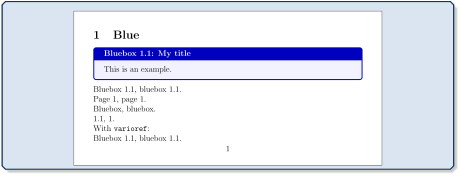
\documentclass[12pt]{article}

\usepackage[papersize={160mm,80mm},noheadfoot,margin=10mm]{geometry}

\usepackage{varioref,cleveref}

\usepackage{tcolorbox}


\newtcolorbox[auto counter,counter within=section,

  crefname={bluebox}{blueboxes}]%

  {mybluebox}[2][]{colback=blue!5!white,colframe=blue!75!black,fonttitle=\bfseries,

     title=Bluebox \thetcbcounter: #2,#1}


\begin{document}

\section{Blue}


\begin{mybluebox}[label={myreference}]{My title}

This is an example.

\end{mybluebox}


\noindent\Cref{myreference}, \cref{myreference}.\\

\Cpageref{myreference}, \cpageref{myreference}.\\

\nameCref{myreference}, \namecref{myreference}.\\

\labelcref{myreference}, \labelcpageref{myreference}.\\

With \texttt{varioref}:\\

\Vref{myreference}, \vref{myreference}.

\end{document}
/tcb/new/blend into=⟨name⟩(style, no default, initially unset)New: 2014-09-19Updated: 2023-07-03
figures: blend into the standard figure environment.
tables: blend into the standard table environment.
listings: blend into the standard lstlisting environment of the package listings [Heinz et al. 2024].
Note that blend into=listings can only be used in the document content or, preferably, inside a \AtBeginDocument clause! Using it without \AtBeginDocument inside the preamble does not work since the listings packages initializes its counter also inside \AtBeginDocument.
Used to comfortably blend into an existing schema of naming and numbering for some selected cases. For example, a tcolorbox can be used to display and entitle an image pretending to be a standard figure environment. Here, /tcb/title is used instead of the standard \caption and /tcb/list text can be used instead of the optional parameter of the standard \caption. Also, /tcb/new/list type is automatically adapted (changed with version 6.0.5).
Feasible values for ⟨name⟩ are:
\begin{figure}[htb]

  \centering\includegraphics[height=4cm]{lichtspiel.jpg}

  \caption{A standard figure}

\end{figure}


\newtcolorbox[blend into=figures]{myfigure}[2][]{float=htb,capture=hbox,

  title={#2},every float=\centering,#1}


\begin{myfigure}{A tcolorbox figure}

  \includegraphics[height=4cm]{lichtspiel.jpg}

\end{myfigure}
/tcb/blend before title=⟨value⟩(no default, initially colon)New: 2015-03-13
colon: use name/number plus colon.
dash: use name/number plus dash.
colon hang: use name/number plus colon with hanging indent.
dash hang: use name/number plus dash with hanging indent.
This option formats the title output of /tcb/new/blend into. Note that this is a common tcolorbox option which should be set globally or in the normal option part of \newtcolorbox.
Feasible values for ⟨value⟩ are:
\newtcolorbox[blend into=figures]{myfigure}[2][]{float=htb,capture=hbox,

  blend before title=dash hang,title={#2},every float=\centering,#1}


\begin{myfigure}{A tcolorbox figure with quite a long title}

  \includegraphics[height=5cm]{lichtspiel.jpg}

\end{myfigure}
/tcb/blend before title code=⟨code⟩(no default)New: 2015-03-13
This option formats the title output of /tcb/new/blend into. The ⟨code⟩ takes one parameter, the name/number. Use this, if /tcb/blend before title is not flexible enough.
\newtcolorbox[blend into=figures]{myfigure}[2][]{float=htb,capture=hbox,

  blend before title code={\fbox{##1}\ },title={#2},every float=\centering,#1}


\begin{myfigure}{A tcolorbox figure}

  \includegraphics[height=6cm]{lichtspiel.jpg}

\end{myfigure}
5.2 Lists of tcolorboxes
For figures and tables, LaTeX provides the \listoffigures and \listoftables commands to create lists of these numbered entities. Also, a tcolorbox can be part of such a kind of list.
Assign a list ⟨name⟩ by the initialization option /tcb/new/list inside.
Optionally, a new ⟨type⟩ for list entries may be assigned by the initialization option /tcb/new/list type.
List entries a generated automatically within each new tcolorbox using the above initialization.
If /tcb/list entry is set, the entry is generated with it.
Otherwise, if /tcb/title is set, the entry is generated with it.
Otherwise, the entry is generated with the current number and the environment name.
The generated list is displayed by \tcblistof.
/tcb/new/list inside=⟨name⟩(no default, initially unset)
Assigns a list or contents file to the generated tcolorboxes. Entries to this list are saved to a file which gets the ⟨name⟩ as file name extension. The list is referenced by this name in \tcblistof. For example:
list inside=exam
See Section 17.11 for a complete example.
/tcb/new/list type=⟨type⟩(no default, initially tcolorbox)
Optionally, some ⟨type⟩ can be assigned to the list entries. For a new ⟨type⟩, a macro \l@⟨type⟩ has to exist which controls the format of the list entry. The default type is defined by
\newcommand*\l@tcolorbox{\@dottedtocline{1}{1.5em}{2.3em}}
This is identical to the \l@section setting of LaTeX. \l@tcolorbox can be redefined or a new ⟨type⟩ can be assigned.
\tcblistof[⟨macro⟩]{⟨name⟩}[⟨short⟩]{⟨title text⟩}Updated: 2021-05-20
If ⟨macro⟩ ends with a *, \tcblistof mimics the behavior of \listoffigures from the standard LaTeX classes and adds the title to the left and right mark for headings.
If ⟨macro⟩ starts with \chapter, a possible two column document setting is restored to one column (as standard LaTeX classes do for \listoffigures).
Displays the generated list of tcolorboxes with the given ⟨name⟩. The heading is generated by ⟨macro⟩[⟨short⟩]{⟨title text⟩} where \section is the default setting for ⟨macro⟩. Here, as usual, ⟨title text⟩ is the title of the section or chapter while ⟨short⟩ is a shorter title for headings and table of contents.
To display the list inside a subsection, use for example:
\tcblistof[\subsection]{exam}{List of Exercises}
The result of the example is found as 17.12.
To apply the list similar to \listoffigures for a report or book, use for example:
\tcblistof[\chapter*]{exam}{List of Exercises}
To set a short title for headings with the default \section setting, use for example:
\tcblistof{exam}[List of Exercises]{Elaborate List of Fine Exercises

                                    for all Students of my Course}
The core of the list is generated by \@starttoc{⟨name⟩} which can be wrapped into an own macro.
The following options are not initialization options, but common options, which are typically reasonable in connection with lists of tcolorboxes.
/tcb/list entry=⟨text⟩(no default, initially unset)
If the «list of tcolorbox(es)» feature described in the current subsection is used, this key describes the ⟨text⟩ for an entry into the generated list, e. g.
list entry={\protect\numberline{\thetcbcounter}My beautiful Example}
See Section 17.11 for a complete example. If \thetcbcounter is omitted, /tcb/list entry could be used for unnumbered boxes too.
This is a customization option. For numbered boxes, /tcb/list entry typically has not to be given, because this entry will be generated automatically.
/tcb/list text=⟨text⟩(style, no default)New: 2014-09-19
This is a shortcut for setting /tcb/list entry to
\protect\numberline{\thetcbcounter}⟨text⟩. So, the following settings are identical:
list text={My beautiful Example},

list entry={\protect\numberline{\thetcbcounter}My beautiful Example}
See Section 17.11 for a complete example.
/tcb/add to list={⟨list⟩}{⟨type⟩}(no default, initially unset)
If the «list of tcolorbox(es)» feature described in the current subsection is used, list entries are generated automatically. With this key, you can enforce an entry to the given ⟨list⟩ with the given ⟨type⟩. This issues: \addcontentsline{⟨list⟩}{⟨type⟩}{⟨entry text⟩} ⟨entry text⟩ may be given by /tcb/list entry.
This is a customization option. For numbered boxes, this feature is configured automatically, where ⟨list⟩ is set by /tcb/new/list inside and ⟨type⟩ is set by /tcb/new/list type