The tcolorbox package
The Core Package
1 Introduction
The package originates from the first edition of my book «LaTeX – Einführung in das Textsatzsystem» [Sturm 2019d] in about 2006. For the LaTeX examples and tutorials given there, I wanted to have accentuated and colored boxes to display source code and compiled text in combination. Since, in my opinion, this type of boxes is also quite useful to highlight definitions and theorems, I applied them for my lecture notes in mathematics [Sturm 2019b, Sturm 2019c, Sturm 2019a] as well. With this package, you are invited to apply these boxes for similar projects.
The breaking news for version 2.00 was the support for breakable boxes. This feature allows new applications of the package without affecting the core package too much if you do not need boxes to break automatically. With version 2.20, the often requested “side by side” mode for listings has been added. With version 3.00, boxed titles are introduced together with improved customization options for overlays, underlays, finishes, and own code extensions.

1.1 Installation
Typically, tcolorbox will be installed as part of a major LaTeX distribution and there is nothing special to do for a user.
If you intend to make a local installation by hand, see the README file of the tcolorbox package for some hints. The short story is: you have to install not only tcolorbox.sty, but also all *.code.tex files in the local texmf tree.
1.2 Loading the Package
The core package tcolorbox loads the packages tikz [Tantau 2023], verbatim [Schöpf et al. 2023], etoolbox [Lehman and Wright 2025], and environ [Robertson 2014]. tcolorbox itself is loaded in the usual manner in the preamble:
\usepackage{tcolorbox}
The package takes option keys in the key-value syntax. Alternatively, you may use these keys later in the preamble with \tcbuselibrary (see there). For example, the key to typeset listings is:
\usepackage[listings]{tcolorbox}
1.3 Libraries
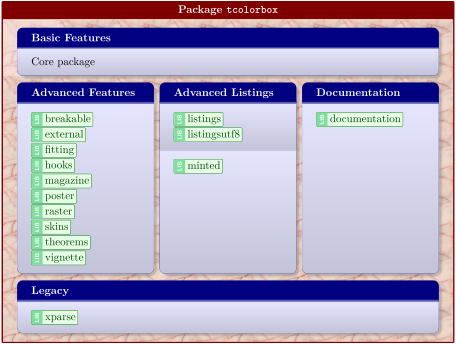
The core package tcolorbox is extendable by program libraries. This is done by using option keys while loading the package or inside the preamble by applying the following macro with the same set of keys.
\tcbuselibrary{⟨key list⟩}
Loads the libraries given by the ⟨key list⟩.
The following keys are used inside \tcbuselibrary respectively \usepackage without the key tree path /tcb/library/.
/tcb/library/skins(skins)
Loads the package tikzfill.image and provides additional styles (skins) for the appearance of the colored boxes; see Section 10.
/tcb/library/vignette(vignette)
Provides code for more ornamental; see Section 15.
/tcb/library/raster(raster)
Provides additional macros and options for typesetting multiple boxes arranged in a kind of raster; see Section 16.
/tcb/library/listings(listings)
Loads the package listings [Heinz et al. 2024] and provides additional macros for typesetting listings which are described in Section 17.
/tcb/library/listingsutf8(listingsutf8)
Loads the packages listings [Heinz et al. 2024] and listingsutf8 [Oberdiek 2019] for UTF-8 support. This is a variant of the library listings and is described in Section 17.
/tcb/library/minted(minted)
Loads the package minted [Poore 2025] to typeset listings with the Pygments [2025] tool, also see Section 17.
/tcb/library/theorems(theorems)
Provides additional macros for typesetting theorems which are described in Section 18.
/tcb/library/breakable(breakable)
Provides support for automatic box breaking from one page to another; see Section 19.
/tcb/library/magazine(magazine)
Provides support for storing broken box parts to be used later or in interchanged order, see Section 20.
/tcb/library/poster(poster)
Provides support for creating posters, see Section 21.
/tcb/library/fitting(fitting)
Provides support for font size adaption of the box content to the box dimensions; see Section 22.
/tcb/library/hooks(hooks)
Extends several option keys to “hookable” keys; see Section 23.
/tcb/library/xparse(xparse)
Loads the package xparse and is considered a legacy library kept for compatibility; see Section 24.
/tcb/library/external(external)
Provides externalization support for stand-alone document snippets, see Section 25.
/tcb/library/documentation(documentation)
Provides additional macros for typesetting LaTeX documentations which are described in Section 26.
/tcb/library/many(style, no value)
Loads the libraries skins, breakable, raster, hooks, theorems, and fitting. Use this shortcut, if you want to use all features of tcolorbox with exception of typesetting listings and using the specialized documentation library.
/tcb/library/all(style, no value)
Loads all libraries. Use this shortcut only, if you intend to use the documentation library.