The tcolorbox package
Libraries
19 Library breakable
The library is loaded by a package option or inside the preamble by:
This also loads the package pdfcol.
19.1 Technical Overview
The library breakable supports the automatic breaking of a tcolorbox. This feature is enabled by /tcb/breakable and disabled by /tcb/unbreakable.
If a tcolorbox is set to be /tcb/breakable, then the following algorithm is executed:
The box content is read to a box register similar but not identical to the unbreakable case.
If the total box fits into the current page, it is shipped out visibly unbroken and the algorithm stops.

Otherwise, it is checked if at least /tcb/lines before break of the upper box can be placed on the current page. If not, a page break is inserted and the algorithm goes back to Step 2.
Now, the break sequence starts. The upper box part or the lower box part is split such that it fits into the current page. The fitting part is named first part of the break sequence and shipped out.

If the remaining content of the total box fits into the current page, the algorithm continues with Step 7, else with Step 6.
The upper box part or the lower box part is split such that it fits into the current page. The fitting part is named middle part of the break sequence and shipped out. Then, the algorithm goes back to Step 5.

The remaining part is named last part of the break sequence and shipped out. The algorithm stops.

The algorithm takes care that the optional segmentation line never appears at the end of a box. The optional lower box part is also checked to have at least /tcb/lines before break.
In principle, all boxes of the break sequence share the same geometric parameters. The differences are:
The given /tcb/before and /tcb/after values are used only before the first and after the last part of the break sequence.
A special behavior between the parts of the break sequence can be given by /tcb/toprule at break, /tcb/bottomrule at break, /tcb/enlarge top at break by, and /tcb/enlarge bottom at break by.
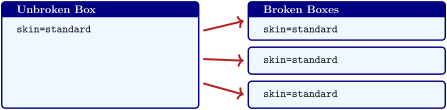
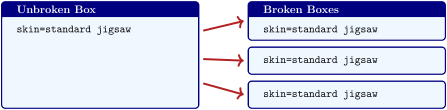
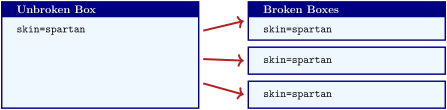
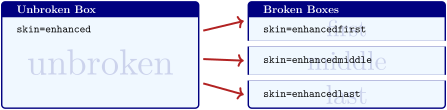
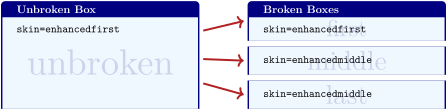
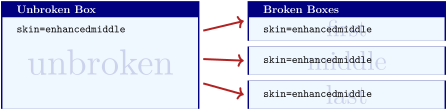
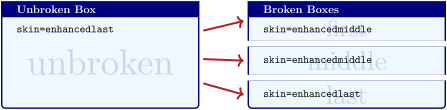
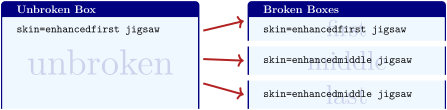
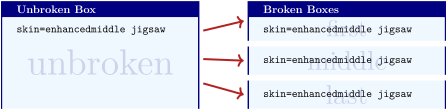
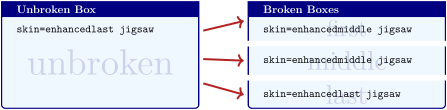
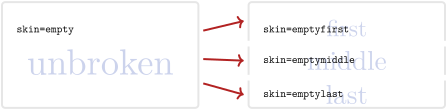
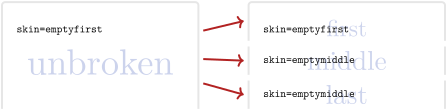
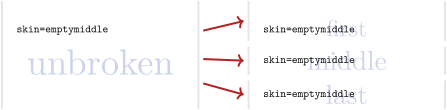
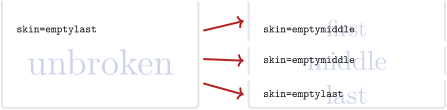
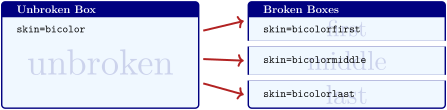
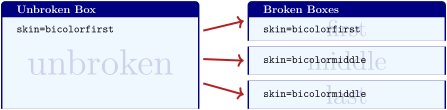
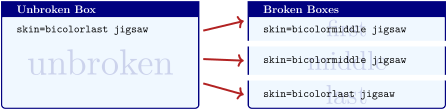
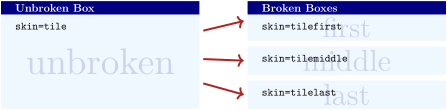
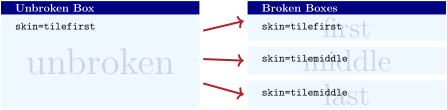
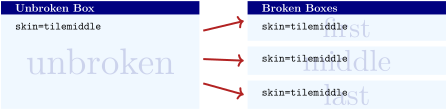
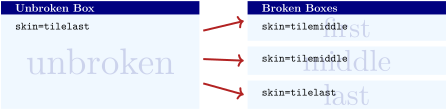
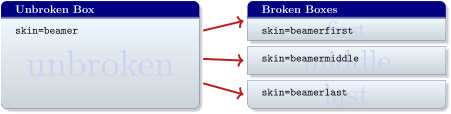
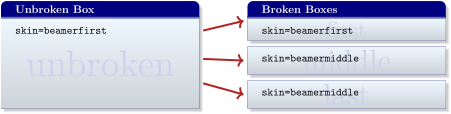
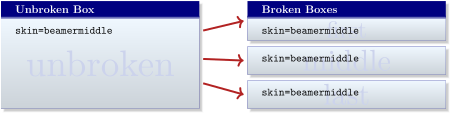
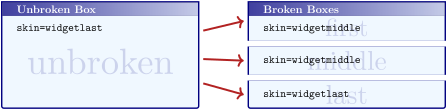
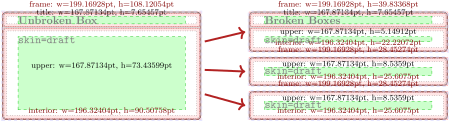
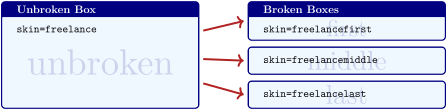
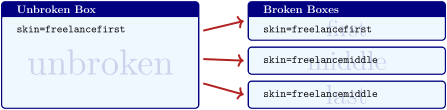
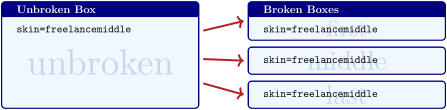
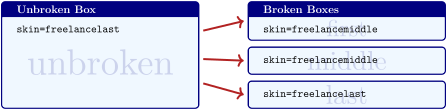
The /tcb/skin decides how the first, middle, and last part look like. Actually, every part type has its own skin given by the options /tcb/skin first, /tcb/skin middle, and /tcb/skin last. Typically, these options are set automatically by the main skin, see Section 19.8.
19.2 Limitations and Known Bugs
The maximal total height of the upper and of the lower part of normal breakable tcolorboxes is about 65536pt (ca. 2300cm) apiece. If such a part gets longer, the output will get buggy without warning. For very oversized boxes which are longer than 65536pt, use the unlimited value for /tcb/breakable. With the unlimited setting, the applied algorithm has (virtually) no height limit for boxes, but very likely the compiler memory will have to be increased for boxes longer than 300 pages (depending on compiler settings and box content). But it is recommended to use unlimited for critical large boxes only.
You can nest an unbreakable tcolorbox inside another tcolorbox, even inside a breakable one. But you cannot not nest a breakable box inside a breakable box. The /tcb/breakable key for a nested box is ignored automatically1, i. e., inner boxes are always unbreakable. After all, in the unlikely case you really want to have the nested box to be breakable, use /tcb/enforce breakable for the nested box2. But, a breakable box inside a breakable box will usually give a mess.
New: 2020-09-17 Depending on the LaTeX engine, if your text content contains some text color changing commands, your color may not survive the break to the next box. See the documentation for /tcb/use color stack for more information.
New: 2014-10-30 The perpage option of the footmisc package is deliberately deactivated inside a breakable box since all footnotes are placed at the end of the box (possibly far away from the reference point).
New: 2016-02-15 Making a box /tcb/breakable which actually is not broken creates a box which acts almost like an unbreakable box. Visual differences are kept as indiscernible as possible, but can appear with certain /tcb/before and /tcb/after settings, especially, if there is an automatic page break before the box.
New: 2016-05-25 LuaTeX version 0.95 changes the behavior of the basic \vsplit (a bug?!) resulting in badly broken boxes. Thanks to Jeremy Engel, the breakable library contains a patch for this which also loads the the ifluatex package.
19.3 Main Option Keys
/tcb/breakable=true|false|unlimited(default true, initially false)Updated: 2017-02-01
false: Sets the tcolorbox to be unbreakable.
true: Breaks the tcolorbox from one page to another. The maximal total height of the upper and of the lower part is about 65536pt (ca. 2300cm or ca. 90 pages) apiece.
unlimited: Experimental code for unlimited total height of breakable boxes. For boxes longer than 300 pages (or even shorter ones) the compiler memory will have to be increased.
Allows the tcolorbox to be breakable. If the box is larger than the available space at the current page, the box is automatically broken and continued to the next page. All sorts of tcolorbox can be made breakable. It depends on the skin how the breaking looks like. If you do not know better, use /tcb/enhanced for breaking a box. The parts of the break sequence are numbered by the counter tcbbreakpart.
% \usepackage{lipsum}  % preamble

\tcbset{enhanced jigsaw,colback=red!5!white,colframe=red!75!black,

  watermark color=yellow!25!white,watermark text=\arabic{tcbbreakpart},

  fonttitle=\bfseries}


\begin{tcolorbox}[breakable,title=My breakable box]

\lipsum[1-6]

\end{tcolorbox}
/tcb/unbreakable(no value, initially set)
Sets the tcolorbox to be unbreakable.
/tcb/enforce breakable(no value)
A tcolorbox inside a tcolorbox is automatically set to be unbreakable. Using /tcb/breakable on such an inner box has no effect. If one really wants the inner box to be breakable, use /tcb/enforce breakable. This will usually give a mess of shattered boxes. You are advised to not use this option.
Note that /tcb/enforce breakable has the functionality that /tcb/breakable had until package version 3.04 and exists for backward compatibility.
/tcb/title after break=⟨text⟩(no default, initially empty)Updated: 2018-07-26
The /tcb/title is used only for the first part of a break sequence. Use title after break to create a heading line with ⟨text⟩ as content for all following parts. Also see /tcb/extras title after break for formatting the title text.
/tcb/notitle after break(no value, initially set)
Removes the title line or following parts in a break sequence if set before.
/tcb/adjusted title after break=⟨text⟩(style, no default, initially unset)
Works like /tcb/adjusted title but applied to /tcb/title after break.
/tcb/lines before break=⟨number⟩(no default, initially 2)
Assures that the given ⟨number⟩ of lines of the upper box part or the lower box part are placed before a break happens.
/tcb/break at=⟨length⟩/⟨length⟩/…/⟨length⟩(no default, initially 0pt)Updated: 2017-07-05
Setting a ⟨length⟩ to 0pt means that the naturally available space is used for breaking.
Setting a ⟨length⟩ to a negative value means that the sum of this negative value and the naturally available space is used for breaking (boxes will shrink in height). Note that before version 4.10 negative values were treated like 0pt.
Defines break points at the given ⟨length⟩ values. The first ⟨length⟩ defines the (maximal) height of the first partial box, the second ⟨length⟩ defines the (maximal) height of the second partial box, and so on. The last ⟨length⟩ value is applied to all following partial boxes if any.
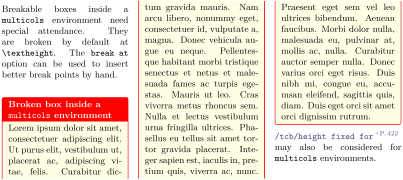
% \usepackage{multicol,lipsum}

\begin{multicols}{3}\footnotesize

Breakable boxes inside a |multicols| environment need special attendance.

They are broken by default at |\textheight|.

The |break at| option can be used to insert better break points by hand.

\begin{tcolorbox}[enhanced jigsaw,size=small,vfill before first,

  colframe=red,colback=yellow!10!white,before title=\raggedright,

  title={Broken box inside a |multicols| environment},fonttitle=\bfseries,

  enforce breakable,% use only breakable in the real world!

  pad at break=1mm,break at=3cm/6.3cm ]

\lipsum[1]

\end{tcolorbox}

\refKey{/tcb/height fixed for} may also be considered for |multicols| environments.

\end{multicols}
/tcb/enlargepage=⟨length⟩/⟨length⟩/…/⟨length⟩(no default, initially 0pt)
Inserts a \enlargethispage{⟨length⟩} to the pages of the break sequence, i. e., allows one to enlarge (or shrink) partial boxes. The first ⟨length⟩ is applied to the first partial box, the second ⟨length⟩ is applied to the second partial box, and so on. The last ⟨length⟩ value is applied to all following partial boxes if any. Note that floating boxes will not be enlarged.
\begin{tcolorbox}[breakable,enlargepage=0mm/\baselineskip/2\baselineskip/0mm,...
The example code enlarged the second partial box by one line, the third partial box by two lines, and all following parts are not enlarged.
If an automated page break occurs before the first partial box, the page enlargement is applied to the page before the first partial box and again to the page of the first partial box. Insert a manual break to prevent this.
In general, enlargepage should be used at the final stage of a document for fine-tuning only.
/tcb/enlargepage flexible=⟨length⟩(no default, initially 0pt)
This allows an automated page enlargement for up to ⟨length⟩. The algorithm can use this to avoid breaking a box, if there is enough room after enlargement. Also, the last partial box of a break sequence may be enlarged to avoid further breaking.
Note that this potential enlargement is additive to settings of /tcb/enlargepage. But /tcb/enlargepage flexible overwrites settings of /tcb/pad before break* or /tcb/pad at break*.
% The following setting hinders orphan lines for the last partial box

\tcbset{enlargepage flexible=\baselineskip}
/tcb/compress page=⟨option⟩(default all, initially baselineskip)New: 2014-12-15
all (default value): All shrinkable glue on the page is potentially used for the unbroken box or the first part of a break sequence. Thus, all vertical spaces on the page will potentially be reduced to their minimal values.
baselineskip (initial value): Shrinkable glue up to one \baselineskip on the page is potentially used for the unbroken box or the first part of a break sequence.
none: The break algorithm respects the target size of the given glue values on the page. This was the initial value before version 3.34.
This option controls the space management on the page which contains the unbroken box or the first part of a break sequence. Feasible ⟨option⟩ values are:
Note that the box content is not influenced by this option.
/tcb/shrink break goal=⟨length⟩(no default, initially 0pt)
This is an emergency parameter if the break algorithm produces unpleasant breaks. It shrinks the goal height of the current box part by ⟨length⟩ which may result in smaller boxes. Never use negative values. Usually, this option will never be needed at all.
/tcb/use color stack=true|false(default true, initially false)New: 2020-10-09
pdfTeX: color stacks supported.
LuaTeX: color stacks supported, but you should consider loading the luacolor package instead which avoids the spacing problem.
XeTeX: color stacks not supported (yet?). From hearsay, with the fontspec package, you may use \addfontfeatures{Color=mycolor} to add a font color which survives the break.
Depending on the LaTeX engine and loaded packages, if your text contains some color changing commands, your color may not survive the break to the next box. For some engines, there is support for additional color stacks which allow colors to survive breaks. Such a color stack can be activated by /tcb/use color stack with help of the pdfcol package. This can be done globally or per box.
Note that activating /tcb/use color stack inserts a color command with a whatsit at the begin of the upper part and of the lower part of a tcolorbox. This may add additional vertical space, e. g. if your box text starts with a list like enumerate!
If pdfcol cannot initialize an additional color stack for the used engine, /tcb/use color stack is silently ignored.
The result of the following example depends on the used LaTeX engine and loaded packages. The right-hand side is blue, if compiled using pdfTeX, LuaTeX without luacolor, and XeTeX. LuaTeX with luacolor gives the next but one result.
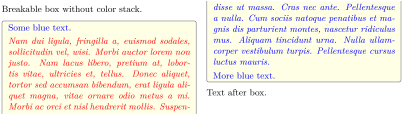
% \usepackage{multicol,lipsum}

\begin{multicols}{2}\footnotesize

Breakable box without color stack.

\begin{tcolorbox}[enhanced jigsaw,

  size=small, colframe=gray, colback=yellow!10!white, colupper=blue,

  enforce breakable,% use only breakable in the real world!

  vfill before first, pad at break=1mm, break at=33mm ]

    Some blue text.\par\smallskip

    {\color{red}\itshape\lipsum[2]}\par\smallskip

    More blue text.

\end{tcolorbox}

Text after box.

\end{multicols}
We do again with /tcb/use color stack. Again, the result depends on the used LaTeX engine. The right-hand side stays blue for XeTeX and and is red and blue for pdfTeX and LuaTeX.
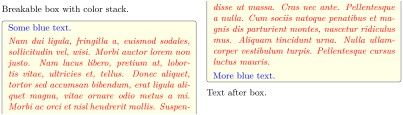
% \usepackage{multicol,lipsum}

\begin{multicols}{2}\footnotesize

Breakable box with color stack.

\begin{tcolorbox}[enhanced jigsaw, use color stack,

  size=small, colframe=gray, colback=yellow!10!white, colupper=blue,

  enforce breakable,% use only breakable in the real world!

  vfill before first, pad at break=1mm, break at=33mm ]

    Some blue text.\par\smallskip

    {\color{red}\itshape\lipsum[2]}\par\smallskip

    More blue text.

\end{tcolorbox}

Text after box.

\end{multicols}
19.4 Option Keys for the Break Appearance
/tcb/toprule at break=⟨length⟩(no default, initially 0.5mm)
Sets the line width of the top rule to ⟨length⟩ if the box is /tcb/breakable. In this case, it is applied to middle and last parts in a break sequence. Note that /tcb/toprule overwrites this value if used afterwards.
/tcb/bottomrule at break=⟨length⟩(no default, initially 0.5mm)
Sets the line width of the bottom rule to ⟨length⟩ if the box is /tcb/breakable. In this case, it is applied to first and middle parts in a break sequence. Note that /tcb/bottomrule overwrites this value if used afterwards.
/tcb/topsep at break=⟨length⟩(no default, initially 0mm)
Additional vertical space of ⟨length⟩ which is added at the top of middle and last parts in a break sequence. In general, it is not advisable to change this value if these parts start with a rule or a title.
/tcb/bottomsep at break=⟨length⟩(no default, initially 0mm)
Additional vertical space of ⟨length⟩ which is added at the bottom of first and middle parts in a break sequence. In general, it is not advisable to change this value if these parts end with a rule.
/tcb/pad before break=⟨length⟩(style, no default, initially 3.5mm)
Sets the total amount of vertical space after the text content and before the break point to ⟨length⟩. This style sets /tcb/toprule at break to 0pt and changes /tcb/topsep at break as required. In general, it is not advisable to change this value if the middle and last parts in a break sequence start with a rule or a title.
/tcb/pad before break*=⟨length⟩(style, no default)
Sets /tcb/pad before break to ⟨length⟩ and /tcb/enlargepage flexible to an appropriate value such that empty closing frames are avoided.
/tcb/pad after break=⟨length⟩(style, no default, initially 3.5mm)
Sets the total amount of vertical space after the break point and before the text content to ⟨length⟩. This style sets /tcb/bottomrule at break to 0pt and changes /tcb/bottomsep at break as required. In general, it is not advisable to change this value if the first and middle parts in a break sequence end with a rule.
/tcb/pad at break=⟨length⟩(style, no default, initially 3.5mm)
Abbreviation for setting ⟨length⟩ to /tcb/pad before break and /tcb/pad after break.
/tcb/pad at break*=⟨length⟩(style, no default)
Sets /tcb/pad at break to ⟨length⟩ and /tcb/enlargepage flexible to an appropriate value such that empty closing frames are avoided.
/tcb/pad at break or /tcb/pad at break* should be used as very last option in an option list, because they adapt other settings.
Also see /tcb/enlarge top at break by and /tcb/enlarge bottom at break by.
/tcb/height fixed for=⟨part⟩(no default, initially none)
none: Every partial tcolorbox is set with its natural height.
first: The first partial box is set to a height which matches the available space.
middle: All middle partial boxes are set to a height which matches the available space.
last: The last partial box is set to a height which matches the available space.
first and middle: The first and all middle partial boxes are set to a height which matches the available space.
middle and last: All middle partial boxes and the last partial box are set to a height which matches the available space.
all: All partial boxes are set to a height which matches the available space.
When certain amount of space is available for a partial box of a break sequence, the partial box typically is smaller than this space (depending on the box content). For given ⟨part⟩(s), the height can be set to all available space.
If the box keeps unbroken, this option is not applied. See /tcb/height for setting a fixed height for unbroken boxes. See /tcb/height fill for giving unbroken boxes maximum height.
/tcb/vfill before first=true|false(default true, initially false)
Inserts a \vfill at the begin of the first partial box to move this partial box to the end of the current page. This may be used as an alternative to /tcb/height fixed for=first to get justified columns or pages. The \vfill is not inserted, if the box gets not actually broken.
/tcb/segmentation at break=true|false(default true, initially true)New: 2017-03-20
the segmentation line (or similar) is drawn as first element of the partial box containing the lower part, if /tcb/segmentation at break is set to be true.
the segmentation line (or similar) is not drawn at all, if /tcb/segmentation at break is set to be false. This may be preferable for skins like bicolor, tile, or beamer.
If a breakable box contains an upper part and a lower part and the break happens at the segmentation between both parts, then
19.5 Extra Options for Partial Boxes
/tcb/extras={⟨options⟩}(no default, initially unset)New: 2015-07-16
Adds tcolorbox ⟨options⟩ to every box of a break sequence (also including unbroken boxes) after skin settings are done. This is quite late in box processing. Geometry and break settings should not be used here, because they will either be ignored or have unexpected negative results. But it is possible to change most colors, skin effects, shadows, borders, frame code, etc. While /tcb/extras affects every box (including unbroken boxes), /tcb/extras first, /tcb/extras middle, /tcb/extras last, /tcb/extras unbroken, etc., apply extra options to specific partial boxes. /tcb/extras and also /tcb/extras first, etc., are stackable, i. e., the given ⟨options⟩ are appended to any previous extra options. Use /tcb/no extras to remove all extra options. If needed, /tcb/extras pre prepends options to previous extra options.
/tcb/no extras(style, no default, initially set)New: 2015-07-16
Removes all extras if set before.
/tcb/extras broken={⟨options⟩}(no default, initially unset)New: 2015-07-16
If the box is set to be /tcb/breakable and is broken actually, then the ⟨options⟩ are added to every box of the break sequence. /tcb/extras overwrites this key. This is a shortcut for setting /tcb/extras first, /tcb/extras middle, and /tcb/extras last.
/tcb/extras unbroken={⟨options⟩}(no default, initially unset)New: 2015-07-16
If the box is set to be /tcb/breakable but is not broken actually or if the box is set to be /tcb/unbreakable, then the ⟨options⟩ are added to the box. /tcb/extras overwrites this key.
/tcb/no extras unbroken(style, no default, initially set)New: 2015-07-16
Removes the unbroken extras if set before.
/tcb/extras first={⟨options⟩}(no default, initially unset)New: 2015-07-16
If the box is set to be /tcb/breakable and is broken actually, then the ⟨options⟩ are added to the first box of the break sequence. /tcb/extras overwrites this key.
/tcb/no extras first(style, no default, initially set)New: 2015-07-16
Removes the first extras if set before.
/tcb/extras middle={⟨options⟩}(no default, initially unset)New: 2015-07-16
If the box is set to be /tcb/breakable and is broken actually, then the ⟨options⟩ are added to every middle box (if any) of the break sequence. /tcb/extras overwrites this key.
/tcb/no extras middle(style, no default, initially set)New: 2015-07-16
Removes the middle extras if set before.
/tcb/extras last={⟨options⟩}(no default, initially unset)New: 2015-07-16
If the box is set to be /tcb/breakable and is broken actually, then the ⟨options⟩ are added to the last box of the break sequence. /tcb/extras overwrites this key.
/tcb/no extras last(style, no default, initially set)New: 2015-07-16
Removes the last extras if set before.
/tcb/extras unbroken and first={⟨options⟩}(no default, initially unset)New: 2015-07-16
This is an abbreviation for setting /tcb/extras unbroken and /tcb/extras first together. /tcb/extras overwrites this key.
/tcb/extras middle and last={⟨options⟩}(no default, initially unset)New: 2015-07-16
This is an abbreviation for setting /tcb/extras middle and /tcb/extras last together. /tcb/extras overwrites this key.
/tcb/extras unbroken and last={⟨options⟩}(no default, initially unset)New: 2015-07-16
This is an abbreviation for setting /tcb/extras unbroken and /tcb/extras last together. /tcb/extras overwrites this key.
/tcb/extras first and middle={⟨options⟩}(no default, initially unset)New: 2015-07-16
This is an abbreviation for setting /tcb/extras first and /tcb/extras middle together. /tcb/extras overwrites this key.
/tcb/extras title after break={⟨options⟩}(no default, initially unset)New: 2018-07-26
If the box has a /tcb/title after break, then the ⟨options⟩ are added for all titles after the first break, i. e., all middle and last. The color, font, and alignment of titles after break can be adapted choosing ⟨options⟩, e. g. by /tcb/coltitle, /tcb/fonttitle, /tcb/halign title. Note that /tcb/colbacktitle has to be placed into /tcb/extras middle and last.
/tcb/no extras title after break(style, no default, initially set)New: 2018-07-26
Removes the title after break extras if set before.
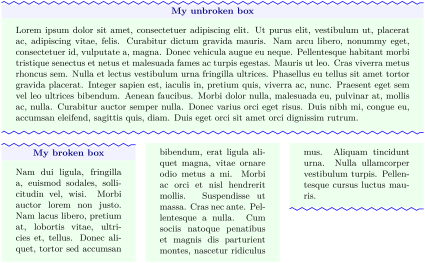
% \usepackage{lipsum,multicol}

% \usetikzlibrary{decorations.pathmorphing}

% \tcbuselibrary{skins}

\newtcolorbox{mybox}[1][]{

  tile,

  colback=green!7,coltitle=blue!50!black,colbacktitle=blue!5,

  center title,

  toprule=1.25mm,bottomrule=1.25mm,

  extras unbroken and first={

    borderline north={0.25mm}{0.5mm}{blue,decoration={zigzag,amplitude=0.5mm},decorate}},

  extras unbroken and last={

    borderline south={0.25mm}{0.5mm}{blue,decoration={zigzag,amplitude=0.5mm},decorate}},

  #1

}


\begin{mybox}[title=My unbroken box]

\lipsum[1]

\end{mybox}


\begin{multicols}{3}

  \begin{mybox}[title=My broken box,

    enforce breakable,% use only breakable in the real world!

    break at=4.2cm,pad at break=2mm,

    height fixed for=first and middle,  ]

  \lipsum[2]

  \end{mybox}

\end{multicols}
19.6 Breakable boxes and the multicol package
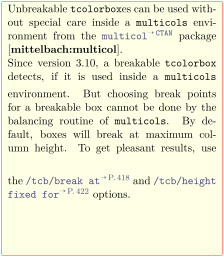
With version 4.10, the algorithm for detecting the available height for a tcolorbox inside a multicols environment was improved with help of Frank Mittelbach. This change may impact existing user code which may have to be adapted.
% \usepackage{lipsum,multicol}  % preamble

\footnotesize

\begin{multicols}{2}

  \lipsum[1]

  \begin{tcolorbox}[enhanced jigsaw,breakable,size=title,

    colback=red!5!white,colframe=red!75!black,fonttitle=\bfseries,

    title=My breakable box,pad at break=1mm, break at=-\baselineskip/0pt ]

  \lipsum[2-4]

  \end{tcolorbox}

  \lipsum[4]

\end{multicols}
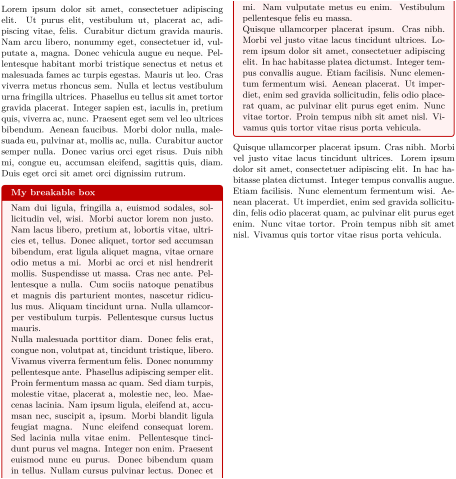
This example is already set inside a multicols environment. This time, a middle part has full column height (here \textheight). /tcb/height fixed for is used to spread this box part over the full height to align with neighboring columns.
% \usepackage{lipsum,multicol}

\lipsum[1]

\begin{tcolorbox}[enhanced jigsaw,

  breakable,

  size=title,

  colback=red!5!white,

  colframe=red!75!black,

  fonttitle=\bfseries,

  title=My breakable box,

  pad at break=2mm,

  break at=-\baselineskip/0pt,

  height fixed for=middle ]

\lipsum[2-7]

\end{tcolorbox}

\lipsum[8]

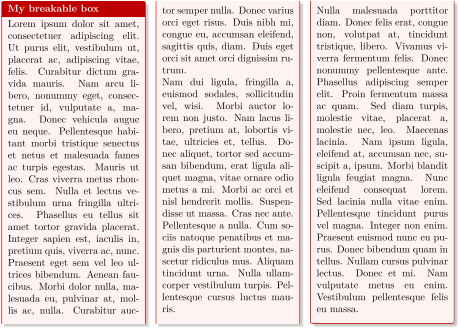
The following example has a \tcolorbox which fills the \multicols environment completely. Here, /tcb/height fixed for is used to give all three columns the full height. Note that the appropriate /tcb/break at value is not computed automatically but set manually.
% \usepackage{lipsum,multicol}  % preamble

\small

\begin{multicols}{3}

  \begin{tcolorbox}[enhanced jigsaw,breakable,size=small,

    colback=red!5!white,colframe=red!75!black,fonttitle=\bfseries,

    title=My breakable box,pad at break=2mm,drop fuzzy shadow,

    height fixed for=all, break at=11.4cm ]

  \lipsum[1-3]

  \end{tcolorbox}

\end{multicols}
19.7 Break Point Insertion
\tcbbreakNew: 2017-07-05
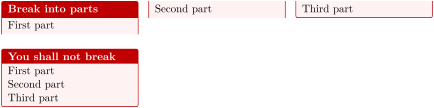
A breakable box is not broken, if there is enough space on the current page or column. Therefore, typical penalty insertion with \break, \pagebreak, \columnbreak, …may only work as expected, if the box is broken at least into two parts without inserting the penalties. To force a page or column break, \tcbbreak starts a new paragraph and inserts an insane tall rule which causes a break and which is immediately discarded. You may ignore this technical information and just use it as you would use \pagebreak. For an unbreakable box, \tcbbreak is identical to insert \par, i. e., it just starts a new paragraph. Also see /tcb/break at for defining height dependent breaks.
% \usepackage{lipsum,multicol}  % preamble

\begin{multicols}{3}

  \begin{tcolorbox}[breakable,enhanced jigsaw,size=small,

    colback=red!5!white,colframe=red!75!black,fonttitle=\bfseries,

    title=Break into parts

  ]

  First part\tcbbreak

  Second part\tcbbreak

  Third part

  \end{tcolorbox}

\end{multicols}


\begin{multicols}{3}

  \begin{tcolorbox}[enhanced jigsaw,size=small,

    colback=red!5!white,colframe=red!75!black,fonttitle=\bfseries,

    title=You shall not break

  ]

  First part\tcbbreak

  Second part\tcbbreak

  Third part

  \end{tcolorbox}

\end{multicols}
19.8 Break Sequence for the Skins
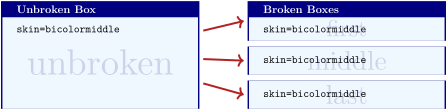
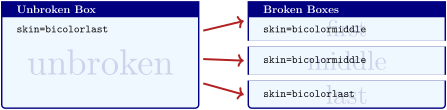
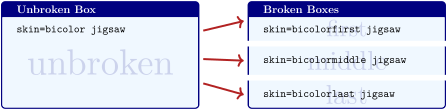
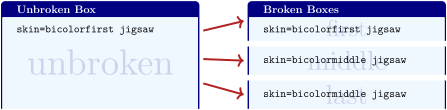
The following diagrams document the break sequence for different skins. Depending on the main skin of a tcolorbox, the actual skins of the break sequence parts are displayed.


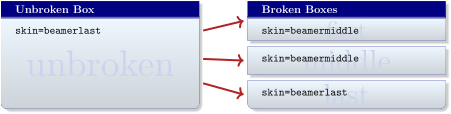
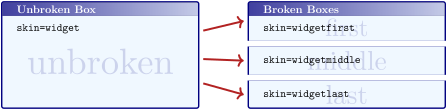
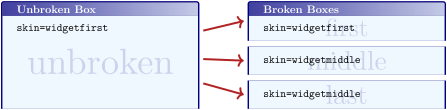
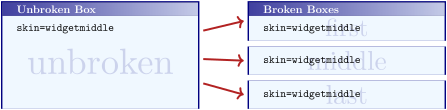
19.9 Break by Hand (Faked Break)
See Section 19.6 for real column breaks.
Since the appearance of broken boxes is done by skins, it is quite easy to ’fake a break’. For this, you actually don’t need the breakable library at all.

\tcbset{enhanced,equal height group=fakedbreak,

  colback=LightGreen,colframe=DarkGreen,

  width=(\linewidth-6mm)/3,nobeforeafter,

  left=1mm,right=1mm,top=1mm,bottom=1mm,middle=1mm}

%

\begin{tcolorbox}[title=My broken box,skin=enhancedfirst]

This is a box which breaks from one column to another

\end{tcolorbox}\hfill

\begin{tcolorbox}[skin=enhancedmiddle]

column. I am sorry to say that this is a trick.

Nevertheless, you may use this trick for your

\end{tcolorbox}\hfill

\begin{tcolorbox}[skin=enhancedlast]

own purposes.

\end{tcolorbox}
1 Until tcolorbox 3.04, the /tcb/breakable key was not ignored for nested boxes.
2 /tcb/enforce breakable acts like /tcb/breakable until tcolorbox 3.04.