The tcolorbox package
Libraries
13 TikZ Auxiliary Macros
The skins library adds some auxiliary options to the vast option set of TikZ [Tantau 2023]. These options can be used in any tikzpicture. For the following options, the skins library has to be loaded by a package option or inside the preamble by:
See Section 10 for the documentation of all other options of the skins library.
Up to version 5.1.1 (2022/06/24) of tcolorbox, TikZ image and picture fill extensions were documented here. These extensions are now separate TikZ libraries and part of the tikzfill package where they are documented now.
13.1 Straightening of the Arcs
This patch is considered as an experimental feature. It changes some of the original TikZ code. This change may break with future updates of TikZ.
\tcbpatcharcangularNew: 2014-05-05
The tikz package provides a nice rounded corners option to replace all corners by little arcs. \tcbpatcharcangular is a patch which straightens the arcs. To say it more prosaic, the little arcs are replaced by little straight lines.
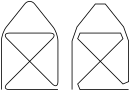
\begin{tikzpicture}

  \draw[thick,rounded corners=8pt]

    (0,0) -- (0,2) -- (1,3.25) -- (2,2) -- (2,0)

     -- (0,2) -- (2,2) -- (0,0) -- (2,0);

  \tcbpatcharcangular

  \draw[thick,rounded corners=8pt,xshift=2.5cm]

    (0,0) -- (0,2) -- (1,3.25) -- (2,2) -- (2,0)

     -- (0,2) -- (2,2) -- (0,0) -- (2,0);

\end{tikzpicture}
\tcbpatcharcroundNew: 2014-05-05
This macro reverts \tcbpatcharcangular, i. e., the patch from \tcbpatcharcangular is replaced by the original code.
13.2 Extracting Node Dimensions
The following auxiliary macros are defined by the skins library. They allow to determine the width and height of an arbitrary TikZ node. To be more specific, they determine the east-to-west and the north-to-south dimensions which may be not the maximal dimensions for a non-rectangular node. Note that the following dimensions are measured exactly including the line width of the border line. If a new rectangle or node with the same dimensions and a border is to be drawn, this border width has to be subtracted.
\tcbsettowidthofnode{⟨register⟩}{⟨node⟩}New: 2014-09-19
Sets the east-to-west dimension of the given ⟨node⟩ to the TeX ⟨register⟩.
\tcbsetmacrotowidthofnode{⟨macro⟩}{⟨node⟩}New: 2014-09-19
Defines ⟨macro⟩ as the east-to-west dimension of the given ⟨node⟩.
\tcbsettoheightofnode{⟨register⟩}{⟨node⟩}New: 2014-09-19
Sets the north-to-south dimension of the given ⟨node⟩ to the TeX ⟨register⟩.
\tcbsetmacrotoheightofnode{⟨macro⟩}{⟨node⟩}New: 2014-09-19
Defines ⟨macro⟩ as the north-to-south dimension of the given ⟨node⟩.

\begin{tikzpicture}

  \node[align=center,draw=red,fill=yellow] (A) {This is my\\example node};

  \tcbsetmacrotowidthofnode\mywidth{A}

  \tcbsetmacrotoheightofnode\myheight{A}

  \path[fill=blue!25!white]           %  rectangle without border

    ([xshift=2mm]A.south east)

    rectangle node{Copy} +(\mywidth,\myheight);

  \node[draw=blue,fill=blue!25!white, % standard border width 0.4pt

    minimum width=\mywidth-0.4pt,     % minus width of border

    minimum height=\myheight-0.4pt    % minus height of border

    ]

    at ([xshift=5cm]A) {Copy 2};

\end{tikzpicture}
13.3 Hyper Nodes
The following auxiliary macro is defined by the skins library.
\tcbhypernode{⟨macro⟩}{⟨node⟩}New: 2016-02-03Updated: 2023-02-28
Applies a hyperlink creating ⟨macro⟩ from the package hyperref [Rahtz and Oberdiek 2025] to an existing TikZ ⟨node⟩. \tcbhypernode can only be used inside a tikzpicture environment. The last argument of the ⟨macro⟩ is to be omitted and should stand for an object (text) which is to be made a hyperlink. For example, use \hyperref[name] instead of \hyperref[name]{text}.

% \usepackage{hyperref}

\begin{tikzpicture}

  \node[align=center,draw=red,fill=red!5] (mybutton)

    {Click me to jump to Section~\ref*{sec:tikzimagefilling}};

  \tcbhypernode{\hyperref[sec:tikzimagefilling]}{mybutton}

\end{tikzpicture}