The tcolorbox package
Libraries
16 Library raster
The library is loaded by a package option or inside the preamble by:
16.1 Concept of Rasters
A raster is used to align several colored boxes in a regular way. It can be seen as a far related counterpart to the matrix construct of TikZ, but it differs in many aspects.
In principle, tcolorboxes are arranged in rows and columns when put inside a tcbraster environment. The boxes are fluently added to the raster like adding text to a paragraph. Especially, line/row breaks are done automatically and one cannot end a line/row ahead of schedule. Further, a raster is not restricted to a single page but may break into an arbitrary series of pages.
16.2 Macros of the Library
\begin{tcbraster}[⟨options⟩]
⟨environment content⟩
\end{tcbraster}New: 2014-11-10Updated: 2017-02-01¶The raster is only allowed to contain a series of tcolorbox environments or derived constructs. With some small restrictions, boxes created with \tcboxfit can also be added. Boxes created with \tcbox are not reasonable here, but may be used to a certain degree.
Do not add anything else between the boxes inside the raster with exception of whitespace. Especially, do not use \\ or \par to end a row; row breaks are done automatically.
The boxes inside a raster are numbered automatically. \thetcbrasternum may be used inside a box to access this number. The LaTeX counter tcbrastercolumn holds the current column, the counter tcbrasterrow holds the current row, and the counter tcbrasternum holds the current box number.
A raster arranges enclosed boxes in a regular way, mainly into rows and columns. The ⟨options⟩ are used to control the raster parameters and to set the properties for the enclosed boxes.
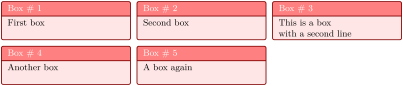
\begin{tcbraster}[raster columns=3, raster equal height,

  size=small,colframe=red!50!black,colback=red!10!white,colbacktitle=red!50!white,

  title={Box \# \thetcbrasternum}]

  \begin{tcolorbox}First box\end{tcolorbox}

  \begin{tcolorbox}Second box\end{tcolorbox}

  \begin{tcolorbox}This is a box\\with a second line\end{tcolorbox}

  \begin{tcolorbox}Another box\end{tcolorbox}

  \begin{tcolorbox}A box again\end{tcolorbox}

\end{tcbraster}
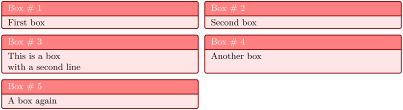
\begin{tcbraster}[raster columns=2, raster equal height=rows,

  size=small,colframe=red!50!black,colback=red!10!white,colbacktitle=red!50!white,

  title={Box \# \thetcbrasternum}]

  \begin{tcolorbox}First box\end{tcolorbox}

  \begin{tcolorbox}Second box\end{tcolorbox}

  \begin{tcolorbox}This is a box\\with a second line\end{tcolorbox}

  \begin{tcolorbox}Another box\end{tcolorbox}

  \begin{tcolorbox}A box again\end{tcolorbox}

\end{tcbraster}
\begin{tcbitemize}[⟨options⟩]
⟨environment content⟩
\end{tcbitemize}New: 2014-11-10¶Here, the enclosed boxes are created using \tcbitem.
There has to be at least one \tcbitem.
One cannot use anything else than \tcbitem to add something to the raster.
This is a special case of a tcbraster with the given ⟨options⟩.
This leads to a very compact syntax.
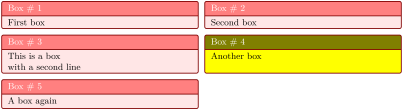
\begin{tcbitemize}[raster columns=2, raster equal height=rows,

  size=small,colframe=red!50!black,colback=red!10!white,colbacktitle=red!50!white,

  title={Box \# \thetcbrasternum}]

  \tcbitem First box

  \tcbitem Second box

  \tcbitem This is a box\\with a second line

  \tcbitem[colback=yellow,colbacktitle=yellow!50!black] Another box

  \tcbitem A box again

\end{tcbitemize}
tcbitemize has more restrictions than tcbraster. Especially, the /tcb/capture mode has to be minipage. For example, /tcb/fit cannot be used safely. If /tcb/fit should be used, turn over to tcbraster.
\tcbitem[⟨options⟩]New: 2014-11-10
Used inside tcbitemize to create a new tcolorbox with the given ⟨options⟩.
\begin{tcboxedraster}[⟨raster options⟩]{⟨box options⟩}
⟨environment content⟩
\end{tcboxedraster}New: 2016-02-19
This is a convenience environment which combines a tcolorbox with an embedded tcbraster. The ⟨box options⟩ are given to the outer tcolorbox, while the ⟨raster options⟩ are given to the embedded tcbraster. This environment is especially useful for rasters inside rasters.
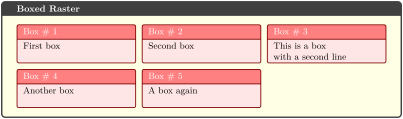
\begin{tcboxedraster}[raster columns=3, raster equal height,

  size=small,colframe=red!50!black,colback=red!10!white,colbacktitle=red!50!white,

  title={Box \# \thetcbrasternum}]

  {colback=yellow!10,fonttitle=\bfseries,title=Boxed Raster}

  \begin{tcolorbox}First box\end{tcolorbox}

  \begin{tcolorbox}Second box\end{tcolorbox}

  \begin{tcolorbox}This is a box\\with a second line\end{tcolorbox}

  \begin{tcolorbox}Another box\end{tcolorbox}

  \begin{tcolorbox}A box again\end{tcolorbox}

\end{tcboxedraster}

% \tcbuselibrary{skins}

\begin{tcbraster}[raster columns=2, raster equal height,

  raster every box/.style={size=small,colframe=red!50!black,colback=red!10!white,

    valign=center,halign=center}]

  \begin{tcolorbox}One\end{tcolorbox}

  \begin{tcolorbox}Two\end{tcolorbox}

    \begin{tcboxedraster}{blankest}

      \begin{tcolorbox}Three\end{tcolorbox}

      \begin{tcolorbox}Four\end{tcolorbox}

      \begin{tcolorbox}Five\end{tcolorbox}

      \begin{tcolorbox}Six\end{tcolorbox}

    \end{tcboxedraster}

    \begin{tcolorbox}Seven\end{tcolorbox}

\end{tcbraster}
\begin{tcboxeditemize}[⟨raster options⟩]{⟨box options⟩}
⟨environment content⟩
\end{tcboxeditemize}New: 2016-04-27
This is a convenience environment which combines a tcolorbox with an embedded tcbitemize. The ⟨box options⟩ are given to the outer tcolorbox, while the ⟨raster options⟩ are given to the embedded tcbitemize. This environment is especially useful for rasters inside rasters.
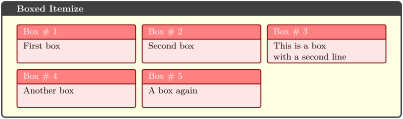
\begin{tcboxeditemize}[raster columns=3, raster equal height,

  size=small,colframe=red!50!black,colback=red!10!white,colbacktitle=red!50!white,

  title={Box \# \thetcbrasternum}]

  {colback=yellow!10,fonttitle=\bfseries,title=Boxed Itemize}

  \tcbitem First box

  \tcbitem Second box

  \tcbitem This is a box\\with a second line

  \tcbitem Another box

  \tcbitem A box again

\end{tcboxeditemize}
16.3 Option Keys of the Library
/tcb/raster columns=⟨number⟩(no default, initially 2)New: 2014-11-10
Sets the ⟨number⟩ of columns for a raster.

\begin{tcbitemize}[raster columns=3,

  size=small,colframe=red!50!black,colback=red!10!white]

  \tcbitem One

  \tcbitem Two

  \tcbitem Three

  \tcbitem Four

\end{tcbitemize}

\begin{tcbitemize}[raster columns=4,

  size=small,colframe=blue!50!black,colback=blue!10!white]

  \tcbitem One

  \tcbitem Two

  \tcbitem Three

  \tcbitem Four

\end{tcbitemize}
/tcb/raster rows=⟨number⟩(no default, initially 2)New: 2014-11-10
Sets the ⟨number⟩ of rows for a raster. Note that this is only relevant in connection with setting /tcb/raster height to a value greater than 0pt. Then, it defines the number of rows per given height.
/tcb/raster width=⟨length⟩(no default, initially \linewidth)New: 2014-11-10
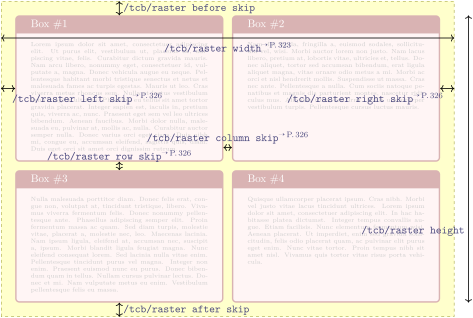
Sets the total raster width to the given ⟨length⟩. /tcb/raster left skip and /tcb/raster right skip are part of the total width. Note that both skip values are not changed by this option.

\begin{tcbitemize}[raster width=\linewidth/2,

  size=small,colframe=red!50!black,colback=red!10!white]

  \tcbitem One

  \tcbitem Two

  \tcbitem Three

  \tcbitem Four

\end{tcbitemize}
/tcb/raster width flush left=⟨length⟩(style, no default)New: 2018-11-30
Sets the total /tcb/raster width to \linewidth and adapts /tcb/raster left skip and /tcb/raster right skip to place the raster on the left hand side with a visual width of the given ⟨length⟩.

\begin{tcbitemize}[raster width flush left=\linewidth/2,

  size=small,colframe=red!50!black,colback=red!10!white]

  \tcbitem One

  \tcbitem Two

  \tcbitem Three

  \tcbitem Four

\end{tcbitemize}
Note that the results of /tcb/raster width and /tcb/raster width flush left look identical, but differ on technical side since the later always fills the available \linewidth.
/tcb/raster width center=⟨length⟩(style, no default)New: 2018-11-30
Sets the total /tcb/raster width to \linewidth and adapts /tcb/raster left skip and /tcb/raster right skip to center the raster with a visual width of the given ⟨length⟩.

\begin{tcbitemize}[raster width center=\linewidth/2,

  size=small,colframe=red!50!black,colback=red!10!white]

  \tcbitem One

  \tcbitem Two

  \tcbitem Three

  \tcbitem Four

\end{tcbitemize}
/tcb/raster width flush right=⟨length⟩(style, no default)New: 2018-11-30
Sets the total /tcb/raster width to \linewidth and adapts /tcb/raster left skip and /tcb/raster right skip to place the raster on the right hand side with a visual width of the given ⟨length⟩.

\begin{tcbitemize}[raster width flush right=\linewidth/2,

  size=small,colframe=red!50!black,colback=red!10!white]

  \tcbitem One

  \tcbitem Two

  \tcbitem Three

  \tcbitem Four

\end{tcbitemize}
/tcb/raster height=⟨length⟩(no default, initially 0pt)New: 2014-11-10
Sets the raster height per /tcb/raster rows to the given ⟨length⟩. This forces an appropriate height for the enclosed boxes. /tcb/raster before skip and /tcb/raster after skip are not part of this calculation. If the ⟨length⟩ is set to 0pt, this feature is deactivated.
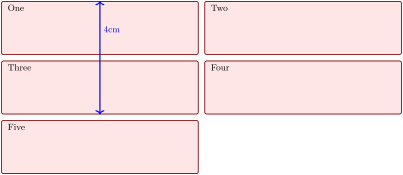
\begin{tcbitemize}[raster height=4cm, raster rows=2,

  size=small,colframe=red!50!black,colback=red!10!white]

  \tcbitem One

  \tcbitem Two

  \tcbitem[enhanced,

    finish={\draw[blue,very thick,<->] (frame.south)

      -- node[right,pos=.75]{4cm} +(0,4); }]

    Three

  \tcbitem Four

  \tcbitem Five

\end{tcbitemize}
/tcb/raster before skip=⟨glue⟩(no default, initially 2mm)New: 2014-11-10Updated: 2014-12-16
Space of the given ⟨glue⟩ is inserted vertically before the raster. This space is discardable.
/tcb/raster after skip=⟨glue⟩(no default, initially 2mm)New: 2014-11-10Updated: 2014-12-16
Space of the given ⟨glue⟩ is inserted vertically after the raster. This space is discardable.
/tcb/raster equal skip=⟨length⟩(style, no default)New: 2015-01-08
Shortcut to set /tcb/raster before skip, /tcb/raster after skip, /tcb/raster column skip, and /tcb/raster row skip to the same ⟨length⟩ value.

\begin{tcbitemize}[raster equal skip=4mm,

  size=small,colframe=red!50!black,colback=red!10!white]

  \tcbitem One

  \tcbitem Two

  \tcbitem Three

  \tcbitem Four

\end{tcbitemize}
/tcb/raster left skip=⟨length⟩(no default, initially 0pt)New: 2014-11-10
Space of the given ⟨length⟩ is inserted horizontally left of the raster.

\begin{tcbitemize}[raster left skip=2cm,

  size=small,colframe=red!50!black,colback=red!10!white]

  \tcbitem One

  \tcbitem Two

  \tcbitem Three

  \tcbitem Four

\end{tcbitemize}
/tcb/raster right skip=⟨length⟩(no default, initially 0pt)New: 2014-11-10
Space of the given ⟨length⟩ is inserted horizontally right of the raster.

\begin{tcbitemize}[raster right skip=2cm,

  size=small,colframe=red!50!black,colback=red!10!white]

  \tcbitem One

  \tcbitem Two

  \tcbitem Three

  \tcbitem Four

\end{tcbitemize}
/tcb/raster column skip=⟨length⟩(no default, initially 2mm)New: 2014-11-10
Space of the given ⟨length⟩ is inserted horizontally between the columns.

\begin{tcbitemize}[raster column skip=2cm,

  size=small,colframe=red!50!black,colback=red!10!white]

  \tcbitem One

  \tcbitem Two

  \tcbitem Three

  \tcbitem Four

\end{tcbitemize}
/tcb/raster row skip=⟨length⟩(no default, initially 2mm)New: 2014-11-10
Space of the given ⟨length⟩ is inserted vertically between the rows.

\begin{tcbitemize}[raster row skip=0pt,

  size=small,colframe=red!50!black,colback=red!10!white]

  \tcbitem One

  \tcbitem Two

  \tcbitem Three

  \tcbitem Four

\end{tcbitemize}
/tcb/raster halign=⟨alignment⟩(no default, initially left)New: 2014-11-10
left: align to the left side,
center: align to the center,
right: align to the right side.
Defines the horizontal alignment for the boxes of the rows of a raster, if these rows are not completely filled (mainly: the last one).
Feasible values for ⟨alignment⟩ are:

\begin{tcbitemize}[raster halign=center,

  size=small,colframe=red!50!black,colback=red!10!white]

  \tcbitem One

  \tcbitem Two

  \tcbitem Three

\end{tcbitemize}
/tcb/raster valign=⟨alignment⟩(no default, initially center)New: 2014-11-10
top: align to the top side,
center: align to the center,
bottom: align to the bottom side.
Defines the vertical alignment for the boxes of a row, if the boxes do not have equal height. This sets the /tcb/box align option.
Feasible values for ⟨alignment⟩ are:
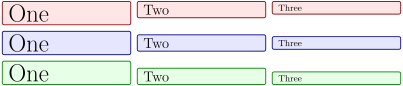
\begin{tcbitemize}[raster valign=top, raster columns=3,

  size=small,colframe=red!50!black,colback=red!10!white]

  \tcbitem \Huge One

  \tcbitem \Large Two

  \tcbitem Three

\end{tcbitemize}

\begin{tcbitemize}[raster valign=center, raster columns=3,

  size=small,colframe=blue!50!black,colback=blue!10!white]

  \tcbitem \Huge One

  \tcbitem \Large Two

  \tcbitem Three

\end{tcbitemize}

\begin{tcbitemize}[raster valign=bottom, raster columns=3,

  size=small,colframe=green!50!black,colback=green!10!white]

  \tcbitem \Huge One

  \tcbitem \Large Two

  \tcbitem Three

\end{tcbitemize}
/tcb/raster equal height=⟨type⟩(default all, initially none)New: 2014-11-10Updated: 2017-02-28
none: no equal height setting,
rows: all boxes in a row are set to equal height,
all: all boxes in the raster are set to equal height.
Puts the enclosed boxes into a common /tcb/equal height group. The ⟨id⟩ of the equal height group is chosen automatically, but it may be set manually by /tcb/raster equal height group. Also see /tcb/minimum for current equal height group.
Feasible values for ⟨type⟩ are:
Note that you have to compile twice to see changes.

\begin{tcbitemize}[raster equal height=rows,

  size=small,colframe=red!50!black,colback=red!10!white]

  \tcbitem One

  \tcbitem \Huge Two

  \tcbitem Three

  \tcbitem Four

\end{tcbitemize}

\begin{tcbitemize}[raster equal height,

  size=small,colframe=red!50!black,colback=red!10!white]

  \tcbitem One

  \tcbitem \Huge Two

  \tcbitem Three

  \tcbitem Four

\end{tcbitemize}
/tcb/raster equal height group=⟨id⟩(no default)New: 2014-11-10
Overwrites the automatically chosen id with the given ⟨id⟩. If this is used to share a common height between the raster and another raster or box, the /tcb/raster equal height option should be set to all.

\tcbset{size=small,colframe=red!50!black,colback=red!10!white}

\begin{tcolorbox}[equal height group=raster-manual-id]

  A single box

\end{tcolorbox}

\begin{tcbitemize}[raster equal height,raster equal height group=raster-manual-id]

  \tcbitem One

  \tcbitem \Huge Two

\end{tcbitemize}
/tcb/raster force size=true|false(default true, initially true)New: 2014-11-10
Enforces the raster size computations onto the enclosed boxes. If set to false, individual settings can be used (for the better or worse).

\begin{tcbitemize}[raster force size=false, raster halign=center,

  size=small,colframe=red!50!black,colback=red!10!white]

  \tcbitem One

  \tcbitem Two

  \tcbitem[add to width=-3cm] Three

  \tcbitem[add to width=-3cm] Four

  \tcbitem[add to width=-3cm] Five

  \tcbitem[add to width=3cm] Six

\end{tcbitemize}
/tcb/raster reset(no value)New: 2014-11-10
Sets all raster settings back to their default values. Note that /tcb/reset does not execute this option. Style settings like /tcb/raster odd column etc. are not touched by /tcb/raster reset.
16.4 Adding Styles for Specific Boxes
The following styles can be defined to address certain boxes inside a raster. Note that such style definitions are not removed by /tcb/reset or /tcb/raster reset. The style definitions are used in the order given below.
/tcb/raster every box(style)New: 2014-11-24
This style is used for every box.
/tcb/raster odd column(style)New: 2014-11-10
This style is used for every box in an odd column.

\begin{tcbitemize}[size=small,colframe=red!50!black,colback=red!10!white,

  raster odd column/.style={colframe=blue!50!black,colback=blue!10!white}]

  \tcbitem One

  \tcbitem Two

  \tcbitem Three

  \tcbitem Four

\end{tcbitemize}
/tcb/raster even column(style)New: 2014-11-10
This style is used for every box in an even column.
/tcb/raster column n(style)New: 2014-11-10
This style is used for every box in the n-th column. n has to be replaced by a number.
/tcb/raster odd row(style)New: 2014-11-10
This style is used for every box in an odd row.
/tcb/raster even row(style)New: 2014-11-10
This style is used for every box in an even row.
/tcb/raster row m(style)New: 2014-11-10
This style is used for every box in the m-th row. m has to be replaced by a number.

/tcb/raster odd number(style)New: 2014-11-10
This style is used for every box with an odd number.
/tcb/raster even number(style)New: 2014-11-10
This style is used for every box with an even number.

\begin{tcbitemize}[size=small,colframe=red!50!black,colback=red!10!white,

  raster columns=3,

  raster even number/.style={colframe=blue!50!black,colback=blue!10!white}]

  \tcbitem One

  \tcbitem Two

  \tcbitem Three

  \tcbitem Four

  \tcbitem Five

  \tcbitem Six

\end{tcbitemize}
/tcb/raster row m column n(style)New: 2014-11-10
This style is used for the box in the m-th row and n-th column. m and n have to be replaced by numbers.
/tcb/raster number n(style)New: 2014-11-10
This style is used for the box with number n. n has to be replaced by a number.

16.5 Combining Columns or Rows
/tcb/raster multicolumn=⟨number⟩(no default, initially unset)New: 2016-02-19
This option has to be set inside the option list of a tcolorbox inside a tcbraster or inside \tcbitem inside tcbitemize. It merges the given ⟨number⟩ of boxes into one single box on the same line. The resulting box gets the \thetcbrasternum of the first box. If there are not enough boxes available on the current line, this option is ignored and a warning is given.
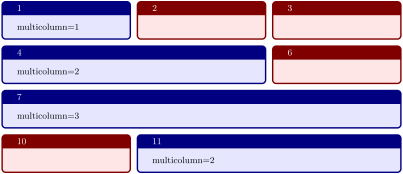
\begin{tcbitemize}[raster equal height=rows,raster columns=3,

  title=\thetcbrasternum,colframe=red!50!black,colback=red!10!white]

\tcbitem[colframe=blue!50!black,colback=blue!10!white,raster multicolumn=1]

  multicolumn=1

\tcbitem

\tcbitem

\tcbitem[colframe=blue!50!black,colback=blue!10!white,raster multicolumn=2]

  multicolumn=2

\tcbitem

\tcbitem[colframe=blue!50!black,colback=blue!10!white,raster multicolumn=3]

  multicolumn=3

\tcbitem

\tcbitem[colframe=blue!50!black,colback=blue!10!white,raster multicolumn=2]

  multicolumn=2

\end{tcbitemize}
/tcb/raster multirow=⟨number⟩(no default, initially unset)New: 2016-02-19
This option has to be set inside the option list of a tcolorbox inside a tcbraster or inside \tcbitem inside tcbitemize. This option not really merges boxes, but simply sizes the current box to fit the space of ⟨number⟩ rows.
/tcb/raster multirow needs /tcb/raster height to be set. How to achieve a similar result for boxes without fixed /tcb/raster height is shown afterwards.
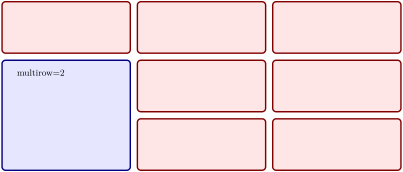
\begin{tcbitemize}[raster rows=3,raster columns=3,raster height=6cm,

  raster every box/.style={colframe=red!50!black,colback=red!10!white}]

\tcbitem

\tcbitem

\tcbitem

\tcbitem[colframe=blue!50!black,colback=blue!10!white,raster multirow=2]

  multirow=2

\tcbitem[raster multicolumn=2,raster multirow=2,blankest]

  \begin{tcbitemize}[raster rows=2,raster columns=2,raster height=\tcbtextheight]

  \tcbitem

  \tcbitem

  \tcbitem

  \tcbitem

  \end{tcbitemize}

\end{tcbitemize}
For rasters without fixed /tcb/raster height, /tcb/raster multirow cannot be used. Note that \tcbtextheight also cannot be used like in the previous example.
But, with combination of /tcb/raster equal height and /tcb/space to, a similar effect can be created:
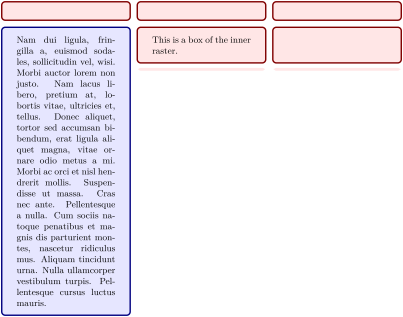
\begin{tcbitemize}[raster columns=3,raster equal height=rows,

  raster every box/.style={colframe=red!50!black,colback=red!10!white}]

\tcbitem

\tcbitem

\tcbitem

\tcbitem[colframe=blue!50!black,colback=blue!10!white]

 \lipsum[2]

\tcbitem[raster multicolumn=2,blankest,space to=\myspace]

  \begin{tcbitemize}[raster columns=2]

  \tcbitem This is a box of the inner raster.

  \tcbitem

  \tcbitem[height=\myspace]

  \tcbitem[height=\myspace]

  \end{tcbitemize}

\end{tcbitemize}
16.6 Rasters inside Rasters
A raster inside a raster cannot be used directly, because a raster can only contain a tcolorbox or something derived from a tcolorbox. So, a raster can be put inside a tcolorbox inside a raster.
Some examples for such constructions can be found at tcboxedraster, /tcb/raster multicolumn, /tcb/raster multirow.
16.6.1 Raster Setup
The intermediating tcolorbox can be made invisible by using /tcb/blankest.

\begin{tcbraster}[raster equal height=rows,

  raster every box/.style={colframe=red!50!black,colback=red!10!white}]

  \begin{tcolorbox}[blankest]

    \begin{tcbraster}[raster columns=1]

      \begin{tcolorbox}One\end{tcolorbox}

      \begin{tcolorbox}Two\end{tcolorbox}

    \end{tcbraster}

  \end{tcolorbox}

  \begin{tcolorbox}raster+tcolorbox+raster\end{tcolorbox}

\end{tcbraster}

\begin{tcbraster}[raster equal height=rows,

  raster every box/.style={colframe=red!50!black,colback=red!10!white}]

  \begin{tcboxedraster}[raster columns=1]{blankest}

    \begin{tcolorbox}One\end{tcolorbox}

    \begin{tcolorbox}Two\end{tcolorbox}

  \end{tcboxedraster}

  \begin{tcolorbox}raster+tcboxedraster\end{tcolorbox}

\end{tcbraster}

\begin{tcbitemize}[raster equal height=rows,

  raster every box/.style={colframe=red!50!black,colback=red!10!white}]

  \tcbitem[blankest]

    \begin{tcbitemize}[raster columns=1]

      \tcbitem One

      \tcbitem Two

    \end{tcbitemize}

  \tcbitem tcbitemize+tcbitem+tcbitemize

\end{tcbitemize}
16.6.2 Placing Spaces
If the heights of boxes inside staggered rasters should be matched, the space has to be distributed accordingly.
For fixed height boxes/rasters using /tcb/raster height, the height of boxes is available by \tcbtextheight. This can be used to size deeper layered boxes/rasters.
For boxes/rasters laid out using /tcb/raster equal height, space can be distributed by /tcb/space to. It can take several compilations until all spaces are distributed correctly.
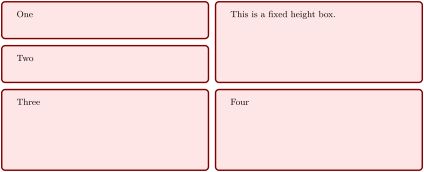
\begin{tcbitemize}[raster rows=2,raster height=6cm,

  raster every box/.style={colframe=red!50!black,colback=red!10!white}]

  \tcbitem[blankest]

    \begin{tcbitemize}[raster columns=1,raster rows=2,raster height=\tcbtextheight]

      \tcbitem One

      \tcbitem Two

    \end{tcbitemize}

  \tcbitem This is a fixed height box.

  \tcbitem Three

  \tcbitem Four

\end{tcbitemize}
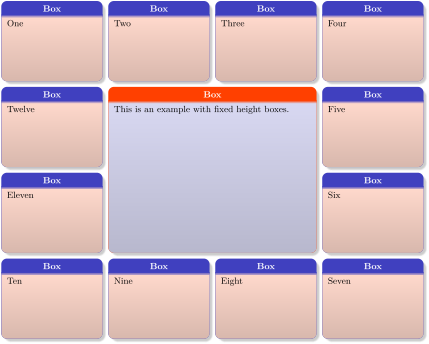
\begin{tcbitemize}[raster columns=4,raster rows=4,raster height=0.8\linewidth,

  raster every box/.style={size=small,beamer,

    colframe=blue!75!yellow,colback=red!75!yellow!20,

    center title,title=Box}]

  \tcbitem One

  \tcbitem Two

  \tcbitem Three

  \tcbitem Four

  \tcbitem[raster multirow=2,blankest]

    \begin{tcbitemize}[raster columns=1,raster rows=2,raster height=\tcbtextheight]

      \tcbitem Twelve

      \tcbitem Eleven

    \end{tcbitemize}

  \tcbitem[raster multirow=2,raster multicolumn=2,

      colframe=red!75!yellow,colback=blue!75!yellow!20]

    This is an example with fixed height boxes.

  \tcbitem[raster multirow=2,blankest]

    \begin{tcbitemize}[raster columns=1,raster rows=2,raster height=\tcbtextheight]

      \tcbitem Five

      \tcbitem Six

    \end{tcbitemize}

  \tcbitem Ten

  \tcbitem Nine

  \tcbitem Eight

  \tcbitem Seven

\end{tcbitemize}
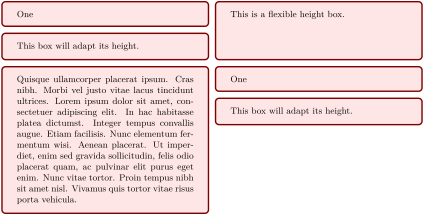
\begin{tcbitemize}[raster equal height=rows,

  raster every box/.style={colframe=red!50!black,colback=red!10!white}]

  \tcbitem[blankest,space to=\myspace]

    \begin{tcbitemize}[raster columns=1]

      \tcbitem One

      \tcbitem[add to natural height=\myspace]

        This box will adapt its height.

    \end{tcbitemize}

  \tcbitem This is a flexible height box.

  \tcbitem \lipsum[4]

  \tcbitem[blankest,space to=\myspace]

    \begin{tcbitemize}[raster columns=1]

      \tcbitem One

      \tcbitem[add to natural height=\myspace]

        This box will adapt its height.

    \end{tcbitemize}

\end{tcbitemize}
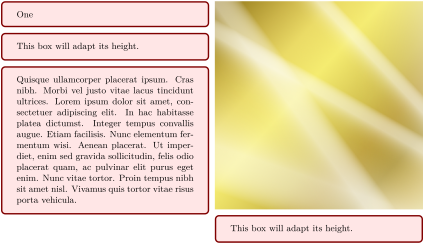
\begin{tcbitemize}[raster equal height=rows,

  raster every box/.style={colframe=red!50!black,colback=red!10!white}]

  \tcbitem[blankest,space to=\myspace]

    \begin{tcbitemize}[raster columns=1]

      \tcbitem One

      \tcbitem[add to natural height=\myspace]

        This box will adapt its height.

      \tcbitem \lipsum[4]

    \end{tcbitemize}

  \tcbitem[blankest,space to=\myspace]

    \begin{tcbitemize}[raster columns=1]

      \tcbitem[blankest]\includegraphics[width=\linewidth]{goldshade.png}

      \tcbitem[add to natural height=\myspace]

        This box will adapt its height.

    \end{tcbitemize}

\end{tcbitemize}