The tcolorbox package
Libraries
20 Library magazine
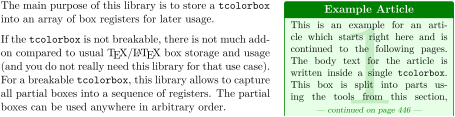
The name of this library indicates magazine in the sense of storage, but also in the sense of a journal where an article often is continued on page x. An example for this kind of application is given throughout this section starting on the right hand side. The creation of this library was motivated by Ulrike Fischer and Steven B. Segletes.
The library is loaded by a package option or inside the preamble by:
This also loads the library breakable, see Section 19.
The box register operations of this library are global. TeX grouping will not clear the registers when leaving the current group. Also be aware that extensive use of large box arrays may eat up TeX’s available memory and registers.
20.1 Creation and Resetting of Box Arrays
\newboxarray{⟨name⟩}New: 2015-07-13
This creates a new box array called ⟨name⟩. There already is a box array available with name default which can be used directly. Note that the creation is a global operation.
\newboxarray{myarray}
\boxarrayreset[⟨name⟩]New: 2015-07-13
Resets the size counter of a box array ⟨name⟩ to zero. If ⟨name⟩ is not provided, default is used as name. Use this or /tcb/reset box array before you apply /tcb/store to box array. Otherwise, all boxes would be appended to the already existing boxes. This command does not clear box registers.
\boxarrayreset            % resets `default'

\boxarrayreset{myarray}   % resets `myarray'
/tcb/reset box array=⟨name⟩(default default, initially unset)New: 2015-07-13
Resets the size counter of a box array ⟨name⟩ to zero. Use this or \boxarrayreset (which does the same) before you apply /tcb/store to box array.
\tcbset{

  reset box array,         % resets `default'

  reset box array=myarray, % resets `myarray'

}
\boxarrayclear[⟨name⟩]New: 2015-07-13
Works like \boxarrayreset to reset the size counter of a box array ⟨name⟩ to zero. Additionally, all allocated box registers of the box array are cleared of their content. Note that the allocated box registers stay allocated. So, this may be useful to clear memory, but not to free registers for other applications. If \consumeboxarray or \consumetcboxarray was used to apply the stored boxes, there is no advantage in using \boxarrayclear.
\boxarrayclear            % clears `default'

\boxarrayclear[myarray]   % clears `myarray'
20.2 Storing Content
/tcb/store to box array=⟨name⟩(default default, initially unset)New: 2015-07-13
Stores a tcolorbox or all parts of a break sequence of a tcolorbox into a box array ⟨name⟩. If no ⟨name⟩ is given, the already existing default box array is used. Otherwise, the box array has to be created beforehand with \newboxarray. Note that the box has to be /tcb/breakable, if the box shall break into several parts. Typically, manual break points are additionally defined by /tcb/break at. Otherwise, the box parts will have a length of about \textheight. For most use cases, a /tcb/reset box array should be applied to reset the box array counter.
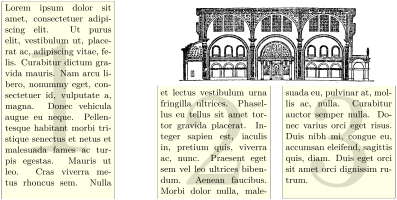
% \usepackage{lipsum}

\begin{tcolorbox}[enhanced jigsaw,size=fbox,width=4cm,

  colback=yellow!10,colframe=yellow!10!black,

  enforce breakable,% use only breakable in the real world!

  break at=7cm/4cm,

  height fixed for=all,

  watermark text=\arabic{tcbbreakpart},

  reset box array,

  store to box array

  ]

\lipsum[1]

\end{tcolorbox}


\useboxarray{1}\hfill

\begin{tabular}[b]{cc}

\multicolumn{2}{c}{\includegraphics[width=7cm]{Basilica_5.png}}\\

\useboxarray{2} & \useboxarray{3}

\end{tabular}
If the first box part should fill the rest of the available space of the current page, you can use \pagegoal-\pagetotal minus some distance for the first element of /tcb/break at. You may want to have some additional distance to the preceding text.
% \usepackage{lipsum}

\begin{tcolorbox}[enhanced,breakable,

  reset box array,

  store to box array,

  break at=\pagegoal-\pagetotal-5mm/0pt,

  height fixed for=first and middle]

\lipsum[1-15]

\end{tcolorbox}%

%

\consumetcboxarray{1}{blanker,before=\par\vfill\noindent}

\begin{tcolorbox}[blanker,width=4cm,

  fontupper=\footnotesize,

  enforce breakable,% use only breakable in the real world!

  break at=4cm,

  height fixed for=all,

  watermark text=\arabic{tcbbreakpart},

  reset box array,

  store to box array

  ]

\includegraphics[width=\linewidth]{Basilica_5.png}\par

\lipsum[1-2]

\end{tcolorbox}


\begin{tcbitemize}[raster columns=3,raster equal height,

  size=small,halign=center,sharp corners,colback=blue!5]

\tcbitem\consumeboxarray{5}

\tcbitem\consumeboxarray{6}

\tcbitem\consumeboxarray{1}

\tcbitem\consumeboxarray{2}

\tcbitem\consumeboxarray{3}

\tcbitem\consumeboxarray{4}

\end{tcbitemize}
/tcb/reset and store to box array=⟨name⟩(style, default default, initially unset)New: 2015-07-13
Combination of /tcb/reset box array and /tcb/store to box array.
/tcb/do not store to box array(style, no default, initially set)New: 2015-07-13
Disables the /tcb/store to box array option, if set before.
\begin{boxarraystore}{⟨name⟩}
⟨environment content⟩
\end{boxarraystore}New: 2015-07-13
Stores the environment content into a box array ⟨name⟩. This corresponds to the standard LaTeX environment lrbox, but the storage operation is global. As long as \boxarrayreset is not used, every new boxarraystore adds a further box to the array.

\boxarrayreset

\begin{boxarraystore}{default}\fbox{Mary}\end{boxarraystore}

\begin{boxarraystore}{default}\fbox{Had}\end{boxarraystore}

\begin{boxarraystore}{default}\fbox{a}\end{boxarraystore}

\begin{boxarraystore}{default}\fbox{Little}\end{boxarraystore}

\begin{boxarraystore}{default}\fbox{Lamb}\end{boxarraystore}

\useboxarray{5}\useboxarray{4}\useboxarray{3}\useboxarray{2}\useboxarray{1}\hfill

\useboxarray{1}\useboxarray{5}
20.3 Retrieving Content
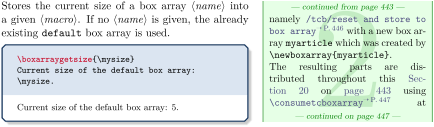
\boxarraygetsize[⟨name⟩]{⟨macro⟩}New: 2015-07-13
\useboxarray[⟨name⟩]{⟨index⟩}New: 2015-07-13
Typesets the box with the given ⟨index⟩ number from the box array ⟨name⟩. If no ⟨name⟩ is given, the already existing default box array is used. It is considered an error, if a not existing box array ⟨name⟩ is used. It is silently ignored, if the ⟨index⟩ is out of range. Note that \useboxarray corresponds to the standard \usebox macro, respectively, \copy.

\boxarraygetsize{\mysize}

\foreach \n in  {1,...,\mysize} { \useboxarray{\n} }
\usetcboxarray[⟨name⟩]{⟨index⟩}{⟨options⟩}New: 2015-07-13
Typesets the box with the given ⟨index⟩ number from the box array ⟨name⟩ using \useboxarray as content of a \tcbox. If no ⟨name⟩ is given, the already existing default box array is used. It is considered an error, if a not existing box array ⟨name⟩ is used. It is silently ignored, if the ⟨index⟩ is out of range. The \tcbox can be customized by tcolorbox ⟨options⟩.

\boxarraygetsize{\mysize}

\foreach \n in  {1,...,\mysize} { \usetcboxarray{\n}{on line,colframe=yellow,

  colback=yellow!10} }
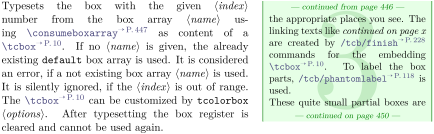
\consumeboxarray[⟨name⟩]{⟨index⟩}New: 2015-07-13
Typesets the box with the given ⟨index⟩ number from the box array ⟨name⟩. If no ⟨name⟩ is given, the already existing default box array is used. It is considered an error, if a not existing box array ⟨name⟩ is used. It is silently ignored, if the ⟨index⟩ is out of range. In contrast to \useboxarray, \consumeboxarray corresponds to the standard \box macro, i. e., after typesetting the box register is cleared and cannot be used again.

\boxarraygetsize{\mysize}

First run: \foreach \n in  {1,...,\mysize} { \consumeboxarray{\n} }

\par

Second run: \foreach \n in  {1,...,\mysize} { \consumeboxarray{\n} }
\consumetcboxarray[⟨name⟩]{⟨index⟩}{⟨options⟩}New: 2015-07-13
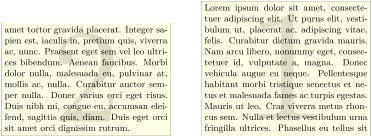
% \usepackage{lipsum}

\begin{tcolorbox}[enhanced jigsaw,size=fbox,width=6cm,

  colback=yellow!10,colframe=yellow!10!black,

  enforce breakable,% use only breakable in the real world!

  break at=5cm,

  watermark text=\arabic{tcbbreakpart},

  reset and store to box array

  ]

\lipsum[1]

\end{tcolorbox}


\consumeboxarray{2} \hfill \consumeboxarray{1} \hfill \consumeboxarray{1}
\boxarraygetbox[⟨name⟩]{⟨macro⟩}{⟨index⟩}New: 2015-07-13
Assigns the box with the given ⟨index⟩ number from the box array ⟨name⟩ to a ⟨macro⟩. If no ⟨name⟩ is given, the already existing default box array is used. It is considered an error, if a not existing box array ⟨name⟩ is used. If the ⟨index⟩ is out of range, the ⟨macro⟩ will be undefined.

\tcbox[size=small,colframe=blue!20,colback=yellow!5,on line,

  reset and store to box array]{Test}


\boxarraygetsize{\mysize} Array size: \mysize


\boxarraygetbox{\mybox}{1}

Box width: \the\wd\mybox

\quad\usebox{\mybox}
\ifboxarrayempty[⟨name⟩]{⟨index⟩}{⟨true⟩}{⟨false⟩}New: 2017-06-27
Tests the box with the given ⟨index⟩ number from the box array ⟨name⟩ for emptiness be empty and executes ⟨true⟩ if it is empty, and ⟨false⟩ otherwise. If no ⟨name⟩ is given, the already existing default box array is used. It is considered an error, if a not existing box array ⟨name⟩ is used.

\tcbox[size=small,colframe=blue!20,colback=yellow!5,on line,

  reset and store to box array]{Test}


\ifboxarrayempty{1}{no Box~1}{Box~1: \useboxarray{1}},

\ifboxarrayempty{2}{no Box~2}{Box~2: \useboxarray{2}}
20.4 Box Dimensions
\boxarraygetwidth[⟨name⟩]{⟨macro⟩}{⟨index⟩}New: 2015-07-13
Assigns the width of the box with the given ⟨index⟩ number from the box array ⟨name⟩ to a ⟨macro⟩. If no ⟨name⟩ is given, the already existing default box array is used. It is considered an error, if a not existing box array ⟨name⟩ is used. If the ⟨index⟩ is out of range, the ⟨macro⟩ will be set to 0pt.

\tcbox[size=small,colframe=blue!20,colback=yellow!5,on line,

  reset and store to box array]{Test}


\begin{tabular}{ll}

\useboxarray{1} & width of box 1: \boxarraygetwidth{\mylen}{1} \mylen\\

\useboxarray{2} & width of box 2: \boxarraygetwidth{\mylen}{2} \mylen

\end{tabular}
\boxarraygetheight[⟨name⟩]{⟨macro⟩}{⟨index⟩}New: 2015-07-13
Assigns the height of the box with the given ⟨index⟩ number from the box array ⟨name⟩ to a ⟨macro⟩. If no ⟨name⟩ is given, the already existing default box array is used. It is considered an error, if a not existing box array ⟨name⟩ is used. If the ⟨index⟩ is out of range, the ⟨macro⟩ will be set to 0pt.

\tcbox[size=small,colframe=blue!20,colback=yellow!5,on line,

  reset and store to box array]{Test}


\begin{tabular}{ll}

\useboxarray{1} & height of box 1: \boxarraygetheight{\mylen}{1} \mylen\\

\useboxarray{2} & height of box 2: \boxarraygetheight{\mylen}{2} \mylen

\end{tabular}
\boxarraygetdepth[⟨name⟩]{⟨macro⟩}{⟨index⟩}New: 2015-07-13
Assigns the depth of the box with the given ⟨index⟩ number from the box array ⟨name⟩ to a ⟨macro⟩. If no ⟨name⟩ is given, the already existing default box array is used. It is considered an error, if a not existing box array ⟨name⟩ is used. If the ⟨index⟩ is out of range, the ⟨macro⟩ will be set to 0pt.

\tcbox[size=small,colframe=blue!20,colback=yellow!5,on line,

  reset and store to box array]{Test}


\begin{tabular}{ll}

\useboxarray{1} & depth of box 1: \boxarraygetdepth{\mylen}{1} \mylen\\

\useboxarray{2} & depth of box 2: \boxarraygetdepth{\mylen}{2} \mylen

\end{tabular}
\boxarraygettotalheight[⟨name⟩]{⟨macro⟩}{⟨index⟩}New: 2015-07-13
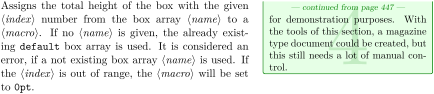

\boxarrayreset

\tcbox[size=small,colframe=blue!20,colback=yellow!5,on line,

  store to box array]{Test}


\begin{tabular}{ll}

\useboxarray{1} & total height of box 1: \boxarraygettotalheight{\mylen}{1} \mylen\\

\useboxarray{2} & total height of box 2: \boxarraygettotalheight{\mylen}{2} \mylen

\end{tabular}
20.5 Leaflet Example
The following full application example can be used to create leaflets. Obviously, the code can be adapted and customized in many ways.
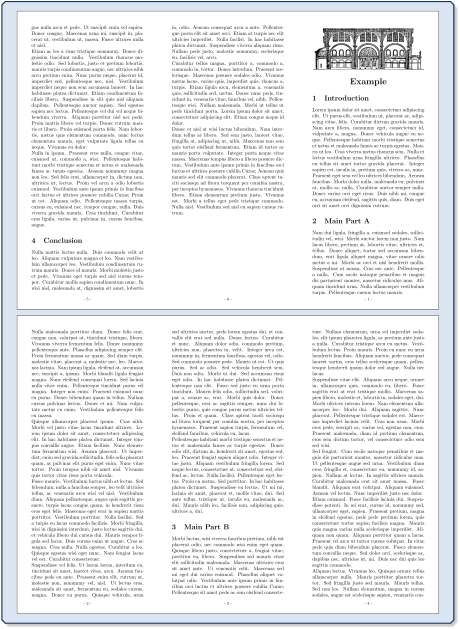
\documentclass[a4paper,landscape]{article}

\usepackage[noheadfoot,margin=0pt]{geometry}

\usepackage[skins,raster,magazine]{tcolorbox}

\usepackage{lipsum}


\newenvironment{leaflet}[1][]{%

  \begin{tcolorbox}[nobeforeafter,empty,colback=white,

    sharp corners,size=minimal,left=10mm,right=10mm,top=10mm,bottom=10mm,

    width=\textwidth/3,

    breakable,

    break at=\textheight,

    height fixed for=all,

    reset box array,

    store to box array,#1]}

  {\end{tcolorbox}%

    \begin{tcbitemize}[raster columns=3,raster equal skip=0pt,blankest]

      \tcbitem\consumeboxarray{5}

      \tcbitem\consumeboxarray{6}

      \tcbitem\consumeboxarray{1}

      \tcbitem\consumeboxarray{2}

      \tcbitem\consumeboxarray{3}

      \tcbitem\consumeboxarray{4}

    \end{tcbitemize}%

  }


\pagestyle{empty}

\begin{document}


\begin{leaflet}[underlay={\node[above=5mm,font=\footnotesize]

    at (frame.south) {- \arabic{tcbbreakpart} -};}]

  \includegraphics[width=\linewidth]{Basilica_5.png}

  \begin{center}

  \bfseries\LARGE Example

  \end{center}


  \section{Introduction}

  \lipsum[1]


  \section{Main Part A}

  \lipsum[2-8]


  \section{Main Part B}

  \lipsum[9-15]


  \section{Conclusion}

  \lipsum[16-18]

\end{leaflet}


\end{document}