The tcolorbox package
Libraries
21 Library poster
The main purpose of this library is to support creation of single page posters with tcolorboxes.
A tcbposter is a tikzpicture where tcolorboxes can be placed in a column oriented manner using \posterbox commands. This base concept is more or less copied from the great baposter package.
The raster library, see Section 16, can produce similar looking results and may be more appropriate depending on the actual project.
The raster library has a flow oriented concept, just like a conventional text flow. The text flow (box flow) is a merely endless ribbon which gets broken into lines (and paragraphs) and the lines are broken into pages. raster shapes the boxes to convenient sizes to fill lines and pages in a pleasant way.
The poster library supports a quite free placement of boxes inside a page. Basically, boxes are placed like nodes are placed inside a tikzpicture. In contrast to raster, this is a single page and not a flow of pages. The poster is divided into columns and rows. There is a more or less gentle force to use the columns (or spans of columns) for positioning and sizing while the row placement is completely optional.
The creation of this library was motivated by Ignasi.
Inside a tikzpicture there should be no embedded tikzpictures. This rule is violated by the poster library. Be aware that there may be some unwanted interactions between the main tikzpicture and the embedded ones inside the tcolorboxes.
The library is loaded by a package option or inside the preamble by:
This also loads the libraries skins, see Section 10, breakable, see Section 19, magazine, see Section 20, and fitting, see Section 22.
21.1 Overview

21.2 Main Poster Environment
\begin{tcbposter}[⟨options⟩]
⟨environment content⟩
\end{tcbposter}New: 2017-07-03¶/tcb/posterset/poster: poster settings like columns, rows, sizes…
/tcb/posterset/coverage and /tcb/posterset/no coverage: settings for a surrounding tcolorbox for background and margins.
/tcb/posterset/boxes: style of the tcolorboxes used for the poster.
/tcb/posterset/fontsize: scaling of used fonts.
This creates a tikzpicture environment with suitable additional settings defined by the given ⟨options⟩. Basically, \posterbox and posterboxenv are used to place tcolorboxes as nodes into the environment, but additional TikZ code can also be used. As ⟨options⟩ all /tcb/posterset/ keys may be applied, namely:
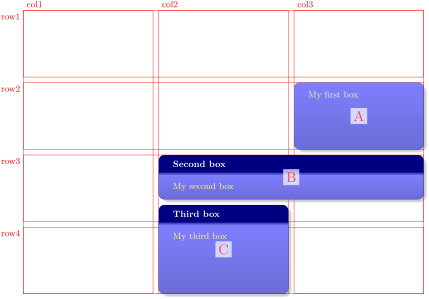
  \begin{tcbposter}[

    poster = {showframe,height=10cm,spacing=2mm},

    boxes  = {beamer,colframe=blue!50!black,colback=blue!50,colupper=yellow!50},

  ]

  \posterbox{name=A,column=3,row=2}{My first box}

  \posterbox[adjusted title=Second box]

            {name=B,column=2,span=2,below=A}{My second box}

  \posterbox[adjusted title=Third box]

            {name=C,column=2,between=B and bottom}{My third box}

  \end{tcbposter}
Inside tcbposter, there are several predefined TikZ nodes. These nodes share a common /tcb/poster/prefix which is TCBPOSTER@ by default. This prefix is used to discriminate the poster nodes from local nodes of any embedded tikzpicture environment. You will never need this prefix using \posterbox and its placement options, but if you want to refer to a predefined node using pure TikZ code. The predefined nodes (shown without prefix) are:
poster: defines the bounding box of the poster (without the coverage).
top: top position plus row spacing
bottom: bottom position minus row spacing
middle: vertical middle position
col1, col2, …: bounding box of column 1, column 2, …
row1, row2, …: bounding box of row 1, row 2, …
Further nodes are defined using the /tcb/posterloc/name option.
Never use a tcbposter inside a tcbposter. But, if you do anyway, use a different /tcb/poster/prefix for the embedded poster or you surely get a total mess.
There are several properties inside a tcbposter which may be useful for advanced code (skip the following on first reading):
\tcbposterwidth: Width of the poster (without margins).
\tcbposterheight: Height of the poster (without margins).
\tcbpostercolspacing: Column distance.
\tcbposterrowspacing: Row distance.
\tcbpostercolumns: Column quantity.
\tcbposterrows: Row quantity.
\tcbpostercolwidth: Width of a column.
\tcbposterrowheight: Height of a row.
21.3 Poster Settings
/tcb/posterset/poster={⟨option list⟩}(style, no default)New: 2017-07-03
This option can be applied inside tcbposter and \tcbposterset to set the given poster ⟨option list⟩, e. g.
\tcbposterset{poster={width=20cm,height=15cm}}
For the ⟨option list⟩, see the following keys.
/tcb/poster/colspacing=⟨length⟩(no default, initially 4mm)New: 2017-07-03
Sets ⟨length⟩ as distance between columns.
/tcb/poster/rowspacing=⟨length⟩(no default, initially 4mm)New: 2017-07-03
Sets ⟨length⟩ as distance between rows.
/tcb/poster/spacing=⟨length⟩(style, no default, initially 4mm)New: 2017-07-03
Sets ⟨length⟩ as distance between columns and rows.
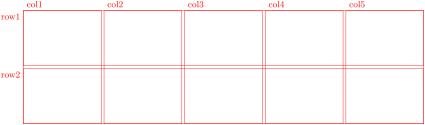
/tcb/poster/showframe=true|false(default true, initially false)New: 2017-07-03
Displays a red auxiliary mesh as optical support during poster creation. Also, every /tcb/posterloc/name is displayed.
/tcb/poster/width=⟨length⟩(no default, initially \linewidth)New: 2017-07-03
Sets ⟨length⟩ as width of the poster. For a typical poster, this has not to be set manually. Especially, if /tcb/posterset/coverage is present, use coverage={width=⟨length⟩} instead to change the overall width.
/tcb/poster/height=⟨length⟩(no default, initially unset)New: 2017-07-03
Sets ⟨length⟩ as height of the poster. For a typical poster, this has not to be set manually, but is set automatically to an appropriate value. If /tcb/posterset/coverage is present, use only one if any option coverage={height=⟨length⟩} or poster={height=⟨length⟩}.
/tcb/poster/prefix=⟨name⟩(no default, initially TCBPOSTER@)New: 2017-07-03
⟨name⟩ is set as prefix for any TikZ node which is generated automatically by the poster library. This encompasses predefined nodes like top, bottom, …, and nodes defined by using /tcb/posterloc/name. Also, see Section 21.2. For a typical poster, this value can stay as it is.
21.4 Coverage
/tcb/posterset/coverage={⟨option list⟩}(style, no default)New: 2017-07-03
For a typical poster, the option /tcb/spread will use the whole page for the poster coverage.
Poster margins can be adapted by /tcb/left, /tcb/right, /tcb/top, /tcb/bottom.
Poster background can be changed by /tcb/colback, /tcb/interior style, /tcb/interior style image, etc.
Do not use /tcb/poster/width and /tcb/poster/height in combination with a coverage. Note that you may use /tcb/width and /tcb/height inside the coverage ⟨option list⟩. Note that this also is not necessary when /tcb/spread is applied.
This option can be applied inside tcbposter and \tcbposterset and it adds an optional coverage for the poster which is a surrounding tcolorbox with the given ⟨option list⟩. Here, margins and background settings for the poster can be given. The coverage has several default tcolorbox settings suitable for the purpose:
enhanced, frame hidden, sharp corners, boxsep=0pt, boxrule=0pt,

top=4mm, bottom=4mm, left=4mm, right=4mm,

toptitle=2mm, bottomtitle=2mm, colback=white
The ⟨option list⟩ can contain any tcolorbox option.
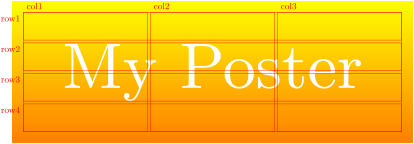
\begin{tcbposter}[

  poster   = {showframe,spacing=1mm},

  coverage = {height=5cm,

              interior style={top color=yellow,bottom color=yellow!50!red},

              watermark text={My Poster},watermark color=white,

             },

]

\end{tcbposter}
/tcb/posterset/no coverage(style, no value, initially set)New: 2017-07-03
Removes the surrounding tcolorbox completely.
21.5 Common Box Settings
/tcb/posterset/boxes={⟨option list⟩}(style, no default)New: 2017-07-03
This option can be applied inside tcbposter and \tcbposterset and it is used to set up the style of the tcolorboxes inside the poster. The ⟨option list⟩ can contain any tcolorbox option, but box size options are not assumed to be useful here, because the size will be determined by the placement options.
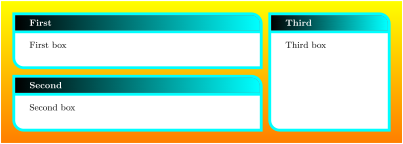
\begin{tcbposter}[

  poster   = {spacing=2mm,columns=3,rows=2},

  coverage = {height=5cm,

              interior style={top color=yellow,bottom color=yellow!50!red},

             },

  boxes    = {sharp corners=downhill,arc=3mm,boxrule=1mm,

              colback=white,colframe=cyan,

              title style={left color=black,right color=cyan},

              fonttitle=\bfseries}

]

  \posterbox[adjusted title=First]{column=1,row=1,span=2}{First box}

  \posterbox[adjusted title=Second]{column=1,row=2,span=2}{Second box}

  \posterbox[adjusted title=Third]{column=3,row=1,rowspan=2}{Third box}

\end{tcbposter}
21.6 Font Scaling
/tcb/posterset/fontsize=⟨length⟩(style, no default, initially unset)New: 2017-07-03
This option can be applied inside tcbposter and \tcbposterset. It uses /tcb/fit basedim and /tcb/fit fontsize macros to redefine \normalsize to ⟨length⟩ and all other standard font size macros like \small and \large accordingly. This needs a freely scalable font family like lmodern to work. If /tcb/posterset/fontsize is not applied, there standard font size macros are not changed in any way.
21.7 Box Placement
\posterbox[⟨options⟩]{⟨placement⟩}{⟨box content⟩}New: 2017-07-03
Inside a tcbposter environment, this places a tcolorbox with additional tcolorbox ⟨options⟩ and the given ⟨box content⟩ at a place determined by ⟨placement⟩. All ⟨placement⟩ options are described in the following. Note that ⟨box content⟩ cannot contain verbatim material, see posterboxenv.
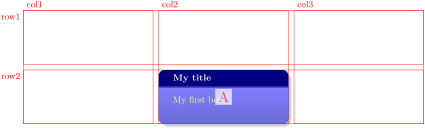
\begin{posterboxenv}[⟨options⟩]{⟨placement⟩}
⟨environment content⟩
\end{posterboxenv}New: 2017-07-03
This is the environment version of \posterbox, i. e., inside a tcbposter environment, this places a tcolorbox with additional tcolorbox ⟨options⟩ and the given ⟨environment content⟩ at a place determined by ⟨placement⟩. In contrast to \posterbox, the ⟨environment content⟩ is allowed to contain verbatim material. Note that the implementation of \posterbox is more efficient than the implementation of posterboxenv.
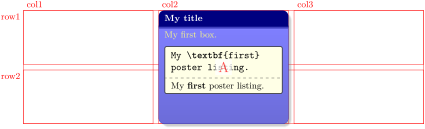
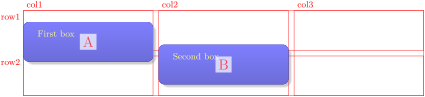
\begin{tcbposter}[

  poster = {showframe,height=4cm,spacing=2mm,rows=2},

  boxes  = {size=small,beamer,

            colframe=blue!50!black,colback=blue!50,colupper=yellow!50},

]

\begin{posterboxenv}[title=My title]{name=A,column=2,between=top and bottom}

  My first box.

  \begin{tcblisting}{size=small,colback=yellow!10}

My \textbf{first}

poster listing.

  \end{tcblisting}

\end{posterboxenv}

\end{tcbposter}
/tcb/posterloc/name=⟨name⟩(no default, initially @)New: 2017-07-03
Sets ⟨name⟩ as reference for the current \posterbox or posterboxenv. A TikZ shape name is constructed automatically as combination of /tcb/poster/prefix and ⟨name⟩.
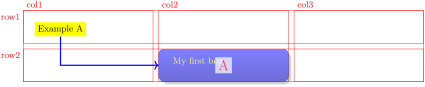
\begin{tcbposter}[

  poster = {showframe,height=2.5cm,spacing=2mm,rows=2},

  boxes  = {beamer,colframe=blue!50!black,colback=blue!50,colupper=yellow!50},

]

\posterbox{name=A,column=2,row=2}{My first box}

\node[below right=4mm,fill=yellow] (X) at (TCBPOSTER@poster.north west) {Example A};

\draw[blue,very thick,->] (X) |- (TCBPOSTER@A);

\end{tcbposter}
/tcb/posterloc/column=⟨number⟩(no default, initially 1)New: 2017-07-03
Places the box at the column denoted by ⟨number⟩. If /tcb/posterloc/span is not 1, the box is aligned to the left side of column ⟨number⟩.
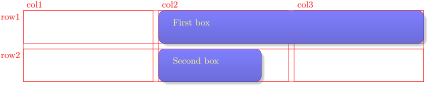
/tcb/posterloc/column*=⟨number⟩(no default, initially unset)New: 2017-07-03
Places the box at the column denoted by ⟨number⟩. If /tcb/posterloc/span is not 1, the box is aligned to the right side of column ⟨number⟩.
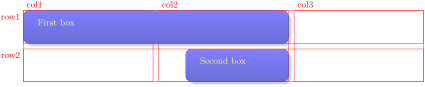
/tcb/posterloc/span=⟨number⟩(no default, initially 1)New: 2017-07-03
Sets the width of the current box to span ⟨number⟩ columns. ⟨number⟩ is also allowed to be a real number like 0.5 or 1.7. See /tcb/posterloc/column and /tcb/posterloc/column* for examples.
/tcb/posterloc/row=⟨number⟩(no default, initially unset)New: 2017-07-03
If this option is applied, the box is placed at the row denoted by ⟨number⟩. Also, the height is set as fixed according to /tcb/posterloc/rowspan.

\begin{tcbposter}[

  poster = {showframe,height=2.5cm,spacing=2mm,rows=2},

  boxes  = {beamer,colframe=blue!50!black,colback=blue!50,colupper=yellow!50},

]

\posterbox{row=1,column=1}{First box}

\posterbox{row=1,column=2,rowspan=2}{Second box}

\posterbox[natural height]{row=1,column=3}{Third box}

\end{tcbposter}
/tcb/posterloc/rowspan=⟨number⟩(no default, initially 1)New: 2017-07-03
Sets the height of the current box to span ⟨number⟩ rows. ⟨number⟩ is also allowed to be a real number like 0.5 or 1.7.
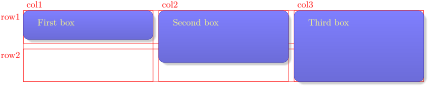
\begin{tcbposter}[

  poster = {showframe,height=2.5cm,spacing=2mm,rows=2},

  boxes  = {beamer,colframe=blue!50!black,colback=blue!50,colupper=yellow!50},

]

\posterbox{row=1,column=1,rowspan=0.9}{First box}

\posterbox{row=1,column=2,rowspan=1.5}{Second box}

\posterbox{row=1,column=3,rowspan=2}{Third box}

\end{tcbposter}
/tcb/posterloc/fixed height(no value, initially 0pt)New: 2017-07-03
Sets the height of the current box span rows as denoted by /tcb/posterloc/rowspan. This can be used, if not /tcb/posterloc/row, but another height placement option is applied.
/tcb/posterloc/below=⟨name⟩(no default, initially top)New: 2017-07-03
The box is placed below another box with the given ⟨name⟩. Also, ⟨name⟩ can be a predefined node, see Section 21.2.
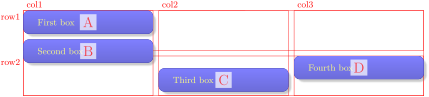
\begin{tcbposter}[

  poster = {showframe,height=3cm,spacing=2mm,rows=2},

  boxes  = {beamer,colframe=blue!50!black,colback=blue!50,colupper=yellow!50},

]

\posterbox{name=A,column=1,below=top}{First box}

\posterbox{name=B,column=1,below=A}{Second box}

\posterbox{name=C,column=2,below=B}{Third box}

\posterbox{name=D,column=3,below=row1}{Fourth box}

\end{tcbposter}
/tcb/posterloc/above=⟨name⟩(no default, initially unset)New: 2017-07-03
The box is placed above another box with the given ⟨name⟩. Also, ⟨name⟩ can be a predefined node, see Section 21.2.
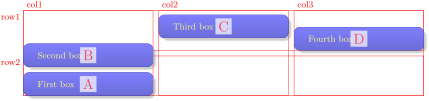
\begin{tcbposter}[

  poster = {showframe,height=3cm,spacing=2mm,rows=2},

  boxes  = {beamer,colframe=blue!50!black,colback=blue!50,colupper=yellow!50},

]

\posterbox{name=A,column=1,above=bottom}{First box}

\posterbox{name=B,column=1,above=A}{Second box}

\posterbox{name=C,column=2,above=B}{Third box}

\posterbox{name=D,column=3,above=row2}{Fourth box}

\end{tcbposter}
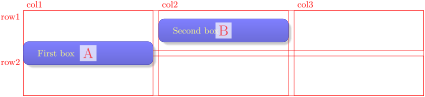
/tcb/posterloc/at=⟨name⟩(no default, initially unset)New: 2017-07-03
The box is placed at the position with the given ⟨name⟩. This is quite likely a predefined node, see Section 21.2.
/tcb/posterloc/between=⟨name1⟩ and ⟨name2⟩(no default, initially unset)New: 2017-07-03
The box is placed below a box ⟨name1⟩ and above another box ⟨name2⟩. Also, ⟨name1⟩ and ⟨name2⟩ can be predefined nodes, see Section 21.2.
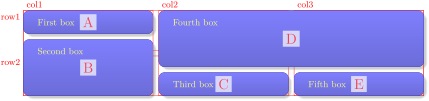
\begin{tcbposter}[

  poster = {showframe,height=3cm,spacing=2mm,rows=2},

  boxes  = {beamer,colframe=blue!50!black,colback=blue!50,colupper=yellow!50},

]

\posterbox{name=A,column=1,below=top}{First box}

\posterbox{name=B,column=1,between=A and bottom}{Second box}

\posterbox{name=C,column=2,above=bottom}{Third box}

\posterbox{name=D,column=2,between=top and C,span=2}{Fourth box}

\posterbox{name=E,column=3,between=D and bottom}{Fifth box}

\end{tcbposter}
/tcb/posterloc/sequence=⟨sequence⟩(no default, initially unset)New: 2017-07-03
The box is broken into partial boxes. These partial boxes are placed following the given ⟨sequence⟩ of placements. The feasible syntax for the ⟨sequence⟩ is: ⟨column a⟩ between ⟨name a1⟩ and ⟨name a2⟩ then
⟨column b⟩ between ⟨name b1⟩ and ⟨name b2⟩ then
⟨column c⟩ between ⟨name c1⟩ and ⟨name c2⟩ then… Obviously, this places the first part box at ⟨column a⟩ between ⟨name a2⟩ and ⟨name a2⟩. The second box part is placed at ⟨column b⟩ between ⟨name b2⟩ and ⟨name b2⟩, and so on.
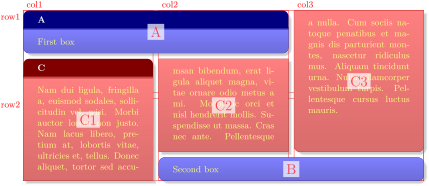
\begin{tcbposter}[

  poster = {showframe,height=6cm,spacing=2mm,rows=2},

  boxes  = {beamer,colframe=blue!50!black,colback=blue!50,colupper=yellow!50},

]

\posterbox[adjusted title=A]{name=A,column=1,below=top,span=2}{First box}

\posterbox{name=B,column=2,above=bottom,span=2}{Second box}

\posterbox[adjusted title=C,colframe=red!50!black,colback=red!50]{

  name=C, sequence=1 between A and bottom then

                   2 between A and B then

                   3 between top and B

  }{\lipsum[2]}

\end{tcbposter}
/tcb/placeholder(style, no value)New: 2017-07-03
If the box content of a /tcb/posterloc/sequence is too short to fill all reserved box parts, the empty boxes are drawn with the /tcb/placeholder style. This style can be redefined, e. g. to /tcb/blankest, if nothing should be drawn for empty boxes.
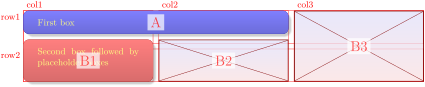
\begin{tcbposter}[

  poster = {showframe,height=2.5cm,spacing=2mm,rows=2},

  boxes  = {beamer,colframe=blue!50!black,colback=blue!50,colupper=yellow!50},

]

\posterbox{name=A,column=1,below=top,span=2}{First box}

\posterbox[colframe=red!50!black,colback=red!50]{

  name=B, sequence=1 between A and bottom then

                   2 between A and bottom then

                   3 between top and bottom

  }{Second box followed by placeholder boxes}

\end{tcbposter}
/tcb/posterloc/xshift=⟨length⟩(no default, initially 0pt)New: 2017-07-03
Horizontal shift of a box by ⟨length⟩.
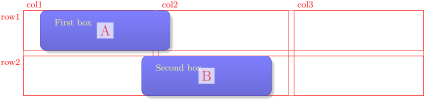
/tcb/posterloc/yshift=⟨length⟩(no default, initially 0pt)New: 2017-07-03
Vertical shift of a box by ⟨length⟩.