The tcolorbox package
Libraries
25 Library external
The library is loaded by a package option or inside the preamble by:
The purpose of this library is to support externalization of document snippets like graphics or boxes which can be compiled stand-alone. These snippets are written to external files, compiled and the resulting pdf files are included to the main document as images. The whole procedure saves compilation time, if such a snippet is costly to compile but needs to compile just once or very seldom.
There are very good alternatives to this library. One should consider the standalone package, the memoize package, the robust-externalize package, or the TikZ externalization library (currently unmaintained) instead. The external library is something in between and can be seen as poor man variant of the TikZ externalization library.
The main differences between TikZ externalization and external are:
TikZ external compiles the whole original document in a sophisticated way while external uses only the preamble or a part of the preamble of the original document.
TikZ external can automatically externalize all tikzpicture environments while external externalizes marked snippets only.
Code snippets to be externalized by external are not restricted to tikzpicture environments. But these snippets have to be stand-alone without dependencies to the rest of the document.
Why should somebody use external instead of the more powerful TikZ external? One reason could be compilation speed, but the main reason for creating the library at all was that TikZ external tends to choke on complicated documents where the sophisticated mechanism stumbles. Since external does not use the original document body for compilation, this cannot happen.
Source snippets are compiled, if their md5 checksum has changed. They are not compiled automatically, if option settings are changed or anything outside the snippet is changed. Use /tcb/external/force remake to force compilation in this case or simply delete the externalized pdf oder md5 files.
To use the externalization options, the compiler has to be called with the -shell-escape permission to authorize potentially dangerous system calls. Be warned that this is a security risk.
25.1 Preparation of a Document for Externalization
The preamble of the main document has to contain the \tcbEXTERNALIZE command. Without this command, no externalization operation will be executed.
\tcbEXTERNALIZENew: 2015-03-11
It is mandatory for externalization that this command is used once in the preamble of the main document. Every setting before \tcbEXTERNALIZE will also be used for compiling an external snippet. Every setting after \tcbEXTERNALIZE will be ignored for compiling an external snippet. Place this command right before \begin{document}, if you are not absolutely sure about another place.
The main document has to look like the following:
\documentclass[a4paper]{book}%   for example

\usepackage{...}%                anything

% ...

% Typically, all or the very most settings for the document.


\tcbEXTERNALIZE% Typically, just before \begin{document}


% Additional settings which are ABSOLUTELY irrelevant for the

% stand-alone snippets.

%

\begin{document}

  % The document.

  % This also contains the marked snippets for externalization.

\end{document}
During compilation, a /tcb/external/runner file is dynamically created (several times). This is the actual main file for compiling an externalized snippet.
/tcb/external/runner=⟨file name⟩(no default, initially \jobname_run.tex)New: 2015-03-11
Sets the ⟨file name⟩ for dynamically created runner file. This is the actual main file for a document snippet. Typically, the initial setting is not needed to be changed.
/tcb/external/prefix=⟨text⟩(no default, initially external/)New: 2015-03-11
The ⟨text⟩ is prefixed to any /tcb/external/name for an externalization snippet. The initial setting implies saving all snippets into an external/ subdirectory. Depending on the operation system, the subdirectory may have to be created manually once.
/tcb/external/externalize=true|false(default true, initially true)New: 2015-03-11
If set to true, the marked snippets are compiled if necessary. If set to false, the marked snippets are not compiled but included as text. /tcb/external/externalize can only be used after \tcbEXTERNALIZE.
/tcb/external/force remake=true|false(default true, initially false)New: 2015-03-11
If set to true, the marked snippets are always compiled. If set to true, the marked snippets are compiled only if necessary. The necessity is given, if a compiled pdf file is missing or the md5 checksum of the source snippet has changed.
/tcb/external/\tcbexclamation(style)New: 2015-03-11Updated: 2017-02-24
Shortcut for setting /tcb/external/force remake to true.
/tcb/external/-(style)New: 2015-06-12Updated: 2017-02-24
Shortcut for setting /tcb/external/externalize to false.
25.2 Marking Externalization Snippets
\begin{tcbexternal}[⟨options⟩]{⟨name⟩}
⟨environment content⟩
\end{tcbexternal}New: 2015-03-11
Marks the environment content as a snippet for externalization. Typically, the content is a tikzpicture or something similar. It is important to note that the snippet should not have any dependencies with the rest of the document, e. g. referencing counters or setting counters is not possible. The ⟨name⟩ is automatically prefixed with /tcb/external/prefix. In combination, this has to be a unique file name. It is advised to not use spaces or umlauts for the name. The ⟨options⟩ are keys from the /tcb/external/ key tree.

\begin{tcbexternal}{example_tikzpicture}

  \begin{tikzpicture}

    \path[fill=yellow!50!white] (0,0) circle (11mm);

    \path[fill=white] (0,0) circle (9mm);

    \foreach \w/\c in {90/red,210/green,330/blue}

      {\path[shading=ball,ball color=\c] (\w:1cm) circle (7mm);}

  \end{tikzpicture}

\end{tcbexternal}
If a tcolorbox is externalized, one should use /tcb/nobeforeafter for the box. Indention and distances to the text before and after have to be given separately outside the tcbexternal environment.

\noindent%

\begin{tcbexternal}[minipage]{example_tcolorbox}

  \begin{tcolorbox}[nobeforeafter,enhanced,

      fonttitle=\bfseries,title=Externalized Box,

      colframe=red!50!black,drop fuzzy shadow,

      interior style={fill overzoom image=goldshade.png}]

    This complete tcolorbox is externalized. One cannot use numbered

    boxes here. Note the \texttt{minipage} option which tells the

    current line width to the external snippet.

  \end{tcolorbox}

\end{tcbexternal}

\begin{tcolorbox}[nobeforeafter,enhanced,

      fonttitle=\bfseries,title=Externalized Box,

      colframe=blue!50!black,

      interior style={fill overzoom image=blueshade.png}]

  \begin{tcbexternal}[minipage]{example_tcolorbox2}

    \color{white}%

    The interior of the tcolorbox is externalized.

    One can use numbered boxes without problems.

    Note that the text color has to be set for the text manually

    since it is converted into an image.

  \end{tcbexternal}

\end{tcolorbox}

\begin{tcbexternal}[minipage]{example_tabularx}

  \newcolumntype{Y}{>{\raggedleft\arraybackslash}X}%

  \begin{tabularx}{\linewidth}{|l||Y|Y|Y|Y||Y|}\hline

    Group & One & Two & Three & Four & Sum\\\hline\hline

    Red & 1000.00 & 2000.00 & 3000.00 & 4000.00 & 10000.00\\\hline

    Green & 2000.00 & 3000.00 & 4000.00 & 5000.00 & 14000.00\\\hline

    Blue & 3000.00 & 4000.00 & 5000.00 & 6000.00 & 18000.00\\\hline\hline

    Sum & 6000.00 & 9000.00 & 12000.00 & 15000.00 & 42000.00\\\hline

  \end{tabularx}

\end{tcbexternal}
/tcb/external/name=⟨name⟩(no default, initially unnamed)New: 2015-03-11
The ⟨name⟩ is automatically prefixed with /tcb/external/prefix. In combination, this has to be a unique file name for externalization. Typically, this key is not used directly but is set indirectly as mandatory parameter, see tcbexternal.
\begin{extcolorbox}[⟨options⟩]{⟨name⟩}[⟨tcolorbox options⟩]
⟨environment content⟩
\end{extcolorbox}New: 2015-03-11
This is an externalized version of tcolorbox created using
\newtcbexternalizetcolorbox:
\newtcbexternalizetcolorbox{extcolorbox}{tcolorbox}{}{}
⟨options⟩ and ⟨name⟩ are given to the underlying tcbexternal environment, while ⟨tcolorbox options⟩ are given to tcolorbox.
Note that you should not redefine /tcb/before and /tcb/after inside the ⟨tcolorbox options⟩, since the externalized version would not be identical to the non-externalized otherwise.

\begin{extcolorbox}[minipage]{example_extcolorbox}

  [ enhanced,colframe=red!50!black,colback=yellow!10,

    fonttitle=\bfseries,drop fuzzy shadow,

    title=My external box ]


  This box is completely externalized.


  \begin{tcolorbox}[colframe=blue,colback=blue!5,before skip=6pt]

  Inner box.

  \end{tcolorbox}

\end{extcolorbox}
Never externalize numbered boxes.
Never externalize boxes which contain references to other things, e. g. using \ref or \cite.
Never externalize breakable boxes.
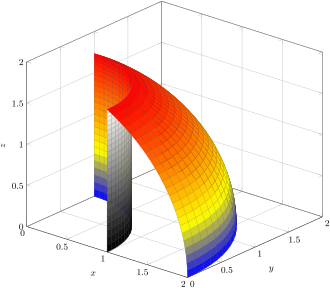
\begin{extikzpicture}[⟨options⟩]{⟨name⟩}[⟨tikz options⟩]
⟨environment content⟩
\end{extikzpicture}New: 2015-03-11
This is an externalized version of tikzpicture created using
\newtcbexternalizeenvironment:
\newtcbexternalizeenvironment{extikzpicture}{tikzpicture}{}{}{}
⟨options⟩ and ⟨name⟩ are given to the underlying tcbexternal environment, while ⟨tikz options⟩ are given to tikzpicture.
\begin{center}

\begin{extikzpicture}[

  preamble={\usepackage{pgfplots}},  % add package for external graph

  input source on error=false,       % do not load source on error

]{example_pgfplots}

  \pgfplotsset{width=12cm}

  \begin{axis}[3d box=background,grid=major,

    xlabel=$x$, ylabel=$y$, zlabel=$z$, view/h=40,

    mesh/interior colormap name=hot,

    colormap/blackwhite,

    z buffer=sort,domain=0:90,y domain=0:60,

    zmin=0,zmax=2,z post scale=1.2,

    ]

  \addplot3[surf,mesh/interior colormap name=blackwhite,

    colormap/hot,] ( {cos(x)},{sin(x)}, {2*sin(y)} );

  \addplot3[surf] ( {2*cos(x)*cos(y)},{2*sin(x)*cos(y)}, {2*sin(y)} );

  \end{axis}

\end{extikzpicture}

\end{center}
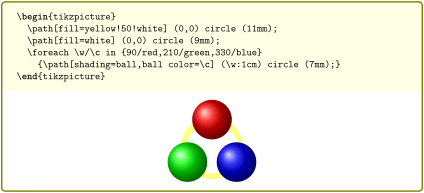
/tcb/externalize listing=⟨name⟩(style, no default)New: 2015-03-11
The text content of a tcblisting is externalized with the given ⟨name⟩. Note that the listing part is not externalized.
\begin{tcblisting}{externalize listing=example_listing,

  bicolor,colback=yellow!10,colframe=yellow!50!black,

  colbacklower=white,center lower}

\begin{tikzpicture}

  \path[fill=yellow!50!white] (0,0) circle (11mm);

  \path[fill=white] (0,0) circle (9mm);

  \foreach \w/\c in {90/red,210/green,330/blue}

    {\path[shading=ball,ball color=\c] (\w:1cm) circle (7mm);}

\end{tikzpicture}

\end{tcblisting}
/tcb/externalize listing\tcbexclamation=⟨name⟩(style, no default)New: 2015-03-11
Combination of /tcb/externalize listing and /tcb/external/force remake.
/tcb/externalize example=⟨name⟩(style, no default)New: 2015-03-11
The text content of a dispExample* is externalized with the given ⟨name⟩. Note that the listing part is not externalized.

\begin{dispExample*}{sidebyside,externalize example=example_example}

\tikz\path[shading=ball,

  ball color=red] circle (7mm);

\end{dispExample*}
/tcb/externalize example\tcbexclamation=⟨name⟩(style, no default)New: 2015-03-11
Combination of /tcb/externalize example and /tcb/external/force remake.
25.3 Customization
/tcb/external/safety=⟨length⟩(no default, initially 2mm)New: 2015-03-11
The snippet box is surrounded with a safety border with a thickness of ⟨length⟩. This border is automatically trimmed during picture inclusion. The reason for this mechanism is to catch box content which extrudes over the bounding box. For example, shadows of a tcolorbox are painted outside the bounding box and would be lost otherwise.
/tcb/external/environment=⟨env⟩(no default, initially unset)New: 2015-03-11
Surrounds the exported snippet text with an environment ⟨env⟩ without parameters. Note that this option is ignored for /tcb/externalize listing.
/tcb/external/environment with percent=true|false(default true, initially true)New: 2015-05-05
If set to true, the \begin and \end code of /tcb/external/environment is appended with a percent sign. For verbatim environments, this option typically has to be set to false.
/tcb/external/minipage=⟨length⟩(default \linewidth, initially unset)New: 2015-03-11
Surrounds the exported snippet text with a minipage. The optional ⟨length⟩ parameter sets the width of the minipage. Note that the default width is the current line width of the main document. See tcbexternal for examples. Note that this option is ignored for /tcb/externalize listing.
/tcb/external/plain(no value, initially set)New: 2015-03-11
Removes any text which was set to surround the snippet. This removes the setting of /tcb/external/minipage, but is independent of /tcb/external/safety.
/tcb/external/compiler=⟨text⟩(no default, initially pdflatex)New: 2015-03-11
Sets the name of the compiler for the snippets.
/tcb/external/runs=⟨number⟩(no default, initially 1)New: 2015-03-11
Sets the number of compiler runs for the snippet.

\begin{tcbexternal}[minipage,runs=2]{example_raster}

  \begin{tcbitemize}[raster equal height,

      size=small,colframe=red!50!black,colback=red!10!white]

    \tcbitem One

    \tcbitem \Huge Two

    \tcbitem Three

    \tcbitem Four

  \end{tcbitemize}

\end{tcbexternal}
/tcb/external/input source on error=true|false(default true, initially true)New: 2015-03-11
If set to true, the source code of the snippet is loaded instead of the failed pdf picture. Typically, this will lead to an error stop at the faulty place of the source and such helps detecting the cause. If the source input compiles without error, the document setup may be incorrect, see Section 25.1. Maybe, the external/ subdirectory has to be created manually in this case, see /tcb/external/prefix. If the option is set to false, the compilation stops immediately on an error. The log file of the external snippet has to be consulted for error messages in this case.
/tcb/external/preclass=⟨code⟩(no default, initially unset)New: 2015-05-05
The given ⟨code⟩ is added before the snippet document. Typically, this means before \documentclass. This is not used for compilation of the main document.
/tcb/external/PassOptionsToPackage={⟨options⟩}{⟨package⟩}(no default, initially unset)New: 2015-05-05
The given ⟨options⟩ are passed to the given ⟨package⟩ for the snippet document. This is a shortcut for using /tcb/external/preclass with \PassOptionsToPackage. This not used for compilation of the main document.
/tcb/external/PassOptionsToClass={⟨options⟩}{⟨class⟩}(no default, initially unset)New: 2015-05-05
The given ⟨options⟩ are passed to the given ⟨class⟩ for the snippet document. This is a shortcut for using /tcb/external/preclass with \PassOptionsToClass. This not used for compilation of the main document.
/tcb/external/clear preclass(no value)New: 2015-05-05
Removes all additional /tcb/external/preclass settings.
/tcb/external/preamble=⟨code⟩(no default, initially unset)New: 2015-03-11
The given ⟨code⟩ is added to the preamble of the snippet document. This is not used for compilation of the main document.
/tcb/external/clear preamble(no value)New: 2015-03-16
Removes all additional /tcb/external/preamble settings.
\tcbifexternal{⟨true⟩}{⟨false⟩}New: 2015-03-11
Expands to ⟨true⟩, if executed during snippet compilation, and to ⟨false⟩, if executed during main document compilation. This can be used before \tcbEXTERNALIZE to give different setting to snippet and main document.
\tcbifexternal{

  \usepackage{onlyforexternal}

}{

  \usepackage{onlyformain}

}
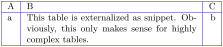
\newtcbexternalizeenvironment{⟨newenv⟩}{⟨env⟩}{⟨options⟩}{⟨begin⟩}{⟨end⟩}New: 2015-03-11
Creates a new environment ⟨newenv⟩ which is based on tcbexternal. This environment takes at least one optional parameter and one mandatory parameter. These two parameters are passed to tcbexternal. Further, the given ⟨options⟩ are always added to the option list of tcbexternal. The environment content is externalized and the external snippet is surrounded by an environment ⟨env⟩. All further parameters of ⟨newenv⟩ are given to ⟨env⟩ as parameters. The included image is prepended by ⟨begin⟩ and appended by ⟨end⟩. extikzpicture is an example application for \newtcbexternalizeenvironment.
\newtcbexternalizeenvironment{extabular}{tabular}{}{\par\centering}{\par}


\begin{extabular}{example_tabular}{|l|p{6cm}|r|}\hline

A & B & C\\\hline

a & This table is externalized as snippet. Obviously,

  this only makes sense for highly complex tables.

& b\\\hline

\end{extabular}
\renewtcbexternalizeenvironment{⟨newenv⟩}{⟨env⟩}{⟨options⟩}{⟨begin⟩}{⟨end⟩}New: 2015-03-11
Identical to \newtcbexternalizeenvironment, but the environment ⟨newenv⟩ is created by \renewenvironment instead of \newenvironment.
\newtcbexternalizetcolorbox{⟨newenv⟩}{⟨env⟩}{⟨options⟩}{⟨begin end options⟩}New: 2015-03-11
Creates a new environment ⟨newenv⟩ which is based on tcbexternal. This environment takes at least one optional parameter and one mandatory parameter. These two parameters are passed to tcbexternal. Further, the given ⟨options⟩ are always added to the option list of tcbexternal. The environment content is externalized and the external snippet is surrounded by an environment ⟨env⟩. All further parameters of ⟨newenv⟩ are given to ⟨env⟩ as parameters. In contrast to \newtcbexternalizeenvironment, the environment ⟨env⟩ is intended to be based on tcolorbox or tcblisting. The ⟨begin end options⟩ are options for settings the space before and after the included image using /tcb/before, /tcb/before skip, /tcb/after, or /tcb/after skip.
Use the exact identical values for /tcb/before and /tcb/after inside ⟨begin end options⟩ as they where used for definition of ⟨env⟩! Otherwise, externalized and non-externalized version will have different spacings.
extcolorbox is an example application for \newtcbexternalizetcolorbox.
\newtcblisting{myownlisting}[2][]{

  enhanced,colback=red!5!white,colframe=red!75!black,fonttitle=\bfseries,

  colbacktitle=red!50!yellow,before skip=6pt,after skip=6pt,

  title={#2},#1}


\newtcbexternalizetcolorbox{exmyownlisting}{myownlisting}%

  {minipage,environment with percent=false}%

  {before skip=6pt,after skip=6pt}% same values as for mylisting

\begin{exmyownlisting}{example_mylisting}% <- name for the external file

  {My externalized example box}

This is my \LaTeX\ box.

\end{exmyownlisting}
\renewtcbexternalizetcolorbox{⟨newenv⟩}{⟨env⟩}{⟨options⟩}{⟨begin end options⟩}New: 2015-03-11
Identical to \newtcbexternalizetcolorbox, but the environment ⟨newenv⟩ is created by \renewenvironment instead of \newenvironment.
\tcbiffileprocess{⟨condition⟩}{⟨source⟩}{⟨md5-file⟩}{⟨target⟩}{⟨true⟩}{⟨false⟩}New: 2016-07-14
if ⟨condition⟩ equals 0, ⟨true⟩ is executed.
if ⟨condition⟩ equals 1:
If the current and stored MD5 digests were different, ⟨true⟩ is executed.
Otherwise, if the ⟨target⟩ file is not existing, ⟨true⟩ is executed.
Otherwise, if the ⟨target⟩ file is older than the ⟨md5-file⟩, ⟨true⟩ is executed.
Otherwise, ⟨false⟩ is executed.if ⟨condition⟩ equals 2, ⟨false⟩ is executed.
This is a low-level macro which is internally used. The MD5 digest of a ⟨source⟩ file is compared with a stored MD5 digest from an auxiliary ⟨md5-file⟩. If they are not equal, the auxiliary ⟨md5-file⟩ is updated to store the current MD5 digest. Further,
The intended processing purpose of the ⟨true⟩ code is to produce a ⟨target⟩ file from the given ⟨source⟩ file.
25.4 Troubleshooting and FAQ
I use the default settings, but the external subdirectory is not created.
Depending on operating system and compiler, an external subdirectory is automatically created or not. If not, create such a directory manually or add the following to your document:\ExplSyntaxOn
\sys_shell_now:n { mkdir~external }
\ExplSyntaxOffor
\ExplSyntaxOn

\sys_shell_now:n { mkdir~-p~external }

\ExplSyntaxOff
If the combination of /tcb/external/prefix and chosen snippet name points to another subdirectory than external, this has to be adapted.
I use the minted package and I get a cache directory for every externalized snippet.
To avoid this problem, there are several ways.If you do not need minted inside the snippet code, you may use \usepackage{minted} after \tcbEXTERNALIZE or use \tcbifexternal to switch minted off for the external code. If minted is already included by another package, add the following to your preamble:
If minted is needed for the snippet code, caching can be switched off by adding the following to your preamble:
Alternatively, the cachedir option of minted may be used to redirect the cache.