The tcolorbox package
Libraries
23 Library hooks
The library is loaded by a package option or inside the preamble by:
For the skin related options, the library skins has to be loaded separately.
23.1 Concept of Hooks
A hook is a placeholder in some LaTeX code where additional code can be added. For example, the LaTeX macro \AtBeginDocument adds code to a hook which is placed at the beginning of every document.
Several option keys of tcolorbox allow providing some code which is added to specific places of a colored box. For example, /tcb/before upper places code before the content of the upper part. A following usage of this key overwrites any prior settings.
The library hooks extends /tcb/before upper and several more existing keys to “hookable” versions, e. g. /tcb/before upper app and /tcb/before upper pre. The “hookable” keys don’t overwrite prior settings but either append or prepend the newly given code to the existing code.
The general naming convention (with some small exceptions) is:
⟨option key⟩ app: works like ⟨option key⟩ but appends its code to the existing code.
⟨option key⟩ pre: works like ⟨option key⟩ but prepends its code to the existing code.
If the original ⟨option key⟩ is used (again), all code will be overwritten. Therefore, the order of the option key usage is crucial.
In particular, if the original ⟨option key⟩ is stackable by default, usually there is already an accompanying “no ⟨option key⟩” option to clear the existing code. Thus this library only adds the “⟨option key⟩ pre” variant.
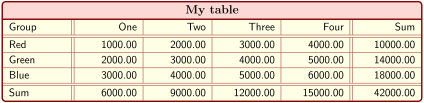
% \usepackage{array,tabularx}

\newcolumntype{Y}{>{\raggedleft\arraybackslash}X}% see tabularx

\tcbset{enhanced,fonttitle=\bfseries\large,fontupper=\normalsize\sffamily,

  colback=yellow!10!white,colframe=red!50!black,colbacktitle=Salmon!30!white,

  coltitle=black,center title,

  tabularx={X||Y|Y|Y|Y||Y},% this sets `before upper' and `after upper'

  before upper app={Group & One & Two & Three & Four & Sum\\\hline\hline}  }


\begin{tcolorbox}[title=My table]

Red   & 1000.00 & 2000.00 &  3000.00 &  4000.00 & 10000.00\\\hline

Green & 2000.00 & 3000.00 &  4000.00 &  5000.00 & 14000.00\\\hline

Blue  & 3000.00 & 4000.00 &  5000.00 &  6000.00 & 18000.00\\\hline\hline

Sum   & 6000.00 & 9000.00 & 12000.00 & 15000.00 & 42000.00

\end{tcolorbox}
23.2 Box Content Additions
The following option keys extend the options given in Section 4.11.
/tcb/before title app=⟨code⟩(no default)
Appends the given ⟨code⟩ to /tcb/before title after the color and font settings and before the content of the title.
/tcb/before title pre=⟨code⟩(no default)
Prepends the given ⟨code⟩ to /tcb/before title after the color and font settings and before the content of the title.
/tcb/after title app=⟨code⟩(no default)
Appends the given ⟨code⟩ to /tcb/after title after the content of the title.
/tcb/after title pre=⟨code⟩(no default)
Prepends the given ⟨code⟩ to /tcb/after title after the content of the title.
/tcb/before upper app=⟨code⟩(no default)
Appends the given ⟨code⟩ to /tcb/before upper or /tcb/before upper* after the color and font settings and before the content of the upper part.
/tcb/before upper pre=⟨code⟩(no default)
Prepends the given ⟨code⟩ to /tcb/before upper or /tcb/before upper* after the color and font settings and before the content of the upper part.
/tcb/after upper app=⟨code⟩(no default)
Appends the given ⟨code⟩ to /tcb/after upper or /tcb/after upper* after the content of the upper part.
/tcb/after upper pre=⟨code⟩(no default)
Prepends the given ⟨code⟩ to /tcb/after upper or /tcb/after upper* after the content of the upper part.
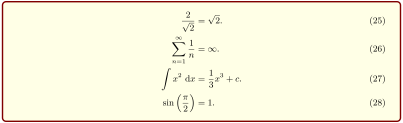
% \tcbuselibrary{theorems}


\begin{tcolorbox}[

  ams align,%  this sets `before upper*' and `after upper*'

  colback=yellow!10!white,colframe=red!50!black,

  before upper app={\frac{2}{\sqrt{2}}&=\sqrt{2}.\\},

  after upper pre={\\\sin\left(\frac{\pi}{2}\right)&=1.},

]

  \sum\limits_{n=1}^{\infty} \frac{1}{n} &= \infty.\\

  \int x^2 ~\text{d}x &= \frac13 x^3 + c.

\end{tcolorbox}
/tcb/before lower app=⟨code⟩(no default)
Appends the given ⟨code⟩ to /tcb/before lower or /tcb/before lower* after the color and font settings and before the content of the lower part.
/tcb/before lower pre=⟨code⟩(no default)
Prepends the given ⟨code⟩ to /tcb/before lower or /tcb/before lower* after the color and font settings and before the content of the lower part.
/tcb/after lower app=⟨code⟩(no default)
Appends the given ⟨code⟩ to /tcb/after lower or /tcb/after lower* after the content of the lower part.
/tcb/after lower pre=⟨code⟩(no default)
Prepends the given ⟨code⟩ to /tcb/after lower or /tcb/after lower* after the content of the lower part.
/tcb/environment title app=⟨name⟩(style)New: 2023-11-13
/tcb/environment title args app={⟨name⟩}{⟨code⟩}(style)New: 2023-11-13
This shortcut style sets /tcb/before title app to \begin{⟨name⟩} and /tcb/after title pre to \end{⟨name⟩}, i. e., the title text is enclosed by the environment ⟨name⟩. The second variant also places ⟨code⟩ after \begin{⟨name⟩}. Note that you may need additional brackets around ⟨code⟩, if ⟨code⟩ contains some parameter(s) for the environment ⟨name⟩.
/tcb/environment title pre=⟨name⟩(style)New: 2023-11-13
/tcb/environment title args pre={⟨name⟩}{⟨code⟩}(style)New: 2023-11-13
This shortcut style sets /tcb/before title pre to \begin{⟨name⟩} and /tcb/after title app to \end{⟨name⟩}, i. e., the title text is enclosed by the environment ⟨name⟩. The second variant also places ⟨code⟩ after \begin{⟨name⟩}. Note that you may need additional brackets around ⟨code⟩, if ⟨code⟩ contains some parameter(s) for the environment ⟨name⟩.
/tcb/environment upper app=⟨name⟩(style)New: 2023-11-13
/tcb/environment upper args app={⟨name⟩}{⟨code⟩}(style)New: 2023-11-13
This shortcut style sets /tcb/before upper app to \begin{⟨name⟩} and /tcb/after upper pre to \end{⟨name⟩}, i. e., the upper part is enclosed by the environment ⟨name⟩. The second variant also places ⟨code⟩ after \begin{⟨name⟩}. Note that you may need additional brackets around ⟨code⟩, if ⟨code⟩ contains some parameter(s) for the environment ⟨name⟩.
/tcb/environment upper pre=⟨name⟩(style)New: 2023-11-13
/tcb/environment upper args pre={⟨name⟩}{⟨code⟩}(style)New: 2023-11-13
This shortcut style sets /tcb/before upper pre to \begin{⟨name⟩} and /tcb/after upper app to \end{⟨name⟩}, i. e., the upper part is enclosed by the environment ⟨name⟩. The second variant also places ⟨code⟩ after \begin{⟨name⟩}. Note that you may need additional brackets around ⟨code⟩, if ⟨code⟩ contains some parameter(s) for the environment ⟨name⟩.
/tcb/environment lower app=⟨name⟩(style)New: 2023-11-13
/tcb/environment lower args app={⟨name⟩}{⟨code⟩}(style)New: 2023-11-13
This shortcut style sets /tcb/before lower app to \begin{⟨name⟩} and /tcb/after lower pre to \end{⟨name⟩}, i. e., the lower part is enclosed by the environment ⟨name⟩. The second variant also places ⟨code⟩ after \begin{⟨name⟩}. Note that you may need additional brackets around ⟨code⟩, if ⟨code⟩ contains some parameter(s) for the environment ⟨name⟩.
/tcb/environment lower pre=⟨name⟩(style)New: 2023-11-13
/tcb/environment lower args pre={⟨name⟩}{⟨code⟩}(style)New: 2023-11-13
This shortcut style sets /tcb/before lower pre to \begin{⟨name⟩} and /tcb/after lower app to \end{⟨name⟩}, i. e., the lower part is enclosed by the environment ⟨name⟩. The second variant also places ⟨code⟩ after \begin{⟨name⟩}. Note that you may need additional brackets around ⟨code⟩, if ⟨code⟩ contains some parameter(s) for the environment ⟨name⟩.
23.3 Embedding into the Surroundings
The following option keys extend the options given in Section 4.14.
The “hookable” versions are usable inside the document. In the preamble, they can only be used after explicit setting of /tcb/before and /tcb/after or by e. g. /tcb/parskip.
/tcb/before app=⟨code⟩(no default)
Appends the given ⟨code⟩ to /tcb/before before the colored box.
/tcb/before pre=⟨code⟩(no default)
Prepends the given ⟨code⟩ to /tcb/before before the colored box.
/tcb/after app=⟨code⟩(no default)
Appends the given ⟨code⟩ to /tcb/after after the colored box.
/tcb/after pre=⟨code⟩(no default)
Prepends the given ⟨code⟩ to /tcb/after after the colored box.

/tcb/before float app=⟨code⟩(no default)
Appends the given ⟨code⟩ to /tcb/before float before the colored box.
/tcb/before float pre=⟨code⟩(no default)
Prepends the given ⟨code⟩ to /tcb/before float before the colored box.
/tcb/after float app=⟨code⟩(no default)
Appends the given ⟨code⟩ to /tcb/after float after the colored box.
/tcb/after float pre=⟨code⟩(no default)
Prepends the given ⟨code⟩ to /tcb/after float after the colored box.
23.4 Overlays
The following option keys extend the options given in Section 4.12.
/tcb/overlay app=⟨graphical code⟩(no default)
Appends the given ⟨graphical code⟩ to /tcb/overlay.
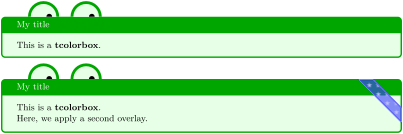
% \usetikzlibrary{patterns} % preamble

% \tcbuselibrary{skins} % preamble

\tcbset{frogbox/.style={enhanced,colback=green!10,colframe=green!65!black,

  enlarge top by=5.5mm,

  overlay={\foreach \x in {2cm,3.5cm} {

    \begin{scope}[shift={([xshift=\x]frame.north west)}]

      \path[draw=green!65!black,fill=green!10,line width=1mm] (0,0) arc (0:180:5mm);

      \path[fill=black] (-0.2,0) arc (0:180:1mm);

    \end{scope}}}}}

\tcbset{ribbon/.style={overlay app={%

  \path[fill=blue!75!white,draw=blue,double=white!85!blue,

    preaction={opacity=0.6,fill=blue!75!white},

    line width=0.1mm,double distance=0.2mm,

    pattern=fivepointed stars,pattern color=white!75!blue]

    ([xshift=-0.2mm,yshift=-1.02cm]frame.north east)

    -- ++(-1,1) -- ++(-0.5,0) -- ++(1.5,-1.5) -- cycle;}}}


\begin{tcolorbox}[frogbox,title=My title]

This is a \textbf{tcolorbox}.

\end{tcolorbox}


\begin{tcolorbox}[frogbox,ribbon,title=My title]

This is a \textbf{tcolorbox}.\par

Here, we apply a second overlay.

\end{tcolorbox}
/tcb/overlay pre=⟨graphical code⟩(no default)
Prepends the given ⟨graphical code⟩ to /tcb/overlay.
/tcb/overlay unbroken app=⟨graphical code⟩(no default)
Appends the given ⟨graphical code⟩ to /tcb/overlay unbroken.
/tcb/overlay unbroken pre=⟨graphical code⟩(no default)
Prepends the given ⟨graphical code⟩ to /tcb/overlay unbroken.
/tcb/overlay first app=⟨graphical code⟩(no default)
Appends the given ⟨graphical code⟩ to /tcb/overlay first.
/tcb/overlay first pre=⟨graphical code⟩(no default)
Prepends the given ⟨graphical code⟩ to /tcb/overlay first.
/tcb/overlay middle app=⟨graphical code⟩(no default)
Appends the given ⟨graphical code⟩ to /tcb/overlay middle.
/tcb/overlay middle pre=⟨graphical code⟩(no default)
Prepends the given ⟨graphical code⟩ to /tcb/overlay middle.
/tcb/overlay last app=⟨graphical code⟩(no default)
Appends the given ⟨graphical code⟩ to /tcb/overlay last.
/tcb/overlay last pre=⟨graphical code⟩(no default)
Prepends the given ⟨graphical code⟩ to /tcb/overlay last.
/tcb/overlay broken app=⟨graphical code⟩(no default)
Appends the given ⟨graphical code⟩ to /tcb/overlay broken.
/tcb/overlay broken pre=⟨graphical code⟩(no default)
Prepends the given ⟨graphical code⟩ to /tcb/overlay broken.
/tcb/overlay unbroken and first app=⟨graphical code⟩(no default)
Appends the given ⟨graphical code⟩ to /tcb/overlay unbroken and first.
/tcb/overlay unbroken and first pre=⟨graphical code⟩(no default)
Prepends the given ⟨graphical code⟩ to /tcb/overlay unbroken and first.
/tcb/overlay middle and last app=⟨graphical code⟩(no default)
Appends the given ⟨graphical code⟩ to /tcb/overlay middle and last.
/tcb/overlay middle and last pre=⟨graphical code⟩(no default)
Prepends the given ⟨graphical code⟩ to /tcb/overlay middle and last.
/tcb/overlay unbroken and last app=⟨graphical code⟩(no default)
Appends the given ⟨graphical code⟩ to /tcb/overlay unbroken and last.
/tcb/overlay unbroken and last pre=⟨graphical code⟩(no default)
Prepends the given ⟨graphical code⟩ to /tcb/overlay unbroken and last.
/tcb/overlay first and middle app=⟨graphical code⟩(no default)New: 2014-09-19
Appends the given ⟨graphical code⟩ to /tcb/overlay first and middle.
/tcb/overlay first and middle pre=⟨graphical code⟩(no default)New: 2014-09-19
Prepends the given ⟨graphical code⟩ to /tcb/overlay first and middle.
23.5 Watermarks
The following option keys extend the options given in Section 10.3.
Watermarks are special overlays. The hooks library allows the combination of several watermarks and overlays.
/tcb/watermark text app=⟨text⟩(no default)
Appends a /tcb/watermark text to the colored box.
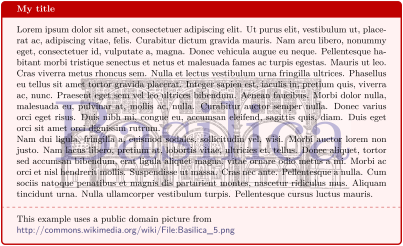
\tcbset{colback=red!5!white,colframe=red!75!black,fonttitle=\bfseries}


\begin{tcolorbox}[enhanced,title=My title,watermark graphics=Basilica_5.png,

  watermark opacity=0.25,

  watermark text app=Basilica,watermark color=Navy

  ]

\lipsum[1-2]

\tcblower

This example uses a public domain picture from\\

\url{http://commons.wikimedia.org/wiki/File:Basilica_5.png}

\end{tcolorbox}
/tcb/watermark text pre=⟨text⟩(no default)
Prepends a /tcb/watermark text to the colored box.
/tcb/watermark text app on=⟨part⟩ is ⟨text⟩(no default)
Appends a /tcb/watermark text on the named ⟨part⟩ of a break sequence.
/tcb/watermark text pre on=⟨part⟩ is ⟨text⟩(no default)
Prepends a /tcb/watermark text on the named ⟨part⟩ of a break sequence.
/tcb/watermark graphics app=⟨file name⟩(no default)
Appends a /tcb/watermark graphics referenced by ⟨file name⟩ to the colored box.
/tcb/watermark graphics pre=⟨file name⟩(no default)
Prepends a /tcb/watermark graphics referenced by ⟨file name⟩ to the colored box.
/tcb/watermark graphics app on=⟨part⟩ is ⟨file name⟩(no default)
Appends a /tcb/watermark graphics on the named ⟨part⟩ of a break sequence. The picture is referenced by ⟨file name⟩.
/tcb/watermark graphics pre on=⟨part⟩ is ⟨file name⟩(no default)
Prepends a /tcb/watermark graphics on the named ⟨part⟩ of a break sequence. The picture is referenced by ⟨file name⟩.
/tcb/watermark tikz app=⟨graphical code⟩(no default)
Appends a /tcb/watermark tikz with the given TikZ ⟨graphical code⟩ to the colored box.
/tcb/watermark tikz pre=⟨graphical code⟩(no default)
Prepends a /tcb/watermark tikz with the given TikZ ⟨graphical code⟩ to the colored box.

% \tcbuselibrary{skins}

\tcbset{colback=red!5!white,colframe=red!75!black,fonttitle=\bfseries,

  watermark color=Navy,watermark opacity=0.25,

  smiley/.style={watermark tikz pre={%

    \path[fill=yellow,draw=yellow!75!red] (0,0) circle (1cm);

    \fill[red] (45:5mm) circle (1mm);

    \fill[red] (135:5mm) circle (1mm);

    \draw[line width=1mm,red] (215:5mm) arc (215:325:5mm);}}}


\begin{tcolorbox}[enhanced,title=My title, watermark text=Watermark,

  smiley]

\lipsum[1-2]

\end{tcolorbox}
/tcb/watermark tikz app on=⟨part⟩ is ⟨graphical code⟩(no default)
Appends a /tcb/watermark tikz on the named ⟨part⟩ of a break sequence.
/tcb/watermark tikz pre on=⟨part⟩ is ⟨graphical code⟩(no default)
Prepends a /tcb/watermark tikz on the named ⟨part⟩ of a break sequence.
23.6 Underlays
The following option keys extend the options given in Section 10.8. There are no app type keys since underlays are stackable by default.
/tcb/underlay pre=⟨graphical code⟩(no default)
Prepends the given ⟨graphical code⟩ to /tcb/underlay.
/tcb/underlay unbroken pre=⟨graphical code⟩(no default)
Prepends the given ⟨graphical code⟩ to /tcb/underlay unbroken.
/tcb/underlay first pre=⟨graphical code⟩(no default)
Prepends the given ⟨graphical code⟩ to /tcb/underlay first.
/tcb/underlay middle pre=⟨graphical code⟩(no default)
Prepends the given ⟨graphical code⟩ to /tcb/underlay middle.
/tcb/underlay last pre=⟨graphical code⟩(no default)
Prepends the given ⟨graphical code⟩ to /tcb/underlay last.
/tcb/underlay boxed title pre=⟨graphical code⟩(no default)
Prepends the given ⟨graphical code⟩ to /tcb/underlay boxed title.
/tcb/underlay broken pre=⟨graphical code⟩(no default)
Prepends the given ⟨graphical code⟩ to /tcb/underlay broken.
/tcb/underlay unbroken and first pre=⟨graphical code⟩(no default)
Prepends the given ⟨graphical code⟩ to /tcb/underlay unbroken and first.
/tcb/underlay middle and last pre=⟨graphical code⟩(no default)
Prepends the given ⟨graphical code⟩ to /tcb/underlay middle and last.
/tcb/underlay unbroken and last pre=⟨graphical code⟩(no default)
Prepends the given ⟨graphical code⟩ to /tcb/underlay unbroken and last.
/tcb/underlay first and middle pre=⟨graphical code⟩(no default)New: 2014-09-19
Prepends the given ⟨graphical code⟩ to /tcb/underlay first and middle.
23.7 Finishes
The following option keys extend the options given in Section 10.9. There are no app type keys since finishes are stackable by default.
/tcb/finish pre=⟨graphical code⟩(no default)
Prepends the given ⟨graphical code⟩ to /tcb/finish.
/tcb/finish unbroken pre=⟨graphical code⟩(no default)
Prepends the given ⟨graphical code⟩ to /tcb/finish unbroken.
/tcb/finish first pre=⟨graphical code⟩(no default)
Prepends the given ⟨graphical code⟩ to /tcb/finish first.
/tcb/finish middle pre=⟨graphical code⟩(no default)
Prepends the given ⟨graphical code⟩ to /tcb/finish middle.
/tcb/finish last pre=⟨graphical code⟩(no default)
Prepends the given ⟨graphical code⟩ to /tcb/finish last.
/tcb/finish broken pre=⟨graphical code⟩(no default)
Prepends the given ⟨graphical code⟩ to /tcb/finish broken.
/tcb/finish unbroken and first pre=⟨graphical code⟩(no default)
Prepends the given ⟨graphical code⟩ to /tcb/finish unbroken and first.
/tcb/finish middle and last pre=⟨graphical code⟩(no default)
Prepends the given ⟨graphical code⟩ to /tcb/finish middle and last.
/tcb/finish unbroken and last pre=⟨graphical code⟩(no default)
Prepends the given ⟨graphical code⟩ to /tcb/finish unbroken and last.
/tcb/finish first and middle pre=⟨graphical code⟩(no default)New: 2014-09-19
Prepends the given ⟨graphical code⟩ to /tcb/finish first and middle.
23.8 Skin Code
The following option keys extend the options given in Section 9.2.
/tcb/frame code app=⟨graphical code⟩(no default)
Appends the given ⟨graphical code⟩ to /tcb/frame code.
/tcb/frame code pre=⟨graphical code⟩(no default)
Prepends the given ⟨graphical code⟩ to /tcb/frame code.
/tcb/interior titled code app=⟨graphical code⟩(no default)
Appends the given ⟨graphical code⟩ to /tcb/interior titled code.
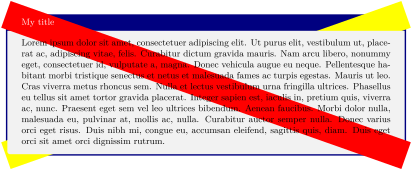
\begin{tcolorbox}[title=My title,enhanced,colframe=Navy,

  frame code app={\draw[yellow,line width=1cm] (

    frame.south west)--(frame.north east);},

  interior titled code app={\draw[red,line width=1cm]

    (frame.north west)--(frame.south east);},

  ]

\lipsum[1]

\end{tcolorbox}
/tcb/interior titled code pre=⟨graphical code⟩(no default)
Prepends the given ⟨graphical code⟩ to /tcb/interior titled code.
/tcb/interior code app=⟨graphical code⟩(no default)
Appends the given ⟨graphical code⟩ to /tcb/interior code.
/tcb/interior code pre=⟨graphical code⟩(no default)
Prepends the given ⟨graphical code⟩ to /tcb/interior code.
/tcb/segmentation code app=⟨graphical code⟩(no default)
Appends the given ⟨graphical code⟩ to /tcb/segmentation code.
/tcb/segmentation code pre=⟨graphical code⟩(no default)
Prepends the given ⟨graphical code⟩ to /tcb/segmentation code.
/tcb/title code app=⟨graphical code⟩(no default)
Appends the given ⟨graphical code⟩ to /tcb/title code.
/tcb/title code pre=⟨graphical code⟩(no default)
Prepends the given ⟨graphical code⟩ to /tcb/title code.
23.9 Extras
The following option keys extend the options given in Section 19.5. There are no app type keys since extras are stackable by default.
/tcb/extras pre={⟨options⟩}(no default)New: 2015-07-16
Prepends the given ⟨options⟩ to /tcb/extras.
/tcb/extras unbroken pre={⟨options⟩}(no default)New: 2015-07-16
Prepends the given ⟨options⟩ to /tcb/extras unbroken.
/tcb/extras first pre={⟨options⟩}(no default)New: 2015-07-16
Prepends the given ⟨options⟩ to /tcb/extras first.
/tcb/extras middle pre={⟨options⟩}(no default)New: 2015-07-16
Prepends the given ⟨options⟩ to /tcb/extras middle.
/tcb/extras last pre={⟨options⟩}(no default)New: 2015-07-16
Prepends the given ⟨options⟩ to /tcb/extras last.
/tcb/extras broken pre={⟨options⟩}(no default)New: 2015-07-16
Prepends the given ⟨options⟩ to /tcb/extras broken.
/tcb/extras unbroken and first pre={⟨options⟩}(no default)New: 2015-07-16
Prepends the given ⟨options⟩ to /tcb/extras unbroken and first.
/tcb/extras middle and last pre={⟨options⟩}(no default)New: 2015-07-16
Prepends the given ⟨options⟩ to /tcb/extras middle and last.
/tcb/extras unbroken and last pre={⟨options⟩}(no default)New: 2015-07-16
Prepends the given ⟨options⟩ to /tcb/extras unbroken and last.
/tcb/extras first and middle pre={⟨options⟩}(no default)New: 2015-07-16
Prepends the given ⟨options⟩ to /tcb/extras first and middle.
23.10 Listings
The following option keys extend the options given in Section 17.
/tcb/listing options app={⟨options⟩}(no default)New: 2019-07-11
Appends the given ⟨options⟩ to /tcb/listing options.
/tcb/listing options pre={⟨options⟩}(no default)New: 2019-07-11
Prepends the given ⟨options⟩ to /tcb/listing options.
/tcb/minted options app={⟨options⟩}(no default)New: 2019-07-11
Appends the given ⟨options⟩ to /tcb/minted options.
/tcb/minted options pre={⟨options⟩}(no default)New: 2019-07-11
Prepends the given ⟨options⟩ to /tcb/minted options.