The tcolorbox package
The Core Package
9 Technical Overview and Customization
This section provides a technical overview of the skin concept of tcolorbox. For most applications of tcolorbox, one will not need to know the bells and whistles described herein. You may proceed to Section 10 where the customization options for most users are documented.
The following explanations also cover options and settings from the skins library, see Section 10.
9.1 Skins and Drawing Engines
From a technical point of view, a skin is a style definition for the appearance of a tcolorbox. The core package provides some additional option keys for skins but only two skins called standard and standard jigsaw. The skins library adds several more skins. To change to a skin, only one option from the core package has to be set.
/tcb/skin=⟨name⟩(style, no default, initially standard)
Sets the current skin to ⟨name⟩. This is a style definition which sets all the following keys, i. e., for many use cases there is nothing more to do.

\tcbset{colback=Salmon!50!white,colframe=FireBrick!75!black,

  width=(\linewidth-8mm)/2,before=,after=\hfill,equal height group=ske}


\begin{tcolorbox}[adjusted title=My title]

  This is my content.

\end{tcolorbox}

\begin{tcolorbox}[beamer,adjusted title=My title]

  This is my content.

\end{tcolorbox}
/tcb/skin first=⟨name⟩(style, no default, initially standard)
If the box is set to be /tcb/breakable and is broken actually, then the skin for the first part of the break sequence is set to ⟨name⟩, see Section 19.8. Typically, this key is set by a /tcb/skin.
/tcb/skin middle=⟨name⟩(style, no default, initially standard)
If the box is set to be /tcb/breakable and is broken actually, then the skin for the middle parts (if any) of the break sequence is set to ⟨name⟩, see Section 19.8. Typically, this key is set by a /tcb/skin.
/tcb/skin last=⟨name⟩(style, no default, initially standard)
If the box is set to be /tcb/breakable and is broken actually, then the skin for the last part of the break sequence is set to ⟨name⟩, see Section 19.8. Typically, this key is set by a /tcb/skin.
The skin of a tcolorbox is drawn by up to four engines. Afterwards, the text content is drawn which is not part of a skin. The four steps are:
The frame of the box, drawn by /tcb/frame engine.
The interior of the box. The interior of a box with title is drawn differently from a box without title. /tcb/interior titled engine or /tcb/interior engine is used to draw the interior.
The segmentation (line) of the box, if there is a lower part; drawn by /tcb/segmentation engine.
The title area of the box, if there is a title and /tcb/title filled is set to true; drawn by /tcb/title engine.
/tcb/frame engine=⟨name⟩(no default, initially standard)
standard: the original code from the core package,
path: a TikZ path which is controlled by /tcb/frame style,
pathjigsaw: a TikZ path which is controlled by /tcb/frame style,
pathfirst: a TikZ path which is controlled by /tcb/frame style,
pathfirstjigsaw: a TikZ path which is controlled by /tcb/frame style,
pathmiddle: a TikZ path which is controlled by /tcb/frame style,
pathmiddlejigsaw: a TikZ path which is controlled by /tcb/frame style,
pathlast: a TikZ path which is controlled by /tcb/frame style,
pathlastjigsaw: a TikZ path which is controlled by /tcb/frame style,
freelance: deprecated.
spartan: a quite spartan code.
empty: draw nothing.
Sets the frame drawing engine for a box to ⟨name⟩. Typically, this key is set by a /tcb/skin. Feasible values for ⟨name⟩ are:
/tcb/interior titled engine=⟨name⟩(no default, initially standard)
standard: the original code from the core package,
path: a TikZ path which is controlled by /tcb/interior style,
pathfirst: a TikZ path which is controlled by /tcb/interior style,
pathmiddle: a TikZ path which is controlled by /tcb/interior style,
pathlast: a TikZ path which is controlled by /tcb/interior style,
freelance: deprecated.
spartan: a quite spartan code.
empty: draw nothing.
Sets the interior drawing engine for a titled box to ⟨name⟩. Typically, this key is set by a /tcb/skin. Feasible values for ⟨name⟩ are:
/tcb/interior engine=⟨name⟩(no default, initially standard)
standard: the original code from the core package,
path: a TikZ path which is controlled by /tcb/interior style,
pathfirst: a TikZ path which is controlled by /tcb/interior style,
pathmiddle: a TikZ path which is controlled by /tcb/interior style,
pathlast: a TikZ path which is controlled by /tcb/interior style,
freelance: deprecated.
spartan: a quite spartan code.
empty: draw nothing.
Sets the interior drawing engine for an untitled box to ⟨name⟩. Typically, this key is set by a /tcb/skin. Feasible values for ⟨name⟩ are:
/tcb/segmentation engine=⟨name⟩(no default, initially standard)
standard: the original code from the core package,
path: a TikZ path which is controlled by /tcb/segmentation style,
freelance: deprecated.
spartan: a quite spartan code.
empty: draw nothing.
Sets the segmentation (line) drawing engine for a box to ⟨name⟩. Typically, this key is set by a /tcb/skin. Feasible values for ⟨name⟩ are:
/tcb/title engine=⟨name⟩(no default, initially standard)
standard: the original code from the core package,
path: a TikZ path which is controlled by /tcb/title style,
pathfirst: a TikZ path which is controlled by /tcb/title style,
pathmiddle: a TikZ path which is controlled by /tcb/title style,
pathlast: a TikZ path which is controlled by /tcb/title style,
freelance: deprecated.
spartan: a quite spartan code.
empty: draw nothing.
Sets the title area drawing engine for a titled box to ⟨name⟩. Typically, this key is set by a /tcb/skin. Feasible values for ⟨name⟩ are:
After an engine is set to an initializing value, the resulting graphical code can be changed using code option keys, see Section 9.2.
/tcb/geometry nodes=true|false(default true, initially false)
If the skins library is loaded and if this option is set to true, up to four TikZ nodes are defined for a tcolorbox which are named frame, interior, segmentation, and title. These nodes describe the boundaries of the equally named parts of a tcolorbox. They are used by most engines based on TikZ. Typically, this key is set automatically by a /tcb/skin.

\tcbset{colback=Salmon!50!white,colframe=FireBrick!75!black,

  width=(\linewidth-8mm)/2,before=,after=\hfill,equal height group=geon}


\begin{tcolorbox}[adjusted title=The title]

  The upper part.\tcblower The lower part.

\end{tcolorbox}

\begin{tcolorbox}[enhanced,adjusted title=The title,

  frame code={\path[draw=red,fill=red!25]

      (frame.south west) rectangle (frame.north east);},

  interior titled code={\path[draw=blue,fill=blue!25]

      (interior.south west) rectangle (interior.north east);},

  segmentation code={\path[draw=green,fill=green!25]

      (segmentation.south west) rectangle (segmentation.north east);},

  title code={\path[draw=black,fill=brown!75!black]

      (title.south west) rectangle (title.north east);}]

  The upper part.\tcblower The lower part.

\end{tcolorbox}
9.2 Code Option Keys
The following code options are applicable for all skins. The used ⟨graphical code⟩ can be any pgf code. For all skins with exception of standard and standard jigsaw, the ⟨graphical code⟩ can also be any tikz code.
/tcb/frame code=⟨graphical code⟩(code, default from standard)
The given ⟨graphical code⟩ is used for drawing the frame of the box.

/tcb/frame empty(style, no value)
This is a shortcut for setting /tcb/frame code to empty. This option removes the drawing of the frame. Alternatively, use /tcb/frame hidden.
/tcb/interior titled code=⟨graphical code⟩(code, default from standard)
The given ⟨graphical code⟩ is used for drawing the interior of the box, if the box comes with a title.

\tcbset{colback=red!5!white,colframe=red!75!black,fonttitle=\bfseries}


\begin{tcolorbox}[enhanced,title=My title,interior titled code={

  \path[draw=red!5!white,line width=5mm,line cap=round]

    ([xshift=3mm,yshift=-3mm]interior.north west)

    --([xshift=-3mm,yshift=3mm]interior.south east)

    ([xshift=3mm,yshift=3mm]interior.south west)

    --([xshift=-3mm,yshift=-3mm]interior.north east);}]

This is a \textbf{tcolorbox}.

\tcblower

This is the lower part.

\end{tcolorbox}
/tcb/interior titled empty(style, no value)
This is a shortcut for setting /tcb/interior titled code to empty. This option removes the drawing of the untitled interior. Alternatively, use /tcb/interior hidden.
/tcb/interior code=⟨graphical code⟩(code, default from standard)
The given ⟨graphical code⟩ is used for drawing the interior of the box, if the box is without a title.

\tcbset{colback=red!5!white,colframe=red!75!black}


\begin{tcolorbox}[enhanced,interior code={

  \path[draw=red!5!white,line width=5mm,line cap=round]

    ([xshift=3mm,yshift=-3mm]interior.north west)

    --([xshift=-3mm,yshift=3mm]interior.south east)

    ([xshift=3mm,yshift=3mm]interior.south west)

    --([xshift=-3mm,yshift=-3mm]interior.north east);}]

This is a \textbf{tcolorbox}.

\tcblower

This is the lower part.

\end{tcolorbox}
/tcb/interior empty(style, no value)
This is a shortcut for setting /tcb/interior code to empty. This option removes the drawing of the interior. Alternatively, use /tcb/interior hidden.
/tcb/segmentation code=⟨graphical code⟩(code, default from standard)
The given ⟨graphical code⟩ is used for drawing the segmentation area of the box.

\tcbset{colback=red!5!white,colframe=red!75!black,fonttitle=\bfseries}


\begin{tcolorbox}[enhanced,title=My title,segmentation code={

  \path[top color=red!5!white,bottom color=red!5!white,middle color=blue]

  (segmentation.south west) rectangle (segmentation.north east);}]

This is a \textbf{tcolorbox}.

\tcblower

This is the lower part.

\end{tcolorbox}
/tcb/segmentation empty(style, no value)
This is a shortcut for setting /tcb/segmentation code to empty. This option removes the drawing of the segmentation line. Alternatively, use /tcb/segmentation hidden.
/tcb/title code=⟨graphical code⟩(code, default from standard)
The given ⟨graphical code⟩ is used for drawing the title area of the box.

\tcbset{colback=red!5!white,colframe=red!75!black,fonttitle=\bfseries,

  coltitle=black}


\begin{tcolorbox}[enhanced,title=My title,title code={

  \path[draw=yellow,solid,decorate,line width=2mm,

    decoration={coil,aspect=0,segment length=10.1mm}]

    ([xshift=1mm]title.west) -- ([xshift=-1mm]title.east);}]

This is a \textbf{tcolorbox}.

\tcblower

This is the lower part.

\end{tcolorbox}
/tcb/title empty(style, no value)
This is a shortcut for setting /tcb/title code to empty. This option removes the drawing of the title area. Alternatively, use /tcb/title hidden.
9.3 Subskins
A subskin is a new /tcb/skin based on an existing skin which is extended or changed.
Never use geometry settings or bounding box options inside a subskin definition! If one skin is replaced by another skin, the overall bounding box should stay constant. Especially, if a skin is used for a breakable box, unpredictable and unpleasant results could arise otherwise. If you want to change the geometry also, use an additional style. See the skin beamer and the style /tcb/beamer as pattern.
\tcbsubskin{⟨name⟩}{⟨base skin⟩}{⟨options⟩}
Creates a new skin ⟨name⟩ which inherits all properties of an existing ⟨base skin⟩ plus the given ⟨options⟩. The new skin ⟨name⟩ can be used as value for the keys /tcb/skin, /tcb/skin first, /tcb/skin middle, and /tcb/skin last. As ⟨base skin⟩, one can take standard, empty, enhanced, or any skin from the skins library, see Section 10.

% \tcbuselibrary{skins}

\tcbsubskin{mycross}{empty}{frame code={%

  \draw[red,line width=5pt] (frame.south west)--(frame.north east);

  \draw[red,line width=5pt] (frame.north west)--(frame.south east);},

  skin first=mycross,skin middle=mycross,skin last=mycross }


\begin{tcolorbox}[skin=mycross]

  This is my content.

\end{tcolorbox}
/tcb/skin first is subskin of={⟨base skin⟩}{⟨options⟩}(no default, initially unset)
Creates a new unnamed skin which inherits all properties of an existing ⟨base skin⟩ plus the given ⟨options⟩. This skin is set as /tcb/skin first.
See a detailed example on section 11.7.
/tcb/skin middle is subskin of={⟨base skin⟩}{⟨options⟩}(no default, initially unset)
Creates a new unnamed skin which inherits all properties of an existing ⟨base skin⟩ plus the given ⟨options⟩. This skin is set as /tcb/skin middle.
See a detailed example on section 11.7.
/tcb/skin last is subskin of={⟨base skin⟩}{⟨options⟩}(no default, initially unset)
Creates a new unnamed skin which inherits all properties of an existing ⟨base skin⟩ plus the given ⟨options⟩. This skin is set as /tcb/skin last.
See a detailed example on section 11.7.
9.4 Drawing Scheme
Depending on the complexity of a tcolorbox definition, the resulting box is drawn in a more or less complex series of steps.
To document and demonstrate these drawing steps, we consider the following box definition:
\newtcolorbox{testbox}[1][]{enhanced,title=Test Box,

  boxrule=1mm,titlerule=0.5mm,colframe=blue!50!black,

  interior style={top color=blue!20!green!50!white,bottom color=blue!20!yellow!50!white},

  colbacktitle=blue!50!green!90!white,segmentation style={solid},

  fonttitle=\bfseries,drop fuzzy shadow,borderline={0.3mm}{0.35mm}{yellow!50!white},

  underlay={\path[fill image opacity=0.15,fill image scale=0.9,

    fill stretch picture={\draw[blue,line width=2mm] circle (1);}]

    (interior.south west) rectangle (interior.north east);},

  watermark text={Watermark},watermark color={green!20!white},

  finish={\begin{tcbclipframe}

    \path[bottom color=black,top color=black!50!white,opacity=0.1]

      (frame.south west) -- (frame.south east) -- (frame.north east) -- cycle;

    \path[top color=white,bottom color=black!50!white,opacity=0.1]

      (frame.south west) -- (frame.north east) -- (frame.north west) -- cycle;

    \end{tcbclipframe}},#1}
For this definition, we get the maximal number of drawing steps:
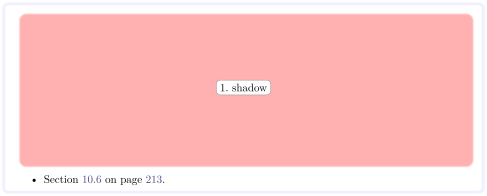
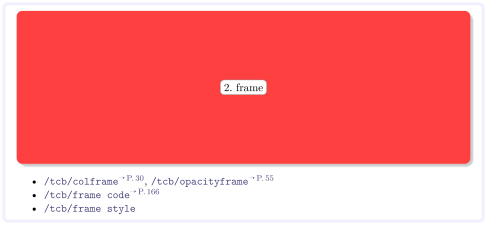
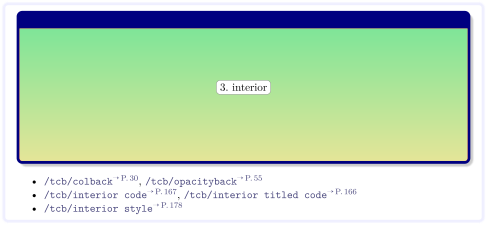
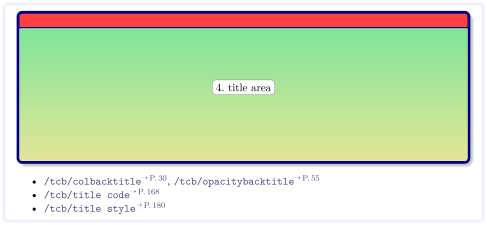
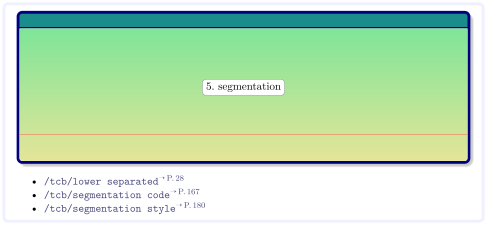

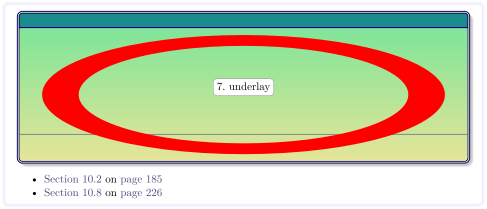
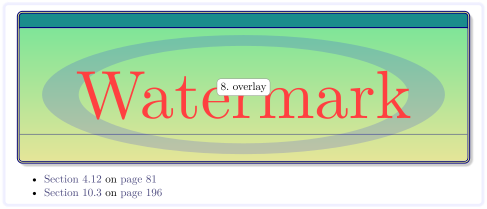

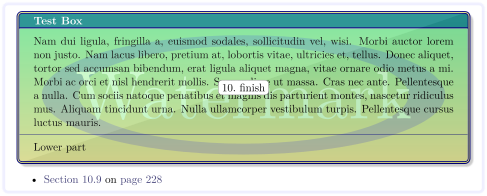
All together, the box is drawn:
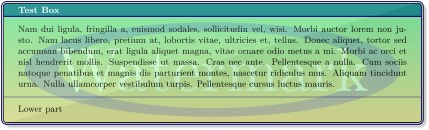
% \usepackage{lipsum}

\begin{testbox}

\lipsum[2]

\tcblower

Lower part

\end{testbox}
9.5 Color Names
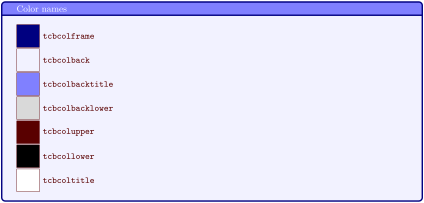
Color settings for a tcolorbox are saved into named colors which may be used inside a box, e. g. for an overlay. New: 2019-01-18 These color names are
tcbcolframe set by /tcb/colframe (frame color)
tcbcolback set by /tcb/colback (background color)
tcbcolbacktitle set by /tcb/colbacktitle (background color of the title)
tcbcolbacklower set by /tcb/colbacklower (skin dependent background color of the lower part; needs skins to be loaded)
tcbcolupper set by /tcb/colupper (text color upper part)
tcbcollower set by /tcb/collower (text color lower part)
tcbcoltitle set by /tcb/coltitle (text color title)
% \tcbuselibrary{skins}

\begin{tcolorbox}[title=Color names,

    colframe=blue!50!black,colback=blue!5,

    colbacktitle=blue!50,colupper=red!35!black]

  \foreach \name in {tcbcolframe,tcbcolback,tcbcolbacktitle,tcbcolbacklower,

    tcbcolupper,tcbcollower,tcbcoltitle}

  {\tikz\path[draw,fill=\name]

    (0,0) rectangle node[right=4mm,font=\ttfamily]{\name} (0.8,0.8);\par}

\end{tcolorbox}
9.6 Useful Properties
The following macros describe certain properties which may be used for the drawing scheme, see Section 9.4. Sometimes, they are even available inside the box content. All of them are considered to be read-only and should never be redefined by the user.
\tcbheightspaceNew: 2016-02-16
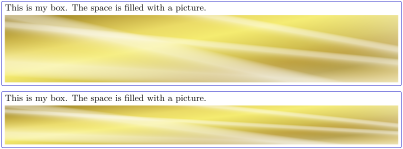
If the height of a tcolorbox is not the natural height, the space difference between the forced and the natural size is hold by \tcbheightspace. This macro is not usable inside the box content, but for skins or inside /tcb/underlay, /tcb/overlay, etc.
If such a space information is needed inside the box content, see /tcb/space to instead.
% \tcbuselibrary{skins}

\newtcolorbox{testbox}[2][]{enhanced,size=fbox,

  colframe=blue!75!black,colback=white,height=#2,

  underlay={\node[above,inner sep=3pt] at (interior.south){%

    \includegraphics[width=\tcbtextwidth,height=\tcbheightspace-3pt]{goldshade.png}};

    },

  #1}

\begin{testbox}{3cm}

  This is my box. The space is filled with a picture.

\end{testbox}

\begin{testbox}{2cm}

  This is my box. The space is filled with a picture.

\end{testbox}
\tcbtextwidthNew: 2016-02-16
If there also is a lower part, it describes the width of the upper part.
For /tcb/sidebyside boxes, it describes the combined text width plus segmentation.
This property can be used inside the box content text with exception of /tcb/fit boxes.
\tcbtextwidth can be used for all box types for skins or inside /tcb/underlay, /tcb/overlay, etc.
This property describes the box content width.

\begin{tcolorbox}[colframe=blue!75!black]

  Inside a box: \tcbtextwidth\ (=\the\linewidth).

\end{tcolorbox}
\tcbtextheightNew: 2016-02-16
For boxes with a fixed /tcb/height, this property can be used inside the box content text. For other boxes, it denotes 0pt inside the box content.
\tcbtextheight can be used for all box types for skins or inside /tcb/underlay, /tcb/overlay, etc.
This property describes the designated box content height. If the box is larger than the natural height, the actual content will be smaller than \tcbtextheight.

% \tcbuselibrary{skins}

\begin{tcolorbox}[enhanced,colframe=blue!75!black,

    underlay={\node[left,red] at (frame.east) {Here: \tcbtextheight};}]

  Inside a box with natural height: \tcbtextheight.

\end{tcolorbox}

\begin{tcolorbox}[enhanced,colframe=blue!75!black,height=1cm,

    underlay={\node[left,red] at (frame.east) {Here: \tcbtextheight};}]

  Inside a box with fixed height: \tcbtextheight.

\end{tcolorbox}
\tcbsegmentstateNew: 2017-04-25
0: The current (partial) box contains only an upper part.
1: The current (partial) box contains an upper and a lower part. The segmentation node can be used for positioning.
2: The current (partial) box contains only a lower part. This can only be true for parts of breakable boxes.
This macro contains 0, 1, or 2. It is set for every unbroken box and every broken partial box with the following meaning:
Skins like bicolor use this property to paint the (partial) boxes.

% \tcbuselibrary{skins,raster}

\begin{tcbraster}[raster equal height,enhanced,

    watermark text=\tcbsegmentstate]

  \begin{tcolorbox}Upper part\end{tcolorbox}

  \begin{tcolorbox}Upper part\tcblower Lower part\end{tcolorbox}

\end{tcbraster}