The tcolorbox package
Libraries
26 Library documentation
This library has the single purpose to support LaTeX package documentations like this one. Actually, the visual nature follows the approach from Till Tantau’s pgf [Tantau 2023] documentation. Typically, this library is assumed to be used in conjunction with the class ltxdoc or alike. Denis Bitouzé, Yukai Chou, and many others provided very valuable input for this library.
The library is loaded by a package option or inside the preamble by:
This also loads the library skins, see Section 10, the library raster, see Section 16, the library listings, see Section 17, and a bunch of packages, namely makeidx, marginnote, refcount, and hyperref. The packages pifont and marvosym should be installed for some symbols, but need not to be loaded.
The package marginnote is loaded only, if \marginnote is not already defined.
In contrast to other tcolorbox options, the option settings for documentation are typically not getting reset by /tcb/reset, i. e., they keep their values for embedded boxes.
In combination with DocStrip, /tcb/verbatim ignore percent may be helpful.
For UTF-8 support load (ignore this when using XeLaTeX):
For minted [Poore 2025] support, load:
26.1 Macros of the Library
\begin{docCommand}[⟨options⟩]{⟨name⟩}{⟨parameters⟩}
⟨environment content⟩
\end{docCommand}Updated: 2020-04-22
Documents a LaTeX macro with given ⟨name⟩ where ⟨name⟩ is written without backslash. The given ⟨options⟩ are set with \tcbset. This macro takes mandatory or optional ⟨parameters⟩. It is automatically indexed and can be referenced with \refCom{⟨name⟩}.

\begin{docCommand}{foomakedocSubKey}{\marg{name}\marg{key path}}

  Creates a new environment \meta{name} based on \refEnv{docKey} for the

  documentation of keys with the given \meta{key path}.

\end{docCommand}

\begin{docCommand}[doc no index,color definition=blue]{section}%

    {\sarg\marg{title}}

  Starts a section. The star variant is unnumbered.

\end{docCommand}
\begin{docCommand*}[⟨options⟩]{⟨name⟩}{⟨parameters⟩}
⟨environment content⟩
\end{docCommand*}Updated: 2020-04-22
Identical to docCommand, but without index entry.
\begin{docCommands}[⟨options⟩]{{⟨variant1⟩},{⟨variant2⟩},...}
⟨environment content⟩
\end{docCommands}New: 2020-04-22
Documents several (similar) LaTeX macro variants simultaneously. The given ⟨options⟩ are set with \tcbset and are valid for all variants and the documentation text. Every variant is described by an option set ⟨variant1⟩, ⟨variant2⟩, and so on. The most crucial options are /tcb/doc name and /tcb/doc parameter.

\begin{docCommands}[

    doc no index,  %  no index entries for this example

    doc name      = newtheorem

  ]

  {

    { doc parameter = \sarg\marg{envname} },

    { doc parameter = \marg{envname}\oarg{numbered within} },

    { doc parameter = \oarg{numbered like}\marg{envname} }

  }

  example

\end{docCommands}
\begin{docEnvironment}[⟨options⟩]{⟨name⟩}{⟨parameters⟩}
⟨environment content⟩
\end{docEnvironment}Updated: 2020-04-22
Documents a LaTeX environment with given ⟨name⟩. The given ⟨options⟩ are set with \tcbset. This environment takes mandatory or optional ⟨parameters⟩. It is automatically indexed and can be referenced with \refEnv{⟨name⟩}.

\begin{docEnvironment}{foocolorbox}{\oarg{options}}

  This is the main environment to create an accentuated colored text box with

  rounded corners and, optionally, two parts.

\end{docEnvironment}

\begin{docEnvironment}%

    [doclang/environment content=My content text]%

    {foocolorbox*}{\oarg{options}}

  This is the main environment to create an accentuated colored text box with

  rounded corners and, optionally, two parts.

\end{docEnvironment}
\begin{docEnvironment*}[⟨options⟩]{⟨name⟩}{⟨parameters⟩}
⟨environment content⟩
\end{docEnvironment*}Updated: 2020-04-22
Identical to docEnvironment, but without index entry.
\begin{docEnvironments}[⟨options⟩]{{⟨variant1⟩},{⟨variant2⟩},...}
⟨environment content⟩
\end{docEnvironments}New: 2020-04-22
Documents several (similar) LaTeX environment variants simultaneously. The given ⟨options⟩ are set with \tcbset and are valid for all variants and the documentation text. Every variant is described by an option set ⟨variant1⟩, ⟨variant2⟩, and so on. The most crucial options are /tcb/doc name and /tcb/doc parameter.
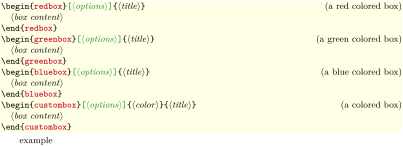
\begin{docEnvironments}[

    doc no index,   %  no index entries for this example

    doc parameter oarg marg     = {options}{title},

    doclang/environment content = box content,

  ]

  {

    {

      doc name        = redbox,

      doc description = a red colored box,

    },

    {

      doc name        = greenbox,

      doc description = a green colored box,

    },

    {

      doc name        = bluebox,

      doc description = a blue colored box,

    },

    {

      doc name        = custombox,

      doc parameter   = \oarg{options}\marg{color}\marg{title},

      doc description = a colored box,

    },

  }

  example

\end{docEnvironments}
\begin{docKey}[⟨key path⟩][⟨options⟩]{⟨name⟩}{⟨parameters⟩}{⟨description⟩}
⟨environment content⟩
\end{docKey}Updated: 2020-04-22
Documents a key with given ⟨name⟩ and an optional ⟨key path⟩. The given ⟨options⟩ are set with \tcbset. This key takes mandatory or optional ⟨parameters⟩ as value with a short ⟨description⟩. It is automatically indexed and can be referenced with \refKey{⟨name⟩}.

\begin{docKey}[foo]{footitle}{=\meta{text}}{\tcbdocdescDefaultInitEmpty}

  Creates a heading line with \meta{text} as content.

\end{docKey}
\begin{docKeys}[⟨options⟩]{{⟨variant1⟩},{⟨variant2⟩},...}
⟨environment content⟩
\end{docKeys}New: 2020-04-22
Documents several (similar) key variants simultaneously. The given ⟨options⟩ are set with \tcbset and are valid for all variants and the documentation text. Every variant is described by an option set ⟨variant1⟩, ⟨variant2⟩, and so on. The most crucial options are /tcb/doc keypath, /tcb/doc name, /tcb/doc parameter, and /tcb/doc description.

\begin{docKeys}[

    doc no index,   %  no index entries for this example

    doc keypath           = mykeyroot,

    doc parameter eq meta = length,

  ]

  {

    {

      doc name             = width,

      doc description init = 10cm,

    },

    {

      doc name             = height,

      doc description init = 7cm,

    },

  }

  example

\end{docKeys}
\tcbdocdescNoDefaultInitNew: 2026-05-26
\tcbdocdescInitEmpty
\tcbdocdescInit{⟨initial value⟩}
\tcbdocdescDefault{⟨default value⟩}
\tcbdocdescDefaultInitEmpty{⟨default value⟩}
\tcbdocdescDefaultInit{⟨default value⟩}{⟨initial value⟩}
These macros insert standardized description texts in the input stream, especially intended for key documentation. Also see /tcb/doc description no default init and friends.
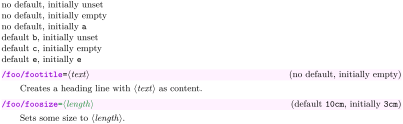
\tcbdocdescNoDefaultInit       \par

\tcbdocdescInitEmpty           \par

\tcbdocdescInit{a}             \par

\tcbdocdescDefault{b}          \par

\tcbdocdescDefaultInitEmpty{c} \par

\tcbdocdescDefaultInit{e}{e}


\begin{docKey}[foo]{footitle}{=\meta{text}}{\tcbdocdescInitEmpty}

  Creates a heading line with \meta{text} as content.

\end{docKey}


\begin{docKey}[foo]{foosize}{\colOpt{=\meta{length}}}{\tcbdocdescDefaultInit{10cm}{3cm}}

  Sets some size to \meta{length}.

\end{docKey}
\begin{docPathOperation}[⟨options⟩]{⟨name⟩}{⟨parameters⟩}
⟨environment content⟩
\end{docPathOperation}New: 2019-09-18Updated: 2020-04-22
Documents a TikZ path operation with given ⟨name⟩. The given ⟨options⟩ are set with \tcbset. This TikZ path operation takes mandatory or optional ⟨parameters⟩. It is automatically indexed and can be referenced with \refPathOperation{⟨name⟩}.

\begin{docPathOperation}{fooop}{\oarg{opt}(\meta{name})\colOpt{at(\meta{coord})}}

  Imaginary path operation for illustration.

\end{docPathOperation}
\begin{docPathOperation*}[⟨options⟩]{⟨name⟩}{⟨parameters⟩}
⟨environment content⟩
\end{docPathOperation*}New: 2019-09-18Updated: 2020-04-22
Identical to docPathOperation, but without index entry.
\begin{docPathOperations}[⟨options⟩]{{⟨variant1⟩},{⟨variant2⟩},...}
⟨environment content⟩
\end{docPathOperations}New: 2020-04-22
Documents several (similar) TikZ path operation variants simultaneously. The given ⟨options⟩ are set with \tcbset and are valid for all variants and the documentation text. Every variant is described by an option set ⟨variant1⟩, ⟨variant2⟩, and so on. The most crucial options are /tcb/doc name and /tcb/doc parameter.

\begin{docPathOperations}[

    doc no index,   %  no index entries for this example

  ]

  {

    {

      doc name      = rectangle,

      doc parameter = \meta{corner or cycle},

    },

    {

      doc name      = circle,

      doc parameter = \oarg{options},

    },

    {

      doc name      = ellipse,

      doc parameter = \oarg{options},

    },

  }

  example

\end{docPathOperations}
\docValueUpdated: 2020-04-23
\docValue*
Documents a value with given ⟨name⟩. Typically, this is a value for a key. The given ⟨options⟩ are set with \tcbset. This value is automatically indexed for \docValue and has no index entry for \docValue*.

\docAuxCommandUpdated: 2020-04-23
\docAuxCommand*
Documents an auxiliary or minor LaTeX macro with given ⟨name⟩ where ⟨name⟩ is written without backslash. The given ⟨options⟩ are set with \tcbset. This macro is automatically indexed for \docAuxCommand and has no index entry for \docAuxCommand*.

The macro \docAuxCommand{fooaux} holds some interesting data.
\docAuxEnvironmentUpdated: 2020-04-23
\docAuxEnvironment*
Documents an auxiliary or minor LaTeX environment with given ⟨name⟩. The given ⟨options⟩ are set with \tcbset. This macro is automatically indexed for \docAuxEnvironment and has no index entry for \docAuxEnvironment*.

The environment \docAuxEnvironment{fooauxenv} holds some interesting data.
\docAuxKey[⟨key path⟩][⟨options⟩]{⟨name⟩}Updated: 2020-04-23
\docAuxKey*[⟨key path⟩][⟨options⟩]{⟨name⟩}
Documents an auxiliary key with given ⟨name⟩ and an optional ⟨key path⟩. The given ⟨options⟩ are set with \tcbset. It is automatically indexed for \docAuxKey and has no index entry for \docAuxKey*.

The key \docAuxKey[foo]{fooaux} holds some interesting data.
\docCounterUpdated: 2020-04-23
\docCounter*
Documents a counter with given ⟨name⟩. The given ⟨options⟩ are set with \tcbset. The counter is automatically indexed for \docCounter and has no index entry for \docCounter*.

The counter \docCounter{foocounter} can be used for computation.
\docLengthUpdated: 2020-04-23
\docLength*
Documents a length with given ⟨name⟩. The given ⟨options⟩ are set with \tcbset. The length is automatically indexed for \docLength and has no index entry for \docLength*.

The length \docLength{foolength} can be used for computation.

\cs{⟨name⟩}
Macro from ltxdoc [Carlisle 2024] to typeset a command word ⟨name⟩ where the backslash is prefixed. The library overwrites the original macro.

This is a \cs{foocommand}.
\meta{⟨text⟩}
Macro from doc [Mittelbach 2024] to typeset a meta ⟨text⟩. The library overwrites the original macro.

This is a \meta{text}.
\marg{⟨text⟩}
Macro from ltxdoc [Carlisle 2024] to typeset a ⟨text⟩ with curly brackets as a mandatory argument. The library overwrites the original macro.

This is a mandatory \marg{argument}.
\oarg{⟨text⟩}
Macro from ltxdoc [Carlisle 2024] to typeset a ⟨text⟩ with square brackets as an optional argument. The library overwrites the original macro.

This is an optional \oarg{argument}.
\pbarg{⟨text⟩}New: 2025-05-28
Renamed macro from the beamer [Tantau et al. 2025] documentation to typeset a ⟨text⟩ with pointed brackets as a mandatory argument.

This is a |beamer| \pbarg{argument}.


\begin{dispExample}
⟨environment content⟩
\end{dispExample}Updated: 2014-10-10
Creates a colored box based on a tcolorbox. It displays the environment content as source code in the upper part and as compiled text in the lower part of the box. The appearance is controlled by /tcb/documentation listing style and the style /tcb/docexample. It may be changed by redefining this style.

\begin{dispExample}

This is a \LaTeX\ example.

\end{dispExample}
\begin{dispExample*}{⟨options⟩}
⟨environment content⟩
\end{dispExample*}Updated: 2014-10-10
The starred version of dispExample takes tcolorbox ⟨options⟩ as parameter. These ⟨options⟩ are executed after /tcb/docexample.

\begin{dispExample*}{sidebyside}

This is a \LaTeX\ example.

\end{dispExample*}
\begin{dispListing}
⟨environment content⟩
\end{dispListing}
Creates a colored box based on a tcolorbox. It displays the environment content as source code. The appearance is controlled by /tcb/documentation listing style and the style /tcb/docexample. It may be changed by redefining this style.

\begin{dispListing}

This is a \LaTeX\ example.

\end{dispListing}
\begin{dispListing*}{⟨options⟩}
⟨environment content⟩
\end{dispListing*}
The starred version of dispListing takes tcolorbox ⟨options⟩ as parameter. These ⟨options⟩ are executed after /tcb/docexample.

\begin{dispListing*}{title=My listing}

This is a \LaTeX\ example.

\end{dispListing*}
\begin{absquote}
⟨environment content⟩
\end{absquote}
Used to typeset an abstract as quoted and small text.

\tcbmakedocSubKey[⟨options⟩]{⟨name⟩}{⟨key path⟩}Updated: 2023-12-01
Creates a new environment ⟨name⟩ based on docKey for the documentation of keys with the given ⟨key path⟩ as root. The new environment ⟨name⟩ takes the same parameters as docKey itself. The given ⟨options⟩ are prepended to options of the ⟨name⟩ environment. A second starred environment ⟨name⟩ is also created, which is identical to ⟨name⟩ but without index entry.

\tcbmakedocSubKey{docFooKey}{foo}


\begin{docFooKey}{foodummy}{=\meta{nothing}}{\tcbdocdescDefaultInitEmpty}

Some key.

\end{docFooKey}


\begin{docFooKey*}{foo another dummy}{=\meta{nothing}}{\tcbdocdescDefaultInitEmpty}

Some key (not indexed).

\end{docFooKey*}
\tcbmakedocSubKeys[⟨options⟩]{⟨name⟩}{⟨key path⟩}New: 2020-04-22Updated: 2023-12-01
Creates a new environment ⟨name⟩ based on docKeys for the documentation of keys with the given ⟨key path⟩ as root. The new environment ⟨name⟩ takes the same parameters as docKeys itself. The given ⟨options⟩ are prepended to options of the ⟨name⟩ environment (see /tcb/index key formatter for an example).

\tcbmakedocSubKeys{docFooKeys}{foo}


\begin{docFooKeys}[

    doc parameter eq meta = nothing,

    doc description init empty,

  ]

  {

    {

      doc name = foodummy 2,

    },

    {

      doc name = foo another dummy 2,

      doc no index,

    }

  }

Some description.

\end{docFooKeys}






\refPathOperation{⟨name⟩}New: 2019-09-17
References a documented TikZ path operation with given ⟨name⟩. The page reference is suppressed if it links to the same page.

We have created \refPathOperation{fooop} as an example.
\refPathOperation*{⟨name⟩}New: 2019-09-17
References a documented TikZ path operation with given ⟨name⟩. There is no page reference.

We have created \refPathOperation*{fooop} as an example.
\refAux{⟨name⟩}Updated: 2020-02-11
References some auxiliary environment, key, value, or color. The ⟨name⟩ is colored according to /tcb/color hyperlink, if hyperref colorlinks are set, but there is no real link.

Some pages back, one can see \refAux{/foo/footitle} as an example.
\refAuxcs{⟨name⟩}Updated: 2020-02-11
References some auxiliary macro ⟨name⟩ where ⟨name⟩ is written without backslash. The ⟨name⟩ is colored according to /tcb/color hyperlink, if hyperref colorlinks are set, but there is no real link.

Some pages back, one can see \refAuxcs{fooaux} as an example.
\refPkg[⟨ctanname⟩]{⟨name⟩}New: 2024-09-18Updated: 2024-11-29
References a package ⟨name⟩ on CTAN with hyperlink https://ctan.org/pkg/⟨name⟩. Using the option ⟨ctanname⟩ creates the hyperlink https://ctan.org/pkg/⟨ctanname⟩. The appearance of the CTAN text can be customized by /tcb/ctan formatter.

\colDef{⟨text⟩}
Sets ⟨text⟩ with the command color, see /tcb/color command.

This is my \colDef{text}.
\colOpt{⟨text⟩}
Sets ⟨text⟩ with the option color, see /tcb/color option.

This is my \colOpt{text}.
\colFade{⟨text⟩}New: 2019-09-18
Sets ⟨text⟩ with the fade color, see /tcb/color fade.

This is my \colFade{text}.
\tcbdocmarginnote[⟨options⟩]{⟨text⟩}New: 2014-09-19
Creates a tcolorbox note with the given ⟨text⟩ inside the margin using the marginnote package. The style of the tcolorbox is predefined and can be altered by /tcb/doc marginnote and the given ⟨options⟩.

Some text\tcbdocmarginnote{Note A}

which is commented by a note inside the margin.

Alternatively to |\tcbdocmarginnote|, you can always use

|\marginnote| with a |tcolorbox| directly.\par

This is further text%

\tcbdocmarginnote[colframe=blue!50!white,colback=blue!5!white]{Note B}

with another note.
\tcbdocnew{⟨date⟩}New: 2014-09-19
Auxiliary macro which typesets the /tcb/doclang/new text with the given ⟨date⟩. It may be redefined for customization.

\tcbdocnew{1981-10-29}.

% Next one is displayed in the margin:

\tcbdocmarginnote{\tcbdocnew{1978-02-09}}
\tcbdocupdated{⟨date⟩}New: 2014-09-19
Auxiliary macro which typesets the /tcb/doclang/updated text with the given ⟨date⟩. It may be redefined for customization.

\tcbdocupdated{2014-09-19}.
26.2 Lists of Choices for Key Documentation
\docKeyChoices{⟨comma separated list of choices⟩}New: 2025-09-25Updated: 2026-05-26
\docKeyChoices*{⟨comma separated list of choices⟩}
default=⟨default value⟩
init=⟨initial value⟩
defaultinit=⟨default and initial value⟩
Inside the parameter list of docKey, docKey*, or docKeys to document a key, this macro can be used to give a ⟨comma separated list of choices⟩. These choices are typeset with one leading = and /tcb/doc key choices separator as separator between every value. Long lists are broken automatically at a width which is configured by /tcb/doc head left width or /tcb/doc head left ratio. The star variant is for optional values and uses \colOpt. Default and/or initial value for the description text can be marked inside the list by
If these marks are used, the generated description text overwrites settings from /tcb/doc description and docKey, etc.
Usage of \docKeyChoices outside the parameter list of a key documentation is not intended and is not supported.

\begin{docKey}[foo]{fooexam1}{\docKeyChoices{init=one,two,three}}{}

  Example for mandatory choices.

\end{docKey}

\begin{docKey}[foo]{fooexam2}{\docKeyChoices*{

  init=zero,default=one,two,three,four,five,six,seven,eight,nine,ten,eleven,twelve,

  thirteen,fourteen,fifteen,sixteen,seventeen,eighteen,nineteen,twenty }}{}

  Example for optional choices.

\end{docKey}

\begin{docKey}[foo][doc head left ratio=0.8]{fooexam3}{\docKeyChoices*{

  zero,one,two,three,four,five,six,seven,eight,nine,ten,eleven,twelve,

  thirteen,fourteen,fifteen,sixteen,seventeen,eighteen,nineteen,twenty }}

    {default \texttt{one},\\ initially \texttt{zero}}

\end{docKey}

\begin{docKey}[foo][doc head left ratio=1.0]{fooexam4}{\docKeyChoices*{

  init=zero,default=one,two,three,four,five,six,seven,eight,

  \\ nine,ten,eleven,twelve, thirteen,fourteen,fifteen,sixteen,

  seventeen,eighteen,nineteen,twenty }}{}

\end{docKey}
/tcb/doc key choices=⟨comma separated list of choices⟩(style, no default)New: 2025-09-25
/tcb/doc key choices*=⟨comma separated list of choices⟩(style, no default)
These options are shortcuts for setting /tcb/doc parameter with \docKeyChoices or \docKeyChoices* respectively, i. e., to have a ⟨comma separated list of choices⟩ inside the parameter list of docKeys. The star variant is for optional values and uses \colOpt.

\begin{docKeys}[

    doc keypath      = foo,

    doc name         = fooexam5,

    doc key choices* = {defaultinit=true,false},

  ]{}

\end{docKeys}

\begin{docKeys}[

    doc keypath     = foo,

    doc name        = fooexam6,

    doc key choices = {

      init=zero,one,two,three,four,five,six,seven,eight,nine,ten,eleven,twelve,

      thirteen,fourteen,fifteen,sixteen,seventeen,eighteen,nineteen,twenty },

    doc head left ratio = 0.6,

  ]{}

\end{docKeys}
/tcb/doc key choices separator=⟨separator⟩(no default, initially \textbar)New: 2025-09-25
Sets the ⟨separator⟩ sign which used for typsetting lists of choices from \docKeyChoices, /tcb/doc key choices, and friends.

\begin{docKeys}[

    doc key choices separator = \textbullet,

    doc keypath      = foo,

    doc name         = fooexam7,

    doc key choices* = {defaultinit=true,false,maybe,unlikely},

  ]{}

\end{docKeys}
/tcb/doc head left width=⟨length⟩(no default, initially 0.7\columnwidth)New: 2025-09-25
The given ⟨length⟩ is the maximal width of a box consisting of key name, = sign, and a list of choices. See also /tcb/doc head left ratio.
/tcb/doc head left ratio=⟨number⟩(no default, initially 0.7)New: 2025-09-25
The given rational ⟨number⟩ should be in the range between 0.0 and 1.0. This option sets /tcb/doc head left width to ⟨number⟩\columnwidth. See examples of \docKeyChoices and /tcb/doc key choices.
26.3 Entry Content Option Keys
/tcb/doc name=⟨name⟩(no default, initially empty)New: 2020-04-22
Sets the ⟨name⟩ of the entry to document, i. e., the ⟨name⟩ of the command, environment, key, etc. For docCommand, docEnvironment, etc. the ⟨name⟩ is set by a mandatory parameter, but can also be set by /tcb/doc name. /tcb/doc name also sets ⟨name⟩ to /tcb/doc label, /tcb/doc index, and /tcb/doc sort index.

\begin{docCommands}[

    doc no index,  %  no index entries for this example

    doc name      = bfseries,

  ] {}

  Font setting to bold face.

\end{docCommands}
/tcb/doc parameter=⟨parameters⟩(no default, initially empty)New: 2020-04-22
Sets the ⟨parameters⟩ of the entry to document, i. e., the ⟨parameters⟩ of the command, environment, key, etc. For docCommand, docEnvironment, etc. the ⟨parameters⟩ is set by a mandatory option, but can also be set by /tcb/doc parameter.

\begin{docCommands}[

    doc no index,  %  no index entries for this example

    doc name      = textbf,

    doc parameter = \marg{text},

  ] {}

  Sets \meta{text} in bold face.

\end{docCommands}
/tcb/doc parameter marg=⟨arg1⟩(style)New: 2026-05-26
/tcb/doc parameter oarg=⟨arg1⟩(style)
/tcb/doc parameter marg marg={⟨arg1⟩}{⟨arg2⟩}(style)
/tcb/doc parameter oarg marg={⟨arg1⟩}{⟨arg2⟩}(style)
/tcb/doc parameter marg oarg={⟨arg1⟩}{⟨arg2⟩}(style)
These shortcut styles set argument ⟨arg1⟩ or ⟨arg1⟩ and ⟨arg2⟩ to /tcb/doc parameter.

\begin{docCommands}[

    doc no index,  %  no index entries for this example

    doc name           = textbf,

    doc parameter marg = text,

  ] {}

  Sets \meta{text} in bold face.

\end{docCommands}
/tcb/doc parameter eq=⟨parameter⟩(style)New: 2026-05-26
/tcb/doc parameter eq meta=⟨arg⟩(style)
/tcb/doc parameter eq marg=⟨arg⟩(style)
/tcb/doc parameter eq meta*=⟨arg⟩(style)
/tcb/doc parameter eq marg*=⟨arg⟩(style)
These shortcut styles set /tcb/doc parameter to “=” followed by ⟨parameter⟩ or ⟨arg⟩ enclosed by \meta or \marg. The star variant is for optional values and uses \colOpt.

\begin{docKeys}[

    doc name              = /foo/footitle,

    doc parameter eq meta = text,

    doc description init empty

  ]{}

  Creates a heading line with \meta{text} as content.

\end{docKeys}
/tcb/doc keypath=⟨key path⟩(no default, initially empty)New: 2020-04-22
Sets the ⟨key path⟩ of the key to document. For docKey and docKey* the ⟨key path⟩ is set by a specialized option, but can also be set by /tcb/doc keypath.

\begin{docKeys}[

    doc no index,  %  no index entries for this example

    doc keypath            = tikz,

    doc name               = fill,

    doc parameter eq meta* = color,

    doc description        = default is scope's color setting,

  ] {}

  This option causes the path to be filled.

\end{docKeys}
/tcb/doc key prefix=⟨key prefix⟩(no default, initially /)New: 2023-12-01
Sets the ⟨key prefix⟩ (root path) of the key to document. This prefix is prepended to /tcb/doc keypath, if /tcb/doc keypath is not empty. The default / setting is intended for pgfkeys. For l3keys, setting /tcb/doc key prefix to be empty is more appropriate, since their path starts with a module name without /.

\begin{docKeys}[

    doc no index,  %  no index entries for this example

    doc key prefix        = ,

    doc keypath           = tcobox,% module name

    doc name              = my_l3_key,

    doc parameter eq meta = some value,

    doc description       = example,

  ] {}

  Documentation of a key using |l3keys|.

\end{docKeys}
/tcb/index key formatter(default \use:n, initially \use:n)New: 2023-12-01
/tcb/index keys formatter(default \use:n, initially \use:n)New: 2023-12-01
Sets ⟨macro⟩ as formatter for the text given by /tcb/doclang/key or /tcb/doclang/keys inside the index. The ⟨macro⟩ has to take one mandatory argument (the language text). The intended purpose is to differentiate between different sorts of keys, if necessary, e. g. between pgfkeys and l3keys. If these options are used without value, the formatters are reset to their standard behavior.

% See index of this documentation to recognize the effect

\newcommand{\myFormatPgfkeysIndex}[1]{#1 (\textsf{pgfkeys})}

\newcommand{\myFormatExplkeysIndex}[1]{#1 (\textsf{l3keys})}


\tcbmakedocSubKey[

    index key formatter=\myFormatPgfkeysIndex,

    index keys formatter=\myFormatPgfkeysIndex

  ]{docFooPgfkey}{foopgf}

\tcbmakedocSubKey[

    doc key prefix=,

    index key formatter=\myFormatExplkeysIndex,

    index keys formatter=\myFormatExplkeysIndex

  ]{docFooExplkey}{fooexpl}


\begin{docFooPgfkey}{foo pgf}{=\meta{name}}{\tcbdocdescInitEmpty}

  content

\end{docFooPgfkey}


\begin{docFooExplkey}{foo expl}{=\meta{name}}{\tcbdocdescInitEmpty}

  content

\end{docFooExplkey}
/tcb/doc description=⟨description⟩(no default, initially empty)
Sets a (short!) additional ⟨description⟩ for docCommand, docEnvironment, or docPathOperation. Such a description is mandatory for docKey.

\begin{docCommand*}[doc description=my description]{myCommandF}{\marg{argument}}

  This is the documentation of \refCom{myCommandF} which takes one \meta{argument}.

  \refCom{myCommandF} does some funny things with its \meta{argument}.

\end{docCommand*}
Note that the description ⟨text⟩ may overlap with the text on the left hand side if too long. Linebreaks can be used inside the ⟨text⟩.
/tcb/doc description no default init(style)New: 2026-05-26
/tcb/doc description init empty(style)
/tcb/doc description init={⟨initial value⟩}(style)
/tcb/doc description default={⟨default value⟩}(style)
/tcb/doc description default init empty={⟨default value⟩}(style)
/tcb/doc description default init={⟨default value⟩}{⟨initial value⟩}(style)
These styles set standardized description texts to /tcb/doc description, see \tcbdocdescNoDefaultInit and friends.

\begin{docKeys}[

    doc name              = /foo/footitle,

    doc parameter eq meta = text,

    doc description init empty

  ]{}

  Creates a heading line with \meta{text} as content.

\end{docKeys}


\begin{docKeys}[

    doc name                     = /foo/foosize,

    doc parameter eq meta*       = length,

    doc description default init = {10cm}{3cm}

  ]{}

  Sets some size to \meta{length}.

\end{docKeys}
/tcb/doc label=⟨text⟩(no default, initially unset)New: 2019-09-18
If used inside the option list of docCommand, docEnvironment, docKey, etc, then ⟨text⟩ is used for labeling instead of the name of the definition.

\begin{docPathOperation*}[doc label=pathline]{-{}-}{\meta{coordinate or cycle}}

  This is the documentation of \refPathOperation{pathline}.

\end{docPathOperation*}
/tcb/doc index=⟨text⟩(no default, initially unset)New: 2020-01-07
If used inside the option list of docCommand, docEnvironment, docKey, etc, then ⟨text⟩ is used for the index instead of the name of the definition.

\begin{docPathOperation}[doc index=foo path (horizontal then vertical),

    doc label=pathline2]{-\textbar}{\meta{coordinate or cycle}}

  This is the documentation of \refPathOperation{pathline2}.

\end{docPathOperation}
/tcb/doc sort index=⟨text⟩(no default, initially unset)New: 2020-04-23
If used inside the option list of docCommand, docEnvironment, docKey, etc, then ⟨text⟩ is used as sort key for the index instead of the name of the definition.
\begin{docCommands}[

    doc name        = l_tcobox_example_tl,

    doc sort index  = example_tl,  % sorted under e like example

  ]{}

\end{docCommands}
/tcb/doc into index=true|false
If set to false, no index entries are written for the main documentation environments. The same effect is achieved by using e. g. docCommand* instead of docCommand.
/tcb/doc no index(style, initially unset)New: 2020-04-22
If set, no index entries are written for the main documentation environments. This is a shortcut for using /tcb/doc into index=false.
/tcb/doc marginnote=⟨options⟩(no default, initially empty)New: 2014-09-19
Sets style ⟨options⟩ for the displayed box of the \tcbdocmarginnote command.

\tcbset{doc marginnote={colframe=blue!50!white,colback=blue!5!white}}%

This is some text\tcbdocmarginnote{Note A}

which is commented by a note inside the margin.
/tcb/doc new=⟨date⟩(style, no default)New: 2014-09-19
Adds a marginnote with a “New: ⟨date⟩” message at the beginning of the upper box part. The intended use is inside the option list of docCommand, docEnvironment, etc.

\begin{docCommand}[doc new=2000-01-01]{foosomething}{\marg{text}}

Some command for something.

\end{docCommand}
/tcb/doc updated=⟨date⟩(style, no default)New: 2014-09-19
Adds a marginnote with a “Updated: ⟨date⟩” message at the beginning of the upper box part. See /tcb/doc new.
/tcb/doc new and updated={⟨new date⟩}{⟨update date⟩}(style, no default)New: 2014-09-19
Adds a marginnote with “New: ⟨new date⟩” and “Updated: ⟨update date⟩” messages at the beginning of the upper box part. See /tcb/doc new.
26.4 Entry Customization Option Keys
/tcb/doc left=⟨length⟩(no default, initially 2em)
Sets the left hand offset of the documentation texts from docCommand, docEnvironment, docKey, etc, to ⟨length⟩.

\begin{docCommand*}[doc left=2cm,doc left indent=-2cm]{myCommandA}{\marg{argument}}

  This is the documentation of \refCom{myCommandA} which takes one \meta{argument}.

  \refCom{myCommandA} does some funny things with its \meta{argument}.

\end{docCommand*}
/tcb/doc right=⟨length⟩(no default, initially 0em)
Sets the right hand offset of the documentation texts from docCommand, docEnvironment, docKey, etc, to ⟨length⟩.

\begin{docCommand*}[doc right=2cm]{myCommandB}{\marg{argument}}

  This is the documentation of \refCom{myCommandB} which takes one \meta{argument}.

  \refCom{myCommandB} does some funny things with its \meta{argument}.

\end{docCommand*}
/tcb/doc left indent=⟨length⟩(no default, initially -2em)
Sets the left hand indent of documentation heads from docCommand, docEnvironment, docKey, etc, to ⟨length⟩.

\begin{docCommand*}[doc left indent=2cm]{myCommandC}{\marg{argument}}

  This is the documentation of \refCom{myCommandC} which takes one \meta{argument}.

  \refCom{myCommandC} does some funny things with its \meta{argument}.

\end{docCommand*}
/tcb/doc right indent=⟨length⟩(no default, initially 0pt)
Sets the right hand indent of documentation heads from docCommand, docEnvironment, docKey, etc, to ⟨length⟩.

\begin{docCommand*}[doc right indent=-10mm,doc right=10mm,

    doc description=test value]{myCommandD}{\marg{argument}}

  This is the documentation of \refCom{myCommandD} which takes one \meta{argument}.

  \refCom{myCommandD} does some funny things with its \meta{argument}.

\end{docCommand*}
The head lines of the main documentation environments docCommand, docEnvironment, docKey, etc, are tcolorboxes inside a tcbraster. Options to the surrounding tcbrasters and the embedded tcolorboxes can be given using the following keys.
/tcb/doc raster command=⟨options⟩(no default, initially empty)New: 2020-04-24
Sets ⟨options⟩ for the surrounding tcbraster of
docCommand, docCommand*, and docCommands.

\tcbset{doc raster command={raster before skip=7mm,raster after skip=0mm}}


The is an example text.


\begin{docCommand*}{myCommandI}{\marg{argument}}

  This is the documentation of \refCom{myCommandI} which takes one \meta{argument}.

  \refCom{myCommandI} does some funny things with its \meta{argument}.

\end{docCommand*}
/tcb/doc raster environment=⟨options⟩(no default, initially empty)New: 2020-04-24
Sets ⟨options⟩ for the surrounding tcbraster of
docEnvironment, docEnvironment*, and docEnvironments.
/tcb/doc raster path=⟨options⟩(no default, initially empty)New: 2020-04-24
Sets ⟨options⟩ for the surrounding tcbraster of
docPathOperation, docPathOperation*, and docPathOperations.
/tcb/doc raster=⟨options⟩(no default, initially empty)New: 2020-04-24
Shortcut for setting the same ⟨options⟩ for /tcb/doc raster command, /tcb/doc raster environment, /tcb/doc raster key, and /tcb/doc raster path.
/tcb/doc head command=⟨options⟩(no default, initially empty)
Sets ⟨options⟩ for the head line of docCommand, docCommand*, and docCommands.

\tcbset{doc head command={interior style={fill,left color=red!20!white,

  right color=blue!20!white}}}


\begin{docCommand*}{myCommandE}{\marg{argument}}

  This is the documentation of \refCom{myCommandE} which takes one \meta{argument}.

  \refCom{myCommandE} does some funny things with its \meta{argument}.

\end{docCommand*}
/tcb/doc head environment=⟨options⟩(no default, initially empty)
Sets ⟨options⟩ for the head line of docEnvironment, docEnvironment*, and docEnvironments.

\tcbset{doc head environment={beamer,boxsep=2pt,arc=2pt,colback=green!20!white}}


\begin{docEnvironment*}{myEnvironment}{\marg{argument}}

  This is the documentation of \refEnv{myEnvironment} which

  takes one \meta{argument}.

\end{docEnvironment*}
/tcb/doc head key=⟨options⟩(no default, initially empty)
Sets ⟨options⟩ for the head line of docKey, docKey*, and docKeys.

\tcbset{doc head key={boxsep=4pt,arc=4pt,boxrule=0.6pt,

  frame style=fill,interior style=fill,colframe=green!50!black}}


\begin{docKey}[foo]{myKey}{}{no value}

  This is the documentation of \refKey{/foo/myKey}.

\end{docKey}
/tcb/doc head path=⟨options⟩(no default, initially empty)New: 2019-09-18
Sets ⟨options⟩ for the head line of docPathOperation, docPathOperation*, and docPathOperations.

\tcbset{doc head command={interior style={fill,left color=red!7!white,

  right color=blue!7!white}}}


\begin{docPathOperation*}{-{}-}{\meta{coordinate or cycle}}

  This is the documentation of \refPathOperation{-{}-}.

\end{docPathOperation*}
/tcb/doc head=⟨options⟩(no default, initially empty)Updated: 2019-09-18
Shortcut for setting the same ⟨options⟩ for /tcb/doc head command, /tcb/doc head environment, /tcb/doc head key, and /tcb/doc head path.
The description texts of the main documentation environments docCommand, docEnvironment, docKey, etc, are set in a compact form without indention and parskip=0pt. This settings can overruled by using the following keys to insert code before (or after) the description texts.
/tcb/before doc body command=⟨code⟩(no default, initially empty)New: 2015-10-09
Executes ⟨code⟩ before the description texts of docCommand and docCommand*.

\tcbset{before doc body command={%

    \setlength{\parindent}{2.5em}%

    \setlength{\parskip}{1ex plus 0.75ex minus 0.25ex}%

}}


\begin{docCommand*}{myCommandG}{\marg{argument}}

  This is the documentation of \refCom{myCommandG} which takes one \meta{argument}.

  \refCom{myCommandG} does some funny things with its \meta{argument}.

\end{docCommand*}
/tcb/after doc body command=⟨code⟩(no default, initially empty)New: 2015-10-09
Executes ⟨code⟩ after the description texts of docCommand and docCommand*.

\tcbset{after doc body command={%

    \hfill\nolinebreak[1]\hspace*{\fill}\textcolor{red}{$\diamondsuit$}%

}}


\begin{docCommand*}{myCommandH}{\marg{argument}}

  This is the documentation of \refCom{myCommandH} which takes one \meta{argument}.

  \refCom{myCommandH} does some funny things with its \meta{argument}.

\end{docCommand*}
/tcb/before doc body environment=⟨code⟩(no default, initially empty)New: 2015-10-09
Executes ⟨code⟩ before the description texts of docEnvironment and docEnvironment*.
/tcb/after doc body environment=⟨code⟩(no default, initially empty)New: 2015-10-09
Executes ⟨code⟩ after the description texts of docEnvironment and docEnvironment*.
/tcb/before doc body path=⟨code⟩(no default, initially empty)New: 2019-09-18
Executes ⟨code⟩ before the description texts of docPathOperation and docPathOperation*.
/tcb/after doc body path=⟨code⟩(no default, initially empty)New: 2019-09-18
Executes ⟨code⟩ after the description texts of docPathOperation and docPathOperation*.
/tcb/before doc body=⟨options⟩(no default, initially empty)New: 2015-10-09Updated: 2019-09-18
Shortcut for setting the same ⟨options⟩ for /tcb/before doc body command, /tcb/before doc body environment, /tcb/before doc body key, and /tcb/before doc body path.
/tcb/after doc body=⟨options⟩(no default, initially empty)New: 2015-10-09Updated: 2019-09-18
Shortcut for setting the same ⟨options⟩ for /tcb/after doc body command, /tcb/after doc body environment, /tcb/after doc body key, and /tcb/after doc body path.
26.5 General Customization Option Keys
/tcb/docexample(style, no value)Updated: 2015-03-16
Sets the style for dispExample and dispListing with the colors ExampleBack and ExampleFrame. To change the appearance of the examples, this style can be redefined.
% Predefined style:

\tcbset{

  docexample/.style={colframe=ExampleFrame,colback=ExampleBack,

    before skip=\medskipamount,after skip=\medskipamount,

    fontlower=\footnotesize}

}
/tcb/documentation listing options=⟨key list⟩(no default,
initially style=tcbdocumentation)
Sets the options from the package listings [Heinz et al. 2024]. They are used inside dispExample and dispListing to typeset the listings. Note that this is not identical to the key /tcb/listing options which is used for “normal” listings.
Used for /tcb/listing engine=listings only.
/tcb/documentation listing style=⟨listing style⟩(no default, initially tcbdocumentation)
Abbreviation for documentation listing options={style=...}. This key sets a ⟨style⟩ for the listings package, see [Heinz et al. 2024]. Note that this is not identical to the key /tcb/listing style which is used for “normal” listings.
Used for /tcb/listing engine=listings only.
/tcb/documentation minted options=⟨key list⟩(no default,
initially tabsize=2,fontsize=\textbackslash small)
Sets the options from the package minted [Poore 2025] which are used during typesetting of the listing, if used. Note that this is not identical to the key /tcb/minted options which is used for “normal” listings.
Used for /tcb/listing engine=minted only.
/tcb/documentation minted style=⟨key list⟩(no default, initially unset)
Sets a ⟨style⟩ known to Pygments [2025] for the package minted [Poore 2025], if used. Note that this is not identical to the key /tcb/minted style which is used for “normal” listings.
Used for /tcb/listing engine=minted only.
/tcb/documentation minted language=⟨programming language⟩(no default, initially latex)New: 2017-04-24
Sets a ⟨programming language⟩ known to Pygments [2025] for the package minted [Poore 2025], if used. Note that this is not identical to the key /tcb/minted language which is used for “normal” listings.
Used for /tcb/listing engine=minted only.
/tcb/keywords bold=true|false()New: 2017-04-25
Keyword used in docEnvironment, docCommand, etc. are printed boldface (or not). Since the typewriter font is used, the effect may be invisible with Computer Modern fonts or similar which do not have a bold variant. Note that references to keywords are not printed boldface at all.
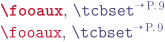
\LARGE

\docAuxCommand{fooaux}, \refCom{tcbset}


\tcbset{keywords bold=false}

\docAuxCommand{fooaux}, \refCom{tcbset}
/tcb/page ref formatter(default \textsuperscript, initially \textsuperscript)New: 2024-03-13
Sets ⟨macro⟩ as formatter for page references like the reference to tcolorbox. The default setting puts the page reference in a \textsuperscript. It may be changed to \fakesuperscript to cope with superiors problems in combination with the realscripts package or just otherwise for user customization.
/tcb/ctan formatter(default \use:n, initially \use:n)New: 2024-11-29
Sets ⟨macro⟩ as formatter for the string CTAN inside \refPkg. The ⟨macro⟩ has to take one mandatory argument (the string CTAN) and is typically some font setting.

\tcbset{ctan formatter=\textsf}

Images are included using the \refPkg{graphicx} package.\par

\newcommand{\myformatter}[1]{\textbf{\ttfamily\color{red}\TeX-Archive}}

\tcbset{ctan formatter=\myformatter}

Draw your own picture with help of the \refPkg{tikz} package.
/tcb/index command=⟨macro⟩(no default, initially \index)New: 2015-01-09
Replaces the internally used \index macro by the given ⟨macro⟩. The ⟨macro⟩ has to take one mandatory argument like \index. This option is mutually exclusive with /tcb/index command name.
\tcbset{index command=\myindexcommand}
/tcb/index command name=⟨name⟩(no default, initially unset)New: 2015-01-09
Replaces the internally used \index macro by \index[⟨name⟩], i. e., \index{…} is replaced by \index[⟨name⟩]{…}. This option is intended to be used with imakeidx and is mutually exclusive with /tcb/index command.
\tcbset{index command name=mydoc}
/tcb/index format=pgfsection|pgfchapter|pgf|doc|off()
pgfsection: The index is formatted like in the pgf documentation (as a section).
pgfchapter: The index is formatted like in the pgf documentation (as a chapter).
pgf: Alias for pgfsection.
doc: The index is assumed to be formatted by doc or ltxdoc. The usage of makeindex with -s gind.ist is assumed. The package hypdoc has to be loaded before tcolorbox. Only a limited set of customizations will work! This option cannot be unset when used!
off: The index is not formatted by tcolorbox. Use this, if the index is formatted by other package like imakeidx.
Determines the basic format of the generated index. Feasible values are:
/tcb/index actual=⟨character⟩(no default, initially @)
Sets the character for “actual” in automatic indexing.
/tcb/index quote=⟨character⟩(no default, initially ")
Sets the character for “quote” in automatic indexing.
/tcb/index level=⟨character⟩(no default, initially !)
Sets the character for “level” in automatic indexing.
/tcb/index default settings(style, no value)
Sets the makeindex default values for /tcb/index actual, /tcb/index quote, and /tcb/index level.
/tcb/index german settings(style, no value)
Sets the makeindex values recommended for German language texts. This is identical to setting the following:
\tcbset{index actual={=},index quote={!},index level={>}}
/tcb/index annotate=true|false()
If set to true, the index entries are annotated with short descriptions given by /tcb/doclang/environment, /tcb/doclang/key, and others.
/tcb/index colorize=true|false()
If set to true, the index entries colorized according to the color settings given by /tcb/color environment, /tcb/color key, and others.
/tcb/index gather colors=true|falseNew: 2022-06-20
/tcb/index gather commands=true|falseNew: 2022-06-20
/tcb/index gather counters=true|falseNew: 2022-06-20
/tcb/index gather environments=true|falseNew: 2022-06-20
/tcb/index gather keys=true|falseNew: 2022-06-20
/tcb/index gather lengths=true|falseNew: 2022-06-20
/tcb/index gather paths=true|falseNew: 2022-06-20
/tcb/index gather values=true|falseNew: 2022-06-20
If set to true, an additional index grouping is created where entries are gathered, e. g. /tcb/index gather counters creates an index entry ‘Colors’, see /tcb/doclang/colors, which gets all colors as sub entries.
/tcb/color command=⟨color⟩(no default, initially Definition)
Sets the highlight color used by macro definitions.
/tcb/color environment=⟨color⟩(no default, initially Definition)
Sets the highlight color used by environment definitions.
/tcb/color key=⟨color⟩(no default, initially Definition)
Sets the highlight color used by key definitions.
/tcb/color path=⟨color⟩(no default, initially Definition)New: 2019-09-18
Sets the highlight color used by TikZ path operation definitions.
/tcb/color value=⟨color⟩(no default, initially Definition)
Sets the highlight color used by value definitions.
/tcb/color counter=⟨color⟩(no default, initially Definition)New: 2015-01-08
Sets the highlight color used by counter definitions.
/tcb/color length=⟨color⟩(no default, initially Definition)New: 2015-01-08
Sets the highlight color used by length definitions.
/tcb/color color=⟨color⟩(no default, initially Definition)
Sets the highlight color used by color definitions.
/tcb/color definition=⟨color⟩(no default, initially Definition)Updated: 2019-09-18
Sets the highlight color for /tcb/color command, /tcb/color environment, /tcb/color key, /tcb/color path, /tcb/color value, /tcb/color counter, /tcb/color length, and /tcb/color color.
/tcb/color option=⟨color⟩(no default, initially Option)
Sets the color used for optional arguments.
/tcb/color fade=⟨color⟩(no default, initially Fade)
Sets the color used for faded text like in docPathOperation.
/tcb/color hyperlink=⟨color⟩(no default, initially Hyperlink)
Sets the color for all hyper-links, i. e., all internal and external links.
26.6 Language Option Keys
The following keys are provided for language specific settings. The English language is predefined.
/tcb/english language(style, no value)
Sets all language specific settings to English.
/tcb/doclang/color=⟨text⟩(no default, initially color)
Text used in the index for colors.
/tcb/doclang/colors=⟨text⟩(no default, initially Colors)
Heading text in the index for colors.
/tcb/doclang/commands=⟨text⟩(no default, initially Commands)New: 2022-06-20
Heading text in the index for commands.
/tcb/doclang/counter=⟨text⟩(no default, initially counter)New: 2015-01-08
Text used in the index for counters.
/tcb/doclang/counters=⟨text⟩(no default, initially Counters)New: 2015-01-08
Heading text in the index for counters.
/tcb/doclang/default=⟨text⟩(no default, initially default)New: 2026-05-26
Text used for \tcbdocdescDefault and friends.
/tcb/doclang/environment=⟨text⟩(no default, initially environment)
Text used in the index for environments.
/tcb/doclang/environments=⟨text⟩(no default, initially Environments)
Heading text in the index for environments.
/tcb/doclang/environment content=⟨text⟩(no default, initially environment content)
Text used in docEnvironment.
/tcb/doclang/index=⟨text⟩(no default, initially Index)
Heading text for the index.
/tcb/doclang/initially=⟨text⟩(no default, initially initially)New: 2026-05-26
Text used for \tcbdocdescInit and friends.
/tcb/doclang/initiallyempty=⟨text⟩(no default, initially initially empty)New: 2026-05-26
Text used for \tcbdocdescInitEmpty and friends.
/tcb/doclang/key=⟨text⟩(no default, initially key)
Text used in the index for keys.
/tcb/doclang/keys=⟨text⟩(no default, initially Keys)
Heading text used in the index for keys.
/tcb/doclang/length=⟨text⟩(no default, initially length)New: 2015-01-08
Text used in the index for lengths.
/tcb/doclang/lengths=⟨text⟩(no default, initially Lengths)New: 2015-01-08
Heading text in the index for lengths.
/tcb/doclang/new=⟨text⟩(no default, initially New)New: 2014-09-19
Announcement text for new content.
/tcb/doclang/nodefault=⟨text⟩(no default, initially no default)New: 2026-05-26
Text used for \tcbdocdescNoDefaultInit and friends.
/tcb/doclang/noinitially=⟨text⟩(no default, initially initially unset)New: 2026-05-26
Text used for \tcbdocdescNoDefaultInit and friends.
/tcb/doclang/path=⟨text⟩(no default, initially path operation)New: 2019-09-18
Text used in the index for path operations.
/tcb/doclang/paths=⟨text⟩(no default, initially Path operations)New: 2019-09-18
Heading text in the index for path operations.
/tcb/doclang/pageshort=⟨text⟩(no default, initially P.)
Short text for page references.
/tcb/doclang/updated=⟨text⟩(no default, initially Updated)New: 2014-09-19
Announcement text for updated content.
/tcb/doclang/value=⟨text⟩(no default, initially value)
Text used in the index for values.
/tcb/doclang/values=⟨text⟩(no default, initially Values)
Heading text in the index for values.
26.7 Predefined Colors of the Library
Updated: 2019-09-18 The following colors are predefined. They are used as default colors in some library commands.

,

,

,

,

,

.