The tcolorbox package
Libraries
12 Inclusion of Boxed Image Files
The skins library adds some commands to conveniently include boxed image files. For the following macros and options, the skins library has to be loaded by a package option or inside the preamble by:
See Section 10 for the documentation of all other options of the skins library.
12.1 Macros
\tcbincludegraphics[⟨options⟩]{⟨file name⟩}New: 2014-11-14Updated: 2016-07-13
If a /tcb/width is specified, but no fixed /tcb/height, the image is sized to fill the inner width of the box. The height of the box adapts to the image.
If a fixed /tcb/height is specified, the image is sized to fill the fixed inner area of the box.
If the /tcb/capture mode /tcb/hbox is specified, the image is sized according to given \includegraphics options only. The box adapts to the image.
In principle, this macro includes an image file denoted by ⟨file name⟩ using the standard \includegraphics and puts it into a tcolorbox. The ⟨options⟩ are tcolorbox keys to set up the colored box. Use /tcb/graphics options to specify options for the underlying \includegraphics. Some tcolorbox option keys are automatically set, namely /tcb/enhanced and options to center the image inside the box.
The sizing of the included image is done depending on the following:
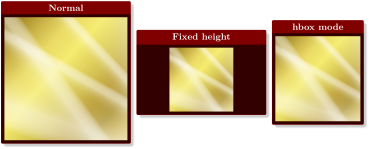
% \tcbuselibrary{raster}

\begin{tcbraster}[raster columns=3,raster force size=false,size=fbox,

    colframe=red!50!black,colback=red!20!black,

    fonttitle=\bfseries,center title,drop fuzzy shadow]

  \tcbincludegraphics[title=Normal]{goldshade.png}

  \tcbincludegraphics[title=Fixed height,height=3cm]{goldshade.png}

  \tcbincludegraphics[title=hbox mode,hbox,graphics options={width=3cm}]

    {goldshade.png}

\end{tcbraster}
The auxiliary macro \imagename may be used inside \tcbincludegraphics to display the name of the file. \imagename is already partially detokenized and is allowed to contain special characters like the underscore. Note that an appropriate font is required to display such characters.
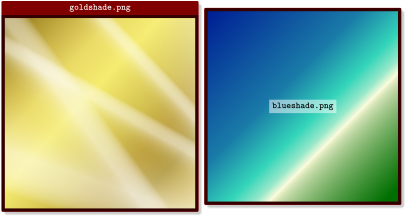
% \tcbuselibrary{raster}

\begin{tcbraster}[size=fbox,

    colframe=red!50!black,colback=red!20!black,

    fonttitle=\bfseries\ttfamily,center title,drop fuzzy shadow]

  \tcbincludegraphics[title=\imagename]{goldshade.png}

  \tcbincludegraphics[finish={

    \node[fill=white,fill opacity=0.5,text opacity=1]

    at (frame.center) {\bfseries\ttfamily\imagename};}]{blueshade.png}

\end{tcbraster}
\tcbincludepdf[⟨options⟩]{⟨file name⟩}New: 2014-11-14
This is a generalized version of \tcbincludegraphics which allows to include a complete PDF file denoted by ⟨file name⟩. Every page is boxed into an own tcolorbox customized by the given ⟨options⟩. It is reasonable to put such a series of boxes inside a tcbraster for alignment.
Use /tcb/graphics pages to use a selection of pages instead of using the whole file.
The auxiliary macro \imagepage may be used inside \tcbincludepdf to display the current page number.
% \tcbuselibrary{raster}

\begin{tcbraster}[raster columns=3,colframe=blue,colback=white,

  colbacktitle=blue!50!white,fonttitle=\small\bfseries\ttfamily,

  left=0pt,right=0pt,top=0pt,bottom=0pt,boxsep=0pt,boxrule=0.6pt,

  toptitle=1mm,bottomtitle=1mm,drop lifted shadow,center title,

  graphics pages={1,...,6},title={\imagename\ [\imagepage]}]

\tcbincludepdf{tcolorbox-example.pdf}

\end{tcbraster}
12.2 Option Keys
/tcb/graphics options=⟨options⟩(no default, initially empty)New: 2014-11-14Updated: 2018-03-18
Used for \tcbincludegraphics and \tcbincludepdf to specify \includegraphics ⟨options⟩. Note that ⟨options⟩ will be fully expanded.

% \tcbuselibrary{raster}

\begin{tcbraster}[raster columns=3,size=fbox,raster equal height,

    colframe=red!50!black,colback=red!20!black,drop fuzzy shadow]

  \tcbincludegraphics{goldshade.png}

  \newcommand{\myangle}{angle=20}%

  \tcbincludegraphics[graphics options=\myangle]{goldshade.png}

  \tcbincludegraphics[graphics options={viewport=0cm 0cm 8cm 4cm,clip}]

    {goldshade.png}

\end{tcbraster}
/tcb/graphics directory=⟨directory⟩(no default, initially empty)New: 2014-11-14
Used for \tcbincludegraphics and \tcbincludepdf to specify a file system ⟨directory⟩ where the image files are located.
\tcbset{

  graphics directory={.},

  graphics directory={examples},

  graphics directory={../../pictures},

}
The \graphicspath macro from the graphics package is superior to this option. /tcb/graphics directory may be used especially for \tcbincludepdf.
/tcb/graphics pages=⟨selection⟩(no default, initially 1,...,\pdfpages)New: 2014-11-14
Used for \tcbincludepdf to specify a ⟨selection⟩ of pages to be included. The largest page number is accessible by \pdfpages. The ⟨selection⟩ has to be given using the \foreach syntax of TikZ.
\tcbset{

  graphics pages={1,3,7},

  graphics pages={1,...,10},

  graphics pages={1,3,...,18},

  graphics pages={100,...,\pdfpages},

}
/tcb/graphics orientation=⟨orientation⟩(no default, initially as-is)New: 2018-03-21
as-is: no rotation of the processed image.
landscape: the processed image is possibly rotated by 90 degrees to ensure that the final width is not smaller than the final height.
landscape*: the processed image is possibly rotated by -90 degrees to ensure that the final width is not smaller than the final height.
portrait: the processed image is possibly rotated by 90 degrees to ensure that the final height is not smaller than the final width.
portrait*: the processed image is possibly rotated by -90 degrees to ensure that the final height is not smaller than the final width.
Used for \tcbincludegraphics and \tcbincludepdf to guarantee a certain ⟨orientation⟩ of the included image. After all other options for the image are processed, the result is possibly rotated to be in landscape or portrait mode.
Feasible values for ⟨orientation⟩ are:

% \tcbuselibrary{raster}

\begin{tcbraster}[raster columns=6,size=fbox,raster equal height,

    colframe=red!50!black,colback=red!20!black,drop fuzzy shadow]

  \tcbincludegraphics{Basilica_5.png}

  \tcbincludegraphics[graphics orientation=landscape]{Basilica_5.png}

  \tcbincludegraphics[graphics orientation=portrait]{Basilica_5.png}

  \tcbincludegraphics[graphics orientation=portrait*]{Basilica_5.png}

  \tcbincludegraphics[graphics options={viewport=0cm 0cm 2cm 3cm,clip}]

    {goldshade.png}

  \tcbincludegraphics[graphics options={viewport=0cm 0cm 2cm 3cm,clip},

    graphics orientation=landscape]{goldshade.png}

\end{tcbraster}