The tcolorbox package
Libraries
15 Library vignette
The library is loaded by a package option or inside the preamble by:
This also loads the skins library, see Section 10, and the fadings library of TikZ [Tantau 2023].
15.1 Vignette Drawing
\tcbvignette{⟨options⟩}New: 2016-04-22
In this context, a vignette is a four part rectangular frame. It is constructed as several TikZ paths and, therefore, can only be used inside a tikzpicture environment or inside tcolorbox options.
The ⟨options⟩ control position, size and style settings of the vignette. Theses options have the common key path /tcb/vig/ and are described in the following.
The next examples show direct \tcbvignette usage without a tcolorbox.

\begin{tikzpicture}

  \tcbvignette{}

\end{tikzpicture}

\begin{tikzpicture}

  \node[draw,fill=blue!15!white] (A) {Test};

  \tcbvignette{outside node=A,raised color=blue}

\end{tikzpicture}

\begin{tikzpicture}

  \node[draw,fill=blue!15!white] (A) {Another Test};

  \tcbvignette{size=3mm,outside node=A,

    north style=red,east style=yellow,

    south style=blue,west style=green}

\end{tikzpicture}

\begin{tikzpicture}

  \node[inner sep=3mm,fill=red!75] (A) {Test};

  \tcbvignette{over node=A,fade in}

\end{tikzpicture}
\tcbvignette can be used directly inside appropriate options keys for tcolorbox. Note that options like /tcb/underlay need /tcb/enhanced or similar settings.

\begin{tcolorbox}[enhanced,size=small,sharp corners,

  colback=green!10,colframe=green!50!black,

  boxrule=1mm,titlerule=0mm,

  title=My title,center title,fonttitle=\bfseries,

  underlay={\tcbvignette{size=1mm,inside node=frame,

      raised color=green!50!black}}]

    This is a tcolorbox.

\end{tcolorbox}
Mostly, convenient short cuts like /tcb/underlay vignette can be used to add a vignette to a tcolorbox. Here, \tcbvignette is used internally.

\begin{tcolorbox}[enhanced,size=small,sharp corners,

  colback=green!10,colframe=green!50!black,

  boxrule=1mm,titlerule=0mm,

  title=My title,center title,fonttitle=\bfseries,

  underlay vignette]

    This is a tcolorbox.

\end{tcolorbox}
15.2 Generic Geometry Settings
/tcb/vig/xmin=⟨length⟩(no default, initially 0pt)New: 2016-04-22
Sets the lower horizontal limit of a \tcbvignette.
/tcb/vig/xmax=⟨length⟩(no default, initially 1cm)New: 2016-04-22
Sets the upper horizontal limit of a \tcbvignette.
/tcb/vig/ymin=⟨length⟩(no default, initially 0pt)New: 2016-04-22
Sets the lower vertical limit of a \tcbvignette.
/tcb/vig/ymax=⟨length⟩(no default, initially 1cm)New: 2016-04-22
Sets the upper vertical limit of a \tcbvignette.

\begin{tikzpicture}

  \fill [black!20] (0,0) rectangle (3,2);

  \path [pattern=checkerboard,pattern color=black!30]

    (0,0) rectangle (3,2);

  \tcbvignette{xmin=1cm,xmax=2.5cm,ymin=0.5cm,ymax=1.75cm}

\end{tikzpicture}
/tcb/vig/lower left corner=⟨coordinates⟩(style, initially 0,0)New: 2016-04-22
Sets the lower left corner of a \tcbvignette. This style sets /tcb/vig/xmin and /tcb/vig/ymin.
/tcb/vig/upper right corner=⟨coordinates⟩(style, initially 1,1)New: 2016-04-22
Sets the upper right corner of a \tcbvignette. This style sets /tcb/vig/xmax and /tcb/vig/ymax.

\begin{tikzpicture}

  \fill [black!20] (0,0) rectangle (3,2);

  \path [pattern=checkerboard,pattern color=black!30]

    (0,0) rectangle (3,2);

  \tcbvignette{lower left corner={1,0.5},

               upper right corner={2.5,1.75}}

\end{tikzpicture}
/tcb/vig/inside node=⟨name⟩(style, initially unset)New: 2016-04-22
Places the \tcbvignette inside the node with the given ⟨name⟩. The outer limits of the vignette are adapted to the node geometry.

\begin{tikzpicture}

  \node[minimum width=2cm,minimum height=1cm] (A) {Node A};

  \tcbvignette{inside node=A}

  \draw[very thick] (A.south west) rectangle (A.north east);

\end{tikzpicture}
/tcb/vig/outside node=⟨name⟩(style, initially unset)New: 2016-04-22
Places the \tcbvignette outside the node with the given ⟨name⟩. The inner limits of the vignette are adapted to the node geometry.

\begin{tikzpicture}

  \node[minimum width=2cm,minimum height=1cm] (A) {Node A};

  \tcbvignette{outside node=A}

  \draw[very thick] (A.south west) rectangle (A.north east);

\end{tikzpicture}
/tcb/vig/over node=⟨name⟩(style, initially unset)New: 2016-04-22
Places the \tcbvignette over the node with the given ⟨name⟩. The outer limits of the vignette are adapted to the node geometry, but are shifted to the outside by /tcb/vig/over node offset.

\begin{tikzpicture}

  \node[minimum width=2cm,minimum height=1cm] (A) {Node A};

  \tcbvignette{over node offset=1mm,over node=A}

  \draw[very thick] (A.south west) rectangle (A.north east);

\end{tikzpicture}
/tcb/vig/over node offset=⟨length⟩(no default, initially 0.1mm)New: 2016-04-22
Determines the shift value for /tcb/vig/over node. Note that /tcb/vig/over node offset has to be set before /tcb/vig/over node is used.
/tcb/vig/north size=⟨length⟩(no default, initially 2mm)New: 2016-04-22
Sets the thickness of the north vignette part.

\begin{tikzpicture}

  \tcbvignette{north size=4mm}

\end{tikzpicture}
/tcb/vig/south size=⟨length⟩(no default, initially 2mm)New: 2016-04-22
Sets the thickness of the south vignette part.

\begin{tikzpicture}

  \tcbvignette{south size=4mm}

\end{tikzpicture}
/tcb/vig/east size=⟨length⟩(no default, initially 2mm)New: 2016-04-22
Sets the thickness of the east vignette part.

\begin{tikzpicture}

  \tcbvignette{east size=4mm}

\end{tikzpicture}
/tcb/vig/west size=⟨length⟩(no default, initially 2mm)New: 2016-04-22
Sets the thickness of the west vignette part.

\begin{tikzpicture}

  \tcbvignette{west size=4mm}

\end{tikzpicture}
/tcb/vig/vertical size=⟨length⟩(style, initially 2mm)New: 2016-04-22
Sets /tcb/vig/north size and /tcb/vig/south size, to the given ⟨length⟩.

\begin{tikzpicture}

  \tcbvignette{vertical size=4mm}

\end{tikzpicture}
/tcb/vig/horizontal size=⟨length⟩(style, initially 2mm)New: 2016-04-22
Sets /tcb/vig/east size and /tcb/vig/west size, to the given ⟨length⟩.

\begin{tikzpicture}

  \tcbvignette{horizontal size=4mm}

\end{tikzpicture}
/tcb/vig/size=⟨length⟩(style, initially 2mm)New: 2016-04-22
Sets /tcb/vig/north size, /tcb/vig/south size, /tcb/vig/east size, and /tcb/vig/west size to the given ⟨length⟩.

\begin{tikzpicture}

  \tcbvignette{size=4mm}

\end{tikzpicture}
/tcb/vig/north size, /tcb/vig/south size, etc. have to be set before /tcb/vig/outside node is used.
15.3 Generic Color and Style Settings
/tcb/vig/north style={⟨style⟩}(no default, initially red!50!white)New: 2016-04-22
Sets TikZ ⟨style⟩ options for the north vignette part.

\begin{tikzpicture}

  \tcbvignette{north style=blue}

\end{tikzpicture}
/tcb/vig/south style={⟨style⟩}(no default, initially red!50!black)New: 2016-04-22
Sets TikZ ⟨style⟩ options for the south vignette part.

\begin{tikzpicture}

  \tcbvignette{south style={draw=blue,fill=yellow}}

\end{tikzpicture}
/tcb/vig/east style={⟨style⟩}(no default, initially red!75!black)New: 2016-04-22
Sets TikZ ⟨style⟩ options for the east vignette part.

\begin{tikzpicture}

  \tcbvignette{east style={left color=yellow!75!black,

    right color=blue!75!black}}

\end{tikzpicture}
/tcb/vig/west style={⟨style⟩}(no default, initially red!75!white)New: 2016-04-22
Sets TikZ ⟨style⟩ options for the west vignette part.

\begin{tikzpicture}

  \tcbvignette{west style={preaction={fill=black!20},

    pattern=checkerboard,

    pattern color=black!30}}

\end{tikzpicture}
/tcb/vig/scope={⟨style⟩}(no default, initially empty)New: 2016-05-24
The four vignette parts are drawn inside a TikZ scope environment which takes the given ⟨style⟩ as option.

\begin{tikzpicture}

  \tcbvignette{scope={transparency group,opacity=0.25}}

\end{tikzpicture}
/tcb/vig/raised color=⟨color⟩(no default)New: 2016-04-22
Creates a raised frame impression by setting the four style options /tcb/vig/north style, /tcb/vig/south style, /tcb/vig/east style, and /tcb/vig/west style to darkened and lightened variations of the given ⟨color⟩.

\begin{tikzpicture}

  \tcbvignette{raised color=blue}

\end{tikzpicture}
/tcb/vig/lowered color=⟨color⟩(no default)New: 2016-04-22
Creates a lowered frame impression by setting the four style options /tcb/vig/north style, /tcb/vig/south style, /tcb/vig/east style, and /tcb/vig/west style to darkened and lightened variations of the given ⟨color⟩.

\begin{tikzpicture}

  \tcbvignette{lowered color=green!75!black}

\end{tikzpicture}
/tcb/vig/color from=⟨inner⟩ to ⟨outer⟩(no default)New: 2016-04-22
Sets the four style options /tcb/vig/north style, /tcb/vig/south style, /tcb/vig/east style, and /tcb/vig/west style such that the color shades from the ⟨inner⟩ color to the ⟨outer⟩ color.
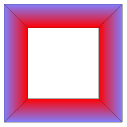
\begin{tikzpicture}

  \tcbvignette{color from=red to blue!50}

\end{tikzpicture}
/tcb/vig/base color=⟨color⟩(no default)New: 2016-04-22
Sets the base color for /tcb/vig/raised color, /tcb/vig/lowered color, /tcb/finish fading vignette. Typically, this value has not to be set directly.
/tcb/vig/draw method=direct|clipped(no default, initially direct)New: 2016-04-22
direct: The vignette parts are drawn/filled by using a single TikZ graph. This is the preferred (and default) method for solid color graphs.
clipped: The vignette parts are drawn somewhat oversized and are clipped to the intended region. In combination with shadings and fadings this seems to give a better/different optical result (depends on the previewer).
Especially, if shadings or fadings are used, the drawn vignette graphs are displayed sometimes not as perfect as expected. Glitches and imperfections are very dependent on the previewer software. The /tcb/vig/draw method intends to give a choice of alternative drawing methods.

\begin{tikzpicture}

  \tcbvignette{color from=red to yellow}

\end{tikzpicture}

\begin{tikzpicture}

  \tcbvignette{color from=red to yellow,draw method=clipped}

\end{tikzpicture}
This option is a stopgap and may be changed or preferably removed in future.
15.4 Generic Fading Settings
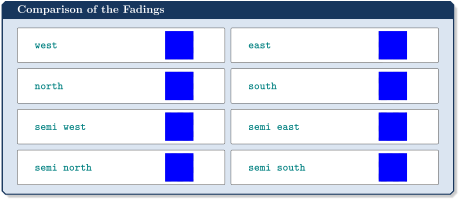
The fadings library of TikZ [Tantau 2023] is loaded automatically by the vignette library. Amongst others, the fadings west, east, north, and south are defined inside the fadings library.
The vignette library adds some more fadings called semi west, semi east, semi north, and semi south. These fadings are much weaker than the normal fadings.

\begin{tikzpicture}

  \fill [black!20] (0,0) rectangle (1,1);

  \path [pattern=checkerboard,pattern color=black!30]

    (0,0) rectangle (1,1);

  \fill [path fading=semi west,blue] (0,0) rectangle (1,1);

\end{tikzpicture}
/tcb/vig/fade in={⟨style⟩}(style, default white)New: 2016-04-22
Sets the four style options /tcb/vig/north style, /tcb/vig/south style, /tcb/vig/east style, and /tcb/vig/west style such that the paths fade from outside to inside.

\begin{tikzpicture}

  \fill [black!20] (-0.5,-0.5) rectangle (1.5,1.5);

  \path [pattern=checkerboard,pattern color=black!30]

    (-0.5,-0.5) rectangle (1.5,1.5);

  \tcbvignette{fade in=blue}

\end{tikzpicture}
/tcb/vig/fade out={⟨style⟩}(style, default white)New: 2016-04-22
Sets the four style options /tcb/vig/north style, /tcb/vig/south style, /tcb/vig/east style, and /tcb/vig/west style such that the paths fade from inside to outside.

\begin{tikzpicture}

  \fill [black!20] (-0.5,-0.5) rectangle (1.5,1.5);

  \path [pattern=checkerboard,pattern color=black!30]

    (-0.5,-0.5) rectangle (1.5,1.5);

  \tcbvignette{fade out=blue}

\end{tikzpicture}
/tcb/vig/semi fade in={⟨style⟩}(style, default white)New: 2016-04-22
Sets the four style options /tcb/vig/north style, /tcb/vig/south style, /tcb/vig/east style, and /tcb/vig/west style such that the paths fade weak from outside to inside.

\begin{tikzpicture}

  \fill [black!20] (-0.5,-0.5) rectangle (1.5,1.5);

  \path [pattern=checkerboard,pattern color=black!30]

    (-0.5,-0.5) rectangle (1.5,1.5);

  \tcbvignette{semi fade in=blue}

\end{tikzpicture}
/tcb/vig/semi fade out={⟨style⟩}(style, default white)New: 2016-04-22
Sets the four style options /tcb/vig/north style, /tcb/vig/south style, /tcb/vig/east style, and /tcb/vig/west style such that the paths fade weak from inside to outside.

\begin{tikzpicture}

  \fill [black!20] (-0.5,-0.5) rectangle (1.5,1.5);

  \path [pattern=checkerboard,pattern color=black!30]

    (-0.5,-0.5) rectangle (1.5,1.5);

  \tcbvignette{semi fade out=blue}

\end{tikzpicture}
It is possible to assign different fadings for each side of the vignette, if needed. Therefore, the fadings have to be applied individually with the four style options /tcb/vig/north style, /tcb/vig/south style, /tcb/vig/east style, and /tcb/vig/west style.

\begin{tikzpicture}

  \fill [black!20] (-0.5,-0.5) rectangle (1.5,1.5);

  \path [pattern=checkerboard,pattern color=black!30]

    (-0.5,-0.5) rectangle (1.5,1.5);

  \tcbvignette{

    north style={blue,path fading=south},

    east style ={blue,path fading=semi west},

    south style={blue,path fading=semi north},

    west style ={blue,path fading=east}

  }

\end{tikzpicture}

\begin{tikzpicture}

  \fill [black!20] (-0.5,-0.5) rectangle (1.5,1.5);

  \path [pattern=checkerboard,pattern color=black!30]

    (-0.5,-0.5) rectangle (1.5,1.5);

  \tcbvignette{

    north style={blue,path fading=west},

    east style ={blue,path fading=south},

    south style={red,path fading=east},

    west style ={red,path fading=north}

  }

\end{tikzpicture}
15.5 Vignette as Underlay
/tcb/underlay vignette={⟨options⟩}(style, no default)New: 2016-04-22
This puts a \tcbvignette with the given ⟨options⟩ as /tcb/underlay to a tcolorbox. The dimensions of the vignette are matched to the dimensions of the tcolorbox. For example, /tcb/leftrule is used as /tcb/vig/west size. Also, /tcb/colframe is used as /tcb/vig/raised color.
For a /tcb/breakable tcolorbox, the vignette is also been broken. Alternatively, \tcbvignette could be used directly inside an /tcb/underlay with appropriate settings.

\begin{tcolorbox}[enhanced,size=small,sharp corners,

  colback=green!10,colframe=green!50!black,

  boxrule=2mm,titlerule=0mm,

  title=My title,center title,fonttitle=\bfseries,

  underlay vignette]

    This is a tcolorbox.

\end{tcolorbox}


\begin{tcolorbox}[enhanced,size=small,sharp corners,

  colframe=red,interior hidden,boxrule=2mm,

  colupper=white,center upper,fontupper=\bfseries,

  underlay vignette]

    This is a tcolorbox.

\end{tcolorbox}

\begin{tcolorbox}[enhanced,size=small,sharp corners,

  colback=red!50!yellow,frame hidden,boxrule=2mm,

  underlay vignette={color from=red!50!yellow to white,

     draw method=clipped,size=2.1mm}]

    This is a tcolorbox.

\end{tcolorbox}

\tcbox[enhanced,sharp corners,colback=red!10,colframe=red]

  {Test}


\tcbox[enhanced,sharp corners,colback=red!10,colframe=red,

  underlay vignette]{Test}
/tcb/underlay raised shading vignette={⟨options⟩}(style, no default)New: 2016-04-22
This is a special style derived from /tcb/underlay vignette, where the frame color is shaded to create a soft raised frame impression.

\begin{tcolorbox}[enhanced,sharp corners,

  colback=green!10,

  colframe=green!50!black,

  size=small,boxrule=2mm,titlerule=0mm,

  title=My title,center title,fonttitle=\bfseries,

  underlay raised shading vignette]

    This is a tcolorbox.

\end{tcolorbox}
/tcb/underlay raised fading vignette={⟨options⟩}(style, no default)New: 2016-04-22
This style gives a similar effect as /tcb/underlay raised shading vignette, but a path fading is used here. Different optical impression are very previewer-dependent.

\begin{tcolorbox}[enhanced,sharp corners,

  colback=green!10,

  colframe=green!50!black,

  size=small,boxrule=2mm,titlerule=0mm,

  title=My title,center title,fonttitle=\bfseries,

  underlay raised fading vignette]

    This is a tcolorbox.

\end{tcolorbox}
/tcb/underlay shade in vignette={⟨options⟩}(style, no default)New: 2016-04-22
This is a special style derived from /tcb/underlay vignette, where the frame color is shaded into the interior color.

\begin{tcolorbox}[enhanced,sharp corners,frame hidden,

  colback=green!10,

  colframe=green!50!black,

  size=small,boxrule=2mm,titlerule=0mm,

  underlay shade in vignette]

    This is a tcolorbox.

\end{tcolorbox}
15.6 Vignette as Finish
/tcb/finish vignette={⟨options⟩}(style, no default)New: 2016-04-22
This puts a \tcbvignette with the given ⟨options⟩ as /tcb/finish to a tcolorbox. The default style settings create a raised frame impression by drawing black and white color parts with reduced opacity.


\tcbincludegraphics[blankest,width=3cm,

  finish vignette={size=3mm}]{pink_marble.png}
/tcb/finish raised fading vignette={⟨options⟩}(style, no default)New: 2016-04-22
This puts a \tcbvignette with the given ⟨options⟩ as /tcb/finish to a tcolorbox. The default style settings create a soft raised frame impression by drawing fading black and white color parts.


\tcbincludegraphics[blankest,width=3cm,

  finish raised fading vignette={size=3mm}]{pink_marble.png}
/tcb/finish fading vignette={⟨options⟩}(style, no default)New: 2016-04-22
This puts a \tcbvignette with the given ⟨options⟩ as /tcb/finish to a tcolorbox. The default style settings fade the box into white from inside to outside. Note that /tcb/vig/over node is used here. /tcb/vig/over node offset can be adapted to overlap the box more or less. The fade color can be set using /tcb/vig/base color.


\tcbincludegraphics[blankest,width=3cm,

  finish fading vignette={size=3mm}]{pink_marble.png}

\begin{tcolorbox}[colback=blue!50!black,size=small,

  title=Example]

\tcbincludegraphics[blankest,

  finish fading vignette={base color=blue!50!black,size=3mm,

    over node offset=0.2mm}]{pink_marble.png}

\end{tcolorbox}
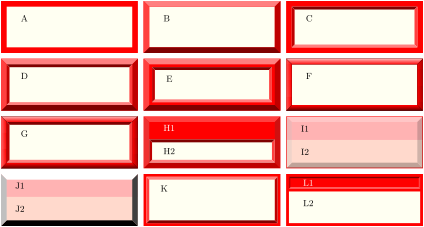
\begin{tcbitemize}[raster columns=3,bicolor,

  raster equal height,sharp corners,boxrule=2mm,

  colframe=red,colback=yellow!5,colbacklower=yellow!25!red!20]

\tcbitem A

\tcbitem[underlay vignette] B

\tcbitem[underlay={\tcbvignette{inside node=interior,

  lowered color=red,size=1mm}}] C

\tcbitem[underlay vignette,

  underlay={\tcbvignette{inside node=interior,

  lowered color=red,size=1mm}}] D

\tcbitem[boxrule=3mm,underlay vignette={size=2mm},

  underlay={\tcbvignette{inside node=interior,

  lowered color=red,size=1mm}}] E

\tcbitem[underlay raised shading vignette] F

\tcbitem[underlay raised shading vignette,

  underlay={\tcbvignette{inside node=interior,

  lowered color=red,size=1mm}}] G

\tcbitem[title=H1,underlay={\tcbvignette{inside node=interior,

  lowered color=red,size=1mm}},finish vignette] H2

\tcbitem[boxrule=0.25mm,colback=red!30,finish vignette] I1 \tcblower I2

\tcbitem[tile,colback=red!30,finish raised fading vignette] J1 \tcblower J2

\tcbitem[boxrule=1mm,underlay={\tcbvignette{inside node=interior,

  raised color=red,size=1mm}}] K

\tcbitem[boxrule=1mm,title=L1,underlay={\tcbvignette{inside node=title,

  lowered color=red,size=0.5mm}}] L2

\end{tcbitemize}