The tcolorbox package
Libraries
14 Beamer Support
The skins library adds some supporting options for the beamer package [Tantau et al. 2025]. For the following options, the skins library has to be loaded by a package option or inside the preamble by:
See Section 10 for the documentation of all other options of the skins library.
/tcb/only=(⟨overlay specification⟩){⟨options⟩}(style, no default, initially unset)New: 2015-01-09Updated: 2019-03-01
Sets the given tcolorbox ⟨options⟩ in dependency of a beamer ⟨overlay specification⟩. Note that this needs the beamer class [Tantau et al. 2025]. The ⟨options⟩ will only be used on the specified beamer frames.
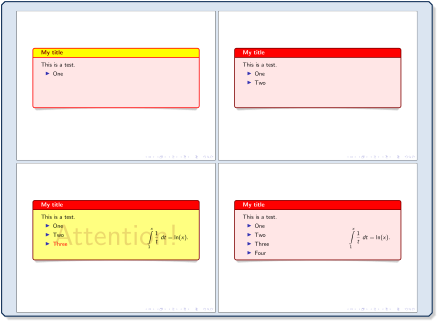
\documentclass{beamer}

\usepackage[many]{tcolorbox}

\begin{document}


\begin{frame}

  \begin{tcolorbox}[title=My title,fonttitle=\bfseries,

      enhanced,colframe=red!50!black,colback=red!10,colbacktitle=red,

      sidebyside,righthand width=3cm,

      lowerbox=invisible,lower separated=false,

      drop lifted shadow,

      only=<1>{colbacktitle=yellow,coltitle=red!50!black,colframe=red},

      only=<3>{colback=yellow!50,watermark text={Attention!}},

      only=<3->{lowerbox=visible}  ]

    This is a test.

    \begin{itemize}[<+->]

      \item One

      \item Two

      \item \alert<3>{Three}

      \item Four

    \end{itemize}

  \tcblower

    \begin{equation*}

    \int\limits_{1}^{x} \frac{1}{t}~dt = \ln(x).

    \end{equation*}

  \end{tcolorbox}

\end{frame}

\end{document}
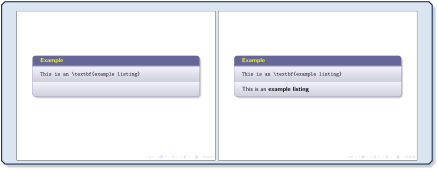
\documentclass{beamer}

\usepackage[most]{tcolorbox}

\begin{document}


\begin{frame}[fragile]

  \begin{tcblisting}{beamer,colback=blue!5,colframe=blue!20!gray,coltitle=yellow,

    title=Example,

    only=<1>{lowerbox=invisible},only=<2>{}

  }

This is an \textbf{example listing}

  \end{tcblisting}

\end{frame}

\end{document}
The option /tcb/only belonged to the core package before version 4.20.
/tcb/alt=(⟨overlay specification⟩){⟨default⟩}{⟨alternative⟩}(style, no default, initially unset)New: 2025-05-28
Alternates between different tcolorbox options in dependency of a beamer ⟨overlay specification⟩. The ⟨default⟩ options are used on the specified slides, otherwise the ⟨alternative⟩ options. Note that this needs the beamer class [Tantau et al. 2025].
/tcb/set alt={⟨default⟩}{⟨alternative⟩}(no default, initially {}{})New: 2025-07-07
Stores the arguments later to be used with /tcb/use alt.
/tcb/use alt=(⟨overlay specification⟩)(style, no default, initially unset)New: 2025-07-07
Like /tcb/alt, but uses the arguments stored with /tcb/set alt.
/tcb/temporal=(⟨overlay specification⟩){⟨before slide⟩}{⟨default⟩}{⟨after slide⟩}(style, no default, initially unset)New: 2025-05-28
Temporarily changes between different tcolorbox options in dependency of a beamer ⟨overlay specification⟩. The ⟨default⟩ options are used on the specified slides, the ⟨before slide⟩ options are used before them, and the ⟨after slide⟩ options after them. Note that this needs the beamer class [Tantau et al. 2025].
/tcb/set temporal={⟨before slide⟩}{⟨default⟩}{⟨after slide⟩}(no default, initially {}{}{})New: 2025-07-07
Stores the arguments later to be used with /tcb/use temporal.
/tcb/use temporal=(⟨overlay specification⟩)(style, no default, initially unset)New: 2025-07-07
Like /tcb/temporal, but uses the arguments stored with /tcb/set temporal.
/tcb/hide=(⟨overlay specification⟩)(style, no default, initially unset)New: 2019-03-01
Sets the /tcb/beamer hidden style in dependency of a beamer ⟨overlay specification⟩. /tcb/beamer hidden can be redefined for customization.
/tcb/beamer hidden(style, no options, initially nirvana)New: 2019-03-01
This style is not intended to be used directly, but in concealed way by applying /tcb/hide. The style can be redefined.
\tcbset{

  beamer hidden/.style={invisible,interior hidden,colframe=blue!20!gray!15},

}
/tcb/alert=(⟨overlay specification⟩)(style, no default, initially unset)New: 2019-03-01
Sets the /tcb/beamer alerted style in dependency of a beamer ⟨overlay specification⟩. /tcb/beamer alerted can be redefined for customization.
/tcb/beamer alerted(style, no options, initially fuzzy halo)New: 2019-03-01
This style is not intended to be used directly, but in concealed way by applying /tcb/alert. The style can be redefined.
\tcbset{

  beamer alerted/.style={colframe=red!50!gray},

}
The following examples use tcbitemize from raster for convenient use of a list of boxes which are uncovered one by one.
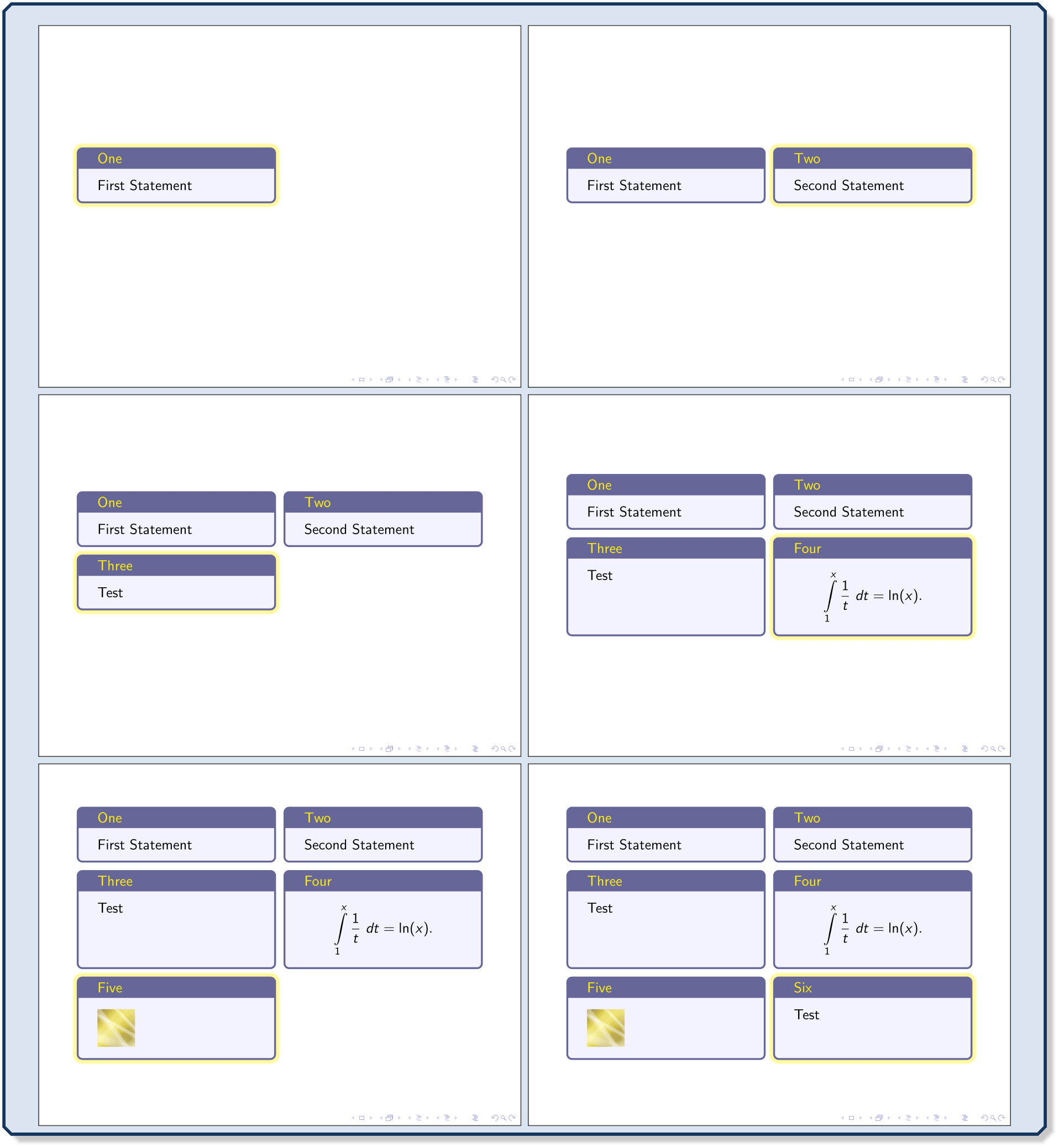
\documentclass{beamer}

\usepackage[most]{tcolorbox}

\begin{document}


\begin{frame}

  \begin{tcbitemize}[raster equal height=rows,

    enhanced,colback=blue!5,colframe=blue!20!gray,coltitle=yellow,

    ]

  \tcbitem[title=One,alert=<1>]

    First Statement

  \tcbitem[title=Two,hide=<-1>,alert=<2>]

    Second Statement

  \tcbitem[title=Three,hide=<-2>,alert=<3>]

    Test

  \tcbitem[title=Four,hide=<-3>,alert=<4>]

    \begin{equation*}

    \int\limits_{1}^{x} \frac{1}{t}~dt = \ln(x).

    \end{equation*}

  \tcbitem[title=Five,hide=<-4>,alert=<5>]

    \includegraphics[width=1cm]{goldshade.png}

  \tcbitem[title=Six,hide=<-5>,alert=<6>]

    Test

  \end{tcbitemize}

\end{frame}

\end{document}
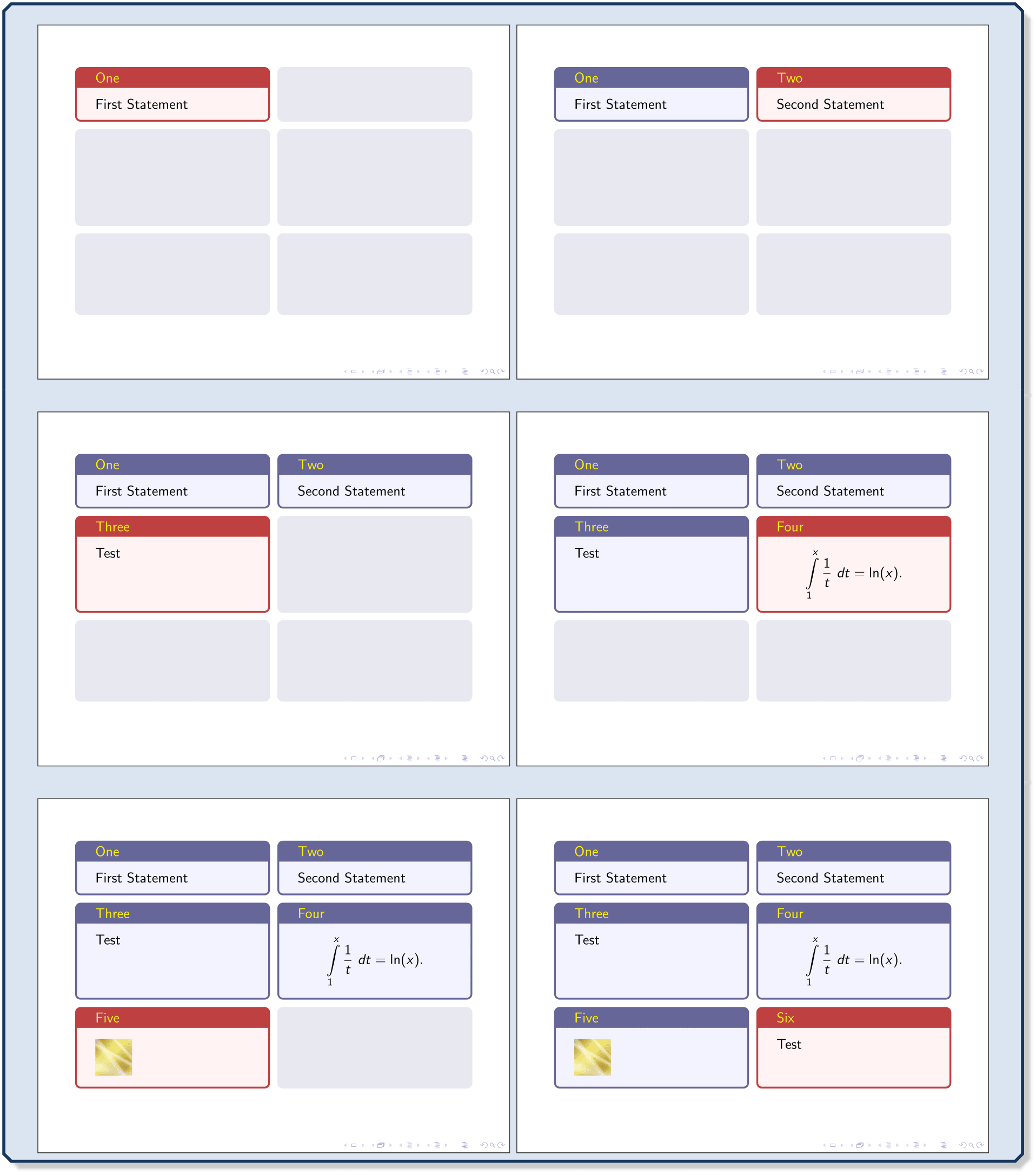
\documentclass{beamer}

\usepackage[most]{tcolorbox}

\begin{document}


\begin{frame}

  \begin{tcbitemize}[raster equal height=rows,enhanced,

    set temporal={invisible,interior hidden,colframe=blue!20!gray!15}

                 {colback=red!5,colframe=red!50!gray,coltitle=yellow}

                 {colback=blue!5,colframe=blue!20!gray,coltitle=yellow},

    ]

  \tcbitem[title=One,use temporal=<1>]

    First Statement

  \tcbitem[title=Two,use temporal=<2>]

    Second Statement

  \tcbitem[title=Three,use temporal=<3>]

    Test

  \tcbitem[title=Four,use temporal=<4>]

    \begin{equation*}

    \int\limits_{1}^{x} \frac{1}{t}~dt = \ln(x).

    \end{equation*}

  \tcbitem[title=Five,use temporal=<5>]

    \includegraphics[width=1cm]{goldshade.png}

  \tcbitem[title=Six,use temporal=<6>]

    Test

  \end{tcbitemize}

\end{frame}

\end{document}
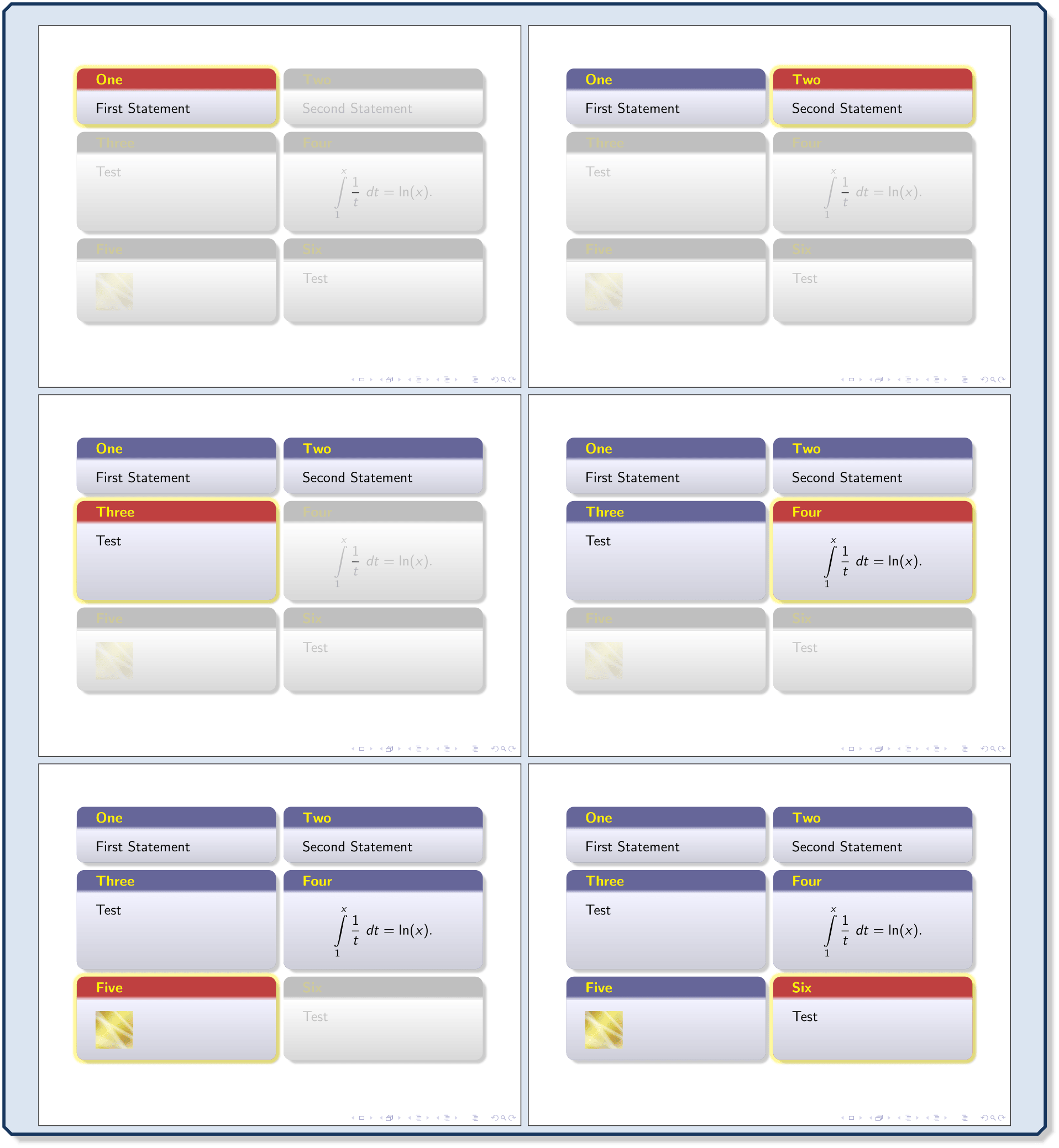
\documentclass{beamer}

\usepackage[most]{tcolorbox}

\begin{document}


\begin{frame}

  \begin{tcbitemize}[raster equal height=rows,beamer,

    colback=blue!5,colframe=blue!20!gray,coltitle=yellow,

    set temporal={colback=white,colframe=gray!50,

                    opacityupper=0.2,opacitytitle=0.2}

                 {colframe=red!50!gray,fuzzy halo}

                 {},

    ]

  \tcbitem[title=One,use temporal=<1>]

    First Statement

  \tcbitem[title=Two,use temporal=<2>]

    Second Statement

  \tcbitem[title=Three,use temporal=<3>]

    Test

  \tcbitem[title=Four,use temporal=<4>]

    \begin{equation*}

    \int\limits_{1}^{x} \frac{1}{t}~dt = \ln(x).

    \end{equation*}

  \tcbitem[title=Five,use temporal=<5>]

    \includegraphics[width=1cm]{goldshade.png}

  \tcbitem[title=Six,use temporal=<6>]

    Test

  \end{tcbitemize}

\end{frame}

\end{document}
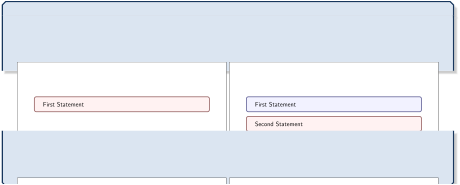
\documentclass{beamer}

\usepackage[most]{tcolorbox}


\NewTColorBox{mybox}{ d<> }{enhanced,

  temporal=<#1>{empty,invisible}

               {colback=red!5,colframe=red!20!gray}

               {colframe=blue!20!gray,colback=blue!5},

}

\begin{document}


\begin{frame}

  \begin{mybox}<1>

    First Statement

  \end{mybox}

  \begin{mybox}<2>

    Second Statement

  \end{mybox}

  \begin{mybox}<3>

    Third Statement

  \end{mybox}

  \begin{mybox}<4>

    Final Statement

  \end{mybox}

\end{frame}

\end{document}