tkz-euclide
Drawing, filling and clipping
21 Drawing
tkz-euclide can draw five types of objects: points, lines or segments, circles, arcs and sectors.
21.1 Draw a point or some points
There are two possibilities: \tkzDrawPoint for a single point or \tkzDrawPoints for one or more points.
21.1.1 Drawing points \tkzDrawPoint
\tkzDrawPoint[⟨local options⟩](⟨name⟩)
| arguments | default | definition |
|---|---|---|
| name of point | no default | Only one point name is accepted |
The argument is required. The disc takes the color of the circle, but lighter; everything can be changed. The point is a node, so it is not affected when the drawing is scaled.
| options | default | definition |
|---|---|---|
| TikZ options | all TikZ options are valid. | |
| shape | circle | Possible cross or cross out |
| size | 6 | \(6 \times\) \pgflinewidth |
| color | black | the default color can be changed |
We can create other forms such as cross
By default, point style is defined like this:
  \tikzset{point style/.style = {%

           draw         = black,

           inner sep    = 0pt,

           shape        = circle,

           minimum size = 3 pt,

           fill         = black

                               }

        }
21.1.2 Example of point drawings
Note that scale does not affect the shape of the points, which is normal. Most of the time, a single shape of point is enough; it can be defined at the beginning, either with a macro or in a configuration file.

  \begin{tikzpicture}[scale=.5]

   \tkzDefPoint(1,3){A}

   \tkzDefPoint(4,1){B}

   \tkzDefPoint(0,0){O}

   \tkzDrawPoint[color=red](A)

   \tkzDrawPoint[fill=blue!20,draw=blue](B)

   \tkzDrawPoint[shape=cross,size=8pt,color=teal](O)

  \end{tikzpicture}
You can draw several points at once, but this macro is a little slower than the previous one, and all the points get the same options.
\tkzDrawPoints[⟨local options⟩](⟨liste⟩)
| arguments | default | definition |
|---|---|---|
| points list | no default | example \tkzDrawPoints(A,B,C) |
| options | default | definition |
|---|---|---|
| shape | circle | Possible cross or cross out |
| size | 6 | \(6 \times\) \pgflinewidth |
| color | black | the default color can be changed |
☞ 💣 Beware of the final s: forgetting it leads to cascading errors when you draw several points. The options are the same as for the previous macro.
21.1.3 Points with size, color and fill

\begin{tikzpicture}

\tkzDefPoints{1/3/A,4/1/B,0/0/C}

\tkzDrawPoints[size=3,color=red,fill=red!50](A,B,C)

\end{tikzpicture}
22 Drawing the lines
The following macros draw and label lines.
22.1 Draw a straight line
To draw a straight line, just give a pair of points. You can use the option add to extend the line (this option is due to Mark Wibrow, see the code below).
The style of a line is by default:
  \tikzset{line style/.style = {%

    line width = 0.6pt,

    color      = black,

    style      = solid,

    add        = {.2} and  {.2}%

   }}
with
  \tikzset{%

    add/.style args={#1 and #2}{

        to path={%

 ($(\tikztostart)!-#1!(\tikztotarget)$)--($(\tikztotarget)!-#2!(\tikztostart)$)%

  \tikztonodes}}}
You can modify this style with \tkzSetUpLine, see 44.1.
\tkzDrawLine[⟨local options⟩](⟨pt1,pt2⟩)
The arguments are a list of two or three points. As for a ray, you could create a style with add.
| options | default | definition |
|---|---|---|
| TikZ options | all TikZ options are valid. | |
| add | 0.2 and 0.2 | add = \(kl\) and \(kr\), … |
| … | … | allows the segment to be extended to the left and right. |
add defines the length of the line through the points pt1 and pt2. Both numbers are percentages. The TikZ styles are available for the drawings.
22.1.1 Examples with add
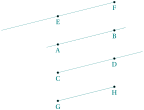
\begin{tikzpicture}

 \tkzInit[xmin=-2,xmax=3,ymin=-2.25,ymax=2.25]

 \tkzClip[space=.25]

 \tkzDefPoint(0,0){A} \tkzDefPoint(2,0.5){B}

 \tkzDefPoint(0,-1){C}\tkzDefPoint(2,-0.5){D}

 \tkzDefPoint(0,1){E} \tkzDefPoint(2,1.5){F}

 \tkzDefPoint(0,-2){G} \tkzDefPoint(2,-1.5){H}

 \tkzDrawLine(A,B)    \tkzDrawLine[add = 0 and .5](C,D)

 \tkzDrawLine[add = 1 and 0](E,F)

 \tkzDrawLine[add = 0 and 0](G,H)

 \tkzDrawPoints(A,B,C,D,E,F,G,H)

 \tkzLabelPoints(A,B,C,D,E,F,G,H)

\end{tikzpicture}
You can draw several lines at once, with the same options.
\tkzDrawLines[⟨local options⟩](⟨pt1,pt2 pt3,pt4 ...⟩)
The arguments are a list of pairs of points separated by spaces. The TikZ styles are available for the drawings.
22.1.2 Example with \tkzDrawLines
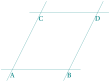
\begin{tikzpicture}

  \tkzDefPoint(0,0){A}

  \tkzDefPoint(2,0){B}

  \tkzDefPoint(1,2){C}

  \tkzDefPoint(3,2){D}

  \tkzDrawLines(A,B C,D A,C B,D)

  \tkzLabelPoints(A,B,C,D)

\end{tikzpicture}
23 Drawing a segment
There is, of course, a macro to draw a segment.
23.1 Draw a segment \tkzDrawSegment
\tkzDrawSegment[⟨local options⟩](⟨pt1,pt2⟩)
The arguments are a list of two points. The TikZ styles are available for the drawings.
| argument | example | definition |
|---|---|---|
| (pt1,pt2) | (A,B) | draw the segment \([A,B]\) |
| options | example | definition |
|---|---|---|
| TikZ options | all TikZ options are valid. | |
| dim | no default | dim = {label,dim,option}, … |
| … | … | allows you to add dimensions to a figure. |
This is of course equivalent to \draw (A)–(B);. You can also use the option add.
23.1.1 Example with point references

\begin{tikzpicture}[scale=1.5]

  \tkzDefPoint(0,0){A}

  \tkzDefPoint(2,1){B}

  \tkzDrawSegment[color=red,thin](A,B)

  \tkzDrawPoints(A,B)

  \tkzLabelPoints(A,B)

\end{tikzpicture}
23.1.2 Extending a segment with option add
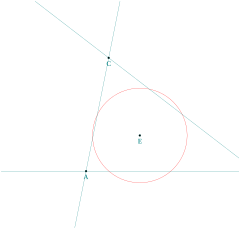
\begin{tikzpicture}

  \tkzDefPoints{0/0/A,6/0/B,0.8/4/C}

  \tkzDefTriangleCenter[euler](A,B,C)

  \tkzGetPoint{E}

  \tkzDefCircle[euler](A,B,C)\tkzGetPoints{E}{e}

  \tkzDrawCircle[red](E,e)

  \tkzDrawLines[add=.5 and .5](A,B A,C B,C)

  \tkzDrawPoints(A,B,C,E)

  \tkzLabelPoints(A,B,C,E)

  \end{tikzpicture}
23.1.3 Adding dimensions with option dim (code by Muzimuzhi Z)
This code comes from an answer to a question on tex.stackexchange.com (change-color-and-style-of-dimension-lines-in-tkz-euclide ). The code of dim is based on TikZ options, so you must give the units. You can now use two styles, dim style and dim fence style, in several ways. Look at the examples to see what you can do with these styles.
   \tikzset{dim style/.append style={dashed}} % append if you want to keep precedent style.

   or

   \begin{scope}[ dim style/.append style={orange},

       dim fence style/.style={dashed}]
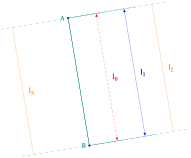
\begin{tikzpicture}[scale=.75]

  \tkzDefPoints{0/3/A, 1/-3/B}

  \tkzDrawPoints(A,B)

  \tkzDrawSegment[dim={\(l_0\),1cm,right=2mm},

    dim style/.append style={red,

    dash pattern={on 2pt off 2pt}}](A,B)

  \tkzDrawSegment[dim={\(l_1\),2cm,right=2mm},

    dim style/.append style={blue}](A,B)

  \begin{scope}[ dim style/.style={orange},

      dim fence style/.style={dashed}]

    \tkzDrawSegment[dim={\(l_2\),3cm,right=2mm}](A,B)

    \tkzDrawSegment[dim={\(l_3\),-2cm,right=2mm}](A,B)

  \end{scope}

  \tkzLabelPoints[left](A,B)

\end{tikzpicture}
23.1.4 Adding dimensions with option dim: part I
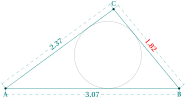
\begin{tikzpicture}[scale=2]

\pgfkeys{/pgf/number format/.cd,fixed,precision=2}

\tkzDefPoint(0,0){A}

\tkzDefPoint(3.07,0){B}

\tkzInterCC[R](A,2.37)(B,1.82)

\tkzGetPoints{C}{C'}

\tkzDefCircle[in](A,B,C) \tkzGetPoints{G}{g}

\tkzDrawCircle(G,g)

\tkzDrawPolygon(A,B,C)

\tkzDrawPoints(A,B,C)

\tkzCalcLength(A,B)\tkzGetLength{ABl}

\tkzCalcLength(B,C)\tkzGetLength{BCl}

\tkzCalcLength(A,C)\tkzGetLength{ACl}

\begin{scope}[dim style/.style={dashed,sloped,teal}]

  \tkzDrawSegment[dim={\pgfmathprintnumber\BCl,6pt,%

                                      text=red}](C,B)

  \tkzDrawSegment[dim={\pgfmathprintnumber\ACl,%

                                        6pt,}](A,C)

  \tkzDrawSegment[dim={\pgfmathprintnumber\ABl,%

                                      -6pt,}](A,B)

\end{scope}

\tkzLabelPoints(A,B) \tkzLabelPoints[above](C)

\end{tikzpicture}
23.1.5 Adding dimensions with option dim: part II
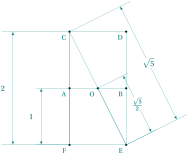
\begin{tikzpicture}[scale=.5]

  \tkzDefPoints{0/0/O,-2/0/A,2/0/B,

                -2/4/C,2/4/D,2/-4/E,-2/-4/F}

  \tkzDrawPolygon(C,...,F)

  \tkzDrawSegments(A,B)

  \tkzDrawPoints(A,...,F,O)

  \tkzLabelPoints[below left](A,...,F,O)

  \tkzDrawSegment[dim={ $\sqrt{5}$,2cm,}](C,E)

  \tkzDrawSegment[dim={ $\frac{\sqrt{5}}{2}$,1cm,}](O,E)

  \tkzDrawSegment[dim={ $2$,2cm,left=8pt}](F,C)

  \tkzDrawSegment[dim={ $1$,1cm,left=8pt}](F,A)

\end{tikzpicture}
23.2 Drawing segments \tkzDrawSegments
If the options are the same, several segments can be drawn with one macro.
\tkzDrawSegments[⟨local options⟩](⟨pt1,pt2 pt3,pt4 ...⟩)
The arguments are a list of pairs of points. The TikZ styles are available for the drawings.

\begin{tikzpicture}

  \tkzInit[xmin=-1,xmax=3,ymin=-1,ymax=2]

  \tkzClip[space=1]

  \tkzDefPoint(0,0){A}

  \tkzDefPoint(2,1){B}

  \tkzDefPoint(3,0){C}

  \tkzDrawSegments(A,B B,C)

  \tkzDrawPoints(A,B,C)

  \tkzLabelPoints(A,C)

  \tkzLabelPoints[above](B)

\end{tikzpicture}
23.2.1 Placing an arrow on a segment
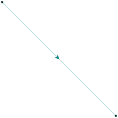
\begin{tikzpicture}

\tkzSetUpStyle[postaction=decorate,

    decoration={markings,

    mark=at position .5 with {\arrow[thick]{#1}}

      }]{myarrow}

  \tkzDefPoint(0,0){A}

  \tkzDefPoint(4,-4){B}

  \tkzDrawSegments[myarrow=stealth](A,B)

  \tkzDrawPoints(A,B)

\end{tikzpicture}
23.3 Drawing the segments of a triangle
23.3.1 How to draw an altitude
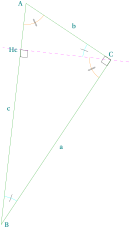
  \begin{tikzpicture}[rotate=-90]

  \tkzDefPoint(0,1){A}

  \tkzDefPoint(2,4){C}

  \tkzDefPointWith[orthogonal normed,K=7](C,A)

  \tkzGetPoint{B}

  \tkzDefSpcTriangle[orthic,name=H](A,B,C){a,b,c}

  \tkzDrawLine[dashed,color=magenta](C,Hc)

  \tkzDrawSegment[green!60!black](A,C)

  \tkzDrawSegment[green!60!black](C,B)

  \tkzDrawSegment[green!60!black](B,A)

  \tkzLabelPoint[left](A){$A$}

  \tkzLabelPoint[right](B){$B$}

  \tkzLabelPoint[above](C){$C$}

  \tkzLabelPoint[left](Hc){$Hc$}

  \tkzLabelSegment[auto](B,A){$c$}

  \tkzLabelSegment[auto,swap](B,C){$a$}

  \tkzLabelSegment[auto,swap](C,A){$b$}

  \tkzMarkAngle[size=1,color=cyan,mark=|](C,B,A)

  \tkzMarkAngle[size=1,color=cyan,mark=|](A,C,Hc)

  \tkzMarkAngle[size=0.75,

                color=orange,mark=||](Hc,C,B)

  \tkzMarkAngle[size=0.75,

                color=orange,mark=||](B,A,C)

  \tkzMarkRightAngle(A,C,B)

  \tkzMarkRightAngle(B,Hc,C)

  \end{tikzpicture}
23.4 Drawing a polygon
\tkzDrawPolygon[⟨local options⟩](⟨points list⟩)
Just give a list of points: the macro draws the polygon with the TikZ options given. You can replace \((A,B,C,D,E)\) by \((A,...,E)\) and \((P_1,P_2,P_3,P_4,P_5)\) by \((P_1,P...,P_5)\).
| arguments | example | explanation |
|---|---|---|
| (⟨pt1,pt2,pt3,...⟩) | \BS tkzDrawPolygon[gray,dashed](A,B,C) | Drawing a triangle |
| options | default | example |
|---|---|---|
| Options TikZ | ... | \BS tkzDrawPolygon[red,line width=2pt](A,B,C) |
23.4.1 \tkzDrawPolygon

\begin{tikzpicture} [rotate=18,scale=1]

 \tkzDefPoints{0/0/A,2.25/0.2/B,2.5/2.75/C,-0.75/2/D}

 \tkzDrawPolygon(A,B,C,D)

 \tkzDrawSegments[style=dashed](A,C B,D)

\end{tikzpicture}
23.4.2 Option two angles
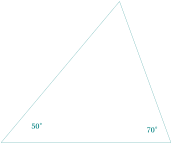
\begin{tikzpicture}

\tkzDefPoint(0,0){A}

\tkzDefPoint(6,0){B}

\tkzDefTriangle[two angles = 50 and 70](A,B) \tkzGetPoint{C}

\tkzDrawPolygon(A,B,C)

\tkzLabelAngle[pos=1.4](B,A,C){$50^\circ$}

\tkzLabelAngle[pos=0.8](C,B,A){$70^\circ$}

\end{tikzpicture}
23.4.3 Style of line

\begin{tikzpicture}[scale=.6]

\tkzSetUpLine[line width=5mm,color=teal]

\tkzDefPoint(0,0){O}

\foreach \i in {0,...,5}{%

 \tkzDefPoint({30+60*\i}:4){p\i}}

\tkzDefMidPoint(p1,p3) \tkzGetPoint{m1}

\tkzDefMidPoint(p3,p5) \tkzGetPoint{m3}

\tkzDefMidPoint(p5,p1) \tkzGetPoint{m5}

\tkzDrawPolygon[line join=round](p1,p3,p5)

\tkzDrawPolygon[teal!80,

line join=round](p0,p2,p4)

\tkzDrawSegments(m1,p3 m3,p5 m5,p1)

\tkzDefCircle[R](O,4.8)\tkzGetPoint{o}

\tkzDrawCircle[teal](O,o)

\end{tikzpicture}
23.5 Drawing a polygonal chain
\tkzDrawPolySeg[⟨local options⟩](⟨points list⟩)
Just give a list of points: the macro draws the polygonal chain with the TikZ options given.
| arguments | example | explanation |
|---|---|---|
| (⟨pt1,pt2,pt3,...⟩) | \BS tkzDrawPolySeg[gray,dashed](A,B,C) | Drawing a triangle |
| options | default | example |
|---|---|---|
| Options TikZ | ... | \BS tkzDrawPolySeg[red,line width=2pt](A,B,C) |
23.5.1 Polygonal chain
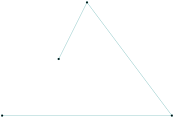
\begin{tikzpicture}

 \tkzDefPoints{0/0/A,6/0/B,3/4/C,2/2/D}

 \tkzDrawPolySeg(A,...,D)

 \tkzDrawPoints(A,...,D)

\end{tikzpicture}
23.5.2 The idea is to inscribe two squares in a semi-circle.
A Sangaku! The problem is to prove that two squares can be inscribed in a half-disc, and to determine the lengths of their sides from the radius.
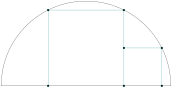
\begin{tikzpicture}[scale=.75]

  \tkzDefPoints{0/0/A,8/0/B,4/0/I}

  \tkzDefSquare(A,B)    \tkzGetPoints{C}{D}

  \tkzInterLC(I,C)(I,B) \tkzGetPoints{E'}{E}

  \tkzInterLC(I,D)(I,B) \tkzGetPoints{F'}{F}

  \tkzDefPointsBy[projection=onto A--B](E,F){H,G}

  \tkzDefPointsBy[symmetry = center H](I){J}

  \tkzDefSquare(H,J)     \tkzGetPoints{K}{L}

  \tkzDrawSector(I,B)(A)

  \tkzDrawPolySeg(H,E,F,G)

  \tkzDrawPolySeg(J,K,L)

  \tkzDrawPoints(E,G,H,F,J,K,L)

\end{tikzpicture}
23.5.3 Polygonal chain: index notation

\begin{tikzpicture}

\foreach \pt in {1,2,...,8} {%

\tkzDefPoint(\pt*20:3){P_\pt}}

\tkzDrawPolySeg(P_1,P_...,P_8)

\tkzDrawPoints(P_1,P_...,P_8)

\end{tikzpicture}
24 Draw a circle with \tkzDrawCircle
24.1 Draw one circle
\tkzDrawCircle[⟨local options⟩](⟨A,B⟩)
☞ 💣 Note that only two points are needed to define a radius. The option R lets you give the radius directly as a measure.
| arguments | example | explanation |
|---|---|---|
| (⟨pt1,pt2⟩) | (⟨A,B⟩) | A center through B |
Of course, you can add all the TikZ styles for the drawings.
24.1.1 Circles and styles, draw a circle and color the disc
We’ll see that it’s possible to color a disc while drawing the circle.
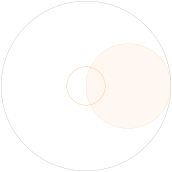
\begin{tikzpicture}

  \tkzDefPoint(0,0){O}

  \tkzDefPoint(3,0){A}

 % circle with center O and passing through A

  \tkzDrawCircle(O,A)

 % diameter circle $[OA]$

 \tkzDefCircle[diameter](O,A) \tkzGetPoint{I}

 \tkzDrawCircle[new,fill=orange!10,opacity=.5](I,A)

 % circle with center O and radius = exp(1) cm

  \edef\rayon{\fpeval{0.25*exp(1)}}

  \tkzDefCircle[R](O,\rayon) \tkzGetPoint{o}

   \tkzDrawCircle[color=orange](O,o)

\end{tikzpicture}
24.2 Drawing circles
\tkzDrawCircles[⟨local options⟩](⟨A,B C,D …⟩)
☞ 💣 Note that the arguments are lists of pairs of points. The circles that can be drawn are the same as with the previous macro. The option R lets you give the radius directly as a measure.
| arguments | example | explanation |
|---|---|---|
| (⟨pt1,pt2 pt3,pt4 ...⟩) | (⟨A,B C,D⟩) | List of two points |
| options | default | definition |
|---|---|---|
| through | through | circle with two points defining a radius |
You do not need to use the default option through. Of course, you can add all the TikZ styles for the drawings.
24.2.1 Circles defined by a triangle.
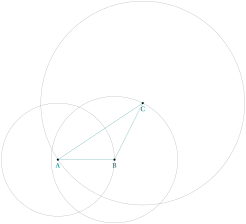
\begin{tikzpicture}

  \tkzDefPoints{0/0/A,2/0/B,3/2/C}

  \tkzDrawPolygon(A,B,C)

  \tkzDrawCircles(A,B B,C C,A)

  \tkzDrawPoints(A,B,C)

  \tkzLabelPoints(A,B,C)

\end{tikzpicture}
24.2.2 Concentric circles.
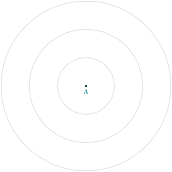
\begin{tikzpicture}

   \tkzDefPoints{0/0/A,1/0/a,2/0/b,3/0/c}

   \tkzDrawCircles(A,a A,b A,c)

   \tkzDrawPoint(A)

   \tkzLabelPoints(A)

\end{tikzpicture}
24.2.3 Exinscribed circles.
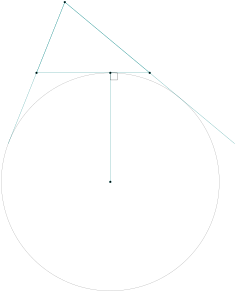
\begin{tikzpicture}[scale=1]

\tkzDefPoints{0/0/A,4/0/B,1/2.5/C}

\tkzDrawPolygon(A,B,C)

\tkzDefCircle[ex](B,C,A)

\tkzGetPoint{J_c} \tkzGetSecondPoint{T_c}

\tkzDrawCircle(J_c,T_c)

\tkzDrawLines[add=0 and 1](C,A C,B)

\tkzDrawSegment(J_c,T_c)

\tkzMarkRightAngle(J_c,T_c,B)

\tkzDrawPoints(A,B,C,J_c,T_c)

\end{tikzpicture}
24.2.4 Cardioid
Based on an idea of O. Reboux, made with pst-eucl (a PSTricks module) by D. Rodriguez.
Its name comes from the Greek kardia (heart), in reference to its shape; it was given by Johan Castillon (Wikipedia).
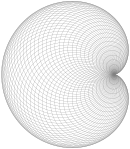
\begin{tikzpicture}[scale=.5]

  \tkzDefPoint(0,0){O}

  \tkzDefPoint(2,0){A}

  \foreach \ang in {5,10,...,360}{%

     \tkzDefPoint(\ang:2){M}

     \tkzDrawCircle(M,A)

   }

\end{tikzpicture}
24.3 Drawing a semicircle
\tkzDrawSemiCircle[⟨local options⟩](⟨O,A⟩)
| arguments | example | explanation |
|---|---|---|
| (⟨pt1,pt2⟩) | (⟨O,A⟩) | OA= radius |
\(O\) is the center and \(A\) an endpoint of the semicircle.
24.3.1 Use of \tkzDrawSemiCircle
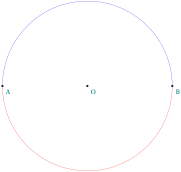
\begin{tikzpicture}

   \tkzDefPoint(0,0){A} \tkzDefPoint(6,0){B}

   \tkzDefMidPoint(A,B)  \tkzGetPoint{O}

   \tkzDrawSemiCircle[blue](O,B)

   \tkzDrawSemiCircle[red](O,A)

   \tkzDrawPoints(O,A,B)

   \tkzLabelPoints[below right](O,A,B)

 \end{tikzpicture}
24.4 Drawing semicircles
\tkzDrawSemiCircles[⟨local options⟩](⟨A,B C,D …⟩)
| arguments | example | explanation |
|---|---|---|
| (⟨pt1,pt2 pt3,pt4 ...⟩) | (⟨A,B C,D⟩) | List of two points |
24.4.1 Use of \tkzDrawSemiCircles: Golden arbelos
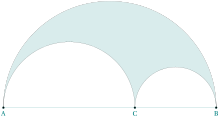
\begin{tikzpicture}[scale=.75]

\tkzDefPoints{0/0/A,10/0/B}

\tkzDefGoldenRatio(A,B) \tkzGetPoint{C}

\tkzDefMidPoint(A,B)                     \tkzGetPoint{O_0}

\tkzDefMidPoint(A,C)                     \tkzGetPoint{O_1}

\tkzDefMidPoint(C,B)                     \tkzGetPoint{O_2}

\tkzLabelPoints(A,B,C)

\tkzDrawSegment(A,B)

\tkzDrawPoints(A,B,C)

\begin{scope}[local bounding box = graph]

  \tkzDrawSemiCircles[color=black](O_0,B)

\end{scope}

\useasboundingbox (graph.south west) rectangle (graph.north east);

\tkzClipCircle[out](O_1,C)\tkzClipCircle[out](O_2,B)

\tkzDrawSemiCircles[draw=none,fill=teal!15](O_0,B)

\tkzDrawSemiCircles[color=black](O_1,C O_2,B)

\end{tikzpicture}
25 Draw an ellipse with \tkzDrawEllipse
25.1 Draw an ellipse
\tkzDrawEllipse[⟨local options⟩](⟨C,a,b,An⟩)
| arguments | example | explanation |
|---|---|---|
| (⟨C,a,b,An⟩) | (⟨C,4,2,45⟩) | C center; 4 and 2 lengths of half-axis |
| 45 slope of main axis |
Of course, you can add all the TikZ styles for the drawings.
25.1.1 Example of drawing an ellipse
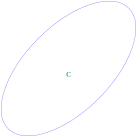
   \begin{tikzpicture}[scale=.75]

      \tkzDefPoint(0,4){C}

      \tkzDrawEllipse[blue](C,4,2,45)

      \tkzLabelPoints(C)

   \end{tikzpicture}
26 Drawing arcs
26.1 The macro \tkzDrawArc
\tkzDrawArc[⟨local options⟩](⟨O,…⟩)(⟨…⟩)
This macro draws an arc with center \(O\); the arguments depend on the options. We need a starting point and an end point. Either the starting point is given, which is the simplest, or the radius of the arc is given; in the latter case, two angles are needed. The angles can be given directly, or with points which, together with the center, determine them. The angles are in degrees.
| options | default | definition |
|---|---|---|
| towards | towards | \(O\) is the center and the arc from \(A\) to \((OB)\) |
| rotate | towards | the arc starts from \(A\) and the angle determines its length |
| R | towards | We give the radius and two angles |
| R with nodes | towards | We give the radius and two points |
| angles | towards | We give the radius and two points |
| delta | 0 | angle added on each side |
| reverse | false | inversion of the arc’s path, interesting to inverse arrow |
Of course, you can add all the TikZ styles for the drawings.
| options | arguments | example |
|---|---|---|
| towards | (⟨pt,pt⟩)(⟨pt⟩) | \tkzDrawArc[delta=10](O,A)(B) |
| rotate | (⟨pt,pt⟩)(⟨an⟩) | \tkzDrawArc[rotate,color=red](O,A)(90) |
| R | (⟨pt,\(r\)⟩)(⟨an,an⟩) | \tkzDrawArc[R](O,2)(30,90) |
| R with nodes | (⟨pt,\(r\)⟩)(⟨pt,pt⟩) | \tkzDrawArc[R with nodes](O,2)(A,B) |
| angles | (⟨pt,pt⟩)(⟨an,an⟩) | \tkzDrawArc[angles](O,A)(0,90) |
Here are a few examples:
26.1.1 Option towards: arc from \(A\) to \(B\)
You don’t need to write towards. In this first example, the arc starts from \(A\) and goes to \(B\). The arc from \(B\) to \(A\) is different: arcs are always drawn counterclockwise.
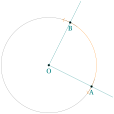
\begin{tikzpicture}[scale=.75]

  \tkzDefPoint(0,0){O}

  \tkzDefPoint(2,-1){A}

  \tkzDefPointBy[rotation= center O angle 90](A)

  \tkzGetPoint{B}

  \tkzDrawArc[color=orange,<->](O,A)(B)

  \tkzDrawArc(O,B)(A)

  \tkzDrawLines[add = 0 and .5](O,A O,B)

  \tkzDrawPoints(O,A,B)

  \tkzLabelPoints[below](O,A,B)

\end{tikzpicture}
26.1.2 Option towards: arc stopping on a line
In this one, the arc starts from \(A\) but stops on the line \((OB)\).

\begin{tikzpicture}[scale=0.75]

  \tkzDefPoint(0,0){O}

  \tkzDefPoint(2,-1){A}

  \tkzDefPoint(1,1){B}

  \tkzDrawArc[color=blue,->](O,A)(B)

  \tkzDrawArc[color=gray](O,B)(A)

  \tkzDrawArc(O,B)(A)

  \tkzDrawLines[add = 0 and .5](O,A O,B)

  \tkzDrawPoints(O,A,B)

  \tkzLabelPoints[below](O,A,B)

\end{tikzpicture}
26.1.3 Option rotate
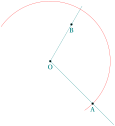
\begin{tikzpicture}[scale=0.75]

  \tkzDefPoint(0,0){O}

  \tkzDefPoint(2,-2){A}

  \tkzDefPoint(60:2){B}

  \tkzDrawLines[add = 0 and .5](O,A O,B)

  \tkzDrawArc[rotate,color=red](O,A)(180)

  \tkzDrawPoints(O,A,B)

  \tkzLabelPoints[below](O,A,B)

\end{tikzpicture}
26.1.4 Option R
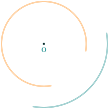
\begin{tikzpicture}[scale=0.75]

  \tkzDefPoints{0/0/O}

  \tkzSetUpCompass[<->]

  \tkzDrawArc[R,color=teal,double](O,3)(270,360)

  \tkzDrawArc[R,color=orange,double](O,2)(0,270)

  \tkzDrawPoint(O)

  \tkzLabelPoint[below](O){$O$}

\end{tikzpicture}
26.1.5 Option R with nodes

\begin{tikzpicture}[scale=0.75]

  \tkzDefPoint(0,0){O}

  \tkzDefPoint(2,-1){A}

  \tkzDefPoint(1,1){B}

  \tkzCalcLength(B,A)\tkzGetLength{radius}

  \tkzDrawArc[R with nodes](B,\radius)(A,O)

\end{tikzpicture}
26.1.6 Option delta
As with \tkzCompass, this option extends the arc on both sides; delta is an angle in degrees. It can also be set for all the arcs with \tkzSetUpArc.
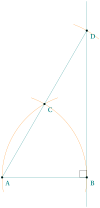
\begin{tikzpicture}

 \tkzDefPoint(0,0){A}

 \tkzDefPoint(3,0){B}

 \tkzDefPointBy[rotation= center A angle 60](B)

 \tkzGetPoint{C}

 \begin{scope}% style only local

   \tkzDefPointBy[symmetry= center C](A)

   \tkzGetPoint{D}

   \tkzDrawSegments(A,B A,D)

   \tkzDrawLine(B,D)

   \tkzSetUpCompass[color=orange]

   \tkzDrawArc[orange,delta=10](A,B)(C)

   \tkzDrawArc[orange,delta=10](B,C)(A)

   \tkzDrawArc[orange,delta=10](C,D)(D)

 \end{scope}


 \tkzDrawPoints(A,B,C,D)

 \tkzLabelPoints[below right](A,B,C,D)

 \tkzMarkRightAngle(D,B,A)

\end{tikzpicture}
26.1.7 Option angles: example 1
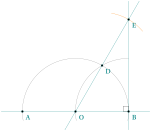
\begin{tikzpicture}[scale=.75]

  \tkzDefPoint(0,0){A}

  \tkzDefPoint(5,0){B}

  \tkzDefPoint(2.5,0){O}

  \tkzDefPointBy[rotation=center O angle 60](B)

  \tkzGetPoint{D}

  \tkzDefPointBy[symmetry=center D](O)

  \tkzGetPoint{E}

  \begin{scope}

    \tkzDrawArc[angles](O,B)(0,180)

    \tkzDrawArc[angles,](B,O)(100,180)

    \tkzCompass[delta=20](D,E)

    \tkzDrawLines(A,B O,E B,E)

    \tkzDrawPoints(A,B,O,D,E)

  \end{scope}

  \tkzLabelPoints[below right](A,B,O,D,E)

  \tkzMarkRightAngle(O,B,E)

\end{tikzpicture}
26.1.8 Option angles: example 2
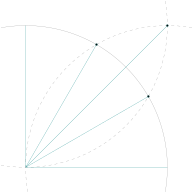
  \begin{tikzpicture}

   \tkzDefPoint(0,0){O}

   \tkzDefPoint(5,0){I}

   \tkzDefPoint(0,5){J}

   \tkzInterCC(O,I)(I,O)\tkzGetPoints{B}{C}

   \tkzInterCC(O,I)(J,O)\tkzGetPoints{D}{A}

   \tkzInterCC(I,O)(J,O)\tkzGetPoints{L}{K}

   \tkzDrawArc[angles](O,I)(0,90)

   \tkzDrawArc[angles,color=gray,

               style=dashed](I,O)(90,180)

   \tkzDrawArc[angles,color=gray,

               style=dashed](J,O)(-90,0)

   \tkzDrawPoints(A,B,K)

   \foreach \point in {I,A,B,J,K}{%

               \tkzDrawSegment(O,\point)}

  \end{tikzpicture}
26.1.9 Option reverse: inversion of the arrow

  \begin{tikzpicture}

    \tkzDefPoints{0/0/O,3/0/U}

    \tkzDefPoint(10:1){A}

    \tkzDefPoint(90:1){B}

    \tkzLabelPoints(A,B)

    \tkzDrawArc[reverse,tkz arrow={Stealth}](O,A)(B)

    \tkzDrawPoints(A,B,O)

  \end{tikzpicture}
27 Drawing a sector or sectors
27.1 \tkzDrawSector
☞ 💣 Note that the arguments depend on the options.
\tkzDrawSector[⟨local options⟩](⟨O,…⟩)(⟨…⟩)
| options | default | definition |
|---|---|---|
| towards | towards | \(O\) is the center and the arc from \(A\) to \((OB)\) |
| rotate | towards | the arc starts from \(A\) and the angle determines its length |
| R | towards | We give the radius and two angles |
| R with nodes | towards | We give the radius and two points |
Of course, you can add all the TikZ styles for the drawings.
| options | arguments | example |
|---|---|---|
| towards | (⟨pt,pt⟩)(⟨pt⟩) | \tkzDrawSector(O,A)(B) |
| rotate | (⟨pt,pt⟩)(⟨an⟩) | \tkzDrawSector[rotate,color=red](O,A)(90) |
| R | (⟨pt,\(r\)⟩)(⟨an,an⟩) | \tkzDrawSector[R,color=teal](O,2)(30,90) |
| R with nodes | (⟨pt,\(r\)⟩)(⟨pt,pt⟩) | \tkzDrawSector[R with nodes](O,2)(A,B) |
Here are a few examples:
27.1.1 \tkzDrawSector and towards
You don’t need to write towards. You can use fill as an option.

\begin{tikzpicture}

  \tkzDefPoint(0,0){O}

  \tkzDefPoint(-30:1){A}

  \tkzDefPointBy[rotation = center O angle -60](A)

  \tkzDrawSector[teal](O,A)(tkzPointResult)

 \begin{scope}[shift={(-60:1)}]

  \tkzDefPoint(0,0){O}

  \tkzDefPoint(-30:1){A}

  \tkzDefPointBy[rotation = center O angle -60](A)

  \tkzDrawSector[red](O,tkzPointResult)(A)

  \end{scope}

\end{tikzpicture}
27.1.2 \tkzDrawSector and rotate
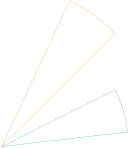
\begin{tikzpicture}[scale=2]

 \tkzDefPoints{0/0/O,2/2/A,2/1/B}

 \tkzDrawSector[rotate,orange](O,A)(20)

 \tkzDrawSector[rotate,teal](O,B)(-20)

\end{tikzpicture}
27.1.3 \tkzDrawSector and R

\begin{tikzpicture}[scale=1.25]

 \tkzDefPoint(0,0){O}

 \tkzDefPoint(2,-1){A}

 \tkzDrawSector[R](O,1)(30,90)

 \tkzDrawSector[R](O,1)(90,180)

 \tkzDrawSector[R](O,1)(180,270)

 \tkzDrawSector[R](O,1)(270,360)

\end{tikzpicture}
27.1.4 \tkzDrawSector and R with nodes: two sectors
In this example I use the option fill, but \tkzFillSector would also work.
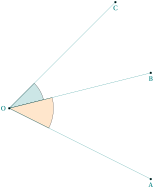
\begin{tikzpicture}[scale=1.25]

 \tkzDefPoint(0,0){O}

 \tkzDefPoint(4,-2){A}

 \tkzDefPoint(4,1){B}

 \tkzDefPoint(3,3){C}

 \tkzDrawSector[R with nodes,%

                fill=teal!20](O,1)(B,C)

 \tkzDrawSector[R with nodes,%

                fill=orange!20](O,1.25)(A,B)

\tkzDrawSegments(O,A O,B O,C)

\tkzDrawPoints(O,A,B,C)

\tkzLabelPoints(A,B,C)

\tkzLabelPoints[left](O)

\end{tikzpicture}
27.1.5 \tkzDrawSector and R with nodes: sector in a hexagon
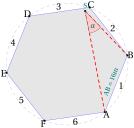
\begin{tikzpicture} [scale=.4]

 \tkzDefPoints{-1/-2/A,1/3/B}

 \tkzDefRegPolygon[side,sides=6](A,B)

 \tkzGetPoint{O}

 \tkzDrawPolygon[fill=black!10, draw=blue](P1,P...,P6)

 \tkzLabelRegPolygon[sep=1.05](O){A,...,F}

 \tkzDrawCircle[dashed](O,A)

 \tkzLabelSegment[above,sloped,

                  midway](A,B){\(A B = 16m\)}

 \foreach \i  [count=\xi from 1]  in {2,...,6,1}

   {%

    \tkzDefMidPoint(P\xi,P\i)

    \path (O) to [pos=1.1] node {\xi} (tkzPointResult) ;

    }

  \tkzDefRandPointOn[segment = P3--P5]

  \tkzGetPoint{S}

  \tkzDrawSegments[thick,dashed,red](A,S S,B)

  \tkzDrawPoints(P1,P...,P6,S)

  \tkzLabelPoint[left,above](S){$S$}

  \tkzDrawSector[R with nodes,fill=red!20](S,2)(A,B)

  \tkzLabelAngle[pos=1.5](A,S,B){$\alpha$}

\end{tikzpicture}