tkz-euclide
Working with styles
42 Predefined styles
How to proceed depends on your use of the package. A good method is to use predefined styles as much as possible, to separate content from form. This is the right method if you plan to create a document with many figures, like this documentation. We will see how to define a global style for a document, and how to use a style locally.
The file tkz-euclide.cfg contains the predefined styles of the main objects, the most important being points, lines, segments, circles, arcs and compass marks. If you always use the same styles and create many figures, it is worth creating your own styles. To do this, you need to know which features can be modified, and some notions of TikZ.
The predefined styles are global: they exist before the figures are created, and it is better not to change them between two figures. On the other hand, they can be modified temporarily inside a figure; they are then defined locally and do not affect the other figures.
Here is how I defined the styles of the document you are reading.
  \tkzSetUpColors[background=white,text=black]

  \tkzSetUpPoint[size=2,color=teal]

  \tkzSetUpLine[line width=.4pt,color=teal]

  \tkzSetUpCompass[color=orange, line width=.4pt,delta=10]

  \tkzSetUpArc[color=gray,line width=.4pt]

  \tkzSetUpStyle[orange]{new}
The macro \tkzSetUpColors sets the background color and the text color. If you don’t use it, the colors and fonts of your document are used. Let’s see how to define the styles of the main objects.
43 Point style
This is how the points are defined:
\tikzset{point style/.style = {%

       draw         = \tkz@euc@pointcolor,

       inner sep    = 0pt,

       shape        = \tkz@euc@pointshape,

       minimum size = \tkz@euc@pointsize,

       fill         = \tkz@euc@pointcolor}}
You can of course use \tikzset, but the package provides a macro for this: \tkzSetUpPoint, which can be used globally or locally.
43.1 Use of \tkzSetUpPoint
\tkzSetUpPoint[⟨local options⟩]
| options | default | definition |
|---|---|---|
| color | black | point color |
| size | 3 | point size |
| fill | black!50 | inside point color |
| shape | circle | point shape circle, cross or cross out |
43.1.1 Global style or local style
First, here is a figure created with the styles of this documentation; then the style of the points is modified inside the tikzpicture environment.
You can use the macro \tkzSetUpPoint globally or locally. If you place it in your preamble or before your first figure, the point style is valid for all the figures of your document. You can use another style locally by placing this command inside a tikzpicture environment.
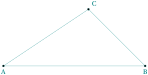
\begin{tikzpicture}

  \tkzDefPoints{0/0/A,5/0/B,3/2/C,3/1/D}

  \tkzDrawPolygon(A,B,C)

  \tkzDrawPoints(A,B,C)

  \tkzLabelPoints(A,B)

  \tkzLabelPoints[above right](C)

\end{tikzpicture}
43.1.2 Local style
The style of the points is modified locally in the second figure.
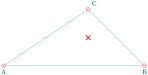
\begin{tikzpicture}

  \tkzSetUpPoint[size=4,color=red,fill=red!20]

  \tkzDefPoints{0/0/A,5/0/B,3/2/C,3/1/D}

  \tkzDrawPolygon(A,B,C)

  \tkzDrawPoints(A,B,C)

  \tkzDrawPoint[shape=cross out,thick](D)

  \tkzLabelPoints(A,B)

  \tkzLabelPoints[above right](C)

\end{tikzpicture}
43.1.3 Style and scope
The points get back the initial style. Point D has a new style limited by the environment scope. It is also possible to use {...} orThe points get back the initial style. Point \(D\) has a new style limited by the environment scope. It is also possible to use {...} or \begingoup ... \endgroup.
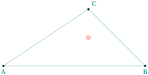
\begin{tikzpicture}

  \tkzDefPoints{0/0/A,5/0/B,3/2/C,3/1/D}

  \tkzDrawPolygon(A,B,C)

  \tkzDrawPoints(A,B,C)

  \begin{scope}

    \tkzSetUpPoint[size=4,color=red,fill=red!20]

    \tkzDrawPoint(D)

  \end{scope}

  \tkzLabelPoints(A,B)

  \tkzLabelPoints[above right](C)

\end{tikzpicture}
43.1.4 Simple example with \tkzSetUpPoint

\begin{tikzpicture}

  \tkzSetUpPoint[shape = cross out,color=blue]

  \tkzDefPoint(2,1){A}

  \tkzDefPoint(4,0){B}

  \tkzDrawLine(A,B)

  \tkzDrawPoints(A,B)

\end{tikzpicture}
43.1.5 Use of \tkzSetUpPoint inside a group
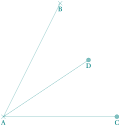
\begin{tikzpicture}

  \tkzDefPoints{0/0/A,2/4/B,4/0/C,3/2/D}

  \tkzDrawSegments(A,B A,C A,D)

  {\tkzSetUpPoint[shape=cross out,

            fill= teal!50,

            size=4,color=teal]

  \tkzDrawPoints(A,B)}

  \tkzSetUpPoint[fill= teal!50,size=4,

               color=teal]

   \tkzDrawPoints(C,D)

  \tkzLabelPoints(A,B,C,D)

\end{tikzpicture}
44 Line style
There are several ways to change the style of a line: with \tkzSetUpLine, or directly with
\tikzset{line style/.style = ... }.
Reminder about line width: There are a number of predefined styles that provide more “natural” ways of setting the line width. You can also redefine these styles.
| predefined style | value of line width |
| ultra thin | 0.1 pt |
| very thin | 0.2 pt |
| thin | 0.4 pt |
| semithick | 0.6 pt |
| thick | 0.8 pt |
| very thick | 1.2 pt |
| ultra thick | 1.6 pt |
44.1 Use of \tkzSetUpLine
This macro defines the style of all the lines.
\tkzSetUpLine[⟨local options⟩]
| options | default | definition |
|---|---|---|
| color | black | color of the construction lines |
| line width | 0.4pt | thickness of the construction lines |
| style | solid | style of construction lines |
| add | .2 and .2 | changing the length of a line segment |
44.1.1 Change line width
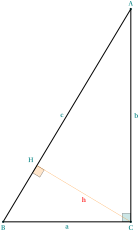
\begin{tikzpicture}[scale=.75]

\tkzSetUpLine[line width=1pt]

\begin{scope}[rotate=-90]

    \tkzDefPoints{0/6/A,10/0/B,10/6/C}

    \tkzDefPointBy[projection = onto B--A](C)

    \tkzGetPoint{H}

    \tkzMarkRightAngle[size=.4,

                       fill=teal!20](B,C,A)

    \tkzMarkRightAngle[size=.4,

                       fill=orange!20](B,H,C)

    \tkzDrawPolygon(A,B,C)

    \tkzDrawSegment[new](C,H)

\end{scope}

 \tkzLabelSegment[below](C,B){$a$}

 \tkzLabelSegment[right](A,C){$b$}

 \tkzLabelSegment[left](A,B){$c$}

 \tkzLabelSegment[color=red](C,H){$h$}

 \tkzDrawPoints(A,B,C)

 \tkzLabelPoints[above left](H)

 \tkzLabelPoints(B,C)

 \tkzLabelPoints[above](A)

\end{tikzpicture}
44.1.2 Change style of line
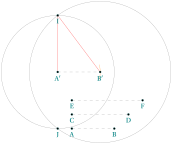
\begin{tikzpicture}[scale=.5]

\tikzset{line style/.style = {color = gray,

                             style=dashed}}

\tkzDefPoints{1/0/A,4/0/B,1/1/C,5/1/D}

\tkzDefPoints{1/2/E,6/2/F,0/4/A',3/4/B'}

\tkzCalcLength(C,D)

\tkzGetLength{rCD}

\tkzCalcLength(E,F)

\tkzGetLength{rEF}

\tkzInterCC[R](A',\rCD)(B',\rEF)

\tkzGetPoints{I}{J}

\tkzDrawLine(A',B')

\tkzCompass(A',B')

\tkzDrawSegments(A,B C,D E,F)

\tkzDefCircle[R](A',\rCD) \tkzGetPoint{a'}

\tkzDefCircle[R](B',\rEF)\tkzGetPoint{b'}

\tkzDrawCircles(A',a' B',b')

\begin{scope}

  \tkzSetUpLine[color=red]

  \tkzDrawSegments(A',I B',I)

\end{scope}

\tkzDrawPoints(A,B,C,D,E,F,A',B',I,J)

\tkzLabelPoints(A,B,C,D,E,F,A',B',I,J)

\end{tikzpicture}
44.1.3 Extending lines
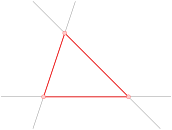
  \begin{tikzpicture}[scale=.75]

  \tkzSetUpLine[add=.5 and .5]

  \tkzDefPoints{0/0/A,4/0/B,1/3/C}

  \tkzDrawLines(A,B B,C A,C)

  \tkzDrawPolygon[red,thick](A,B,C)

  \tkzSetUpPoint[size=4,circle,color=red,fill=red!20]

  \tkzDrawPoints(A,B,C)

  \end{tikzpicture}
45 Arc style
45.1 The macro \tkzSetUpArc
\tkzSetUpArc[⟨local options⟩]
| options | default | definition |
|---|---|---|
| color | black | color of the lines |
| line width | 0.4pt | thickness of the lines |
| style | solid | style of construction lines |
| delta | 0 | extends the arcs by delta degrees at each end |
Since version 5.14, delta set with this macro only acts on the arcs drawn by \tkzDrawArc, \tkzMarkArc and \tkzLabelArc; the compass marks have their own delta, set with \tkzSetUpCompass.
45.1.1 Use of \tkzSetUpArc
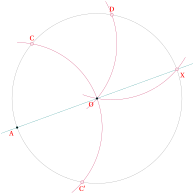
\begin{tikzpicture}

\def\r{3} \def\angle{200}

\tkzSetUpArc[delta=10,color=purple,line width=.2pt]

\tkzSetUpLabel[font=\scriptsize,red]

\tkzDefPoint(0,0){O}

\tkzDefPoint(\angle:\r){A}

\tkzInterCC(O,A)(A,O) \tkzGetPoints{C'}{C}

\tkzInterCC(O,A)(C,O) \tkzGetPoints{D'}{D}

\tkzInterCC(O,A)(D,O) \tkzGetPoints{X'}{X}

\tkzDrawCircle(O,A)

\tkzDrawArc(A,C')(C)

\tkzDrawArc(C,O)(D)

\tkzDrawArc(D,O)(X)

\tkzDrawLine[add=.1 and .1](A,X)

\tkzDrawPoints(O,A)

\tkzSetUpPoint[size=3,color=purple,fill=purple!10]

\tkzDrawPoints(C,C',D,X)

\tkzLabelPoints[below left](O,A)

\tkzLabelPoints[below](C')

\tkzLabelPoints[below right](X)

\tkzLabelPoints[above](C,D)

\end{tikzpicture}
46 Compass style
Compass marks help to understand the construction of a figure, by showing the arcs needed to obtain some points.
46.1 The macro \tkzSetUpCompass
\tkzSetUpCompass[⟨local options⟩]
| options | default | definition |
|---|---|---|
| color | black | color of the construction lines |
| line width | 0.4pt | thickness of the construction lines |
| style | solid | style of lines: solid, dashed,dotted,... |
| delta | 0 | changes the length of the compass marks |
46.1.1 Use of \tkzSetUpCompass
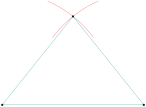
\begin{tikzpicture}

  \tkzSetUpCompass[color=red,delta=15]

  \tkzDefPoint(1,1){A}

  \tkzDefPoint(6,1){B}

  \tkzInterCC[R](A,4)(B,4) \tkzGetPoints{C}{D}

  \tkzCompass(A,C)

  \tkzCompass(B,C)

  \tkzDrawPolygon(A,B,C)

  \tkzDrawPoints(A,B,C)

\end{tikzpicture}
46.1.2 Use of \tkzSetUpCompass with \tkzShowLine

\begin{tikzpicture}[scale=.75]

\tkzSetUpStyle[bisector,size=2,gap=3]{showbi}

\tkzSetUpCompass[color=teal,line width=.3 pt]

\tkzDefPoints{0/1/A, 8/3/B, 3/6/C}

\tkzDrawPolygon(A,B,C)

\tkzDefLine[bisector](B,A,C) \tkzGetPoint{a}

\tkzDefLine[bisector](C,B,A) \tkzGetPoint{b}

\tkzShowLine[showbi](B,A,C)

\tkzShowLine[showbi](C,B,A)

\tkzInterLL(A,a)(B,b) \tkzGetPoint{I}

\tkzDefPointBy[projection= onto A--B](I)

\tkzGetPoint{H}

\tkzDrawCircle[new](I,H)

\tkzDrawSegments[new](I,H)

\tkzDrawLines[add=0 and .2,new](A,I B,I)

\end{tikzpicture}
47 Label style
47.1 The macro \tkzSetUpLabel
The macro \tkzSetUpLabel defines the style of the point labels.
\tkzSetUpStyle[⟨local options⟩]
The options are the same as those of TikZ
47.1.1 Use of \tkzSetUpLabel

\begin{tikzpicture}[scale=.75]

  \tkzSetUpLabel[font=\scriptsize,red]

  \tkzSetUpStyle[line width=1pt,teal]{XY}

  \tkzInit[xmin=-3,xmax=3,ymin=-3,ymax=3]

  \tkzDrawX[noticks,XY]

  \tkzDrawY[noticks,XY]

  \tkzDefPoints{1/0/A,0/1/B,-1/0/C,0/-1/D}

  \tkzDrawPoints[teal,fill=teal!30,size=6](A,...,D)

  \tkzLabelPoint[above right](A){$A(1,0)$}

  \tkzLabelPoint[above right](B){$B(0,1)$}

  \tkzLabelPoint[above left](C){$C(-1,0)$}

  \tkzLabelPoint[below left](D){$D(0,-1)$}

\end{tikzpicture}
48 Own style
You can define your own style with \tkzSetUpStyle.
48.1 The macro \tkzSetUpStyle
\tkzSetUpStyle[⟨local options⟩]
The options are the same as those of TikZ
48.1.1 Use of \tkzSetUpStyle

\begin{tikzpicture}

  \tkzSetUpStyle[color=blue!20!black,fill=blue!20]{mystyle}

  \tkzDefPoint(0,0){O}

  \tkzDefPoint(0,1){A}

  \tkzDrawPoints(O) % general style

  \tkzDrawPoints[mystyle,size=4](A) % my style

  \tkzLabelPoints(O,A)

\end{tikzpicture}
49 How to use arrows
In some countries, arrows are used to show that lines are parallel, or to represent rays, such as the sides of an angle.
Here are some examples of how to place these arrows. tkz-euclide loads the library arrows.meta.
\usetikzlibrary{arrows.meta}
This library provides different styles of arrow tips; the next examples use some of them.
49.1 Arrows at endpoints on segment, ray or line
Stealth, Triangle, To, Latex, …, which can be combined with reversed. It is easy to place an arrow at one or both endpoints.
-Triangle and Segment

    \begin{tikzpicture}

      \tkzDefPoints{0/0/A,4/0/B}

      \tkzDrawSegment[-Triangle](A,B)

    \end{tikzpicture}
Stealth-Stealth and Segment

    \begin{tikzpicture}

      \tkzDefPoints{0/0/A,4/0/B}

      \tkzDrawSegment[Stealth-Stealth](A,B)

    \end{tikzpicture}
Latex-Latex and Line

    \begin{tikzpicture}

      \tkzDefPoints{0/0/A,4/0/B}

      \tkzDrawLine[red,Latex-Latex](A,B)

      \tkzDrawPoints(A,B)

    \end{tikzpicture}
To-To and Segment

    \begin{tikzpicture}

      \tkzDefPoints{0/0/A,4/0/B}

      \tkzDrawSegment[To-To](A,B)

    \end{tikzpicture}
Latex-Latex and Segment

    \begin{tikzpicture}

      \tkzDefPoints{0/0/A,4/0/B}

      \tkzDrawSegment[Latex-Latex](A,B)

    \end{tikzpicture}
Latex- and Segment

    \begin{tikzpicture}

      \tkzDefPoints{0/0/A,4/0/B}

      \tkzDrawSegment[Latex-](A,B)

    \end{tikzpicture}
-Latex and Segments
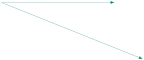
\begin{tikzpicture}

 \tkzDefPoints{0/0/A,4/0/B,5/-2/C}

 \tkzDrawSegments[-Latex](A,B A,C)

\end{tikzpicture}
49.1.1 Scaling an arrow head

\begin{tikzpicture}

 \tkzDefPoints{0/0/A,4/0/B}

 \tkzDrawSegment[{Latex[scale=2]}-{Latex[scale=2]}](A,B)

\end{tikzpicture}
49.1.2 Using vector style
\tikzset{vector style/.style={>=Latex,->}}
You can redefine this style.

\begin{tikzpicture}

 \tkzDefPoints{0/0/A,4/0/B}

\tkzDrawSegment[vector style](A,B)

\end{tikzpicture}
49.2 Arrows on middle point of a line segment
Arrows on lines indicate that the lines are parallel. This depends on the country: in France we prefer to write outside the figure that \((AB) \parallel (DC)\). The code is an adaptation of an answer by Muzimuzhi Z on the site tex.stackexchange.com.
Syntax:
tkz arrow (Latex by default)
tkz arrow=<arrow end tip>
tkz arrow=<arrow end tip> at <pos> (<pos> = .5 by default)
tkz arrow={<arrow end tip>[<arrow options>] at <pos>} option possible scale
Example usages:
\tkzDrawSegment[tkz arrow=Stealth] (A,B)
\tkzDrawSegment[tkz arrow={To[scale=3] at .4}](A,B)
\tkzDrawSegment[tkz arrow={Latex[scale=5,blue] at .6}](A,B)
49.2.1 In a parallelogram
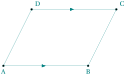
\begin{tikzpicture}

 \tkzDefPoints{0/0/A,3/0/B,4/2/C}

 \tkzDefParallelogram(A,B,C)

 \tkzGetPoint{D}

 \tkzDrawSegments[tkz arrow](A,B D,C)

 \tkzDrawSegments(B,C D,A)

 \tkzLabelPoints(A,B)

 \tkzLabelPoints[above right](C,D)

 \tkzDrawPoints(A,...,D)

\end{tikzpicture}
49.2.2 A line parallel to another one
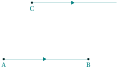
\begin{tikzpicture}

 \tkzDefPoints{0/0/A,3/0/B,1/2/C}

 \tkzDefPointWith[colinear= at C](A,B)

 \tkzGetPoint{D}

 \tkzDrawSegments[tkz arrow=Triangle](A,B C,D)

 \tkzLabelPoints(A,B,C)

 \tkzDrawPoints(A,...,C)

\end{tikzpicture}
49.2.3 Arrow on a circle
You can place an arrow on the first quarter of a circle; a rotation moves the arrow.

\begin{tikzpicture}

\tkzDefPoints{0/0/A,3/0/B}

\begin{scope}[rotate=150]

 \tkzDrawCircle[tkz arrow={Latex[scale=2,red]}](A,B)

\end{scope}

\end{tikzpicture}
49.3 Arrows on all segments of a polygon
Some users asked me for a way to place an arrow on each side of a polygon. I used a style proposed by Paul Gaborit on the site tex.stackexchange.com.
\tikzset{tkz arrows/.style=
{postaction={on each path={tkz arrow={Latex[scale=2,color=black]}}}}}
You can change this style. With tkz arrows you can place an arrow on each segment of a polygon.
49.3.1 Arrow on each segment with tkz arrows

\begin{tikzpicture}

 \tkzDefPoints{0/0/A,3/0/B}

 \tkzDefSquare(A,B) \tkzGetPoints{C}{D}

 \tkzDrawPolygon[tkz arrows](A,...,D)

\end{tikzpicture}
49.3.2 Using tkz arrows with a circle
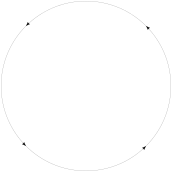
\begin{tikzpicture}

 \tkzDefPoints{0/0/A,3/0/B}

 \tkzDrawCircle[tkz arrows](A,B)

\end{tikzpicture}