tkz-euclide
Marking and labelling
32 Labelling points
32.1 Label for a point: \tkzLabelPoint
You can add several labels to the same point by using this macro several times.
\tkzLabelPoint[⟨local options⟩](⟨point⟩)⟨label⟩
| arguments | example | |
|---|---|---|
| point | \tkzLabelPoint(A){$A_1$} | |
| options | default | definition |
| TikZ options | color, position etc. |
Optionally, you can use any TikZ style, in particular placements such as above, right, …
32.1.1 Example with \tkzLabelPoint
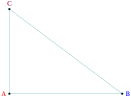
\begin{tikzpicture}

  \tkzDefPoint(0,0){A}

  \tkzDefPoint(4,0){B}

  \tkzDefPoint(0,3){C}

  \tkzDrawSegments(A,B B,C C,A)

  \tkzDrawPoints(A,B,C)

  \tkzLabelPoint[left,red](A){$A$}

  \tkzLabelPoint[right,blue](B){$B$}

  \tkzLabelPoint[above,purple](C){$C$}

\end{tikzpicture}
32.1.2 Label and reference
The reference of a point is what lets you use the point in the code; the label is the name of the point that is displayed.

 \begin{tikzpicture}

    \tkzDefPoint(2,0){A}

    \tkzDrawPoint(A)

    \tkzLabelPoint[above](A){$A_1$}

  \end{tikzpicture}
32.2 Add labels to points \tkzLabelPoints
You can quickly place several labels when the references of the points are identical to the labels and when all the labels are placed in the same way relative to their points. By default, below right is used.
\tkzLabelPoints[⟨local options⟩](⟨\(A_1,A_2,...\)⟩)
| arguments | example | result |
|---|---|---|
| list of points | \tkzLabelPoints(A,B,C) | Display of \(A\), \(B\) and \(C\) |
This macro reduces the number of lines of code, but all the points rarely need the same label position.
32.2.1 Example with \tkzLabelPoints
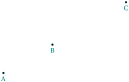
\begin{tikzpicture}

  \tkzDefPoint(2,3){A}

  \tkzDefShiftPoint[A](30:2){B}

  \tkzDefShiftPoint[A](30:5){C}

  \tkzDrawPoints(A,B,C)

  \tkzLabelPoints(A,B,C)

\end{tikzpicture}
32.3 Automatic position of labels \tkzAutoLabelPoints
The label of a point is placed in the direction defined by a center, given with the option center, and the point. The distance between the label and the point is a percentage of the distance between the center and the point, given by dist.
\tkzAutoLabelPoints[⟨local options⟩](⟨\(A_1,A_2,...\)⟩)
| arguments | example | result |
|---|---|---|
| list of points | \tkzAutoLabelPoint(A,B,C) | Display of \(A\), \(B\) and \(C\) |
32.3.1 Label for points with \tkzAutoLabelPoints
Here the labels are positioned relative to the centroid of \(A\), \(B\), \(C\) and \(O\).
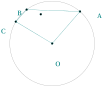
\begin{tikzpicture}[scale=1]

 \tkzDefPoint(2,1){O}

 \tkzDefRandPointOn[circle=center O radius 1.5]\tkzGetPoint{A}

 \tkzDefPointBy[rotation=center O angle 100](A)\tkzGetPoint{C}

 \tkzDefPointBy[rotation=center O angle 78](A)\tkzGetPoint{B}

 \tkzDrawCircle(O,A)

 \tkzDrawPoints(O,A,B,C)

 \tkzDrawSegments(C,B B,A A,O O,C)

 \tkzDefTriangleCenter[centroid](A,B,C) \tkzGetPoint{G}

 \tkzDrawPoint(tkzPointResult)

 \tkzAutoLabelPoints[center=G,dist=.5](O,A,B,C)

\end{tikzpicture}
33 Labelling segments
33.1 The macros \tkzLabelSegment and \tkzLabelSegments
\tkzLabelSegment[⟨local options⟩](⟨pt1,pt2⟩){⟨label⟩}
This macro places a label along a segment or a line. The options are those of TikZ, for example pos.
| argument | example | definition |
|---|---|---|
| label | \tkzLabelSegment(A,B){\(5\)} | label text |
| (pt1,pt2) | (A,B) | label along \([AB]\) |
| options | default | definition |
|---|---|---|
| pos | .5 | label’s position |
33.1.1 Labels above and below a segment

\begin{tikzpicture}

\tkzDefPoint(0,0){A}

\tkzDefPoint(6,0){B}

\tkzDrawSegment(A,B)

\tkzLabelSegment[above,pos=.8](A,B){$a$}

\tkzLabelSegment[below,pos=.2](A,B){$4$}

\end{tikzpicture}
33.1.2 Example: blackboard
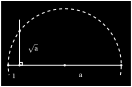
\tikzstyle{background rectangle}=[fill=black]

\begin{tikzpicture}[show background rectangle,scale=.4]

  \tkzDefPoint(0,0){O}

  \tkzDefPoint(1,0){I}

  \tkzDefPoint(10,0){A}

  \tkzDefPointWith[orthogonal normed,K=4](I,A)

   \tkzGetPoint{H}

  \tkzDefMidPoint(O,A) \tkzGetPoint{M}

  \tkzInterLC(I,H)(M,A)\tkzGetPoints{B}{C}

  \tkzDrawSegments[color=white,line width=1pt](I,H O,A)

  \tkzDrawPoints[color=white](O,I,A,B,M)

  \tkzMarkRightAngle[color=white,line width=1pt](A,I,B)

  \tkzDrawArc[color=white,line width=1pt,

              style=dashed](M,A)(O)

  \tkzLabelSegment[white,right=1ex,pos=.5](I,B){$\sqrt{a}$}

  \tkzLabelSegment[white,below=1ex,pos=.5](O,I){$1$}

  \tkzLabelSegment[pos=.6,white,below=1ex](I,A){$a$}

\end{tikzpicture}
33.1.3 Labels and option swap
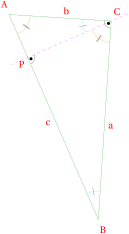
\begin{tikzpicture}[rotate=-60]

\tkzSetUpStyle[red,auto]{label style}

\tkzDefPoint(0,1){A}

\tkzDefPoint(2,4){C}

\tkzDefPointWith[orthogonal normed,K=7](C,A)

\tkzGetPoint{B}

\tkzDefSpcTriangle[orthic](A,B,C){N,O,P}

\tkzDefTriangleCenter[circum](A,B,C)

\tkzGetPoint{O}

\tkzDrawPolygon[green!60!black](A,B,C)

\tkzDrawLine[dashed,color=magenta](C,P)

\tkzLabelSegment(B,A){$c$}

\tkzLabelSegment[swap](B,C){$a$}

\tkzLabelSegment[swap](C,A){$b$}

\tkzMarkAngles[size=1,

     color=cyan,mark=|](C,B,A A,C,P)

\tkzMarkAngle[size=0.75,

     color=orange,mark=||](P,C,B)

\tkzMarkAngle[size=0.75,

      color=orange,mark=||](B,A,C)

\tkzMarkRightAngles[german](A,C,B B,P,C)

\tkzAutoLabelPoints[center = O,dist= .1](A,B,C)

 \tkzLabelPoint[below left](P){$P$}

 \end{tikzpicture}
\tkzLabelSegments[⟨local options⟩](⟨pt1,pt2 pt3,pt4 ...⟩)
The arguments are a list of pairs of points. The TikZ styles are available.
33.1.4 Labels for an isosceles triangle
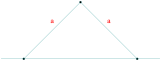
\begin{tikzpicture}[scale=1]

 \tkzDefPoints{0/0/O,2/2/A,4/0/B,6/2/C}

 \tkzDrawSegments(O,A A,B)

 \tkzDrawPoints(O,A,B)

 \tkzDrawLine(O,B)

 \tkzLabelSegments[color=red,above=4pt](O,A A,B){$a$}

\end{tikzpicture}
34 Labelling lines
34.1 The macro \tkzLabelLine
\tkzLabelLine[⟨local options⟩](⟨pt1,pt2⟩){⟨label⟩}
| arguments | default | definition |
|---|---|---|
| label | \tkzLabelLine(A,B){$\Delta$} |
| options | default | definition |
|---|---|---|
| pos | .5 | pos is an option for TikZ, but essential in this case… |
As options, in addition to pos, you can use all the TikZ styles, in particular placements such as above, right, …
34.1.1 Example with \tkzLabelLine
An important option is pos: it places the label along the line. The value of pos can be greater than 1 or negative.
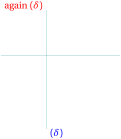
\begin{tikzpicture}

   \tkzDefPoints{0/0/A,3/0/B,1/1/C}

   \tkzDefLine[perpendicular=through C,K=-1](A,B)

   \tkzGetPoint{c}

   \tkzDrawLines(A,B C,c)

   \tkzLabelLine[pos=1.25,blue,right](C,c){$(\delta)$}

   \tkzLabelLine[pos=-0.25,red,left](C,c){again $(\delta)$}

\end{tikzpicture}
35 Labelling angles
35.1 The macros \tkzLabelAngle and \tkzLabelAngles
\tkzLabelAngle[⟨local options⟩](⟨A,O,B⟩)
There is only one option, dist (with or without unit), which can be replaced by the TikZ option pos (without unit). By default, the value is in centimeters.
| options | default | definition |
|---|---|---|
| pos | 1 | or dist, controls the distance from the top to the label. |
You can move the label with all the TikZ options: rotate, shift, below, etc.
35.1.1 Example by J. S. Bibra (TeX.SE)
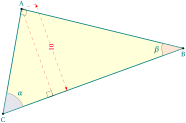
\begin{tikzpicture}[scale=.75]

  \tkzDefPoint(0,0){C}

  \tkzDefPoint(20:9){B}

  \tkzDefPoint(80:5){A}

  \tkzDefPointsBy[projection=onto B--C](A){a}

  \tkzDrawPolygon[thick,fill=yellow!15](A,B,C)

  \tkzDrawSegment[dashed, red](A,a)

  \tkzDrawSegment[style=red, dashed,

  dim={$10$,15pt,midway,font=\scriptsize,

   rotate=90}](A,a)

  \tkzMarkAngle(B,C,A)

  \tkzMarkRightAngle(A,a,C)

  \tkzMarkRightAngle(C,A,B)

  \tkzFillAngle[fill=blue!20, opacity=0.5](B,C,A)

  \tkzFillAngle[fill=red!20, opacity=0.5](A,B,C)

  \tkzLabelAngle[pos=1.25](A,B,C){$\beta$}

  \tkzLabelAngle[pos=1.25](B,C,A){$\alpha$}

  \tkzMarkAngle(A,B,C)

  \tkzDrawPoints(A,B,C)

  \tkzLabelPoints(B,C)

  \tkzLabelPoints[above](A)

\end{tikzpicture}
35.1.2 With pos
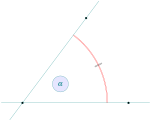
\begin{tikzpicture}[scale=.75]

  \tkzDefPoints{0/0/O,5/0/A,3/4/B}

  \tkzMarkAngle[size = 4,mark = ||,

      arc=ll,color = red](A,O,B)%

  \tkzDrawLines(O,A O,B)

  \tkzDrawPoints(O,A,B)

  \tkzLabelAngle[pos=2,draw,circle,

      fill=blue!10](A,O,B){$\alpha$}

\end{tikzpicture}
35.1.3 pos and \tkzLabelAngles
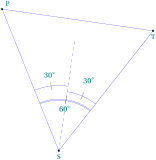
\begin{tikzpicture}[rotate=30]

  \tkzDefPoint(2,1){S}

  \tkzDefPoint(7,3){T}

  \tkzDefPointBy[rotation=center S angle 60](T)

  \tkzGetPoint{P}

  \tkzDefLine[bisector,normed](T,S,P)

  \tkzGetPoint{s}

  \tkzDrawPoints(S,T,P)

  \tkzDrawPolygon[color=blue](S,T,P)

  \tkzDrawLine[dashed,color=blue,add=0 and 3](S,s)

  \tkzLabelPoint[above right](P){$P$}

  \tkzLabelPoints(S,T)

  \tkzMarkAngle[size = 1.8,mark = |,arc=ll,

                    color = blue](T,S,P)

  \tkzMarkAngle[size = 2.1,mark = |,arc=l,

                    color = blue](T,S,s)

  \tkzMarkAngle[size = 2.3,mark = |,arc=l,

                    color = blue](s,S,P)

 \tkzLabelAngle[pos = 1.5](T,S,P){$60^{\circ}$}%

 \tkzLabelAngles[pos = 2.7](T,S,s s,S,P){%

                            $30^{\circ}$}%

\end{tikzpicture}
\tkzLabelAngles[⟨local options⟩](⟨A,O,B⟩)(⟨A’,O’,B’⟩)etc.
With common options, there is a macro for several angles.
Finally, we need to give a label to a circle. Several methods are possible; here we look at \tkzLabelCircle.
36 Labelling circles
36.1 The macro \tkzLabelCircle
\tkzLabelCircle[⟨tikz options⟩](⟨O,A⟩)(⟨angle⟩){⟨label⟩}
| options | default | definition |
|---|---|---|
| tikz options | circle \(O\) center through \(A\) |
The TikZ styles can be used. The label is created, so it is passed between braces.
36.1.1 Labels around a circle

\begin{tikzpicture}

 \tkzDefPoint(0,0){O} \tkzDefPoint(2,0){N}

 \tkzDefPointBy[rotation=center O angle 50](N)

     \tkzGetPoint{M}

 \tkzDefPointBy[rotation=center O angle -20](N)

      \tkzGetPoint{P}

 \tkzDefPointBy[rotation=center O angle 125](N)

      \tkzGetPoint{P'}

 \tkzLabelCircle[above=4pt](O,N)(120){$\mathcal{C}$}

 \tkzDrawCircle(O,M)

 \tkzFillCircle[color=blue!10,opacity=.4](O,M)

 \tkzLabelCircle[draw,

       text width=2cm,text centered,left=24pt](O,M)(-120)%

          {The circle\\ $\mathcal{C}$}

 \tkzDrawPoints(M,P)\tkzLabelPoints[right](M,P)

\end{tikzpicture}
37 Labelling arcs
37.1 The macro \tkzLabelArc
\tkzLabelArc[⟨local options⟩](⟨pt1,pt2,pt3⟩){⟨label⟩}
This macro places a label along an arc. The options are those of TikZ, for example pos.
| argument | example | definition |
|---|---|---|
| label | \tkzLabelArc(A,B){\(5\)} | label text |
| (pt1,pt2,pt3) | (O,A,B) | label along the arc \(\widearc{AB}\) |
| options | default | definition |
|---|---|---|
| pos | .5 | label’s position |
37.1.1 Label on arc
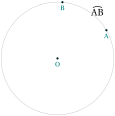
\begin{tikzpicture}

\tkzDefPoint(0,0){O}

\pgfmathsetmacro\r{2}

\tkzDefPoint(30:\r){A}

\tkzDefPoint(85:\r){B}

\tkzDrawCircle(O,A)

\tkzDrawPoints(B,A,O)

\tkzLabelArc[right=2pt](O,A,B){$\widearc{AB}$}

\tkzLabelPoints(A,B,O)

\end{tikzpicture}