tkz-euclide
Drawing, filling and clipping
28 Filling
28.1 Coloring a disc
This was possible with the macro \tkzDrawCircle, but the circle had to be drawn; this is no longer the case.
\tkzFillCircle[⟨local options⟩](⟨A,B⟩)
| options | default | definition |
|---|---|---|
| radius | radius | two points define a radius |
| R | radius | a point and the measurement of a radius |
You don’t need to write radius, because it is the default option. Of course, you can add all the TikZ styles.
28.1.1 Yin and Yang

  \begin{tikzpicture}[scale=.75]

    \tkzDefPoint(0,0){O}

    \tkzDefPoint(-4,0){A}

    \tkzDefPoint(4,0){B}

    \tkzDefPoint(-2,0){I}

    \tkzDefPoint(2,0){J}

    \tkzDrawSector[fill=teal](O,A)(B)

    \tkzFillCircle[fill=white](J,B)

    \tkzFillCircle[fill=teal](I,A)

    \tkzDrawCircle(O,A)

  \end{tikzpicture}
28.1.2 From a sangaku
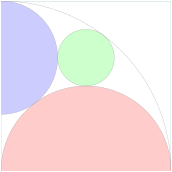
\begin{tikzpicture}

   \tkzDefPoint(0,0){B}  \tkzDefPoint(6,0){C}%

   \tkzDefSquare(B,C)    \tkzGetPoints{D}{A}

   \tkzClipPolygon(B,C,D,A)

   \tkzDefMidPoint(A,D)  \tkzGetPoint{F}

   \tkzDefMidPoint(B,C)  \tkzGetPoint{E}

   \tkzDefMidPoint(B,D)  \tkzGetPoint{Q}

   \tkzDefLine[tangent from = B](F,A)

   \tkzGetPoints{H}{G}

   \tkzInterLL(F,G)(C,D) \tkzGetPoint{J}

   \tkzInterLL(A,J)(F,E) \tkzGetPoint{K}

   \tkzDefPointBy[projection=onto B--A](K)

   \tkzGetPoint{M}

   \tkzDrawPolygon(A,B,C,D)

   \tkzFillCircle[red!20](E,B)

   \tkzFillCircle[blue!20](M,A)

   \tkzFillCircle[green!20](K,Q)

  \tkzDrawCircles(B,A M,A E,B K,Q)

\end{tikzpicture}
28.1.3 Clipping and filling part I

\begin{tikzpicture}

\tkzDefPoints{0/0/A,4/0/B,2/2/O,3/4/X,4/1/Y,1/0/Z,

              0/3/W,3/0/R,4/3/S,1/4/T,0/1/U}

\tkzDefSquare(A,B)\tkzGetPoints{C}{D}

\tkzDefPointWith[colinear normed=at X,K=1](O,X)

 \tkzGetPoint{F}

\begin{scope}

  \tkzFillCircle[fill=teal!20](O,F)

  \tkzFillPolygon[white](A,...,D)

  \tkzClipPolygon(A,...,D)

  \foreach \c/\t in {S/C,R/B,U/A,T/D}

  {\tkzFillCircle[teal!20](\c,\t)}

\end{scope}

\foreach \c/\t in {X/C,Y/B,Z/A,W/D}

{\tkzFillCircle[white](\c,\t)}

  \foreach \c/\t in {S/C,R/B,U/A,T/D}

  {\tkzFillCircle[teal!20](\c,\t)}

\end{tikzpicture}
28.1.4 Clipping and filling part II
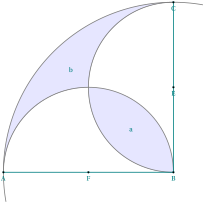
\begin{tikzpicture}[scale=.75]

\tkzDefPoints{0/0/A,8/0/B,8/8/C,0/8/D}

\tkzDefMidPoint(A,B) \tkzGetPoint{F}

\tkzDefMidPoint(B,C) \tkzGetPoint{E}

\tkzDefMidPoint(D,B) \tkzGetPoint{I}

\tkzDefMidPoint(I,B) \tkzGetPoint{a}

\tkzInterLC(B,I)(B,C) \tkzGetSecondPoint{K}

\tkzDefMidPoint(I,K) \tkzGetPoint{b}

\begin{scope}

  \tkzFillSector[fill=blue!10](B,C)(A)

  \tkzDefMidPoint(A,B) \tkzGetPoint{x}

  \tkzDrawSemiCircle[fill=white](x,B)

  \tkzDefMidPoint(B,C) \tkzGetPoint{y}

  \tkzDrawSemiCircle[fill=white](y,C)

  \tkzClipCircle(E,B)

  \tkzClipCircle(F,B)

  \tkzFillCircle[fill=blue!10](B,A)

\end{scope}

\tkzDrawSemiCircle[thick](F,B)

\tkzDrawSemiCircle[thick](E,C)

\tkzDrawArc[thick](B,C)(A)

\tkzDrawSegments[thick](A,B B,C)

\tkzDrawPoints(A,B,C,E,F)

\tkzLabelPoints[centered](a,b)

\tkzLabelPoints(A,B,C,E,F)

\end{tikzpicture}
28.1.5 Clipping and filling part III

\begin{tikzpicture}

  \tkzDefPoint(0,0){A} \tkzDefPoint(1,0){B}

  \tkzDefPoint(2,0){C} \tkzDefPoint(-3,0){a}

  \tkzDefPoint(3,0){b}  \tkzDefPoint(0,3){c}

  \tkzDefPoint(0,-3){d}

\begin{scope}

 \tkzClipPolygon(a,b,c,d)

 \tkzFillCircle[teal!20](A,C)

\end{scope}

 \tkzFillCircle[white](A,B)

 \tkzDrawCircle[color=red](A,C)

 \tkzDrawCircle[color=red](A,B)

\end{tikzpicture}
28.2 Coloring a polygon
\tkzFillPolygon[⟨local options⟩](⟨points list⟩)
You can color a polygon while drawing it; this macro colors the inside of the polygon without drawing it.
| arguments | example | explanation |
|---|---|---|
| (⟨pt1,pt2,…⟩) | (⟨A,B,…⟩) |
28.2.1 \tkzFillPolygon
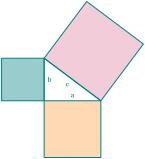
\begin{tikzpicture}[scale=.5]

   \tkzDefPoint(0,0){C} \tkzDefPoint(4,0){A}

   \tkzDefPoint(0,3){B}

   \tkzDefSquare(B,A)      \tkzGetPoints{E}{F}

   \tkzDefSquare(A,C)      \tkzGetPoints{G}{H}

   \tkzDefSquare(C,B)       \tkzGetPoints{I}{J}

   \tkzFillPolygon[color  =  orange!30   ](A,C,G,H)

   \tkzFillPolygon[color  =  teal!40  ](C,B,I,J)

   \tkzFillPolygon[color  =  purple!20](B,A,E,F)

   \tkzDrawPolygon[line width  =  1pt](A,B,C)

   \tkzDrawPolygon[line width  =  1pt](A,C,G,H)

   \tkzDrawPolygon[line width  =  1pt](C,B,I,J)

   \tkzDrawPolygon[line width  =  1pt](B,A,E,F)

   \tkzLabelSegment[above](C,A){$a$}

   \tkzLabelSegment[right](B,C){$b$}

   \tkzLabelSegment[below left](B,A){$c$}

\end{tikzpicture}
28.3 \tkzFillSector
☞ 💣 Note that the arguments depend on the options.
\tkzFillSector[⟨local options⟩](⟨O,…⟩)(⟨…⟩)
| options | default | definition |
|---|---|---|
| towards | towards | \(O\) is the center and the arc from \(A\) to \((OB)\) |
| rotate | towards | the arc starts from A and the angle determines its length |
| R | towards | We give the radius and two angles |
| R with nodes | towards | We give the radius and two points |
Of course, you can add all the TikZ styles for the drawings.
| options | arguments | example |
|---|---|---|
| towards | (⟨pt,pt⟩)(⟨pt⟩) | \tkzFillSector(O,A)(B) |
| rotate | (⟨pt,pt⟩)(⟨an⟩) | \tkzFillSector[rotate,color=red](O,A)(90) |
| R | (⟨pt,\(r\)⟩)(⟨an,an⟩) | \tkzFillSector[R,color=blue](O,2)(30,90) |
| R with nodes | (⟨pt,\(r\)⟩)(⟨pt,pt⟩) | \tkzFillSector[R with nodes](O,2)(A,B) |
28.3.1 \tkzFillSector and towards
You don’t need to write towards. Note that the contours are not drawn: only the surface is colored.

  \begin{tikzpicture}[scale=.6]

  \tkzDefPoint(0,0){O}

  \tkzDefPoint(-30:3){A}

  \tkzDefPointBy[rotation = center O angle -60](A)

  \tkzFillSector[fill=purple!20](O,A)(tkzPointResult)

    \begin{scope}[shift={(-60:1)}]

    \tkzDefPoint(0,0){O}

    \tkzDefPoint(-30:3){A}

    \tkzDefPointBy[rotation = center O angle -60](A)

    \tkzGetPoint{A'}

    \tkzFillSector[color=teal!40](O,A')(A)

      \end{scope}

  \end{tikzpicture}
28.3.2 \tkzFillSector and rotate
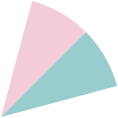
\begin{tikzpicture}[scale=1.5]

 \tkzDefPoint(0,0){O} \tkzDefPoint(2,2){A}

 \tkzFillSector[rotate,color=purple!20](O,A)(30)

 \tkzFillSector[rotate,color=teal!40](O,A)(-30)

\end{tikzpicture}
28.4 Coloring an angle: \tkzFillAngle
The simplest case:
\tkzFillAngle[⟨local options⟩](⟨A,O,B⟩)
\(O\) is the vertex of the angle, \(OA\) and \(OB\) are its sides. Note that the angle depends on the order of the points.
| options | default | definition |
|---|---|---|
| size | 1 | this option determines the radius of the colored angular sector. |
Of course, you can add all the TikZ styles, such as fill and shade.
28.4.1 Example with size
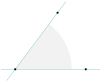
\begin{tikzpicture}

   \tkzInit

   \tkzDefPoints{0/0/O,2.5/0/A,1.5/2/B}

   \tkzFillAngle[size=2, fill=gray!10](A,O,B)

   \tkzDrawLines(O,A O,B)

   \tkzDrawPoints(O,A,B)

\end{tikzpicture}
28.4.2 Changing the order of items
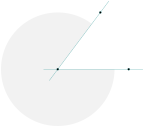
\begin{tikzpicture}

   \tkzInit

   \tkzDefPoints{0/0/O,2.5/0/A,1.5/2/B}

   \tkzFillAngle[size=2,fill=gray!10](B,O,A)

   \tkzDrawLines(O,A O,B)

   \tkzDrawPoints(O,A,B)

\end{tikzpicture}
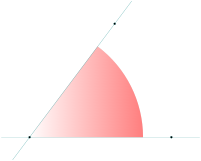
\begin{tikzpicture}

   \tkzInit

   \tkzDefPoints{0/0/O,5/0/A,3/4/B}

   % Don't forget {} to get, () to use

   \tkzFillAngle[size=4,left color=white,

                 right color=red!50](A,O,B)

   \tkzDrawLines(O,A O,B)

   \tkzDrawPoints(O,A,B)

\end{tikzpicture}
\tkzFillAngles[⟨local options⟩](⟨A,O,B⟩)(⟨A’,O’,B’⟩)etc.
With common options, there is a macro for several angles.
28.4.3 Several angles
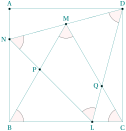
\begin{tikzpicture}[scale=0.5]

  \tkzDefPoints{0/0/B,8/0/C,0/8/A,8/8/D}

  \tkzDrawPolygon(B,C,D,A)

  \tkzDefTriangle[equilateral](B,C) \tkzGetPoint{M}

  \tkzInterLL(D,M)(A,B) \tkzGetPoint{N}

  \tkzDefPointBy[rotation=center N angle -60](D)

  \tkzGetPoint{L}

  \tkzInterLL(N,L)(M,B)     \tkzGetPoint{P}

  \tkzInterLL(M,C)(D,L)     \tkzGetPoint{Q}

  \tkzDrawSegments(D,N N,L L,D B,M M,C)

  \tkzDrawPoints(L,N,P,Q,M,A,D)

  \tkzLabelPoints[left](N,P,Q)

  \tkzLabelPoints[above](M,A,D)

  \tkzLabelPoints(L,B,C)

  \tkzMarkAngles(C,B,M B,M,C M,C,B D,L,N L,N,D N,D,L)

  \tkzFillAngles[fill=red!20,opacity=.2](C,B,M

      B,M,C M,C,B D,L,N L,N,D N,D,L)

\end{tikzpicture}