tkz-euclide
Getting started
1 Presentation and overview

  \begin{tikzpicture}[scale=.25]

  \tkzDefPoints{0/0/A,12/0/B,6/12*sind(60)/C}

  \foreach \density in {20,30,...,240}{%

    \tkzDrawPolygon[fill=teal!\density](A,B,C)

    \pgfnodealias{X}{A}

    \tkzDefPointWith[linear,K=.15](A,B) \tkzGetPoint{A}

    \tkzDefPointWith[linear,K=.15](B,C) \tkzGetPoint{B}

    \tkzDefPointWith[linear,K=.15](C,X) \tkzGetPoint{C}}

  \end{tikzpicture}
1.1 Why tkz-euclide?
My initial goal was to provide other mathematics teachers and myself with a tool to quickly create Euclidean geometry figures without investing too much effort in learning a new programming language. tkz-euclide is meant for mathematics teachers who use LaTeX: it makes it easy to create correct drawings within LaTeX.
The simplest method seemed to be to reproduce the way a construction is made by hand. To describe a construction, you must, of course, define the objects but also the actions that you perform. It seemed to me that a syntax close to the language of mathematicians and their students would be easier to understand, and that this syntax should also be close to that of LaTeX. The objects, of course, are points, segments, lines, triangles, polygons and circles. As for the actions, I considered five to be sufficient: define, create, draw, mark and label.
The syntax is perhaps verbose, but I believe it is easy to learn. As a result, students as well as teachers have been able to use this tool easily.
1.2 TikZ vs tkz-euclide
I love programming with TikZ, and without TikZ I would never have had the idea of creating tkz-euclide. Never forget that TikZ works behind it and that you can always insert TikZ code: tkz-euclide does not prevent you from using TikZ. That said, I don’t think mixing syntax is a good thing.
There is no need to compare TikZ and tkz-euclide: they are not addressed to the same audience. The first one allows you to do a lot of things, the second one only draws geometric figures. The first one can do everything the second one does, but the second one will do what you want more easily.
The main purpose is to define points in order to create geometric figures. tkz-euclide allows you to draw the essential objects of Euclidean geometry from these points, but it may be insufficient for some actions such as coloring surfaces. In this case you can always use TikZ.
Here are some comparisons between TikZ and tkz-euclide, based on the geometry examples of the PGF manual. The two main tools used by the ancient Greeks to construct geometric shapes and angles were the compass and the straightedge. My idea is to let you follow, step by step and as naturally as possible, a construction that would be done by hand with these two tools.
1.2.1 Book I, Proposition I, _Euclid’s Elements_

Explanation:
The fourth tutorial of the PgfManual is about geometric constructions. T. Tantau obtains the drawing with his beautiful tool TikZ. Here I propose the same construction with tkz-euclide. The TikZ code is shown in green and the tkz-euclide code in red.
\usepackage{tikz}
\usetikzlibrary{calc,intersections,through,backgrounds}
\usepackage{tkz-euclide}
How do we get the line \(AB\)? We use two fixed points.
\coordinate [label=left:$A$] (A) at (0,0);
\coordinate [label=right:$B$] (B) at (1.25,0.25);
\draw (A) -- (B);
\tkzDefPoint(0,0){A}
\tkzDefPoint(1.25,0.25){B}
\tkzDrawSegment(A,B)
\tkzLabelPoint[left](A){$A$}
\tkzLabelPoint[right](B){$B$}
We want to draw a circle around each of the points \(A\) and \(B\), whose radius is the length of the segment \(AB\).
\draw let \p1 = ($ (B) - (A) $),
\n2 = {veclen(\x1,\y1)} in
(A) circle (\n2)
(B) circle (\n2);
\tkzDrawCircles(A,B B,A)
The intersection of the circles \(\mathcal{D}\) and \(\mathcal{E}\):
draw [name path=A--B] (A) -- (B);
node (D) [name path=D,draw,circle through=(B),label=left:$D$] at (A) {};
node (E) [name path=E,draw,circle through=(A),label=right:$E$] at (B) {};
path [name intersections={of=D and E, by={[label=above:$C$]C,[label=below:$C'$]C'}}];
draw [name path=C--C',red] (C) -- (C');
path [name intersections={of=A--B and C--C',by=F}];
node [fill=red,inner sep=1pt,label=-45:$F$] at (F) {};
\tkzInterCC(A,B)(B,A) \tkzGetPoints{C}{X}
How to draw points:
\foreach \point in {A,B,C}
\fill [black,opacity=.5] (\point) circle (2pt);
\tkzDrawPoints[fill=gray,opacity=.5](A,B,C)
1.2.2 Complete code with tkz-euclide
We need to define some colors:
\colorlet{input}{red!80!black}
\colorlet{output}{red!70!black}
\colorlet{triangle}{green!50!black!40}
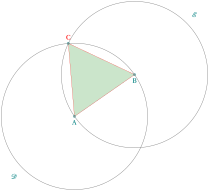
  \colorlet{input}{red!80!black}

  \colorlet{output}{red!70!black}

  \colorlet{triangle}{green!50!black!40}

  \begin{tikzpicture}[scale=1.25,thick,help lines/.style={thin,draw=black!50}]

  \tkzDefPoint(0,0){A}

  \tkzDefPoint(1.25+rand(),0.25+rand()){B}

  \tkzInterCC(A,B)(B,A) \tkzGetPoints{C}{X}


  \tkzFillPolygon[triangle,opacity=.5](A,B,C)

  \tkzDrawSegment[input](A,B)

  \tkzDrawSegments[red](A,C B,C)

  \tkzDrawCircles[help lines](A,B B,A)

  \tkzDrawPoints[fill=gray,opacity=.5](A,B,C)


  \tkzLabelPoints(A,B)

  \tkzLabelCircle[below=12pt](A,B)(180){$\mathcal{D}$}

  \tkzLabelCircle[above=12pt](B,A)(180){$\mathcal{E}$}

  \tkzLabelPoint[above,red](C){$C$}


  \end{tikzpicture}
1.2.3 Book I, Proposition II, _Euclid’s Elements_

Explanation
In the first part, we need the midpoint of the segment \(AB\). With TikZ we can use the library calc:
\coordinate [label=left:$A$] (A) at (0,0);
\coordinate [label=right:$B$] (B) at (1.25,0.25);
\draw (A) -- (B);
\node [fill=red,inner sep=1pt,label=below:$X$] (X) at ($ (A)!.5!(B) $) {};
With tkz-euclide we have the macro \tkzDefMidPoint; we get the point \(X\) with \tkzGetPoint, but we don’t need this point for the next step.
\tkzDefPoints{0/0/A,0.75/0.25/B,1/1.5/C}
\tkzDefMidPoint(A,B) \tkzGetPoint{X}
Then we need to construct an equilateral triangle. It’s easy with tkz-euclide. With TikZ it takes more effort, because you need the midpoint \(X\) to get the point \(D\) by a trigonometric calculation.
\node [fill=red,inner sep=1pt,label=below:$X$] (X) at ($ (A)!.5!(B) $) {};
\node [fill=red,inner sep=1pt,label=above:$D$] (D) at
($ (X) ! {sin(60)*2} ! 90:(B) $) {};
\draw (A) -- (D) -- (B);
\tkzDefTriangle[equilateral](A,B) \tkzGetPoint{D}
We can draw the triangle at the end of the picture with:
\tkzDrawPolygon{A,B,C}
We know how to draw the circle \(\mathcal{H}\) around \(B\) through \(C\) and how to place the points \(E\) and \(F\):
\node (H) [label=135:$H$,draw,circle through=(C)] at (B) {};
\draw (D) -- ($ (D) ! 3.5 ! (B) $) coordinate [label=below:$F$] (F);
\draw (D) -- ($ (D) ! 2.5 ! (A) $) coordinate [label=below:$E$] (E);
\tkzDrawCircle(B,C)
\tkzDrawLines[add=0 and 2](D,A D,B)
We can place the points \(E\) and \(F\) at the end of the picture. We don’t need them now.
Intersecting a line and a circle: here we look for the intersection of the circle around \(B\) through \(C\) with the line \(DB\). The infinite line \(DB\) intersects the circle, but with TikZ we need to extend the segment \(DB\), which can be done with partway calculations. We get the point \(F\), and \(BF\) or \(DF\) intersects the circle:
\node (H) [label=135:$H$,draw,circle through=(C)] at (B) {};
\path let \p1 = ($ (B) - (C) $) in
coordinate [label=left:$G$] (G) at ($ (B) ! veclen(\x1,\y1) ! (F) $);
\fill[red,opacity=.5] (G) circle (2pt);
As for the intersection of two circles, it’s easy to find the intersection of a line and a circle with tkz-euclide. We don’t need \(F\):
\tkzInterLC(B,D)(B,C)\tkzGetFirstPoint{G}
There are no more difficulties. Here is the final code, with some simplifications. We draw the circle \(\mathcal{K}\) with center \(D\) and passing through \(G\). It intersects the line \(AD\) at point \(L\). \(AL = BC\).
\tkzDrawCircle(D,G) \tkzInterLC(D,A)(D,G)\tkzGetSecondPoint{L}
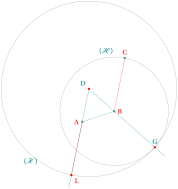
\begin{tikzpicture}[scale=1.5]

\tkzDefPoint(0,0){A}

\tkzDefPoint(0.75,0.25){B}

\tkzDefPoint(1,1.5){C}

\tkzDefTriangle[equilateral](A,B)\tkzGetPoint{D}

\tkzInterLC[near](D,B)(B,C)      \tkzGetSecondPoint{G}

\tkzInterLC[near](A,D)(D,G)      \tkzGetFirstPoint{L}

\tkzDrawCircles(B,C D,G)

\tkzDrawLines[add=0 and 2](D,A D,B)

\tkzDrawSegment(A,B)

\tkzDrawSegments[red](A,L B,C)

\tkzDrawPoints[red](D,L,G)

\tkzDrawPoints[fill=gray](A,B,C)

\tkzLabelPoints[left,red](A)

\tkzLabelPoints[below right,red](L)

\tkzLabelCircle[above](B,C)(20){$\mathcal{(H)}$}

\tkzLabelPoints[above left](D)

\tkzLabelPoints[above](G)

\tkzLabelPoints[above,red](C)

\tkzLabelPoints[right,red](B)

\tkzLabelCircle[below](D,G)(-90){$\mathcal{(K)}$}

\end{tikzpicture}
1.3 How to use the tkz-euclide package?
1.3.1 Let’s look at a classic example
To show the right way, we will build an equilateral triangle. Several methods are possible; we will follow the steps of Euclid.
First of all, you need a document class. To test your code, the best choice is to create a single figure with the class standalone.
\documentclass{standalone}Then load the tkz-euclide package:
\usepackage{tkz-euclide} or \usepackage[lua]{tkz-euclide}You don’t need to load TikZ: the tkz-euclide package works on top of TikZ and loads it.
Start the document and open a TikZ picture environment:
\begin{document}

\begin{tikzpicture}
Now we define two fixed points:
\tkzDefPoint(0,0){A}

\tkzDefPoint(5,2){B}
Two points define two circles; let’s use them:
circle with center \(A\) through \(B\) and circle with center \(B\) through \(A\). These two circles have two points in common.
\tkzInterCC(A,B)(B,A)We get the points of intersection with
\tkzGetPoints{C}{D}All the necessary points are now defined; we can move on to the final steps, including the drawings.
\tkzDrawCircles[gray,dashed](A,B B,A)

\tkzDrawPolygon(A,B,C)% The triangle
Draw all points \(A\), \(B\), \(C\) and \(D\):
\tkzDrawPoints(A,...,D)In the final step, we add labels to the points and use options to position them:
\tkzLabelSegments[swap](A,B){$c$}

\tkzLabelPoints(A,B,D)

\tkzLabelPoints[above](C)
Finally, we close both environments:
\end{tikzpicture}

\end{document}
The complete code:
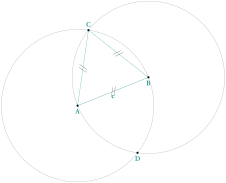
 \begin{tikzpicture}[scale=.5]

   % fixed points

  \tkzDefPoint(0,0){A}

  \tkzDefPoint(5,2){B}

  % calculus

  \tkzInterCC(A,B)(B,A)

  \tkzGetPoints{C}{D}

  % drawings

  \tkzDrawCircles(A,B B,A)

  \tkzDrawPolygon(A,B,C)

  \tkzDrawPoints(A,...,D)

  % marking

  \tkzMarkSegments[mark=s||](A,B B,C C,A)

  % labelling

  \tkzLabelSegments[swap](A,B){$c$}

  \tkzLabelPoints(A,B,D)

  \tkzLabelPoints[above](C)

\end{tikzpicture}
1.3.2 Part I: golden triangle
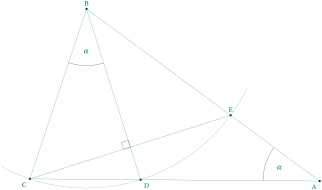
Let’s analyze the figure:
\(CBD\) and \(DBE\) are isosceles triangles;
\(BC=BE\) and \((BD)\) is a bisector of the angle \(CBE\);
From this we deduce that the angles \(CBD\) and \(DBE\) are equal; let \(\alpha\) be their measure.
\[\widehat{BAC} +\widehat{ABC} + \widehat{BCA}=180^\circ \ \text{in the triangle}\ BAC \]
\[3\alpha + \widehat{BCA}=180^\circ\ \text{in the triangle}\ CBD\]
then
\[\alpha + 2\widehat{BCA}=180^\circ \]
or
\[\widehat{BCA}=90^\circ -\alpha/2 \]
Finally
\[\widehat{CBD}=\alpha=36^\circ \]
the triangle \(CBD\) is a golden triangle.
How can we construct a golden triangle, or an angle of \(36^\circ\)?
We place the fixed points \(C\) and \(D\). \tkzDefPoint(0,0){C} and \tkzDefPoint(4,0){D};
We construct a square \(CDef\) and we construct the midpoint \(m\) of \([Cf]\);
We can do all of this with a compass and a ruler;
Then we draw an arc with center \(m\) through \(e\). This arc crosses the line \((Cf)\) at \(n\);
Now the two arcs with center \(C\) and \(D\) and radius \(Cn\) define the point \(B\).
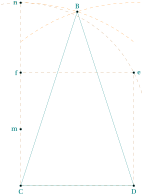
\begin{tikzpicture}

  \tkzDefPoint(0,0){C}

  \tkzDefPoint(4,0){D}

  \tkzDefSquare(C,D)

  \tkzGetPoints{e}{f}

  \tkzDefMidPoint(C,f)

  \tkzGetPoint{m}

  \tkzInterLC(C,f)(m,e)

  \tkzGetSecondPoint{n}

  \tkzInterCC[with nodes](C,C,n)(D,C,n)

  \tkzGetFirstPoint{B}

  \tkzDrawSegment[brown,dashed](f,n)

  \pgfinterruptboundingbox% from tikz

  \tkzDrawPolygon[brown,dashed](C,D,e,f)

  \tkzDrawArc[brown,dashed](m,e)(n)

  \tkzCompass[brown,dashed,delta=20](C,B)

  \tkzCompass[brown,dashed,delta=20](D,B)

  \endpgfinterruptboundingbox

  \tkzDrawPolygon(B,...,D)

  \tkzDrawPoints(B,C,D,e,f,m,n)

  \tkzLabelPoints[above](B)

  \tkzLabelPoints[left](f,m,n)

  \tkzLabelPoints(C,D)

  \tkzLabelPoints[right](e)

\end{tikzpicture}
After building the golden triangle \(BCD\), we build the point \(A\) by noticing that \(BD=DA\). Then we get the point \(E\) and finally the point \(F\), as intersections of objects already defined (a line and a circle).
1.3.3 Part II: two other methods with the golden and Euclid triangles
tkz-euclide knows how to define a golden or euclide triangle. We can define \(BCD\) and \(BCA\) as golden triangles.
      \begin{tikzpicture}

        \tkzDefPoint(0,0){C}

        \tkzDefPoint(4,0){D}

        \tkzDefTriangle[golden](C,D)

        \tkzGetPoint{B}

        \tkzDefTriangle[golden](B,C)

        \tkzGetPoint{A}

        \tkzInterLC[near](A,B)(B,D) \tkzGetFirstPoint{E}

        \tkzInterLL(B,D)(C,E) \tkzGetPoint{F}

        \tkzDrawPoints(C,D,B)

        \tkzDrawPolygon(B,...,D)

        \tkzDrawPolygon(B,C,D)

        \tkzDrawSegments(D,A A,B C,E)

        \tkzDrawArc[delta=10](B,C)(E)

        \tkzDrawPoints(A,...,F)

        \tkzMarkRightAngle(B,F,C)

        \tkzMarkAngles(C,B,D E,A,D)

        \tkzLabelAngles[pos=1.5](C,B,D E,A,D){$\alpha$}

        \tkzLabelPoints[below](A,C,D,E)

        \tkzLabelPoints[above right](B,F)

      \end{tikzpicture}
Here is a final method that uses rotations:
  \begin{tikzpicture}

  \tkzDefPoint(0,0){C} % possible

  % \tkzDefPoint[label=below:$C$](0,0){C}

  % but don't do this

  \tkzDefPoint(2,6){B}

  % We get D and E with a rotation

  \tkzDefPointBy[rotation= center B angle 36](C) \tkzGetPoint{D}

  \tkzDefPointBy[rotation= center B angle 72](C) \tkzGetPoint{E}

  % To get A we use an intersection of lines

  \tkzInterLL(B,E)(C,D) \tkzGetPoint{A}

  \tkzInterLL(C,E)(B,D) \tkzGetPoint{H}

  % drawing

  \tkzDrawArc[delta=10](B,C)(E)

  \tkzDrawPolygon(C,B,D)

  \tkzDrawSegments(D,A B,A C,E)

  % angles

  \tkzMarkAngles(C,B,D E,A,D) %this is to draw the arcs

  \tkzLabelAngles[pos=1.5](C,B,D E,A,D){$\alpha$}

  \tkzMarkRightAngle(B,H,C)

  \tkzDrawPoints(A,...,E)

  % Label only now

  \tkzLabelPoints[below left](C,A)

  \tkzLabelPoints[below right](D)

  \tkzLabelPoints[above](B,E)

  \end{tikzpicture}
1.3.4 Complete but minimal example
A unit of length being chosen, this example shows how to obtain a segment of length \(\sqrt{a}\) from a segment of length \(a\), with a ruler and a compass.
\(IB=a\), \(AI=1\)
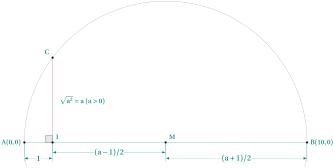
\begin{tikzpicture}[scale=1,ra/.style={fill=gray!20}]

   % fixed points

   \tkzDefPoint(0,0){A}

   \tkzDefPoint(1,0){I}

   % calculation

   \tkzDefPointBy[homothety=center A ratio  10 ](I) \tkzGetPoint{B}

   \tkzDefMidPoint(A,B)              \tkzGetPoint{M}

   \tkzDefPointWith[orthogonal](I,M) \tkzGetPoint{H}

   \tkzInterLC(I,H)(M,B)             \tkzGetFirstPoint{C}

   \tkzDrawSegment[style=purple](I,C)

   \tkzDrawArc(M,B)(A)

   \tkzDrawSegment[dim={$1$,-16pt,}](A,I)

   \tkzDrawSegment[dim={$(a-1)/2$,-10pt,}](I,M)

   \tkzDrawSegment[dim={$(a+1)/2$,-16pt,}](M,B)

   \tkzMarkRightAngle[ra](A,I,C)

   \tkzDrawPoints(I,A,B,C,M)

   \tkzLabelPoint[left](A){$A(0,0)$}

   \tkzLabelPoints[above right](I,M)

   \tkzLabelPoints[above left](C)

   \tkzLabelPoint[right](B){$B(10,0)$}

   \tkzLabelSegment[right=4pt](I,C){$\sqrt{a^2}=a \ (a>0)$}

\end{tikzpicture}
Comments
The Preamble
Let us first look at the preamble. If you need xcolor, load it before tkz-euclide, that is, before TikZ. TikZ may cause problems with active characters, but it provides the library babel, which is meant to solve these problems.
\documentclass{standalone} % or another class

   % \usepackage{xcolor} % before tikz or tkz-euclide if necessary

\usepackage{tkz-euclide} % no need to load TikZ

   % \usetkzobj{all}  is no longer necessary

   % \usetikzlibrary{babel}  if there are problems with the active characters
The following code consists of several parts:
Definition of the fixed points: the first part defines the points needed for the construction; these are the fixed points. In most cases the macros \tkzInit and \tkzClip are not necessary.
  \tkzDefPoint(0,0){A}

  \tkzDefPoint(1,0){I}
The second part creates new points from the fixed points: a point \(B\) is placed \(10\) cm from \(A\). The midpoint of \([AB]\) is \(M\), then we define the line orthogonal to \((AB)\) at the point \(I\). Then we look for the intersection of this line with the semicircle with center \(M\) through \(A\).
   \tkzDefPointBy[homothety=center A ratio  10 ](I)

      \tkzGetPoint{B}

   \tkzDefMidPoint(A,B)

      \tkzGetPoint{M}

   \tkzDefPointWith[orthogonal](I,M)

      \tkzGetPoint{H}

   \tkzInterLC(I,H)(M,B)

   \tkzGetSecondPoint{C}
The third part contains the drawings;
   \tkzDrawSegment[style=purple](I,H)

   \tkzDrawPoints(O,I,A,B,M)

   \tkzDrawArc(M,A)(O)

   \tkzDrawSegment[dim={$1$,-16pt,}](A,I)

   \tkzDrawSegment[dim={$a/2$,-10pt,}](I,M)

   \tkzDrawSegment[dim={$a/2$,-16pt,}](M,B)
Marking: the fourth part is devoted to marks;
\tkzMarkRightAngle[ra](A,I,C)Labelling: the last part only places the labels.
   \tkzLabelPoint[left](A){$A(0,0)$}

   \tkzLabelPoint[right](B){$B(10,0)$}

   \tkzLabelSegment[right=4pt](I,C){$\sqrt{a^2}=a \ (a>0)$}