The nicematrix package
6 The color of the background of the rows and columns
6.1 Use of colortbl
We recall that the package colortbl can be loaded directly with \usepackage{colortbl} or by loading xcolor with the key table: \usepackage[table]{xcolor}.
However, there is two drawbacks:
The package colortbl patches array, leading to some incompatibilities (for instance with the command \hdotsfor).
The package colortbl constructs the array row by row, alterning colored rectangles, rules and contents of the cells. The resulting pdf is difficult to interpret by some pdf viewers and may lead to artefacts on the screen.
Some rules seem to disappear. This is because many PDF viewers give priority to graphical element drawn posteriorly (which is in the spirit of the “painting model” of PostScript and PDF). Concerning this problem, MuPDF (which is used, for instance, by SumatraPDF) gives better results than Adobe Reader.
A thin white line may appear between two cells of the same color. This phenomenon occurs when each cell is colored with its own instruction fill (the PostScript operator fill noted f in PDF). This is the case with colortbl: each cell is colored on its own, even when \columncolor or \rowcolor is used.
As for this phenomenon, Adobe Reader gives better results than MuPDF.
The package nicematrix provides tools to avoid both problems.
6.2 The tools of nicematrix in the \CodeBefore
The package nicematrix provides some tools to draw the colored panels first, and, then, the content of the cells and the rules. This strategy is more conform to the “painting model” of the formats PostScript and pdf and is more suitable for the pdf viewers. However, it requires several compilations.1
The extension nicematrix provides a key code-before for some code that will be executed before the drawing of the tabular.
An alternative syntax is provided: it’s possible to put the content of that code-before between the keywords \CodeBefore and \Body at the beginning of the environment.
\begin{pNiceArray}{preamble}

\CodeBefore [\textsl{options}]

  instructions of the code-before

\Body

  contents of the environment

\end{pNiceArray}
The optional argument between square brackets is a list of key=value pairs which will be presented progressively in this documentation.2
New commands are available in that \CodeBefore: \cellcolor, \rectanglecolor, \rowcolor, \columncolor, \rowcolors, \rowlistcolors, \chessboardcolors and \arraycolor.3
The names of these commands are inspired by the names of the commands provided by colortbl.
These commands don’t color the cells which are in the “corners” if the key corners is used (cf. 5.3.3).
These commands respect the rounded corners if the key rounded-corners (cf. 14.2) has been used.
These commands also apply the colored panels between the rules of the double rules (that’s a difference with colortbl).
All these commands accept an optional argument, between square brackets and in first position. That optional argument may contain two elements (separated by a comma)
the colorimetric space (RGB, rgb, HTML, etc) as specified by the the extension xcolor;
a specification of opacity of the form opacity = value.4
We describe now in detail those commands.
The command \cellcolor takes its name from the command \cellcolor of colortbl.
This command takes in as mandatory arguments a color and a list of cells, each of which with the format \(i\)-\(j\) where \(i\) is the number of the row and \(j\) the number of the column of the cell. In fact, despite its name, this command may be used to color a whole row (with the syntax \(i\)-) or a whole column (with the syntax -\(j\)).

\begin{NiceTabular}{ccc}[hvlines]

\CodeBefore

  \cellcolor[HTML]{FFFF88}{3-1,2-2,-3}

\Body

  a & b & c \\

  e & f & g \\

  h & i & j \\

\end{NiceTabular}
The command \rectanglecolor takes three mandatory arguments. The first is the color. The second is the upper-left cell of the rectangle and the third is the lower-right cell of the rectangle.

\begin{NiceTabular}{ccc}[hvlines]

\CodeBefore

  \rectanglecolor{blue!15}{2-2}{3-3}

\Body

  a & b & c \\

  e & f & g \\

  h & i & j \\

\end{NiceTabular}
The command \arraycolor takes in as mandatory argument a color and color the whole tabular with that color (except the potential exterior rows and columns: cf. 9). It’s only a particular case of \rectanglecolor.
The command \chessboardcolors takes in as mandatory arguments two colors and it colors the cells of the tabular in quincunx with these colors.

$\begin{pNiceMatrix}[r,margin]

\CodeBefore

  \chessboardcolors{red!15}{blue!15}

\Body

  1  & -1 & 1 \\

  -1 & 1  & -1 \\

  1  & -1 & 1

\end{pNiceMatrix}$
We have used the key r which aligns all the columns rightwards (cf. 14.5).
The command \rowcolor takes its name from the command \rowcolor of colortbl. Its first mandatory argument is the color and the second is a comma-separated list of rows or interval of rows with the form \(a\)-\(b\) (an interval of the form \(a\)- represent all the rows from the row \(a\) until the end). Contrarily to the command \rowcolor of colortbl, that commands applies also the color between the rules of a double rule.

The command \columncolor takes its name from the command \columncolor of colortbl. Its syntax is similar to the syntax of \rowcolor.
The command \rowcolors (with a s) takes its name from the command \rowcolors of colortbl. The s emphasizes the fact that there is two colors. This command colors alternately the rows of the tabular with the two colors (provided in second and third argument), beginning with the row whose number is given in first (mandatory) argument. One of the arguments of color may be empty (no color is applied in the corresponding rows).
In fact, the first (mandatory) argument is, more generally, a comma separated list of intervals describing the rows involved in the action of \rowcolors (an interval of the form \(i\)- describes in fact the interval of all the rows of the tabular, beginning with the row \(i\)).
The last argument of \rowcolors is an optional list of pairs key=value (the optional argument in the first position corresponds to the colorimetric space). The available keys are cols, restart and respect-blocks.
The key cols describes a set of columns. The command \rowcolors will color only the cells of these columns. The value is a comma-separated list of intervals of the form \(i\)-\(j\) (where \(i\) or \(j\) may be replaced by *).
With the key restart, each interval of rows (specified by the first mandatory argument) begins with the same color.5
With the key respect-blocks the “rows” alternately colored may extend over several rows if they have to incorporate blocks (created with the command \Block: cf. 4).
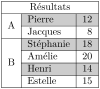
\begin{NiceTabular}{clr}[hvlines]

\CodeBefore

  \rowcolors[gray]{2}{0.8}{}[cols=2-3,restart]

\Body

  \Block{1-*}{Résultats} \\

  \Block{2-1}{A}& Pierre & 12 \\

                & Jacques & 8 \\

  \Block{4-1}{B}& Stéphanie & 18 \\

                & Amélie & 20 \\

                & Henri & 14 \\

                & Estelle & 15

\end{NiceTabular}
The extension nicematrix provides also a command \rowlistcolors. This command generalises the command \rowcolors: instead of two successive arguments for the colors, this command takes in an argument which is a (comma-separated) list of colors. In that list, the symbol = represents a color identical to the previous one.

\begin{NiceTabular}{c}[rounded-corners]

\CodeBefore

  \rowlistcolors{1}{red!15,blue!15,green!15}

\Body

  Peter \\

  James \\

  Abigail \\

  Elisabeth \\

  Claudius \\

  Jane \\

  Alexandra \\

\end{NiceTabular}
It’s also possible to use in the command \rowlistcolors a color series defined by the command \definecolorseries of xcolor (and initialized with the command \resetcolorseries6).

\begin{NiceTabular}{c}

\CodeBefore

  \definecolorseries{BlueWhite}{rgb}{last}{blue}{white}

  \resetcolorseries[\value{iRow}]{BlueWhite}

  \rowlistcolors{1}{BlueWhite!!+}

\Body

  Peter \\

  James \\

  Abigail \\

  Elisabeth \\

  Claudius \\

  Jane \\

  Alexandra \\

\end{NiceTabular}
We recall that all the color commands that we have described don’t color the cells which are in the “corners”. In the following example, we use the key corners to require the determination of the “corner” east (E).
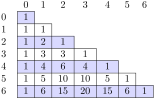
\begin{NiceTabular}{ccccccc}[\emph{corners=E},margin,hvlines,first-row,first-col]

\CodeBefore

  \rowlistcolors{1}{blue!15, }

\Body

    & 0 & 1 & 2 & 3 & 4 & 5 & 6 \\

  0 & 1 \\

  1 & 1 & 1 \\

  2 & 1 & 2 & 1 \\

  3 & 1 & 3 & 3 & 1 \\

  4 & 1 & 4 & 6 & 4 & 1 \\

  5 & 1 & 5 & 10 & 10 & 5 & 1 \\

  6 & 1 & 6 & 15 & 20 & 15 & 6 & 1 \\

\end{NiceTabular}
The previous example uses the keys first-row and first-col which are described in the chapter concerning the “exterior” rows and columns (cf. 9).
As one can see, by default, the coloring commands that we have described don’t apply in those exterior rows and columns.
However, it may still be possible to color in those rows and columns by providing explicitly the numbers of those rows and columns.
In the following example, we require a color in the column \(0\) (which is the “first column” and which exists because the key first-col has been used).
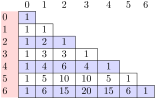
\begin{NiceTabular}{ccccccc}[\emph{corners=E},margin,hvlines,first-row,first-col]

\CodeBefore

  \rowlistcolors{1}{blue!15, }

  \columncolor{red!15}{0}

\Body

    & 0 & 1 & 2 & 3 & 4 & 5 & 6 \\

  0 & 1 \\

  1 & 1 & 1 \\

  2 & 1 & 2 & 1 \\

  3 & 1 & 3 & 3 & 1 \\

  4 & 1 & 4 & 6 & 4 & 1 \\

  5 & 1 & 5 & 10 & 10 & 5 & 1 \\

  6 & 1 & 6 & 15 & 20 & 15 & 6 & 1 \\

\end{NiceTabular}
One should remark that all the previous commands are compatible with the commands of booktabs (\toprule, \midrule, \bottomrule, etc). However, booktabs is not loaded by nicematrix.
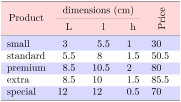
\begin{NiceTabular}[c]{lSSSS}[no-cell-nodes] % no-cell-nodes is optional

\CodeBefore

  \rowcolor{red!15}{1-2}

  \rowcolors{3}{blue!15}{}

\Body

  \toprule

  \Block[C]{2-1}{Product} &

  \Block{1-3}{dimensions (cm)} & & &

  \Block{2-1}{\rotate Price} \\

  \cmidrule(rl){2-4}

   & L & l & h \\

  \midrule

  small    & 3   & 5.5  & 1   & 30    \\

  standard & 5.5 & 8    & 1.5 & 50.5  \\

  premium  & 8.5 & 10.5 & 2   & 80    \\

  extra    & 8.5 & 10   & 1.5 & 85.5  \\

  special  & 12  & 12   & 0.5 & 70    \\

  \bottomrule

\end{NiceTabular}
We have used the type of column S of siunitx (which should be loaded by the user).
It’s also possible, in the \CodeBefore, to use the commands \EmptyColumn and \EmptyRow. The command \EmptyColumn takes in as argument a (comma-separated) list of numbers of columns and requires that no rule nor background colors will be drawn in the corresponding columns. The command \EmptyRow is similar for the rows.
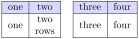
\begin{NiceTabular}{ccccc}[hvlines,no-cell-nodes] % no-cell-nodes is optional

\CodeBefore

  \rowcolor{blue!15}{1}

  \EmptyColumn{3}

\Body

  one & two && three & four \\

  one & \Block{}{two\\ rows} && three & four \\

\end{NiceTabular}
These commands may typically be used in order to compose several tabulars side by side. If you want to draw double-rules, you should instead consider the command \FalseRow and the letter F (cf. 5.3.8).
6.3 Color tools to be used inside the tabular
The extension nicematrix also provides commands to be used directly in the tabular (as does colortbl).
These available commands are the following ones (the first three ones are inspired by the similar commands of colortbl).
\cellcolor which colorizes a cell;7
\rowcolor which must be used in a cell and which colorizes the end of the row;8
\columncolor which must be used in the preamble of the environment with the same syntax as the corresponding command of colortbl (however, unlike the command \columncolor of colortbl, this command \columncolor can appear within another command, itself used in the preamble of the array; on the other hand, the two final optional arguments for fixing offset are not supported);
\rowcolors which takes in as arguments two colors and color the rest of the tabular with those colors (must be used after a potential \hline, \Hline or \toprule!) ;
\rowlistcolors which takes in as argument a color and color the rest of the tabular with the colors of that list of colors.9
These commands are compatible with the commands for the overlays of Beamer (\only, etc.)
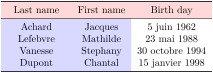
\NewDocumentCommand { \Blue } { } { \columncolor{blue!15} }

\begin{NiceTabular}{>{\Blue}c>{\Blue}cc}

\toprule

  \rowcolor{red!15}

  Last name & First name & Birth day \\

\midrule

  Achard  & Jacques & 5 juin 1962 \\

  Lefebvre & Mathilde & 23 mai 1988 \\

  Vanesse & Stephany & 30 octobre 1994 \\

  Dupont & Chantal & 15 janvier 1998 \\

\bottomrule

\end{NiceTabular}
Each use of the \rowlistcolors (or \rowcolors, which is, in fact, a special case of \rowlistcolors) stops the potential coloring schemes10 specified by a previous command \rowlistcolors. In particular, it’s possible to start coloring the rows with \rowlistcolors{...} and stop coloring by a command \rowlistcolors with an empty argument.

\begin{NiceTabular}{c}[hvlines]

  one \\

  two \\

\rowlistcolors{red!15}

  three \\

  four \\

  five \\

\rowlistcolors{}

  six \\

  seven \\

\end{NiceTabular}
Here is an example of use of \rowcolors in conjunction with create-blocks-in-col.
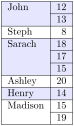
\begin{NiceTabular}{lr}[hvlines,create-blocks-in-col=1]

\rowcolors{blue!10}{}[respect-blocks]

  John      & 12 \\

            & 13 \\

  Steph     &  8 \\

  Sarach    & 18 \\

            & 17 \\

            & 15 \\

  Ashley    & 20 \\

  Henry     & 14 \\

  Madison   & 15 \\

            & 19

\end{NiceTabular}
6.4 The special color “nocolor”
The extension nicematrix provides the special color nocolor which may be used in all the coloring commands provided by nicematrix (in the \CodeBefore or in the array itself).
The cells marked by this color won’t be colored, whatever the other instructions of coloring which may apply to these cells.
Therefore, the color nocolor is an easy way to add an exception to a more general coloring command.
1 If you use Overleaf, Overleaf will do automatically a sufficient number of compilations.
2 The available keys are create-cell-nodes, sub-matrix (and its subkeys) and delimiters-color.
3 Remark that, in the \CodeBefore, PGF/TikZ nodes of the form “(i-|j)” are also available to indicate the position to the potential rules: cf. 15.3.
4 Caution: that feature creates instructions of transparency in the pdf and some readers of pdf don’t support such instructions. The opacity is applied by using \pgfsetfillopacity of pgf.
5 Otherwise, the color of a given row relies only upon the parity of its absolute number.
6 For the initialization, in the following example, you have used the LaTeX counter iRow (which corresponds to the internal TeX counter \c@iRow) which, when used in the \CodeBefore (and in the \CodeAfter) corresponds to the number of rows of the array: cf. 14.8. That leads to an adjustment of the gradation of the colors to the size of the tabular.
7 That command \cellcolor will delete the following spaces (which does not the command \cellcolor of colortbl). Moreover, if one wishes to define a command above that command \cellcolor, it must be protected in the TeX sens (whereas, if it were the command \cellcolor of colortbl, one should, on the contrary, write a fully expandable command).
8 If you want a command to color the following \(n\) rows, consider the command \RowStyle and its key fillcolor: cf. 7
9 When the command \rowlistcolors (or the command \rowcolors) is used in a cell of the column \(j\) of the array, the command applies only on the columns above \(j\) (by design).
10 We say schemes in plural form because it’s possible to start simultaneously several coloring schemes if they apply on different columns.