The nicematrix package
18 Examples
18.1 Notes in the tabulars
The tools provided by nicematrix for the composition of the tabular notes have been presented in the section 13.
Let’s consider that we wish to number the notes of a tabular with stars.1
First, we write a command \stars similar to the well-known commands \arabic, \alph, \Alph, etc. which produces a number of stars equal to its argument2.
\ExplSyntaxOn

\NewDocumentCommand { \stars } { m }

  { \prg_replicate:nn { \value { #1 } } { \( \star \) } }

\ExplSyntaxOff
Of course, we change the style of the labels with the key notes/style. However, it would be interesting to change also some parameters in the type of list used to compose the notes at the end of the tabular. First, we required a composition flush right for the labels with the setting align=right. Moreover, we want the labels to be composed on a width equal to the width of the widest label. The widest label is, of course, the label with the greatest number of stars. We know that number: it is equal to \value{tabularnote} (because tabularnote is the LaTeX counter used by \tabularnote and, therefore, at the end of the tabular, its value is equal to the total number of tabular notes). We use the key widest* of enumitem in order to require a width equal to that value: widest*=\value{tabularnote}.
\NiceMatrixOptions

  {

    notes =

     {

       style = \stars{#1} ,

       enumitem-keys =

        {

          widest* = \value{tabularnote} ,

          align = right

        }

     }

  }
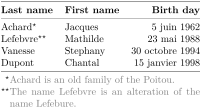
\begin{NiceTabular}{@{}llr@{}}

\toprule \RowStyle{\bfseries}

  Last name & First name & Birth day \\

\midrule

  Achard\tabularnote{Achard is an old family of the Poitou.}

  & Jacques & 5 juin 1962 \\

  Lefebvre\tabularnote{The name Lefebvre is an alteration of the name Lefebure.}

  & Mathilde & 23 mai 1988 \\

  Vanesse & Stephany & 30 octobre 1994 \\

  Dupont & Chantal & 15 janvier 1998 \\

\bottomrule

\end{NiceTabular}
18.2 Use of the key “tikz” of the command \Block
The key tikz of the command \Block is available only when TikZ is loaded.3
For the following example, we also need the TikZ library patterns.
\usepackage{tikz}         % in the preamble

\usetikzlibrary{patterns} % in the preamble

\ttfamily \small

\begin{NiceTabular}{X[m]X[m]X[m]}[hvlines,cell-space-limits=3pt,rounded-corners]

  \Block[tikz={pattern=grid,pattern color=lightgray}]{}

    {pattern = grid,\\ pattern color = lightgray}

& \Block[tikz={pattern = north west lines,pattern color=blue}]{}

    {pattern = north west lines,\\ pattern color = blue}

& \Block[tikz={outer color = red!50, inner color=white }]{2-1}

    {outer color = red!50,\\ inner color = white} \\

  \Block[tikz={pattern = sixpointed stars, pattern color = blue!15}]{}

    {pattern = sixpointed stars,\\ pattern color = blue!15}

& \Block[tikz={left color = blue!50}]{}

    {left color = blue!50} \\

\end{NiceTabular}
In the following example, we use the key tikz to hatch a row of the tabular. Remark that you use the key transparent of the command \Block in order to have the rules drawn in the block.4
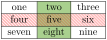
\begin{NiceTabular}{ccc}[hvlines]

\CodeBefore

  \columncolor[RGB]{169,208,142}{2}

\Body

  one & two & three \\

  \Block[transparent,tikz={pattern = north west lines, pattern color = red}]{1-*}{}

  four & five & six \\

  seven & eight & nine

\end{NiceTabular}
18.3 Use with tcolorbox
Here is an example of use of {NiceTabular} within a command \tcbox of tcolorbox. We have used the key hvlines-except-borders in order to draw all the rules, except on the borders (which are, of course, added by tcolorbox).
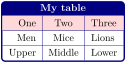
\tcbset

  {

    colframe = blue!50!black ,

    colback = white ,

    fonttitle = \bfseries ,

    nobeforeafter ,

    center title

  }

\tcbox

  [

    left = 0mm ,

    right = 0mm ,

    top = 0mm ,

    bottom = 0mm ,

    boxsep = 0mm ,

    toptitle = 0.5mm ,

    bottomtitle = 0.5mm ,

    title = My table

  ]

  {

    \renewcommand{\arraystretch}{1.2}% <-- the % is mandatory here

    \begin{NiceTabular}{rcl}[hvlines-except-borders,rules/color=blue!50!black]

    \CodeBefore

      \rowcolor{red!15}{1}

    \Body

      One & Two & Three \\

      Men & Mice & Lions \\

      Upper & Middle & Lower

    \end{NiceTabular}

  }
18.4 A sign chart

With the key C of the command \Block, the content of the block is centered according to the absolute limits of the columns (whereas, with the key c, the content is centered according to the contents of the cells of the corresponding columns — and, here, there are many columns without content).
18.5 A variation table
In the following variation table, you draw the arrows (and some additional rules) with TikZ by using the PGF/TikZ nodes created by nicematrix (cf. 15).
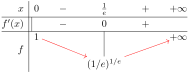
$\begin{NiceArray}{r|cw{c}{1cm}cw{c}{1cm}c}[cell-space-limits=2pt]

x     & 0 & - & \frac{1}{e} & +  & +\infty \\

\Hline

f'(x) &   & - & 0 & + & \\

\Hline

      & 1 &   &   &   & +\infty \\

f     &   &   &   &   &         \\

      &   &   & (1/e)^{1/e} \\

\CodeAfter

  \begin{tikzpicture}

  \draw (3-|4.5) -- (5-|4.5) ;

  \draw ([xshift=3pt]2-|2) -- ([xshift=3pt]3-|2) ;

  \draw [->,red,shorten < = 3pt] (3-2) -- (5-4) ;

  \draw [->,red,shorten < = 3pt] (5-4) -- (3-6) ;

  \end{tikzpicture}

\end{NiceArray}$
18.6 Example of description of a table of a database
In the following example, we use the extension hhline (it would have been also possible to use the package ehhline) in an environment {NiceTabular} in order to draw the double horizontal rule which is conventionnaly used to denote the primary key of the table.
\usepackage{hhline} % in the preamble
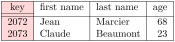
\begin{NiceTabular}{>{\columncolor{red!15}}cllr}[vlines]

\Hline

key  & first name & last name & age \\

\hhline{=---}

2072 & Jean       & Marcier  & 68  \\

2073 & Claude     & Beaumont & 23  \\

\Hline

\end{NiceTabular}
As we see, thanks to the use of the key vlines, we have been able to write \hhline{=---} instead of \hhline{|=|-|-|-|}.
18.7 Use of the key borders of the command \Block
In the following example, we use the command \Block to draw rules.
\usepackage{tikz} % in the preamble
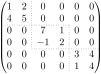
$\begin{pNiceMatrix}

  \Block[borders={bottom,right,tikz=dotted}]{2-2}{}

  1 & 2 & 0  & 0 & 0 & 0 \\

  4 & 5 & 0  & 0 & 0 & 0 \\

  0 & 0 & \Block[borders={all,tikz=dotted}]{2-2}{}

          7  & 1 & 0 & 0 \\

  0 & 0 & -1 & 2 & 0 & 0 \\

  0 & 0 & 0  & 0 & \Block[borders={left,top,tikz=dotted}]{2-2}{}

                   3 & 4 \\

  0 & 0 & 0  & 0 & 1 & 4

\end{pNiceMatrix}$
18.8 Leaders in the matrices
An example with the resultant of two polynoms (this example requires TikZ for the dashed rule specified by the letter “;” in the preamble of the array).
\usepackage{tikz} % in the preamble
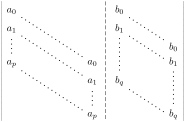
\setlength{\extrarowheight}{1mm}

\[\begin{vNiceArray}{cccc;ccc}[columns-width=6mm, xdots/shorten += 3pt]

  a_0   &      &&       &b_0    &      &     \\

  a_1   &\Ddots&&       &b_1    &\Ddots&     \\

  \Vdots&\Ddots&&       &\Vdots &\Ddots&b_0  \\

  a_p   &      &&a_0    &       &      &b_1   \\

        &\Ddots&&a_1    &b_q    &      &\Vdots\\

        &      &&\Vdots &       &\Ddots&      \\

        &      &&a_p    &       &      &b_q

\end{vNiceArray}\]
An example for a linear system. We recall that the key xdots/nullify nullifies the horizontal and vertical spaces created by the commands \Cdots, \Vdots, etc. in the tabular (but the dotted lines are actually drawn, despite the name nullify!).
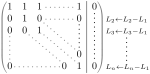
\NiceMatrixOptions{code-for-last-col=\scriptstyle}

$\begin{pNiceMatrix}[vlines=-1,xdots/nullify,last-col]

  1      & 1 & 1 &\Cdots &   & 1      & 0      & \\

  0      & 1 & 0 &\Cdots &   & 0      &        & L_2 \gets L_2-L_1 \\

  0      & 0 & 1 &\Ddots &   & \Vdots &        & L_3 \gets L_3-L_1 \\

         &   &   &\Ddots &   &        & \Vdots & \Vdots \\

  \Vdots &   &   &\Ddots &   & 0      & \\

  0      &   &   &\Cdots & 0 & 1      & 0      & L_n \gets L_n-L_1

\end{pNiceMatrix}$
The option line-style controls the style of the leaders drawn by \Ldots, \Cdots, etc. Thus, it’s possible with these commands to draw lines which are not longer dotted.
\usepackage{tikz}             % in the preamble

\usetikzlibrary{decorations}  % in the preamble
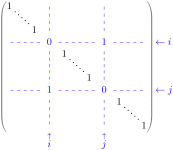
\setcounter{MaxMatrixCols}{12}

\newcommand{\blue}{\color{blue}}

\[\begin{pNiceMatrix}%

    [last-row,last-col,xdots={nullify,line-style={dashed,dash expand off,blue}}]

  1& & & \Vdots & & & & \Vdots \\

  & \Ddots[line-style=standard] \\

  & & 1 \\

  \Cdots & & & \blue 0 & \Cdots & & & \blue 1 & & & \Cdots & \blue \leftarrow i \\

  & & & & 1 \\

  & & &\Vdots & & \Ddots[line-style=standard] & & \Vdots \\

  & & & & & & 1 \\

  \Cdots & & & \blue 1 & \Cdots & & \Cdots & \blue 0 & & & \Cdots & \blue \leftarrow j \\

  & & & & & & & & 1 \\

  & & & & & & & & & \Ddots[line-style=standard] \\

  & & & \Vdots & & & & \Vdots & & & 1 \\

  & & & \blue \overset{\uparrow}{i} & & & & \blue \overset{\uparrow}{j} \\

\end{pNiceMatrix}\]
18.9 How the illustrate the numbers of rows and columns in a matrix
In this document, the TikZ library arrows.meta has been loaded, which impacts the shape of the arrow tips.
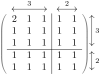
\NiceMatrixOptions{xdots={horizontal-labels,line-style = <->}}

$\begin{pNiceArray}{ccc|cc}[first-row,last-col,margin]

  \Hdotsfor{3}^{3} & \Hdotsfor{2}^{2} \\

  2 & 1 & 1 & 1 & 1 & \Vdotsfor{3}^{3}\\

  1 & 1 & 1 & 1 & 1 \\

  1 & 1 & 1 & 1 & 1 \\

\Hline

  1 & 1 & 1 & 1 & 1 & \Vdotsfor{2}^{2} \\

  1 & 1 & 1 & 1 & 1 \\

\end{pNiceArray}$
If you want the label on the line, you should use the special token “:” instead of “^”:
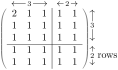
\NiceMatrixOptions{xdots={horizontal-labels,line-style = <->}}

$\begin{pNiceArray}{ccc|cc}[first-row,last-col,margin]

  \Hdotsfor{3}:{3} & \Hdotsfor{2}:{2} \\

  2 & 1 & 1 & 1 & 1 & \Vdotsfor{3}:{3} \\

  1 & 1 & 1 & 1 & 1 \\

  1 & 1 & 1 & 1 & 1 \\

\Hline

  1 & 1 & 1 & 1 & 1 &

  \Vdotsfor{2}:{2 \rlap{ \smash{rows}}} \\

  1 & 1 & 1 & 1 & 1 \\

\end{pNiceArray}$
If one prefers the braces of the library decorations.pathreplacing of TikZ, the best way is to use the commands \Hbrace and \Vbrace provided by nicematrix (cf. 10.7).
\usepackage{tikz}                          % in the preamble

\usetikzlibrary{decorations.pathreplacing} % in the preamble
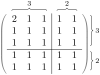
It’s possible to change the TikZ style of those braces by changing the TikZ style nicematrix/brace. In the following example, we use “calligraphic” braces (the TikZ library calligraphy must be loaded after decorations.pathreplacing).
\usepackage{tikz}                                      % in the preamble

\usetikzlibrary{decorations.pathreplacing,calligraphy} % in the preamble
\NiceMatrixOptions{xdots/horizontal-labels}

\tikzset

  {

    nicematrix/brace/.style =

      {

        decoration =

          {

            calligraphic brace ,

            amplitude = 0.4 em ,

            raise = -0.25 em

          } ,

        line width = 0.1 em ,

        decorate

      }

  }
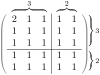
If one prefers the curly braces of the current mathematical font of LaTeX, one should use the commands \SubMatrix, \OverBrace and \UnderBrace in the \CodeAfter.
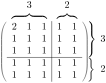
$\begin{pNiceArray}{ccc|cc}[margin,last-col]

  2 & 1 & 1 & 1 & 1 & \Block{3-1}{\quad 3} \\

  1 & 1 & 1 & 1 & 1 \\

  1 & 1 & 1 & 1 & 1 \\

\Hline

  1 & 1 & 1 & 1 & 1 & \Block{2-1}{\quad 2} \\

  1 & 1 & 1 & 1 & 1 \\

\CodeAfter

  \OverBrace[shorten,yshift=1.5mm]{1-1}{1-3}{3}

  \OverBrace[shorten,yshift=1.5mm]{1-4}{1-5}{2}

  \SubMatrix{.}{1-1}{3-5}{\rbrace}[xshift=3.5mm]

  \SubMatrix{.}{4-1}{5-5}{\rbrace}[xshift=3.5mm]

\end{pNiceArray}$
Or course, the output may seem disappointing. That’s why, for this type of use, we recommend the use of the commands \Hbrace and \Vbrace (provided by nicematrix), as shown in the previous examples.
18.10 Stacks of matrices
We often need to compose mathematical matrices on top on each other (for example for the resolution of linear systems).
In order to have the columns aligned one above the other, it’s possible to fix a width for all the columns. That’s what is done in the following example with the environment {NiceMatrixBlock} and its option auto-columns-width.
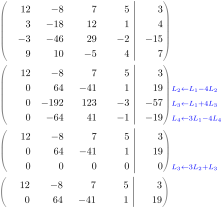
\begin{NiceMatrixBlock}[auto-columns-width]

\NiceMatrixOptions

  {

    light-syntax,

    last-col, code-for-last-col = \color{blue}\scriptstyle,

    vlines = 5 ,

    matrix/columns-type = r ,

    no-cell-nodes % only for speedup

  }

\setlength{\extrarowheight}{1mm}


\quad $\begin{pNiceMatrix}

12  -8  7  5   3 {} ;

 3 -18 12  1   4    ;

-3 -46 29 -2 -15    ;

 9  10 -5  4   7

\end{pNiceMatrix}$


\smallskip

\quad $\begin{pNiceMatrix}

12  -8   7  5   3 ;

0   64 -41  1  19  { L_2 \gets L_1-4L_2  } ;

0 -192 123 -3 -57  { L_3 \gets L_1+4L_3  } ;

0 -64   41 -1 -19  { L_4 \gets 3L_1-4L_4 } ;

\end{pNiceMatrix}$


\smallskip

\quad $\begin{pNiceMatrix}

12 -8   7 5  3 ;

0  64 -41 1 19 ;

0   0   0 0  0 { L_3 \gets 3 L_2 + L_3 }

\end{pNiceMatrix}$


\smallskip

\quad $\begin{pNiceMatrix}

12 -8   7 5  3 {} ;

0  64 -41 1 19    ;

\end{pNiceMatrix}$

\end{NiceMatrixBlock}
However, one can see that the last matrix is not perfectly aligned with others. That’s because, in LaTeX, the parenthesis have not exactly the same width (smaller parenthesis are a bit slimer).
In order the solve that problem, it’s possible to require the delimiters to be composed with the maximal width, thanks to the boolean key delimiters/max-width.
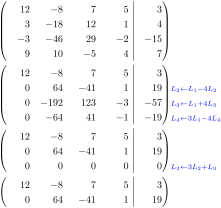
\begin{NiceMatrixBlock}[auto-columns-width]

\NiceMatrixOptions

  {

    delimiters/max-width,

    light-syntax,

    last-col, code-for-last-col = \color{blue}\scriptstyle,

    vlines = 5 ,

    matrix/columns-type = r ,

    no-cell-nodes % only for speedup

  }

\setlength{\extrarowheight}{1mm}


\quad $\begin{pNiceMatrix}

12  -8  7  5   3 {} ;

 3 -18 12  1   4    ;

-3 -46 29 -2 -15    ;

 9  10 -5  4   7

\end{pNiceMatrix}$

etc.

\end{NiceMatrixBlock}
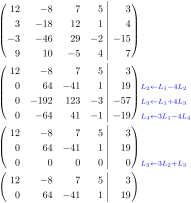
If you wish an alignment of the different matrices without the same width for all the columns, you can construct a unique array and place the parenthesis with commands \SubMatrix in the \CodeAfter. Of course, that array can’t be broken by a page break.
\setlength{\extrarowheight}{1mm}

\[\begin{NiceMatrix}[r, last-col=6, code-for-last-col = \scriptstyle \color{blue}]

12 &  -8  &  7 & 5 &  3 \\

 3 & -18  & 12 & 1 &  4 \\

-3 & -46  & 29 &-2 &-15 \\

 9 & 10   &-5  &4  & 7 \\[1mm]

12 & -8   & 7  &5  & 3 \\

0  & 64   &-41 & 1 & 19 & L_2 \gets L_1-4L_2  \\

0  & -192 &123 &-3 &-57 & L_3 \gets L_1+4L_3  \\

0  & -64  & 41 &-1 &-19 & L_4 \gets 3L_1-4L_4 \\[1mm]

12 & -8   &7   &5  & 3 \\

0  & 64   &-41 &1  &19 \\

0  &  0   &0   &0  & 0  & L_3 \gets 3L_2+L_3 \\[1mm]

12 & -8   &7   &5  & 3 \\

0  & 64   &-41 & 1 & 19 \\

\CodeAfter [sub-matrix/vlines=4]

   \SubMatrix({1-1}{4-5})

   \SubMatrix({5-1}{8-5})

   \SubMatrix({9-1}{11-5})

   \SubMatrix({12-1}{13-5})

\end{NiceMatrix}\]
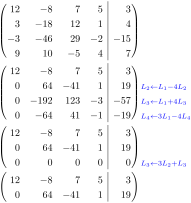
In this tabular, the instructions \SubMatrix are executed after the composition of the tabular and, thus, the vertical rules are drawn without adding space between the columns.
In fact, it’s possible, with the key vlines-in-sub-matrix, to choice a letter in the preamble of the array to specify vertical rules which will be drawn in the \SubMatrix only (and it will add space between the columns for that rule).
\setlength{\extrarowheight}{1mm}

\[\begin{NiceArray}

   [

     vlines-in-sub-matrix = I,

     last-col,

     code-for-last-col = \scriptstyle \color{blue}

   ]

  {rrrrIr}

12 &  -8  &  7 & 5 &  3 \\

 3 & -18  & 12 & 1 &  4 \\

-3 & -46  & 29 &-2 &-15 \\

 9 & 10   &-5  &4  & 7 \\[1mm]

12 & -8   & 7  &5  & 3 \\

0  & 64   &-41 & 1 & 19 & L_2 \gets L_1-4L_2  \\

0  & -192 &123 &-3 &-57 & L_3 \gets L_1+4L_3  \\

0  & -64  & 41 &-1 &-19 & L_4 \gets 3L_1-4L_4 \\[1mm]

12 & -8   &7   &5  & 3 \\

0  & 64   &-41 &1  &19 \\

0  &  0   &0   &0  & 0 & L_3 \gets 3L_2+L_3 \\[1mm]

12 & -8   &7   &5  & 3 \\

0  & 64   &-41 & 1 & 19 \\

\CodeAfter

   \SubMatrix({1-1}{4-5})

   \SubMatrix({5-1}{8-5})

   \SubMatrix({9-1}{11-5})

   \SubMatrix({12-1}{13-5})

\end{NiceArray}\]
18.11 How to highlight cells of a matrix
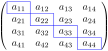
In order to highlight a cell of a matrix, it’s possible to “draw” that cell with the key draw of the command \Block (this is one of the uses of a mono-cell block5).
$\begin{pNiceArray}{>{\strut}cccc}[margin,rules/color=blue,no-cell-nodes]

\Block[draw]{}{a_{11}} & a_{12} & a_{13} & a_{14} \\

a_{21} & \Block[draw]{}{a_{22}} & a_{23} & a_{24} \\

a_{31} & a_{32} & \Block[draw]{}{a_{33}} & a_{34} \\

a_{41} & a_{42} & a_{43} & \Block[draw]{}{a_{44}} \\

\end{pNiceArray}$
We should remark that the rules we have drawn are drawn after the construction of the array and thus, they don’t spread the cells of the array. We recall that, on the other side, the commands \hline and \Hline, the specifier “|” and the options hlines, vlines, hvlines, hvlines-except-borders and hlines-except-borders spread the cells.6
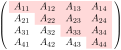
It’s possible to color a row with \rowcolor in the \CodeBefore, or with \rowcolor in the first cell of the row (if used in another cell of the row \rowcolor will color till the end of the row).
$\begin{pNiceArray}{>{\strut}cccc}% <-- % mandatory

   [margin, extra-margin=2pt,no-cell-nodes]

  \rowcolor{red!15}A_{11} & A_{12} & A_{13} & A_{14} \\

  A_{21} & \rowcolor{red!15}A_{22} & A_{23} & A_{24} \\

  A_{31} & A_{32} & \rowcolor{red!15}A_{33} & A_{34} \\

  A_{41} & A_{42} & A_{43} & \rowcolor{red!15}A_{44}

\end{pNiceArray}$
For a more precise tuning, it’s possible to use the command \Block.
\usepackage{tikz} % in the preamble
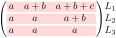
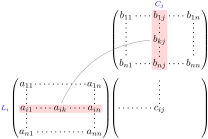
However, that technic is sometimes not sufficient when we have to underline a part of a row or a part of a column.
That’s why we present now a more general technic.
First, we load the TikZ library fit and we define a TikZ style called highlight.
\usepackage{tikz} % dans le préambule

\usetikzlibrary{fit} % dans le préambule
\tikzset{highlight/.style={rectangle,

                           fill=red!15,

                           rounded corners = 0.5 mm,

                           inner sep=1pt,

                           fit = #1}}
We use that style in the \CodeBefore of the environment.
\[\begin{NiceArray}{*{6}{c}@{\hspace{6mm}}*{5}{c}}[xdots/nullify]

\CodeBefore [create-cell-nodes]

  \SubMatrix({2-7}{6-last})

  \SubMatrix({7-2}{last-6})

  \SubMatrix({7-7}{last-last})

  \begin{tikzpicture}

    \node [highlight = (9-2) (9-6)] { } ;

    \node [highlight = (2-9) (6-9)] { } ;

  \end{tikzpicture}

\Body

    &        &        &        &        &        &        &        & \color{blue}\scriptstyle C_j \\

    &        &        &        &        &        & b_{11} & \Cdots & b_{1j} & \Cdots & b_{1n} \\

    &        &        &        &        &        & \Vdots &        & \Vdots &        & \Vdots \\

    &        &        &        &        &        &        &        & b_{kj} \\

    &        &        &        &        &        &        &        & \Vdots \\

    &        &        &        &        &        & b_{n1} & \Cdots & b_{nj} & \Cdots & b_{nn} \\[3mm]

    & a_{11} & \Cdots &        &        & a_{1n} \\

    & \Vdots &        &        &        & \Vdots &        &        & \Vdots \\

\color{blue}\scriptstyle L_i

    & a_{i1} & \Cdots & a_{ik} & \Cdots & a_{in} & \Cdots &        & c_{ij} \\

    & \Vdots &        &        &        & \Vdots \\

    & a_{n1} & \Cdots &        &        & a_{nn}  \\

\CodeAfter

\tikz \draw [gray,shorten > = 1mm, shorten < = 1mm] (9-4.north) to [bend left] (4-9.west) ;

\end{NiceArray}\]
The whole figure is an environment {NiceArray} and the three pairs of parenthesis have been added with \SubMatrix in the \CodeBefore (since you have put these \SubMatrix in the \CodeBefore — and not the \CodeAfter — the dotted leaders specified in the matrix product \(C\) will be limited to that matrix).
18.12 A triangular tabular
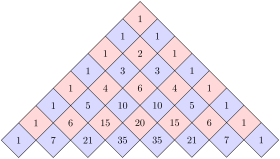
In the following example, we use the style PGF/TikZ nicematrix/cell-node (cf. 15.1) to rotate the contents of the cells (and, then, we compensate that rotation by a rotation of the whole tabular with the command \adjustbox of the eponymous package, which must be loaded previously).
\usepackage{adjustbox} % in the preamble
\pgfset

  {

    nicematrix/cell-node/.append style =

      { text/rotate = 45, minimum size = 6 mm }

  }


\setlength{\tabcolsep}{0pt}


\adjustbox{rotate = -45, set depth = 6mm + 1.414 \arrayrulewidth}

  {\begin{NiceTabular} [ hvlines, corners=S, baseline = line-9 ] { cccccccc }

   \CodeBefore

     \chessboardcolors{red!15}{blue!15}

   \Body

     1 & 1 & 1  & 1  & 1  & 1 & 1 & 1 \\

     1 & 2 & 3  & 4  & 5  & 6 & 7 \\

     1 & 3 & 6  & 10 & 15 & 21 \\

     1 & 4 & 10 & 20 & 35 \\

     1 & 5 & 15 & 35 \\

     1 & 6 & 21 \\

     1 & 7 \\

     1

   \end{NiceTabular}}
Of course, if you have to draw many diagrams like this one, you should consider using a dedicated package, such as atableau.
1 Of course, it’s realistic only when there is very few notes in the tabular.
2 In fact: the value of its argument.
3 By default, nicematrix only loads pgf, which is a sub-layer of TikZ.
4 By default, the rules are not drawn in the blocks created by the command \Block (cf. 5): with the key transparent, they are drawn (the block becomes transparent to the exterior rules).
5 We recall that, if the first mandatory argument of the command \Block is left empty, that means that the block is a mono-cell block.
6 For the command \cline, see the remark in the section 5.1.2.