The nicematrix package
15 Explicit use of TikZ with nicematrix
15.1 The nodes corresponding to the contents of the cells
The package nicematrix creates a PGF/TikZ node1 for the content of each (non-empty) cell of the array. These nodes are used to draw the dotted lines between the cells of the matrix (inter alia).
By default, those nodes are not available in the \CodeBefore (in order to speed up compilations). In order to be able to use those nodes in the \CodeBefore, one must use the key create-cell-nodes of the keyword \CodeBefore.
Caution : By default, no node is created in an empty cell.
However, it’s possible to impose the creation of a node with the command \NotEmpty. 2
The creation of those nodes needs time and memory. It’s possible to desactive ponctually the creation of those nodes with the key no-cell-nodes in order to speed up the compilations. But be careful: those nodes are used internally but nicematrix for several features. One should use the key no-cell-nodes only when those feateures are not used. Among these are the key corners and the commands for the continuous dotted lines (\Cdots, etc.).
The nodes of a document must have distinct names. That’s why the names of the nodes created by nicematrix contains the number of the current environment. Indeed, the environments of nicematrix are numbered by a internal global counter.
In the environment with the number \(n\), the node of the row \(i\) and column \(j\) has for name nm-\(n\)-\(i\)-\(j\).
The command \NiceMatrixLastEnv provides the number of the last environment of nicematrix (for LaTeX, it’s a “fully expandable” command and not a counter).
However, it’s advisable to use instead the key name3. This key gives a name to the current environment. When the environment has a name, the nodes are accessible with the name “name-\(i\)-\(j\)” where name is the name given to the array and \(i\) and \(j\) the numbers of row and column. It’s possible to use these nodes with pgf but the final user will probably prefer to use TikZ (which is a convenient layer upon pgf). However, one should remind that nicematrix doesn’t load TikZ by default. In the following examples, we assume that TikZ has been loaded.

$\begin{pNiceMatrix}[name=mymatrix]

  1 & 2 & 3 \\

  4 & 5 & 6 \\

  7 & 8 & 9

\end{pNiceMatrix}$

\tikz[remember picture,overlay]

     \draw (mymatrix-2-2) circle (2mm) ;
Don’t forget the options remember picture and overlay.
In the \CodeAfter, the things are easier : one must refer to the nodes with the form \(i\)-\(j\) (we don’t have to indicate the environment which is of course the current environment).

$\begin{pNiceMatrix}

  1 & 2 & 3 \\

  4 & 5 & 6 \\

  7 & 8 & 9

\CodeAfter

  \tikz \draw (2-2) circle (2mm) ;

\end{pNiceMatrix}$
The nodes of the last column (except the potential “last column” specified by last-col4) may also be indicated by \(i\)-last. Similarly, the nodes of the last row may be indicated by last-\(j\).
In the following example, we have stroken all the nodes of the matrix.

Since those nodes are PGF nodes, one won’t be surprised to learn that they are drawn by using a specific PGF style. That style is called nicematrix/cell-node and its definition in the source file nicematrix.sty is as follows:
\pgfset

  {

    nicematrix / cell-node /.style =

     {

       inner sep = 0 pt ,

       minimum width = 0 pt

     }

  }
The final user may modify that style by changing the values of the keys text/rotate, inner xsep, inner ysep, inner sep, outer xsep, outer ysep, outer sep, minimum width, minimum height and minimum size.
For an example of use, see part 18.12.
15.1.1 The key pgf-node-code
For the experienced users, nicematrix provides the key pgf-node-code which corresponds to some PGF node that will be executed at the creation, by PGF, of the nodes corresponding to the cells of the array. More pricisely, the value given to the key pgf-node-code will be passed in the fifth argument of the command \pgfnode. That value should contain at least an instruction such as \pgfusepath, \pgfusepathqstroke, \pgfusepathqfill, etc.
15.1.2 The columns V of varwidth
When the extension varwidth is loaded, the columns of the type V defined by varwidth are supported by nicematrix. It may be interessant to notice that, for a cell of a column of type V, the PGF/TikZ node created by nicematrix for the content of that cell has a width adjusted to the content of the cell. This is in contrast to the case of the columns of type p, m or b for which the nodes have always a width equal to the width of the column. In the following example, the command \lipsum is provided by the eponymous package.
\begin{NiceTabular}{V{10cm}}

  \bfseries \large

  Titre \\

  \lipsum[1][1-4]

\CodeAfter

  \tikz \draw [rounded corners] (1-1) -| (last-|2) -- (last-|1) |- (1-1) ;

\end{NiceTabular}
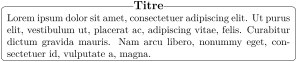
We have used the nodes corresponding to the position of the potential rules, which are described below (cf. 15.3).
Of course, there are dedicated packages to such constructions (for example tcolorbox).
15.2 The “medium nodes” and the “large nodes”
In fact, the package nicematrix can create “extra nodes”: the “medium nodes” and the “large nodes”. The first ones are created with the option create-medium-nodes and the second ones with the option create-large-nodes.5
These nodes are not used by nicematrix by default, and that’s why they are not created by default.
The names of the “medium nodes” are constructed by adding the suffix “-medium” to the names of the “normal nodes”. In the following example, we have underlined the “medium nodes”. We consider that this example is self-explanatory.

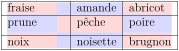
The names of the “large nodes” are constructed by adding the suffix “-large” to the names of the “normal nodes”. In the following example, we have underlined the “large nodes”. We consider that this example is self-explanatory.6

The “large nodes” of the first column and last column may appear too small for some usage. That’s why it’s possible to use the options left-margin and right-margin to add space on both sides of the array and also space in the “large nodes” of the first column and last column. In the following example, we have used the options left-margin and right-margin.7
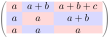
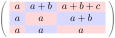
It’s also possible to add more space on both sides of the array with the options extra-left-margin and extra-right-margin. These margins are not incorporated in the “large nodes”. It’s possible to fix both values with the option extra-margin and, in the following example, we use extra-margin with the value \(3\) pt.
Be careful : These nodes are reconstructed from the contents of the contents cells of the array. Usually, they do not correspond to the cells delimited by the rules (if we consider that these rules are drawn).
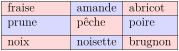
Here is an array composed with the following code:
\large

\begin{NiceTabular}{w{l}{2cm}ll}[hvlines]

  fraise & amande & abricot \\

  prune & pêche & poire  \\[1ex]

  noix & noisette & brugnon

\end{NiceTabular}
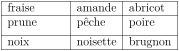
Here, we have colored all the cells of the array with \chessboardcolors.
Here are the “large nodes” of this array (without use of margin nor extra-margin).
The nodes we have described are not available by default in the \CodeBefore (cf. 6.2).
It’s possible to have these nodes available in the \CodeBefore by using the key create-cell-nodes of the keyword \CodeBefore (in that case, the nodes are created first before the construction of the array by using information written on the aux file and created a second time during the construction of the array itself; this mechanism is not activated by default for efficiency reasons).
Here is an example which uses these nodes in the \CodeAfter.

$\begin{NiceArray}{c@{\;}c@{\;}c@{\;}c@{\;}c}[create-medium-nodes]

   u_1 &-& u_0 &=& r     \\

   u_2 &-& u_1 &=& r     \\

   u_3 &-& u_2 &=& r     \\

   u_4 &-& u_3 &=& r     \\

   \phantom{u_5} & &  \phantom{u_4}    &\smash{\vdots} &       \\

   u_n &-& u_{n-1} &=& r \\[3pt]

   \hline

   u_n &-& u_0 &=& nr \\

\CodeAfter

   \tikz[very thick, red, opacity=0.4, name suffix = -medium]

     \draw (1-1.north west) -- (2-3.south east)

       (2-1.north west) -- (3-3.south east)

       (3-1.north west) -- (4-3.south east)

       (4-1.north west) -- (5-3.south east)

       (5-1.north west) -- (6-3.south east) ;

\end{NiceArray}$
15.3 The nodes which indicate the position of the rules
The package nicematrix creates a PGF/TikZ node merely called \(i\) (with the classical prefix) at the intersection of the horizontal rule of number \(i\) and the vertical rule of number \(i\) (more specifically the potential position of those rules because maybe there are not actually drawn). The last node has also an alias called last.
There are also nodes called \(i\).1, \(i\).2, \(i\).25, \(i\).3, \(i\).4, \(i\).5, \(i\).6, \(i\).7, \(i\).75, \(i\).8 and \(i\).9 between the node \(i\) and the node \(i+1\).
These nodes are available in the \CodeBefore and the \CodeAfter.
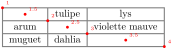
If we use TikZ (we remind that nicematrix does not load TikZ by default, by only pgf, which is a sub-layer of TikZ), we can access, in the \CodeAfter but also in the \CodeBefore, to the intersection of the (potential) horizontal rule \(i\) and the (potential) vertical rule \(j\) with the syntax (\(i\)-|\(j\)).
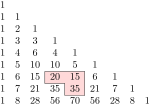
$\begin{NiceMatrix}

\CodeBefore

  \tikz \draw [fill=red!15] (7-|4) |- (8-|5) |- (9-|6) |- cycle ;

\Body

  1 \\

  1 & 1 \\

  1 & 2 &  1 \\

  1 & 3 &  3 &  1 \\

  1 & 4 &  6 &  4 &  1 \\

  1 & 5 & 10 & 10 &  5 &  1 \\

  1 & 6 & 15 & 20 & 15 &  6 &  1 \\

  1 & 7 & 21 & 35 & 35 & 21 &  7 & 1 \\

  1 & 8 & 28 & 56 & 70 & 56 & 28 & 8 & 1

\end{NiceMatrix}$
The “decimal” nodes (like \(i\).4) may be used, for example to cross a row of a matrix (if TikZ is loaded).

$\begin{pNiceArray}{ccc|c}

  2 & 1 & 3 & 0 \\

  3 & 3 & 1 & 0 \\

  3 & 3 & 1 & 0

\CodeAfter

  \tikz \draw [red] (3.4-|1) -- (3.4-|last) ;

\end{pNiceArray}$
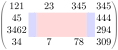
15.4 The nodes corresponding to the command \SubMatrix
The command \SubMatrix available in the \CodeAfter has been described in the section 12.2.
If a command \SubMatrix has been used with the key name with an expression such as name=MyName three PGF/TikZ nodes are created with the names MyName-left, MyName and MyName-right.
The nodes MyName-left and MyName-right correspond to the delimiters left and right and the node MyName correspond to the submatrix itself.
In the following example, we have highlighted these nodes (the submatrix itself has been created with \SubMatrix\{{2-2}{3-3}\}).
1 We recall that TikZ is a layer over PGF. The extension nicematrix loads PGF but does not load TikZ. We speak of PGF/TikZ nodes to emphase the fact that the PGF nodes created by nicematrix may be used with PGF but also with TikZ. The final user will probably prefer to use TikZ rather than PGF.
2 One should note that, with that command, the cell is considered as non-empty, which has consequencies for the continuous dotted lines (cf. 10) and the computation of the “corners” (cf. 5.3.3).
3 The value of the key name is expanded (in the TeX sens).
4 For the exterior columns, cf. 9.
5 There is also an option create-extra-nodes which is an alias for the conjunction of create-medium-nodes and create-large-nodes.
6 There is no “large nodes” created in the exterior rows and columns (for these rows and columns, cf. 9).
7 The options left-margin and right-margin take dimensions as values but, if no value is given, the default value is used, which is \arraycolsep (by default: 5 pt). There is also an option margin to fix both left-margin and right-margin to the same value.