The nicematrix package
9 The exterior rows and columns
The keys first-row, last-row, first-col and last-col allow the composition of exterior rows and columns in the environments of nicematrix. It’s particularly interesting for the (mathematical) matrices.
A potential “first row” (exterior) has the number \(0\) (and not \(1\)). Idem for the potential “first column”.
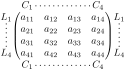
$\begin{pNiceMatrix}[first-row,last-row,first-col,last-col,xdots/nullify]

       & C_1    & \Cdots &        & C_4    &        \\

L_1    & a_{11} & a_{12} & a_{13} & a_{14} & L_1    \\

\Vdots & a_{21} & a_{22} & a_{23} & a_{24} & \Vdots \\

       & a_{31} & a_{32} & a_{33} & a_{34} &        \\

L_4    & a_{41} & a_{42} & a_{43} & a_{44} & L_4    \\

       & C_1    & \Cdots &        & C_4    &

\end{pNiceMatrix}$
The dotted lines of this example have been drawn with the tools presented in the section 10.
We have several remarks to do.
For the environments with an explicit preamble (i.e. {NiceTabular}, {NiceArray} and its variants), no letter must be given in that preamble for the potential first column and the potential last column: they will automatically (and necessarily) be of type r for the first column and l for the last one.1
One may wonder how nicematrix determines the number of rows and columns which are needed for the composition of the “last row” and “last column”.
For the environments with explicit preamble, like {NiceTabular} and {pNiceArray}, the number of columns can obviously be computed from the preamble.
When the option light-syntax (cf. 14.9) is used, nicematrix has, in any case, to load the whole body of the environment (and that’s why it’s not possible to put verbatim material in the array with the option light-syntax). The analysis of this whole body gives the number of rows and the number of columns.
In the other cases, nicematrix compute the number of rows and columns during the first compilation and write the result in the aux file for the next run.
However, it’s possible to provide the number of the last row and the number of the last column as values of the options last-row and last-col, tending to an acceleration of the whole compilation of the document. That’s what we will do throughout the rest of the document.
It’s possible to control the appearance of these rows and columns with options code-for-first-row\(^+\), code-for-last-row\(^+\), code-for-first-col\(^+\) and code-for-last-col\(^+\). These options specify tokens that will be inserted before each cell of the corresponding row or column.
Those keys have a normal syntax but also an “additive” syntax. For example, it’s possible to write code-for-first-row = \color{blue} but also code-for-first-row += \color{blue} (in the latter case, the tokens are appended on the right of the current value of the parameter).
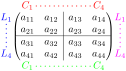
\NiceMatrixOptions{code-for-first-row = \color{red},

                   code-for-first-col = \color{blue},

                   code-for-last-row = \color{green},

                   code-for-last-col = \color{magenta}}


$\begin{pNiceArray}{cc|cc}[first-row,last-row=5,first-col,last-col,xdots/nullify]

       & C_1    & \multicolumn1c{\Cdots} &        & C_4    &        \\

L_1    & a_{11} & a_{12} & a_{13} & a_{14} & L_1    \\

\Vdots & a_{21} & a_{22} & a_{23} & a_{24} & \Vdots \\

\hline

       & a_{31} & a_{32} & a_{33} & a_{34} &        \\

L_4    & a_{41} & a_{42} & a_{43} & a_{44} & L_4    \\

       & C_1    & \multicolumn1c{\Cdots} &        & C_4    &

\end{pNiceArray}$
Remarks
As shown in the previous example, the horizontal and vertical rules don’t extend in the exterior rows and columns. This remark also applies to the customized rules created by the key custom-line (cf. 5.3.5).
A specification of color present in code-for-first-row also applies to a dotted line drawn in that exterior “first row” (except if a value has been given to xdots/color). Idem for the other exterior rows and columns.
Logically, the potential option columns-width (cf. 8) doesn’t apply to the “first column” and “last column”.
For technical reasons, it’s not possible to use the option of the command \\ after the “first row” or before the “last row”. The placement of the delimiters would be wrong. If you are looking for a workaround, consider the command \SubMatrix in the \CodeAfter (and the \CodeBefore) described in the section 12.2.