The nicematrix package
14 Other features
14.1 Trees
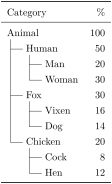
The key draw-trees-in-col takes in as argument a list of numbers of columns and, in each of those columns, will draw a tree in the style the trees drawn by the packages dirtree and dirtreex.
\usepackage{booktabs} % in the preamble
\renewcommand{\arraystretch}{1.3}

\begin{NiceTabular}{w{l}{2.5mm}w{l}{2.5mm}lr}[draw-trees-in-col=1-2]

\toprule

  Category &&&  \% \\

\midrule

  Animal   &&& 100 \\

  & Human   &&  50 \\

  && Man     &  20 \\

  && Woman   &  30 \\

  & Fox     &&  30 \\

  && Vixen   &  16 \\

  && Dog     &  14 \\

  & Chicken &&  20 \\

  && Cock    &   8 \\

  && Hen     &  12 \\

\bottomrule

\end{NiceTabular}
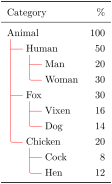
Three keys trees/line-width, trees/color and trees/rounded-corners are provided for the customization of those rules (the prefix trees may be factorized).
\renewcommand{\arraystretch}{1.3}

\NiceMatrixOptions{trees= {line-width = 0.4pt, color = red , rounded-corners}}

\begin{NiceTabular}{w{l}{2.5mm}w{l}{2.5mm}lr}[draw-trees-in-col=1-2]

\toprule

  Category &&&  \% \\

\midrule

  Animal   &&& 100 \\

  & Human   &&  50 \\

  && Man     &  20 \\

  && Woman   &  30 \\

  & Fox     &&  30 \\

  && Vixen   &  16 \\

  && Dog     &  14 \\

  & Chicken &&  20 \\

  && Cock    &   8 \\

  && Hen     &  12 \\

\bottomrule

\end{NiceTabular}
14.2 The key rounded-corners of the environments
The key rounded-corners that we will describe now has no direct link with the key corners (which is used to specify “empty corners”) described in the part 5.3.3. On the other side, it is similar with the key rounded-corners of the command \Block (cf. 4.1, ).
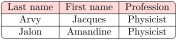
The key rounded-corners specifies that the tabular should have rounded corners with a radius equal to the value of that key (the default value is 4 pt1). More precisely, that key has two effects that we describe now.
All the commands for coloring the cells, columns and rows (in the \CodeBefore but also directly in the array) will respect those rounded corners.
When the key hvlines is used, the exterior rules will be drawn with rounded corners.2
That key is available in all the environments and commands (e.g. \pAutoNiceMatrix) of nicematrix and also in the command \NiceMatrixOptions.
\begin{NiceTabular}

  [hvlines,rounded-corners]

  {ccc}

\CodeBefore

  \rowcolor{red!15}{1}

\Body

  Last name & First name & Profession \\

  Arvy & Jacques & Physicist \\

  Jalon & Amandine & Physicist

\end{NiceTabular}
14.3 The command \ShowCellNames
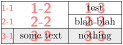
The command \ShowCellNames, which may be used in the \CodeBefore and in the \CodeAfter displays the name (with the form \(i\)-\(j\)) of each cell. It is provided as a tool which may be helpul during the conception of a table.
When it is used in the \CodeBefore, the names are drawn after the colored backgrounds (but before the contents of the cells).
\begin{NiceTabular}{ccc}[hvlines,cell-space-limits=3pt]

\CodeBefore

  \ShowCellNames

  \rowcolor{gray!15}{3}

\Body

  \Block{2-2}{} &           & test \\

                &           & blah blah \\

                & some text & nothing

\end{NiceTabular}
When used in the \CodeAfter, that command applies a semi-transparent white rectangle to fade the array (caution: some pdf readers don’t support transparency) and, then, the names of the cells are drawn above.
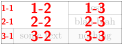
\begin{NiceTabular}{ccc}[hvlines,cell-space-limits=3pt]

\CodeBefore

  \rowcolor{gray!15}{3}

\Body

  \Block{2-2}{} &           & test \\

                &           & blah blah \\

                & some text & nothing

\CodeAfter \ShowCellNames

\end{NiceTabular}
14.4 Use of the column type S of siunitx
If the package siunitx is loaded (before or after nicematrix), it’s possible to use the S column type of siunitx in the environments of nicematrix.
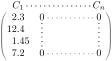
On the other hand, the d columns of the package dcolumn and the n columns of the package numprint are not supported by nicematrix.
14.5 Default column type in {NiceMatrix}
The environments without preamble ({NiceMatrix}, {pNiceMatrix}, {bNiceMatrix}, etc.) and the commande \pAutoNiceMatrix (and its variants) provide an option columns-type to specify the type of column which will be used (the initial value is, of course, c).
The keys l and r are shortcuts for columns-type=l and columns-type=r.

$\begin{bNiceMatrix}[r]

  \cos x & - \sin x \\

  \sin x & \cos x

\end{bNiceMatrix}$
This syntax is similar to the syntax of the environment {bmatrix*}, fournie par l’exension mathtools.
The key columns-type is available in \NiceMatrixOptions but with the prefix matrix, which means that its name is, within \NiceMatrixOptions : matrix/columns-type.
14.6 The command \rotate
The package nicematrix provides a command \rotate. When used in the beginning of a cell, this command composes the contents of the cell after a rotation of 90° in the direct sens.
In the following command, we use that command in the code-for-first-row.3

\NiceMatrixOptions

 {

   code-for-first-row = \scriptstyle \rotate \text{image of },

   code-for-last-col = \scriptstyle

 }

$A = \begin{pNiceMatrix}[first-row,last-col=4]

  e_1 & e_2 & e_3       \\

  1   & 2   & 3   & e_1 \\

  4   & 5   & 6   & e_2 \\

  7   & 8   & 9   & e_3

\end{pNiceMatrix}$
If the command \rotate is used in the “last row” (exterior to the matrix), the corresponding elements are aligned upwards as shown below.

\NiceMatrixOptions

  {

    code-for-last-row = \scriptstyle \rotate ,

    code-for-last-col = \scriptstyle

  }

$A = \begin{pNiceMatrix}[last-row=4,last-col=4]

  1   & 2   & 3   & e_1 \\

  4   & 5   & 6   & e_2 \\

  7   & 8   & 9   & e_3 \\

  \text{image of } e_1 & e_2 & e_3

\end{pNiceMatrix}$
The command \rotate has a key c: \rotate[c] (spaces are deleted after \rotate[c]). When that key is used, the content is composed in a \vcenter and, therefore, in most cases, we will have a vertical alignment.
The command \rotate also supports a key called -90. With that key, the content is rotated by an angle of \(-90\)° and not \(90\)°.
Caution: the command \rotate is designed to be used in a \Block or in columns of type l, r, c, w or W; if it is used in other column types (such as p{...}), the result will maybe differ from what is expected. In that case, it will be valuable to consider the command \rotatebox of the package graphicx (that package is loaded by nicematrix).
14.7 The key small
With the option small, the environments of the package nicematrix are composed in a way similar to the environment {smallmatrix} of the package amsmath (and the environments {psmallmatrix}, {bsmallmatrix}, etc. of the package mathtools).

$\begin{bNiceArray}{cccc|c}[small,

                            last-col ,

                            code-for-last-col = \scriptscriptstyle,

                            columns-width = 3mm ]

  1 & -2 & 3 & 4 & 5 \\

  0 & 3  & 2 & 1 & 2 & L_2 \gets 2 L_1 - L_2 \\

  0 & 1  & 1 & 2 & 3 & L_3 \gets L_1 + L_3

\end{bNiceArray}$
One should note that the environment {NiceMatrix} with the option small is not composed exactly as the environment {smallmatrix}. Indeed, all the environments of nicematrix are constructed upon {array} (of the package array) whereas the environment {smallmatrix} is constructed directly with an \halign of TeX.
In fact, the option small corresponds to the following tuning:
the cells of the array are composed with \scriptstyle;
\arraystretch is set to \(0.47\);
\arraycolsep is set to \(1.45\) pt;
the characteristics of the dotted lines are also modified.
When the key small is in force, some functionalities of nicematrix are no longer available: for example, it’s no longer possible to put vertical delimiters directly in the preamble of an environment with preamble (cf. 11).
14.8 \AutoNiceMatrix and the counters iRow and jCol
In the cells of the array, it’s possible to use the LaTeX counters iRow and jCol4 which represent the number of the current row and the number of the current column. We recall that the exterior “first row” (if it exists) has the number \(0\) and that the exterior “first column” (if it exists) has also the number \(0\). Of course, the user must not change the value of these counters iRow and jCol which are used internally by nicematrix.
In the \CodeBefore (cf. 6.2) and in the \CodeAfter (cf. 12), iRow represents the total number of rows (except the potential exterior rows: cf. 9) and jCol represents the total number of columns (except the potential exterior columns).

$\begin{pNiceMatrix}% don’t forget the %

    [first-row,

     first-col,

     code-for-first-row = \mathbf{\alph{jCol}} ,

     code-for-first-col = \mathbf{\arabic{iRow}} ]

  &   &    &    &   \\

  & 1 & 2  & 3  & 4 \\

  & 5 & 6  & 7  & 8 \\

  & 9 & 10 & 11 & 12

\end{pNiceMatrix}$
If LaTeX counters called iRow and jCol are defined in the document by packages other than nicematrix (or by the final user), they are shadowed in the environments of nicematrix.
The package nicematrix also provides commands in order to compose automatically matrices from a general pattern. These commands are \AutoNiceMatrix, \pAutoNiceMatrix, \bAutoNiceMatrix, \vAutoNiceMatrix, \VAutoNiceMatrix et \BAutoNiceMatrix.
These commands take in two mandatory arguments. The first is the format of the matrix, with the syntax \(n\)-\(p\) where \(n\) is the number of rows and \(p\) the number of columns. The second argument is the pattern (it’s a list of tokens which are inserted in each cell of the constructed matrix).
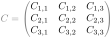
$C = \pAutoNiceMatrix{3-3}{C_{\arabic{iRow},\arabic{jCol}}}$
There exists also \AutoNiceArrayWithDelims similar to {NiceArrayWithDelims}.
14.9 The key light-syntax
The option light-syntax (inpired by the package spalign) allows the user to compose the arrays with a lighter syntax, which gives a better legibility of the TeX source.
When this option is used, one should use the semicolon for the end of a row and spaces or tabulations to separate the columns. However, as usual in the TeX world, the spaces after a control sequence are discarded and the elements between curly braces are considered as a whole. These commands take in also an optional argument (for the standard options of nicematrix) in the first position and also another in the last position (in particular, it’s possible to use the keys code-before and code-after in these arguments).
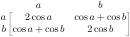
$\begin{bNiceMatrix}[light-syntax,first-row,first-col]

  {} a             b                 ;

  a  2\cos a       {\cos a + \cos b} ;

  b \cos a+\cos b  { 2 \cos b }

\end{bNiceMatrix}$
It’s possible to change the character used to mark the end of rows with the option end-of-row. As said before, the initial value is a semicolon.
When the option light-syntax is used, it is not possible to put verbatim material (for example with the command \verb) in the cells of the array.5
The key light-syntax-expanded has the same behaviour as the key light-syntax but the body of the environment is expanded (in the TeX sense6) before being split in rows (but after the extraction of a potential \CodeAfter).
14.10 Color of the delimiters
For the environments with delimiters ({pNiceArray}, {pNiceMatrix}, etc.), it’s possible to change the color of the delimiters with the key delimiters/color.

$\begin{bNiceMatrix}[delimiters/color=red]

  1 & 2 \\

  3 & 4

\end{bNiceMatrix}$
This color also applies to the delimiters drawn by the command \SubMatrix (cf. 12.2) and for the delimiters directly specified in the preamble of the environments with preamble (cf. 11).
14.11 The environment {NiceArrayWithDelims}
In fact, the environment {pNiceArray} and its variants are based upon a more general environment, called {NiceArrayWithDelims}. The first two mandatory arguments of this environment are the left and right delimiters used in the construction of the matrix.
It’s possible to use {NiceArrayWithDelims} if we want to use atypical or asymmetrical delimiters.

$\begin{NiceArrayWithDelims}

   {\downarrow}{\uparrow}{ccc}[margin]

  1 & 2 & 3 \\

  4 & 5 & 6 \\

  7 & 8 & 9

\end{NiceArrayWithDelims}$
14.12 The command \OnlyMainNiceMatrix
The command \OnlyMainNiceMatrix executes its argument only when it is in the main part of the array, that is to say when it is not in one of the exterior rows or one of the exterior columns. If it is used outside an environment of nicematrix, that command is no-op. That command is available in all the environments of nicematrix (and might have been called \OnlyMainNiceTabular).
For examples of use, see tex.stackexchange.com/questions/488566 and tex.stackexchange.com/questions/73412.
1 This value is the initial value of the rounded corners of TikZ.
2 Of course, when used in an environment with delimiters ({pNiceMatrix}, {bNiceArray}, etc.), the key hvlines does not draw the exterior rules.
3 It can also be used in \RowStyle (cf. 7).
4 These counters are actual LaTeX counters: the underlying TeX counters are \c@iRow and \c@jCol
5 The reason is that, when the option light-syntax is used, the whole content of the environment is loaded as a TeX argument to be analyzed. The environment doesn’t behave in that case as a standard environment of LaTeX which only put TeX commands before and after the content.
6 More precisely, it’s an expansion of type e of L3.