The TikZpingus package
Getting started
3 A Collection of Examples
To showcase the capabilities of this package, I have created a couple of example-penguins.
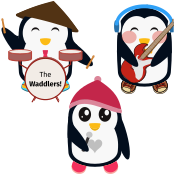
The Waddlers!
\begin{tikzpicture}

   \pingu[wings hug, eyes wink,flip-flops, conical hat=pingu@bronze!40!black,body type=legacy,tie=pingu@purple,drum stick left,drum stick right,drum stick right handle shift=-0.5mm,right wing wave,drums,drums center text={The\\\fontseries{sb}\selectfont Waddlers!}]

   \pingu[xshift=3.5cm,right wing grab, left wing wave, eyes wink,guitar right, right item angle=20, left wing grab,body type=legacy,bow tie=pingu@yellow!60!orange, headphones=pingu@blue, headphones inner=pingu@blue!5!pingu@white,sneaker,blush]

   \pingu[xshift=1.75cm,yshift=-3cm, right wing grab, eyes shiny,body type=legacy,small,shoes=pingu@purple,heart,wool hat=pingu@purple!80!black,bill=open,microphone right]

\end{tikzpicture}
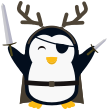
Lord Double-Dagger
\begin{tikzpicture}

  \pingu[body type=legacy,wings=wave,sword left,sword right,sword left length=5mm,sword left width=.25mm,left wing item angle=-40,sword left handle length=2.65mm,right eye wink,eye patch left,bill open,cape=pingu@bronze!70!pingu@blue!50!black,deer hat=pingu@bronze!70!pingu@blue!50!black,belt=pingu@black,belt knot color=pingu@bronze!70!pingu@blue!50!black]

\end{tikzpicture}
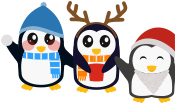
A Winter Walk
\begin{tikzpicture}[scale=.85]

  \pingu[xshift=-2.3cm,yshift=.1cm,body type=legacy,scarf=pingu@blue,scarf stripes=pingu@white,scarf end=right,wool hat=pingu@blue!70!pingu@black,snowball right,right wing wave,left wing hug,eyes shiny,blush]

  \pingu[body type=legacy,body=pingu@black!88!blue,deer hat,scarf=orange,scarf end=left,cup=pingu@red,cup steam,cup straw=!hide,wings grab,eyes shiny]

  \pingu[xshift=2.3cm,yshift=-.7cm,small,body=pingu@black!62!gray,santa hat,santa beard,wings wave,eyes wink,bill open]

\end{tikzpicture}