The TikZpingus package
Getting started
2.3 Colors
A lot of options allow for a color to be passed. In general, you can provide any color that TikZ is happy with! Yet, there are some predefined pingu-colors shipped with this package:
Furthermore, there is the special color “!hide” (\@pingu@none) which is available for most1 extras and wing-items. This color prohibits the compartments from being drawn. To be more precise, the package defines the macro \@pingu@none, which is matched against the selected color.
As an example, lets take a look at the /pingu/cup-extra, which provides an additional key /pingu/cup straw to color the straw:
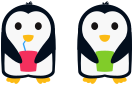
\begin{tikzpicture}

  \pingu[wings grab, cup=pingu@purple,

         cup straw=pingu@blue]

  \pingu[wings grab, cup, xshift=2.7cm,

         cup straw=!hide]

\end{tikzpicture}
As you can see, using !hide, the straw will not be drawn.
1 Why just “most”? Well, this package is work in progress and I have added the option late, so I may have forgotten to patch some keys.