The TikZpingus package
Getting started
2.2 Anchors and Placement
The origin of a penguin sits at its right shoulder. /pingu/anchor moves the penguin so that another of its points lands on the origin instead:
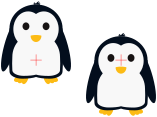
Besides the names listed at /pingu/anchor any point works, e.g. anchor={(1cm,-5mm)}.
Anchors refer to the silhouette of the body; gadgets, wings, and feet may stick out of it, so the anchors do not change with the extras a penguin wears. Its nine outer anchors are coordinates as well (prefixed by </pingu/name>-): center, north, south, east, west, north east, north west, south east, and south west. The anchor in use is available as </pingu/name>-anchor and, together with the silhouette, shown by /pingu/meta-dots.
Those outer anchors are what /pingu/right of, /pingu/left of, /pingu/above of, and /pingu/below of use, each taking the name of the other penguin and, after a colon, the distance to keep:
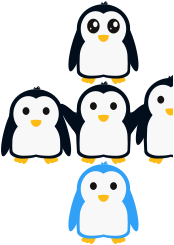
\begin{tikzpicture}

  \pingu[name=a,wings wave]

  \pingu[name=b,right of=a:5mm,large size]

  \pingu[name=c,left of=a:5mm,small size]

  \pingu[name=d,above of=a:2mm,eyes shiny]

  \pingu[name=e,below of=a:2mm,body=pingu@blue]

\end{tikzpicture}
/pingu/right of and /pingu/left of keep both penguins on the same ground line, /pingu/above of and /pingu/below of center them horizontally. An /pingu/anchor passed after one of them keeps the target point but changes which point of the new penguin is moved onto it.