The TikZpingus package
Getting started
2.11 Wing-Items
Wing items are basically just like extras, but they can be selected separately for the left and right wing. Furthermore, they adapt their default appearance to the active wing positions (Section 2.5). Currently there are the following wing items: cane, staff, flower, present, snowball, basket, devilfork, flag, lollipop, fish, broom, hammer, drumstick, sword, microphone, plank, magnifier, horse, handcast, lightsaber, lightstaff, signpost, vrcontroller, laptop, guitar. They are selected using <wing item> <left/right>.
Additionally, they can be customized by /pingu/left item angle and /pingu/right item angle, as well as /pingu/left item flip and /pingu/right item flip. Lets consider an example…
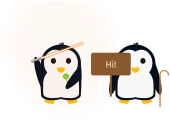
Penguin with full wings!
\begin{tikzpicture}[scale=.75]

  \pingu[lightsaber right=orange,

    lollipop left,

    right item angle=70,

    right wing raise, left wing grab]

  \pingu[cane left, right item flip,

    sign post right={Hi!}, xshift=35mm]

\end{tikzpicture}