The TikZpingus package
Getting started
2.5 Changing the wings
As already demonstrated, it is possible to change the wing positions! All selected wing-items will adapt to the wing-position (although not all wing-items will make sense with every wing-position). Currently, there are the following wing-positions: none, normal, wave, raise, grab, shock, hug. “none” is a special wing-position: it omits the drawing of wings (teaser: every selection has a none-option, which prohibits the part from being drawn)!
For each valid wing-position you can use wings <position> to change both wings or left wing <position> and right wing <position> to change only one wing respectively. The default wing-position is “normal”. If you supply multiple options for a wing, only the last one survives.1 This is shown in Box “Wing-Showcase”.
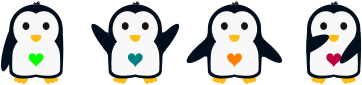
\begin{tikzpicture}

  \pingu[left wing none, heart=green]

  \pingu[wings wave, heart=teal, xshift=3.5cm]

  \pingu[wings hug, heart=orange, xshift=7cm]

  \pingu[left wing grab, right wing shock, heart=purple, xshift=10.5cm]

\end{tikzpicture}
1 For the sake of completeness: wings <position>, left wing <position>, and right wing <position> are just alternatives i prefer: wings=<position>, left wing=<position> and right wing=<position>.