The TikZpingus package
Getting started
2.7 Changing other components
Just like for the wings and the eyes, you can change the following body parts:
The body type itself
Select from: none, normal, chubby, legacy, tilt-right, tilt-left.The feet (again with separate left and right)
Select from: none, normal, sit, simple, back, chubby.The bill (does not have left and right, as there is just one)
Select from: none, normal, foreground, flat, open, angry.The hairstyle (does not have left and right)
Select from: none, normal.
For each selection, “none” will prohibit the drawing, and “normal” is the default chosen. See Box “Bodyparts-Showcase” for a example.
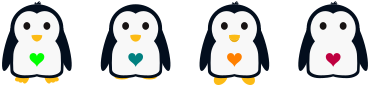
Bodyparts-Showcase
\begin{tikzpicture}

  \pingu[bill angry, heart=green]

  \pingu[feet back, hairstyle none, heart=teal, xshift=3.5cm]

  \pingu[bill open, feet simple, heart=orange, xshift=7cm]

  \pingu[feet none, bill none, heart=purple, xshift=10.5cm]

\end{tikzpicture}