The TikZpingus package
Getting started
2.6 Changing the eyes
Just like the wings, there are a couple of different eye-styles to choose from: none, normal, vertical, shiny, wink, shock, devil, sad, angry, hearts, critical. Similar to the wings, there is a “none” and a “normal”-option (which is the default). Furthermore, the convenient selectors eyes <style>, left eye <style>, and right eye <style> exist as well. All of this is showcased in Box “Eye-Showcase”.
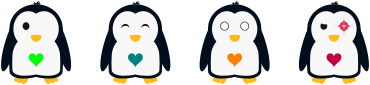
Eye-Showcase
\begin{tikzpicture}

  \pingu[left eye none, heart=green]

  \pingu[eyes wink, heart=teal, xshift=3.5cm]

  \pingu[eyes shock, heart=orange, xshift=7cm]

  \pingu[left eye devil, right eye angry, heart=purple,  xshift=10.5cm]

\end{tikzpicture}