The TikZpingus package
Getting started
2.1 Using the Coordinates
While there are a lot of gadgets available already, every penguin is accompanied by several adaptive coordinates to place custom items, texts, … (the anchors are described in Section 2.2 and their code in Section C.11). They can be visualized by the /pingu/meta-dots option. Furthermore, some extras create further coordinates themselves! All coordinates are available with <pingu-name>-<coordinate>. While the default name of a penguin is “pingu”, it can be changed with the name option:

\begin{tikzpicture}

  \pingu[meta dots,left wing wave,

         right wing grab, name=paula]

  \node at (paula-belly-center) {X};

  \node at (paula-foot-left) {Foot};

\end{tikzpicture}
Lets look at those coordinates in more detail (all labels are to be prefixed by </pingu/name>-):
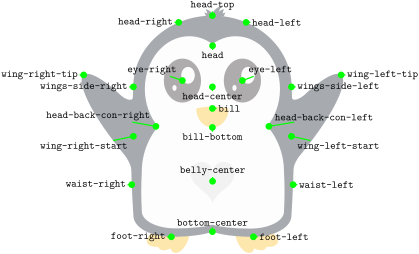
The Wings
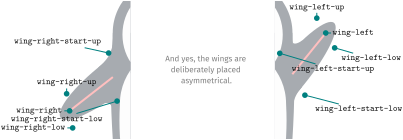
This view excluded a lot of special data collected on the wings! While there is more information stored for each wing, the following five coordinates are the most important to place items into penguins hand:
The Body
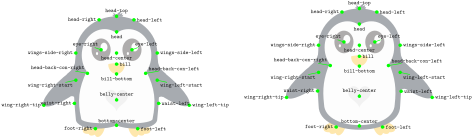
Similarly to the wing position, different body types can change the coordinates (left the /pingu/body type chubby and right the /pingu/body type legacy):
The Layers
The parts of a penguin which are behind or in front of the rest are drawn in five layers, which belong to the package and are the same for every penguin. The figure shows them for one penguin; each plane contains only what is drawn in this layer (the penguin on the right is the sum of all planes). When a penguin is finished, its five layers are put into one box of a sixth layer, the stack layer, one above the other, and are empty again. So a picture needs six layers, no matter how many penguins it contains, and a penguin which is drawn later is above all parts of an earlier one. With /pingu/:back, the order of the five layers is reversed. Only the glow of a lightsaber is not stacked: it has a seventh layer, which is shared by all penguins of the picture and lies above all of them.
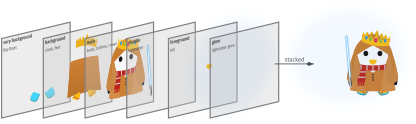
The penguin of the figure: \pingu[flip-flops,cloak,scarf,shirt,crown,bill above,lightsaber right]